1. SYSMON (WINDOWS ENDPOINT)
This chapter gives a brief overview of Sysmon, what telemetry it provides and how to read the logs. For a more in-depth overview of Sysmon, its configuration and event ID's please refer to the
Sysmon Community Guide.
"System Monitor (Sysmon) is a Windows system service and device driver that, once installed on a system, remains resident across system reboots to monitor and log system activity to the Windows event log. It provides detailed information about process creations, network connections, and changes to file creation time. By collecting the events it generates using Windows Event Collection or SIEM agents and subsequently analyzing them, you can identify malicious or anomalous activity and understand how intruders and malware operate on your network."
Note that Sysmon does not provide analysis of the events it generates, nor does it attempt to protect or hide itself from attackers.
Below are some useful links to get you started:
- Sysmon-Modular
- Sysmon Community Guide 📄 Download PDF
- Sysmon SwiftOnSecurity Config
- Visual Studio Code download
- Visual Studio Code Sysmon Extension
- Youtube walkthrough Sysmon extension Visual Studio Code
- Sysmon under the hood
Source: https://docs.microsoft.com/en-us/sysinternals/downloads/sysmon
1.1 SYSMON ARCHITECTURE
Sysmon installs a device driver that monitors and reports on system activity to the Windows event log. It consists of three main components with WMI integration:
- Kernel-mode driver (
SysmonDrv.sys) that monitors system calls and generates events - User-mode service (
Sysmon64.exe) that configures the driver and writes events to the Windows event log - Event Manifest that defines event schemas for proper parsing by Windows Event Log
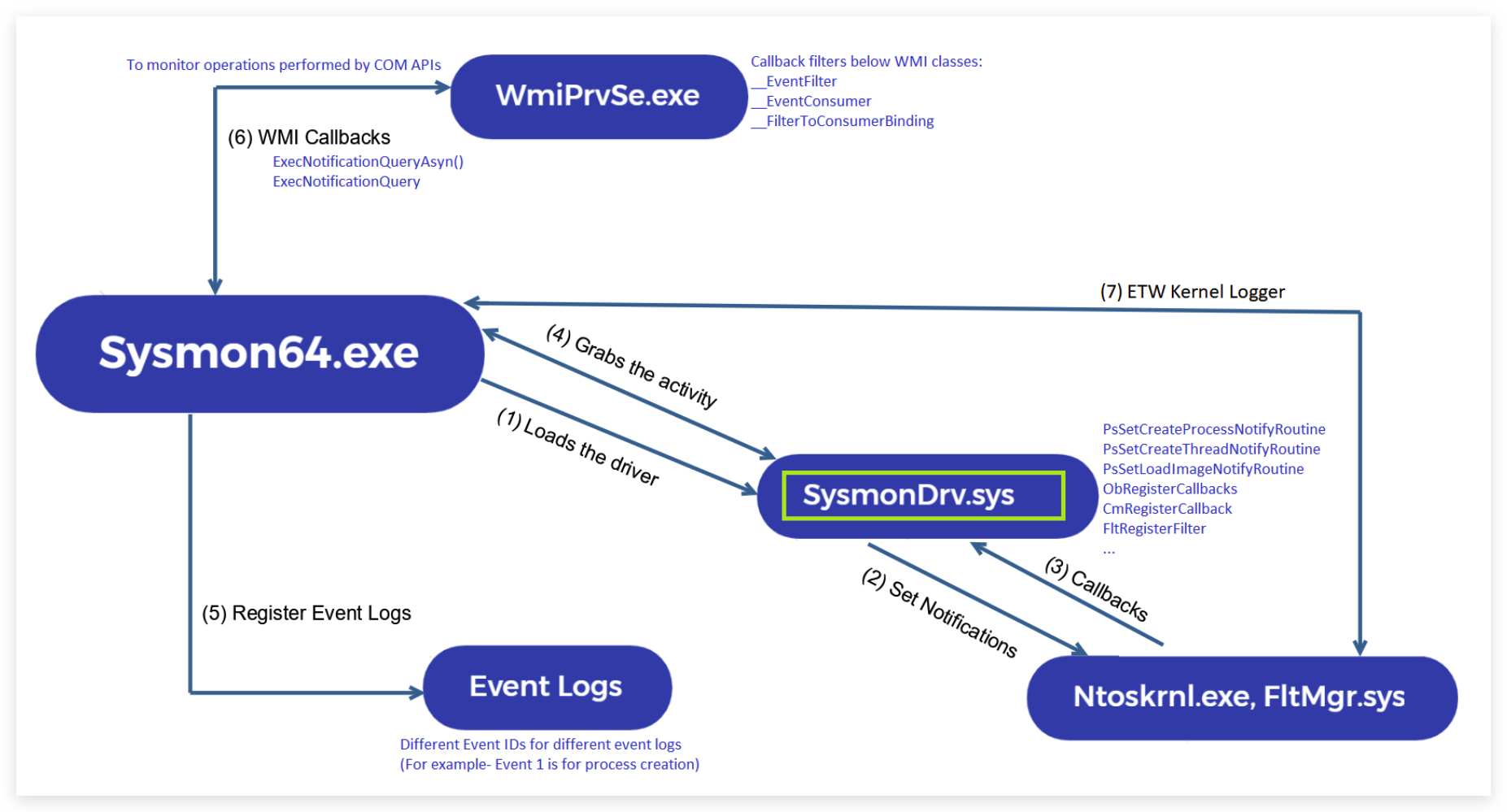
Enhanced Architecture Details:
The kernel driver (SysmonDrv.sys) operates using multiple detection methods:
Kernel Callbacks (Primary Detection Method):
PsSetCreateProcessNotifyRoutineEx: Process creation/termination monitoring (Events 1, 5)PsSetCreateThreadNotifyRoutine: Thread creation monitoring (Event 8)PsSetLoadImageNotifyRoutine: Image/DLL loading monitoring (Events 6, 7)CmRegisterCallback: Registry operations monitoring (Events 12, 13, 14)ObRegisterCallbacks: Object handle operations monitoring (Event 10)
Minifilter Driver Integration:
- File System Operations: Registers as a minifilter driver on all volumes to monitor file operations (Events 11, 23, 26)
- Pre-operation Callbacks: Intercepts file system requests before they reach the file system
- Post-operation Callbacks: Monitors completed file operations
Network Detection Methods:
- WFP (Windows Filtering Platform) Callouts: Network connection monitoring (Event 3)
- Kernel Network Callbacks: Direct kernel-level network monitoring
- Implementation: Uses Windows Filtering Platform APIs for real-time network traffic interception
ETW Integration (Selective):
Sysmon subscribes to specific ETW providers for targeted telemetry collection:
DNS Query Monitoring (Event 22):
- ETW Provider:
Microsoft-Windows-DNS-Client - Provider GUID:
{1C95126E-7EEA-49A9-A3FE-A378B03DDB4D} - ETW Session:
SysmonDnsEtwSession - Collection Method: Real-time ETW event subscription
- Event Processing: ETW DNS events converted to Sysmon Event ID 22
WMI Detection (Implementation Details):
Note: The specific technical implementation for WMI monitoring is not detailed in Microsoft's official Sysmon documentation. The following is based on community research and behavioral analysis.
WMI Activity Monitoring (Events 19-21):
- Observed Method: Research suggests direct COM API interception via
ExecNotificationQueryAsync()andExecNotificationQuery()callbacks - Target Classes: Monitors WMI Trinity (
__EventFilter,__EventConsumer,__FilterToConsumerBinding) - Behavioral Evidence: Sysmon successfully detects WMI persistence mechanisms without relying on ETW providers
- Implementation Theory: Direct IWbemServices interface monitoring combined with WMI repository change detection
Technical Implementation Details:
- Hook Points: Sysmon intercepts WMI COM interface calls at the kernel level
- Monitoring Scope: Tracks WMI class instance creation, modification, and deletion
- Event Correlation: Links filter creation to consumer binding for complete persistence chain visibility
- Repository Monitoring: Monitors direct WMI repository (
root\cimv2) modifications
Key Technical Distinction:
- Network Events (Event 3): WFP callouts - kernel-level network filtering
- DNS Events (Event 22): ETW provider subscription - event-driven collection
- WMI Events (Events 19-21): COM API interception - direct interface monitoring
Service Architecture:
The user-mode service (Sysmon64.exe/Sysmon.exe):
- Configuration Management: Processes XML configuration and applies filtering rules
- Event Processing: Receives events from kernel driver and formats them for Windows Event Log
- Registry Integration: Stores configuration in registry (
HKLM\SYSTEM\CurrentControlSet\Services\SysmonDrv) - Service Communication: Maintains continuous communication with kernel driver via IOCTL calls
Performance Characteristics:
- CPU Overhead: Typically <2% on modern systems with default configuration
- Memory Footprint: 15-30MB resident memory (driver + service)
- I/O Impact: Minimal due to efficient kernel-level filtering
- Event Generation: Can produce 10GB+ daily on busy enterprise systems
-
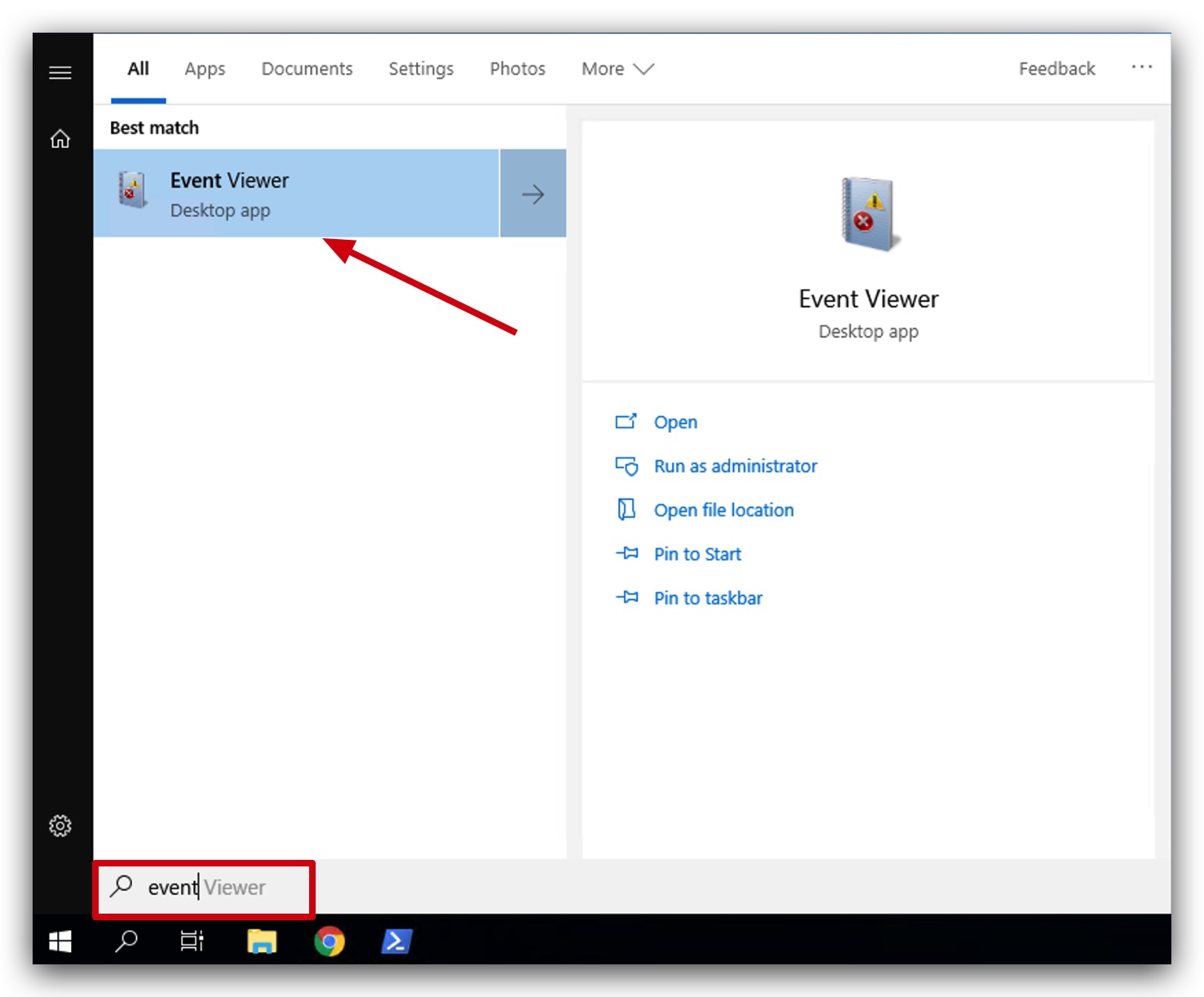
Sysmon has already been installed on your Windows machine, you can open your Windows event viewer by clicking on the Windows logo in the bottom left corner, and just start typing "event".
-
You can have a look at the sysmon.xml with by using Visual Studio Code.
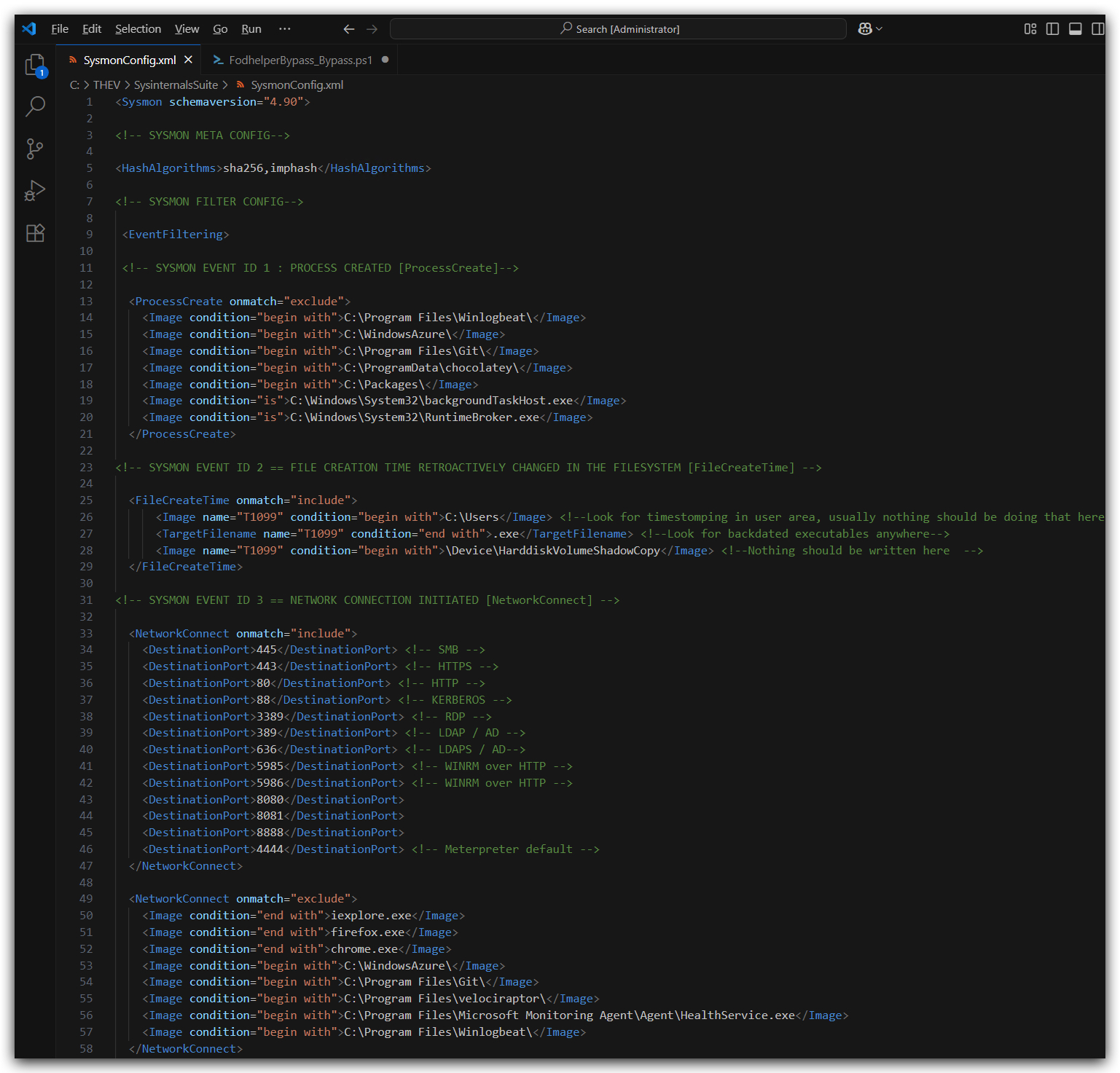
IMPORTANT: Make sure you are running as local admin in order to see the sysmon logs.
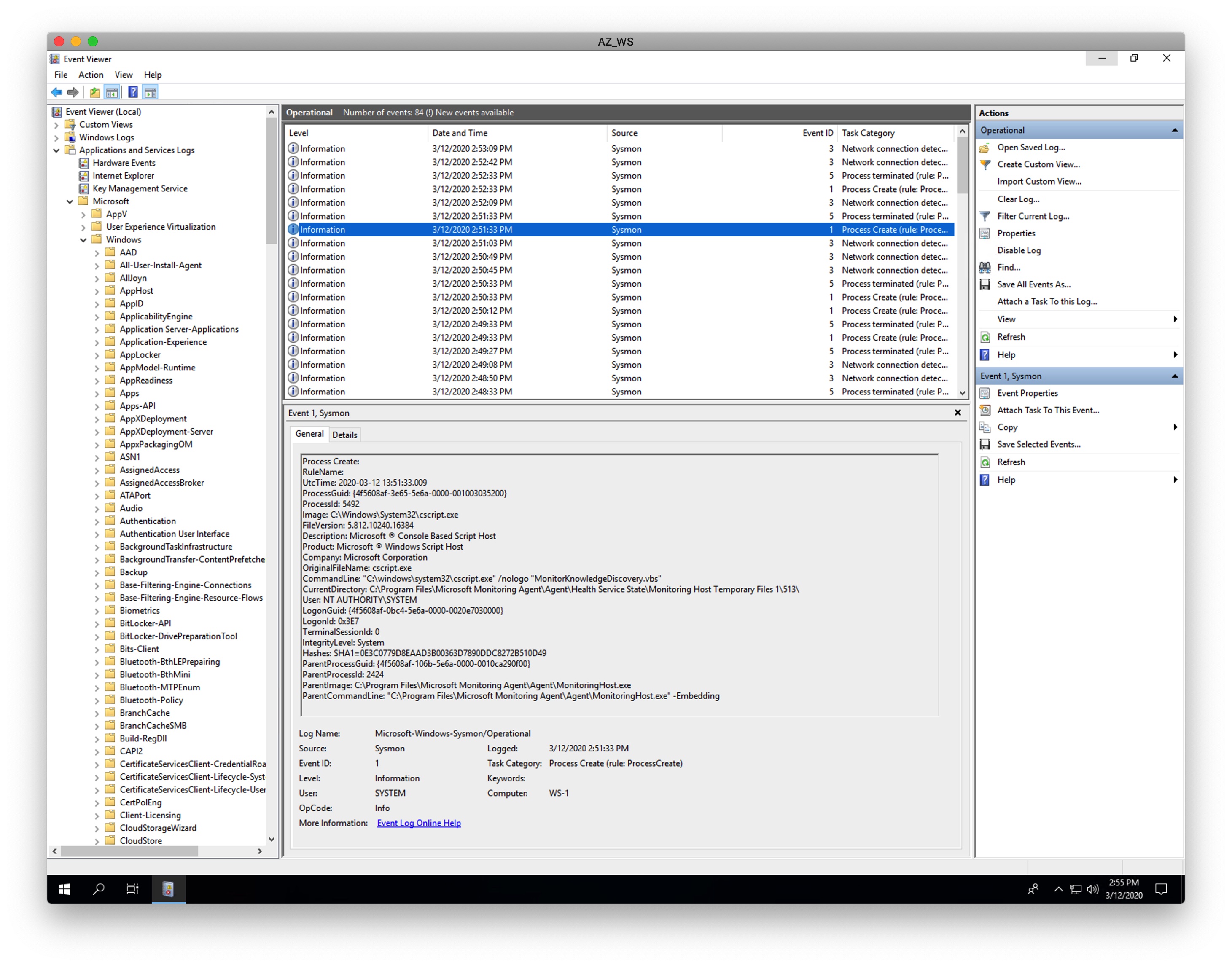
- Now navigate to Application and Services Logs > Microsoft > Windows > Sysmon > Operational, you can now see that Sysmon has created a new Windows event log and is tracking process creations (ID 1), file creation time changes (ID 2), process terminations (ID 5) and other activities.
If Sysmon is installed without a configuration file it will only log a few event IDs, we have provided a basic config file during the installation - which logs more event IDs, you can see that in the event viewer now there are more event IDs logged, like network connections (ID 3), driver loads (ID 6), image loads (ID 7), create remote thread (ID 8), file creates (ID 11), registry events (ID 12, 13, 14), WMI activity (ID 19, 20, 21), DNS queries (ID 22) and more. You can find this config file in C:\THEV\SysinternalsSuite\SysmonConfig.xml.
1.2 SYSMON EVENT SUMMARY - NOISE LEVEL ANALYSIS
| Event ID | Event Type | Red Team Detection Risk | Noise Level |
|---|---|---|---|
| 1 | Process Creation | 🔴 High | 🔴 Extremely High (every process) |
| 2 | File Creation Time Change | 🟡 Moderate | 🟢 Very Low (rare operations) |
| 3 | Network Connection | 🔴 High | 🔴 Very High (every connection) |
| 5 | Process Terminated | 🟢 Low | 🔴 Extremely High (every process) |
| 6 | Driver Loaded | 🟡 Moderate | 🟡 Medium (system startup + installs) |
| 7 | Image Loaded | 🔴 High | 🔴 Extremely High (every DLL load) |
| 8 | CreateRemoteThread | 🔴 Critical | 🟢 Low (injection attempts only) |
| 9 | Raw Disk Access | 🟢 Low | 🟢 Very Low (forensic tools, backup) |
| 10 | Process Access | 🔴 High | 🟡 Medium (debugging, injection) |
| 11 | File Create | 🟡 Moderate | 🔴 Very High (every file creation) |
| 12 | Registry Create/Delete | 🟡 Moderate | 🟡 Medium (installs, config changes) |
| 13 | Registry Value Set | 🟡 Moderate | 🔴 High (frequent config changes) |
| 14 | Registry Rename | 🟢 Low | 🟢 Very Low (rare operations) |
| 15 | File Create Stream | 🟡 Moderate | 🟡 Medium (downloads, NTFS streams) |
| 16 | Sysmon Configuration Change | 🟢 Low | 🟢 Very Low (admin changes only) |
| 17 | Named Pipe Creation | 🟡 Moderate | 🟡 Medium (IPC, legitimate apps) |
| 18 | Named Pipe Connection | 🟡 Moderate | 🟡 Medium (IPC communications) |
| 19 | WMI Filter Activity | 🔴 High | 🟢 Low (WMI persistence attempts) |
| 20 | WMI Consumer Activity | 🔴 High | 🟢 Low (WMI persistence attempts) |
| 21 | WMI Consumer-to-Filter Activity | 🔴 Critical | 🟢 Very Low (complete WMI persistence) |
| 22 | DNS Query | 🔴 High | 🔴 Very High (every DNS lookup) |
| 23 | File Delete | 🟡 Moderate | 🔴 High (cleanup, temp files) |
| 24 | Clipboard Change | 🟢 Low | 🟡 Medium (user copy/paste) |
| 25 | Process Tampering | 🔴 Critical | 🟢 Low (injection/hollowing only) |
| 26 | File Delete Detected | 🟡 Moderate | 🟡 Medium (anti-virus, cleanup) |
| 27 | File Block Executable | 🔴 High | 🟢 Low (blocked executables) |
| 28 | File Block Shredding | 🟢 Low | 🟢 Very Low (secure delete tools) |
| 29 | File Executable Detected | 🔴 High | 🟡 Medium (new executables) |
| 255 | Error | 🟢 Low | 🟢 Low (system errors) |
Noise Level Legend:
- 🟢 Low/Very Low: Rare events, high signal-to-noise ratio, suitable for alerting
- 🟡 Medium: Moderate frequency, requires filtering, good for hunting
- 🔴 High/Very High/Extremely High: Frequent events, requires significant filtering, storage intensive
Key Insights for Red Teams:
- High-Value, Low-Noise Events: 8, 19-21, 25 (injection and WMI persistence detection) - immediate alerting candidates
- High-Risk, High-Noise Events: 1, 3, 7, 22 - require sophisticated filtering but critical for detection
- WMI Trinity Events: 19-21 specifically target WMI-based persistence mechanisms (
__EventFilter,__EventConsumer,__FilterToConsumerBinding) - Storage Impact: Events 1, 3, 7, 11, 13, 22, 23 generate massive log volumes in enterprise environments
Event Distinction Clarifications:
- Event 8 vs 25: Event 8 specifically logs
CreateRemoteThreadAPI calls (thread-based injection), while Event 25 covers broader process memory tampering (hollowing, code injection, memory modification) - Event 23 vs 26: Event 23 logs file deletion via standard deletion APIs (e.g.,
DeleteFile), while Event 26 logs file deletions detected through file system monitoring (minifilter)
NOTE: Be very careful with
SYSMON EVENT ID 23: A file delete was detected [FileDelete] - this can fill up your disk quickly, files are by default saved toC:\Sysmon, you can change this by running sysmon64.exe with -a SysmonArchive, to save it to a custom (hidden folder), this can be useful but probably best if used very targeted to specific user writable folders (c:\Users, c:\windows\temp) and for specific file types (i.e. exe, dll, ps1, vbs, etc...). If you can put this archive on a partition that doesn't host the Windows OS!
1.3 SYSMON EVENT IDS FOR RED TEAM ANALYSIS
This table summarizes the Sysmon Event IDs from the Microsoft Sysinternals documentation (v15.15, July 23, 2024) at https://learn.microsoft.com/en-us/sysinternals/downloads/sysmon. It includes implications for red team operations, focusing on detection/forensics and capabilities, particularly for fileless/memory-based attacks and C# tools.
| Event ID | Event Type | Description | Red Team Implications (Detection/Forensics) | Red Team Implications (Capabilities) |
|---|---|---|---|---|
| 1 | Process Creation | Logs process creation with full command line for current and parent processes. Includes process GUID for correlation, hashes (SHA1 default, MD5, SHA256, or IMPHASH), and session GUID. | Detection Risk: High. Captures command-line arguments and hashes, exposing C# tools using PowerShell or .NET (e.g., powershell.exe spawning processes). EDRs correlate these events to detect malicious activity. Forensic Impact: Detailed logs (e.g., process lineage, hashes) aid in reconstructing C# attack chains, especially if using System.Diagnostics.Process. | Impact on C#: Limits stealth of C# payloads relying on process spawning (e.g., via Process.Start). Red teams must obfuscate command lines or use in-memory execution to minimize logging. |
| 2 | File Creation Time Change | Logs changes to file creation times, useful for detecting timestomping (altering file metadata to evade detection). | Detection Risk: Moderate. Fileless C# attacks (e.g., in-memory PowerShell) don't typically modify file times, but disk-based persistence (e.g., registry writes) may trigger this. Forensic Impact: Helps defenders detect timestomping attempts, though less relevant for purely memory-based C# attacks. | Impact on C#: Minimal for fileless attacks, but C# tools writing to disk (e.g., for persistence) must avoid metadata changes or use anti-forensic techniques to evade. |
| 3 | Network Connection | Logs network connections, including source/destination IP, port, and protocol. | Detection Risk: High. C# tools using System.Net (e.g., for C2 communication) trigger this event, exposing network activity to EDRs. Forensic Impact: Detailed connection logs help trace C2 servers, impacting Havoc or C# C2 operations. | Impact on C#: Red teams must use encrypted channels (e.g., HTTPS) or proxies to mask C2 traffic. Havoc's TrustXForwardedFor setting may mitigate but requires careful configuration. |
| 5 | Process Terminated | Logs when a process ends, including process ID and GUID. | Detection Risk: Low. Termination of C# processes (e.g., powershell.exe) may be logged but is less suspicious unless correlated with other events. Forensic Impact: Aids in reconstructing process lifecycle but less critical for fileless attacks. | Impact on C#: Minimal impact, as process termination is normal. Red teams should ensure C# payloads persist in memory to avoid repeated process creation. |
| 6 | Driver Loaded | Logs loading of drivers or DLLs, including signatures and hashes. | Detection Risk: Moderate. C# tools using P/Invoke to load unsigned DLLs (e.g., for injection) may trigger this. Forensic Impact: Hashes and signatures expose unsigned or malicious DLLs used in C# attacks. | Impact on C#: Avoids direct driver loading but P/Invoke calls (e.g., LoadLibrary) may still trigger. Use signed DLLs or in-memory loading to evade. |
| 7 | Image Loaded | Logs loading of DLLs or modules into processes, including hashes and signatures. | Detection Risk: High. C# tools using System.Reflection or P/Invoke for in-memory DLL loading (e.g., reflective injection) trigger this event. Forensic Impact: Exposes loaded modules, aiding memory forensics (e.g., Volatility analyzing .NET assemblies). | Impact on C#: Reflective DLL injection in C# (e.g., via Assembly.Load) is less stealthy due to this event. Red teams should minimize module loading or use obfuscation. |
| 8 | CreateRemoteThread | Logs creation of threads in another process, often used for process injection. | Detection Risk: Critical. C# tools performing process injection (e.g., via CreateRemoteThread in P/Invoke) are highly likely to be flagged by EDRs. Forensic Impact: Directly links to injection techniques, exposing Havoc or C# payloads. | Impact on C#: Injection-based C# attacks (e.g., Havoc's notepad.exe injection) are at high risk. Use stealthier processes (e.g., svchost.exe) or avoid injection. |
| 9 | Raw Disk Access | Logs raw read access to disks or volumes. | Detection Risk: Low. Fileless C# attacks rarely involve raw disk access. Forensic Impact: Minimal unless C# tools manipulate disk structures directly. | Impact on C#: Negligible for memory-based attacks, as C# typically operates at a higher level. |
| 10 | Process Access | Logs when a process opens another process, often for injection or memory manipulation. | Detection Risk: High. C# tools using OpenProcess (e.g., for injection) trigger this, alerting EDRs. Forensic Impact: Reveals process tampering, critical for tracing C# injection attacks. | Impact on C#: Increases risk for C# injection tools (e.g., Havoc's injection settings). Use stealthier processes or avoid direct process access. |
| 11 | File Create | Logs file creation or overwrite, useful for monitoring autostart or malware drop locations. | Detection Risk: Moderate. Fileless C# attacks avoid this, but persistence mechanisms (e.g., dropping files via System.IO) trigger it. Forensic Impact: Exposes disk-based artifacts, less relevant for memory-based C# attacks. | Impact on C#: Encourages fully fileless C# payloads (e.g., PowerShell, .NET reflection) to avoid disk writes. |
| 12 | Registry Create/Delete | Logs creation or deletion of registry keys/values, useful for autostart or malware persistence monitoring. | Detection Risk: Moderate. C# tools modifying registry (e.g., for persistence via Microsoft.Win32) trigger this. Forensic Impact: Exposes persistence mechanisms, aiding forensic analysis. | Impact on C#: Red teams must minimize registry writes or use in-memory persistence to evade detection. |
| 13 | Registry Value Set | Logs modifications to registry values (DWORD/QWORD types). | Detection Risk: Moderate. Similar to Event 12, C# tools setting registry values (e.g., via Registry.SetValue) are logged. Forensic Impact: Reveals configuration changes, critical for tracing C# persistence. | Impact on C#: Avoid registry modifications in C# tools to maintain stealth, favoring memory-based techniques. |
| 14 | Registry Rename | Logs renaming of registry keys or values. | Detection Risk: Low. Rare in C# attacks unless manipulating registry for persistence. Forensic Impact: Limited unless C# tools rename keys (e.g., to hide persistence). | Impact on C#: Minimal impact, as registry renaming is uncommon in fileless attacks. |
| 15 | File Create Stream | Logs creation of named file streams, including hashes of the file and stream contents. | Detection Risk: Moderate. C# tools downloading files (e.g., via System.Net.WebClient) may trigger this if streams include Zone.Identifier metadata. Forensic Impact: Exposes browser-based drops, less relevant for pure memory attacks. | Impact on C#: Avoid browser-based downloads in C#; use in-memory payloads to bypass stream logging. |
| 16 | Sysmon Configuration Change | Logs changes to Sysmon's configuration (e.g., updated filtering rules). | Detection Risk: Low. Not directly tied to red team actions unless tampering with Sysmon. Forensic Impact: Indicates potential attacker interference with Sysmon. | Impact on C#: Negligible unless C# tools attempt to disable Sysmon (e.g., via sc stop Sysmon). |
| 17 | Named Pipe Creation | Logs creation of named pipes, often used for interprocess communication by malware. | Detection Risk: Moderate. C# tools using named pipes (e.g., via System.IO.Pipes) trigger this. Forensic Impact: Exposes IPC mechanisms, aiding attribution of C# payloads. | Impact on C#: Avoid named pipes in C# tools; use alternative C2 channels (e.g., TCP/HTTP). |
| 18 | Named Pipe Connection | Logs connections between named pipe clients and servers. | Detection Risk: Moderate. Similar to Event 17, C# tools using pipes for C2 or data exfiltration are logged. Forensic Impact: Links pipe-based communication, aiding forensic tracing. | Impact on C#: Prefer network-based C2 in C# to avoid pipe-related logging. |
| 19 | WMI Filter Activity | Logs WMI filter operations, including creation, deletion, and modification of filters. | Detection Risk: High. Directly monitors WMI persistence attempts. Forensic Impact: Critical for tracing WMI-based attacks, especially those using the WMI Trinity (__EventFilter, __EventConsumer, __FilterToConsumerBinding). | Impact on C#: Red teams using WMI for persistence are at high risk. Avoid WMI-based techniques or ensure robust obfuscation and encryption. |
| 20 | WMI Consumer Activity | Logs WMI consumer operations, including execution of consumers. | Detection Risk: High. Monitors execution of WMI consumers, often used in persistence mechanisms. Forensic Impact: Links consumer activity to specific filters, aiding in dismantling WMI-based persistence. | Impact on C#: Similar to Event 19, high risk for C# tools using WMI consumers. Stealth and encryption are paramount. |
| 21 | WMI Consumer-to-Filter Activity | Logs activity between WMI consumers and filters, including data flow. | Detection Risk: Critical. Provides complete visibility into WMI persistence chains. Forensic Impact: Essential for understanding and mitigating WMI-based attacks. | Impact on C#: Extremely high risk for C# tools using WMI for persistence. Avoidance or extreme stealth is necessary. |
| 22 | DNSQuery | Logs DNS queries made by processes. | Detection Risk: High. C# tools resolving C2 domains (e.g., via System.Net.Dns) trigger this, exposing C2 infrastructure. Forensic Impact: Reveals domain resolutions, critical for tracing C2 servers. | Impact on C#: Use hard-coded IPs or DNS over HTTPS in C# to minimize DNS logging. |
| 23 | File Delete | Logs file deletion events, including hashes of deleted files. | Detection Risk: Moderate. C# tools deleting files (e.g., via System.IO.File.Delete) trigger this, exposing cleanup attempts. Forensic Impact: Aids in tracking anti-forensic actions. | Impact on C#: Minimize file operations in C# to avoid deletion logs; focus on memory-based attacks. |
| 24 | Clipboard Change | Logs changes to the clipboard, often used by malware for data theft. | Detection Risk: Low. Rare in C# attacks unless stealing clipboard data (e.g., via System.Windows.Forms.Clipboard). Forensic Impact: Exposes data exfiltration attempts. | Impact on C#: Avoid clipboard access in C# unless critical, as it's a low-priority attack vector. |
| 25 | Process Tampering | Logs attempts to tamper with process memory (e.g., hollowing, injection). | Detection Risk: Critical. C# injection tools (e.g., using VirtualAllocEx, WriteProcessMemory) are highly likely to be flagged. Forensic Impact: Directly links to advanced injection techniques, critical for Havoc or C# attacks. | Impact on C#: Injection-based C# payloads (e.g., Havoc's notepad.exe injection) are at high risk. Use stealthier processes or avoid injection. |
| 26 | File Delete Detected | Logs when Sysmon detects a file being deleted by another process. | Detection Risk: Moderate. Similar to Event 23, C# cleanup scripts trigger this. Forensic Impact: Exposes anti-forensic actions, aiding attribution. | Impact on C#: Minimize file operations in C# to avoid deletion logs; focus on memory-based attacks. |
| 27 | File Block Executable | Logs when Sysmon blocks an executable file from running. | Detection Risk: High for disk-based payloads. Fileless C# attacks (e.g., PowerShell) avoid this. Forensic Impact: Limited to disk-based artifacts, less relevant for memory attacks. | Impact on C#: Fileless C# payloads bypass this event, reinforcing their utility for stealth. |
| 28 | File Block Shredding | Logs when Sysmon prevents secure file deletion (shredding). | Detection Risk: Low. Rare in C# unless using secure delete libraries. Forensic Impact: Exposes anti-forensic attempts. | Impact on C#: Negligible, as secure deletion is uncommon in fileless C# attacks. |
| 29 | File Executable Detected | Logs detection of executable files, including hashes and signatures. | Detection Risk: High for disk-based C# payloads. Fileless attacks (e.g., .NET reflection) avoid this. Forensic Impact: Exposes dropped executables, less relevant for memory-based C# attacks. | Impact on C#: Reinforces use of fileless C# techniques (e.g., PowerShell, Assembly.Load) to evade detection. |
| 255 | Error | Generated when a Sysmon error occurs (e.g., heavy system load, bugs, or security violations). | Detection Risk: Low. Not directly tied to red team actions. Forensic Impact: May indicate system stress or tampering attempts, but not specific to C# attacks. | Impact on C#: Negligible unless C# tools cause Sysmon errors (e.g., via resource exhaustion). |