WriteProcessMemory (kernel32.dll)
TLDR: WriteProcessMemory copies the shellcode byte array into the newly allocated memory.
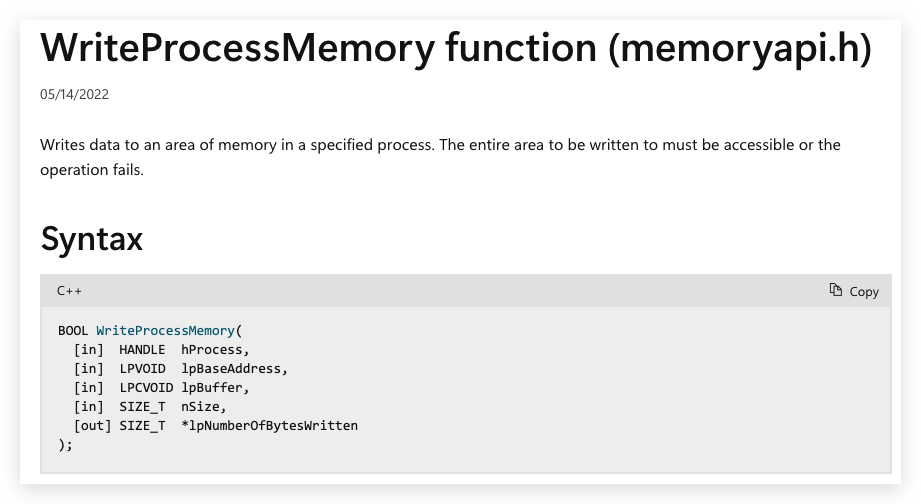
https://learn.microsoft.com/en-us/windows/win32/api/memoryapi/nf-memoryapi-writeprocessmemory
Executive Summary
WriteProcessMemory is the original memory manipulation primitive. It's simple, powerful, and dangerously flexible, and it’s at the root of many of the injection technique worth knowing, from shellcode drops and DLL injection to full-blown process hollowing. If malware wants to make another process do something it shouldn’t, this is the API it calls. For attackers, it’s a trusted workhorse. For defenders, it’s a red flare. You’ll rarely see WriteProcessMemory in benign software unless you’re debugging, automating, or managing systems at a very low level. So when it shows up outside those use cases, especially with thread creation or in-memory payloads; it’s time to start asking hard questions. This API isn’t inherently malicious, but it’s almost always intentional. Intent is where detection begins.
What is WriteProcessMemory?
WriteProcessMemory is a core part of the Windows debugging and introspection toolchain. It allows a process with sufficient privileges to write directly into the memory of another process. It is commonly used by debuggers to patch instructions, insert breakpoints, or modify variables at runtime. It also shows up in software updaters, automation tools, and systems management frameworks that need to inject configuration or adjust process behavior without restarting. When used legitimately, it's always in a high-privilege, high-trust context. The caller will have full access and the memory writes are tightly scoped and intentional.
Why It Matters
WriteProcessMemory sits at the heart of countless post-exploitation techniques. It’s a low-noise, high-impact primitive that attackers reach for when they want to manipulate memory across process boundaries. For defenders, it’s a behavioral anchor (something that rarely shows up without intent). Whether you're building detections, reversing implants, or designing evasive payloads, understanding this API is table stakes.
How Attackers Abuse It
- Classic DLL Injection: Writes the DLL path into remote memory before calling CreateRemoteThread or NtCreateThreadEx to load it via LoadLibrary.
- Reflective DLL Injection: Drops a custom loader and in-memory PE image into a remote process; bypassing LoadLibrary entirely.
- Shellcode Injection: Writes raw shellcode into remote memory and executes it with CreateRemoteThread, NtQueueApcThread, or RtlCreateUserThread.
- Process Hollowing: Hollowed target is unwrapped with WriteProcessMemory to overwrite its image with a malicious payload post-CreateSuspended.
- Thread Hijacking: Writes shellcode into an existing thread’s memory space, then redirects execution with SetThreadContext or QueueUserAPC.
- Code Patching/Hooking: Overwrites functions or syscalls in a remote process (like import or export table patching, inline hooks) to alter behavior or evade detection.
- Implant Configuration Injection: Drops configuration blobs or encrypted payloads directly into an implant’s memory for runtime decryption and execution.
- Inter-Process Data Staging: Used for staging larger payloads or artifacts across multiple processes, often combined with named pipe or shared memory comms.
- Memory Tunneling/Stomping: Writes into the memory space of trusted processes (commonly explorer.exe) to hide malicious code execution behind legitimate processes.
In .Net
Marshal.Copycan also be used (Marshal.Copy(shellcode, 0, allocatedMemory, shellcode.Length);) - It facilitates copying between managed and unmanaged memory safely, and is essential in scenarios that deal with interop, unsafe code, or manual memory management. Marshal.Copy is
- Used to copy data between managed and unmanaged memory within the same process.
- It does not work across process boundaries—it cannot read or write memory from another (remote) process.
- It does not use WriteProcessMemory or ReadProcessMemory internally.
- Works well and is straightforward for copying buffers if your process owns the memory.
Marshal.Copy(shellcode, startIndex, allocatedMemory, shellCode.Length);
- shellcode = array which holds your shellcode.
- startIndex = 0 (start adress of the array).
- allocatedMemory = pointer to the memory of the base address allocated by VirtualAlloc.
- shellCode.Length = number of bytes to copy.
The Marshal.Copy method takes a managed byte array (shellcode), a start index in that array (0 here), a destination unmanaged memory pointer (allocatedMemory), and the number of bytes to copy (shellcode.Length).
- First step allocate memory with
VirtualAlloc:
// allocate memory for shellcode
    UInt32 MEM_COMMIT = 0x1000;
    UInt32 PAGE_EXECUTE_READWRITE = 0x40;
    IntPtr funcAddr = VirtualAlloc(
        IntPtr.Zero,
        (UInt32)shellCode.Length,
        MEM_COMMIT,
        PAGE_EXECUTE_READWRITE);
- Next step with
WriteProcessMemory:
// inject shellcode into allocated memory using WriteProcessMemory
    IntPtr bytesWritten;
    bool result = WriteProcessMemory(
        GetCurrentProcess(),
        funcAddr,
        shellCode,
        (uint)shellCode.Length,
        out bytesWritten);
- Alternatively you can use
Marshal.Copy:
// inject shellcode into allocated memory using Marshal.Copy
    Marshal.Copy(
        shellcode,
        0,
        funcAddr,
        shellcode.Length);