1. .NET & CLR / POWERSHELL
1.1 WHAT IS .NET? (FROM A DFIR PERSPECTIVE)
.NET is a Microsoft framework that helps developers build apps for Windows, web, mobile, and more. It's like a toolbox with pre-built components (libraries for files, networking, etc.) so developers don't start from scratch. On Windows 10, .NET is used for desktop apps, web services, and system tools.
DFIR Relevance: Many apps, including malware, use .NET because it's easy to develop and obfuscate.
1.2 WHAT IS THE CLR?
The Common Language Runtime (CLR) is the engine that runs .NET apps. On Windows 10, it:
- Executes Code: Converts .NET code (written in C# or other languages) into CPU instructions.
- Manages Memory: Handles memory allocation and cleanup (garbage collection) to avoid crashes.
- Ensures Security: Enforces rules to limit malicious code, like sandboxing or permission checks.
- Supports Multiple Languages: Allows different programming languages to work together.
How Does It Work on Windows 10?
- .NET apps are compiled into MSIL (Microsoft Intermediate Language), not direct machine code.
- The CLR uses a Just-In-Time (JIT) compiler to turn MSIL into machine code at runtime.
- The CLR dynamically resolves dependencies (e.g.,
kernel32.dll,clr.dll) at runtime, not statically in the IAT.
DFIR Implications
- Artifacts: Look for .NET assemblies (.exe, .dll), config files, or logs in
%APPDATA%,%PROGRAMFILES%, or Windows Event Logs. - Malware Analysis: .NET malware is common. Use tools like dnSpy or ILSpy to decompile and analyze code.
- Memory Forensics: Check memory dumps for .NET structures (heap, JIT code) to understand app behavior using Volatility or Rekall.
- Execution Traces: Processes like
clr.dllormscorwks.dllindicate .NET activity.
1.3 .NET LANGUAGES
- PowerShell (scripting)
- VB.NET (compiled to MSIL)
- C# (compiled to MSIL)
- F# (compiled to MSIL)
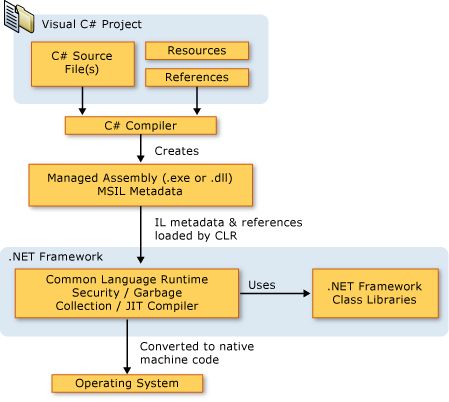
Here's a simplified diagram:
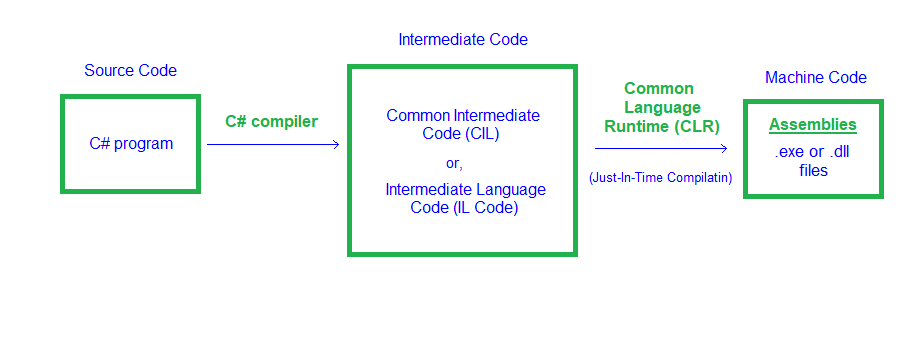
Unlike C/C++ programs, which are compiled to native code and rely directly on ntdll.dll, kernel32.dll, and other system libraries, .NET binaries require additional DLLs—mscoree.dll and clr.dll—to initialize and run the .NET CLR. However, .NET binaries still load ntdll.dll and kernel32.dll initially, as these are essential for all Windows processes.
1.4 .NET BINARY ANALYSIS BREAKDOWN
.NET binaries have unique characteristics that affect both malware development and detection:
- Minimal IAT: Typically only referencing
mscoree.dll, as they are compiled to MSIL and rely on the CLR for final machine code conversion via JIT compilation. - Easy Reversibility: The MSIL code is easily reversed with tools like dnSpy, exposing plain text strings and logic, but attackers use obfuscation to counter this.
- EDR Detection: EDRs focus on hooking the CLR rather than the IAT to monitor .NET apps.
- AMSI Integration: AMSI is dynamically loaded by the CLR and scans buffers, strings, or assemblies for malicious content.
Import Address Table Analysis
The Import Address Table (IAT) in a Windows PE file lists DLLs and functions a binary needs at runtime. Native binaries (e.g., C/C++) have detailed IATs referencing kernel32.dll, user32.dll, etc.
.NET binaries have a minimal IAT, typically only referencing mscoree.dll (Microsoft .NET Runtime Execution Engine, via _CorExeMain or _CorDllMain). The IAT isn't truly "missing" but is sparse because the CLR dynamically resolves system APIs (e.g., CreateFile) via .NET framework classes (e.g., System.IO.File).
DFIR Analysis: Use PEiD or CFF Explorer to check the IAT. A sparse IAT (e.g., only mscoree.dll) is a quick .NET binary indicator, prompting analysis with dnSpy rather than traditional IAT analysis.
JIT Compilation Process
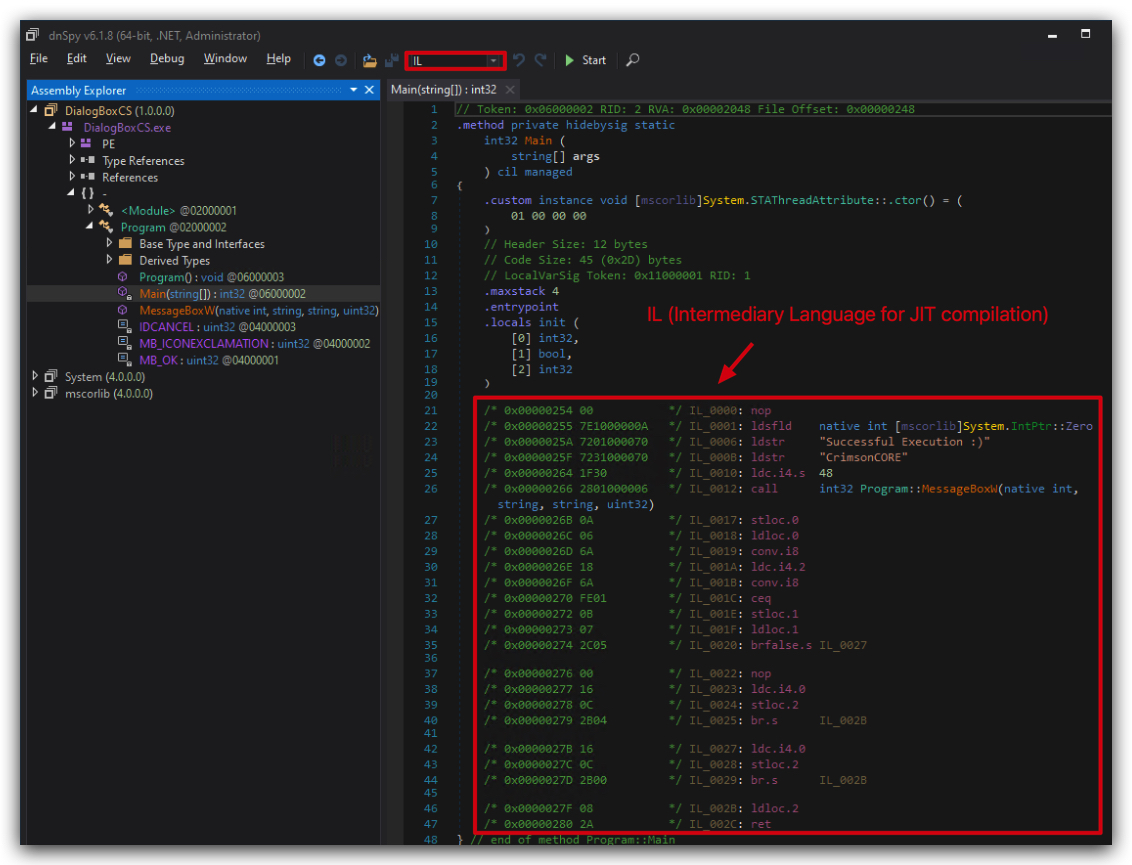
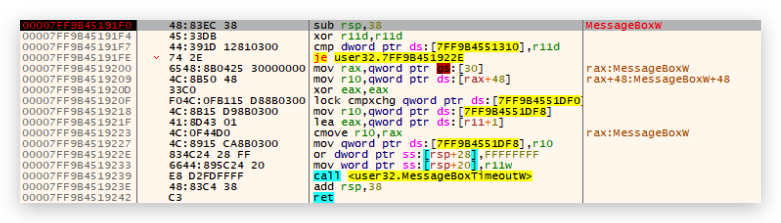
.NET binaries are compiled to MSIL, a platform-independent intermediate language, not native machine code. The CLR uses a Just-In-Time (JIT) compiler to convert MSIL to native code (e.g., x86/x64) at runtime.
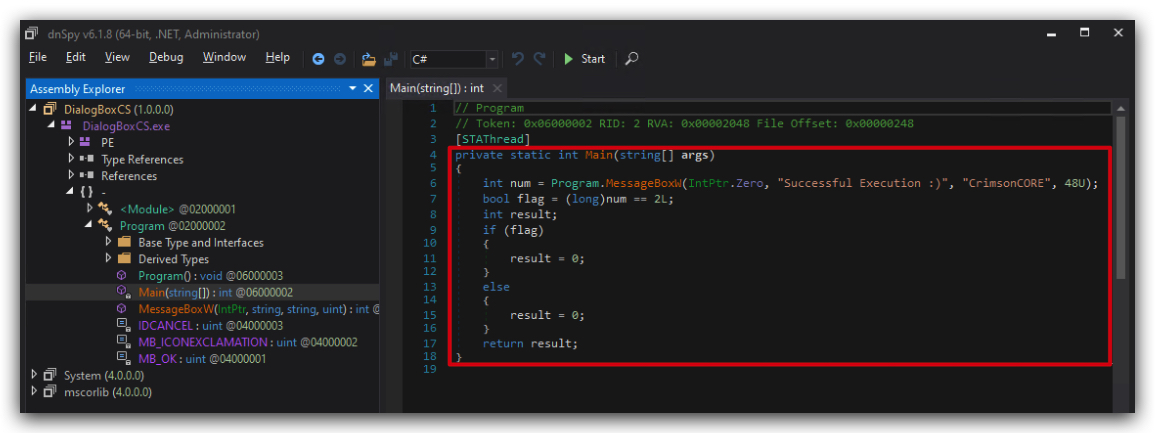
DFIR Analysis: MSIL's structured format is easily reversed with dnSpy or ILSpy, aiding malware analysis. Attackers use obfuscators (e.g., ConfuserEx) to counter this. In memory forensics, find JIT-compiled code or MSIL in memory dumps.
EDR Detection Methods
Endpoint Detection and Response (EDR) solutions hook system APIs (e.g., CreateFile in kernel32.dll) for native binaries, but .NET's minimal IAT makes this less effective. EDRs hook CLR components (e.g., JIT compiler, .NET methods like System.Net.WebClient) to monitor .NET apps, as the CLR mediates system calls.
DFIR Analysis: Check EDR logs for CLR-related alerts (e.g., suspicious JIT compilation or .NET method calls). Look for CLR hook evasion in memory or logs (e.g., via reflection).
Code Reversibility
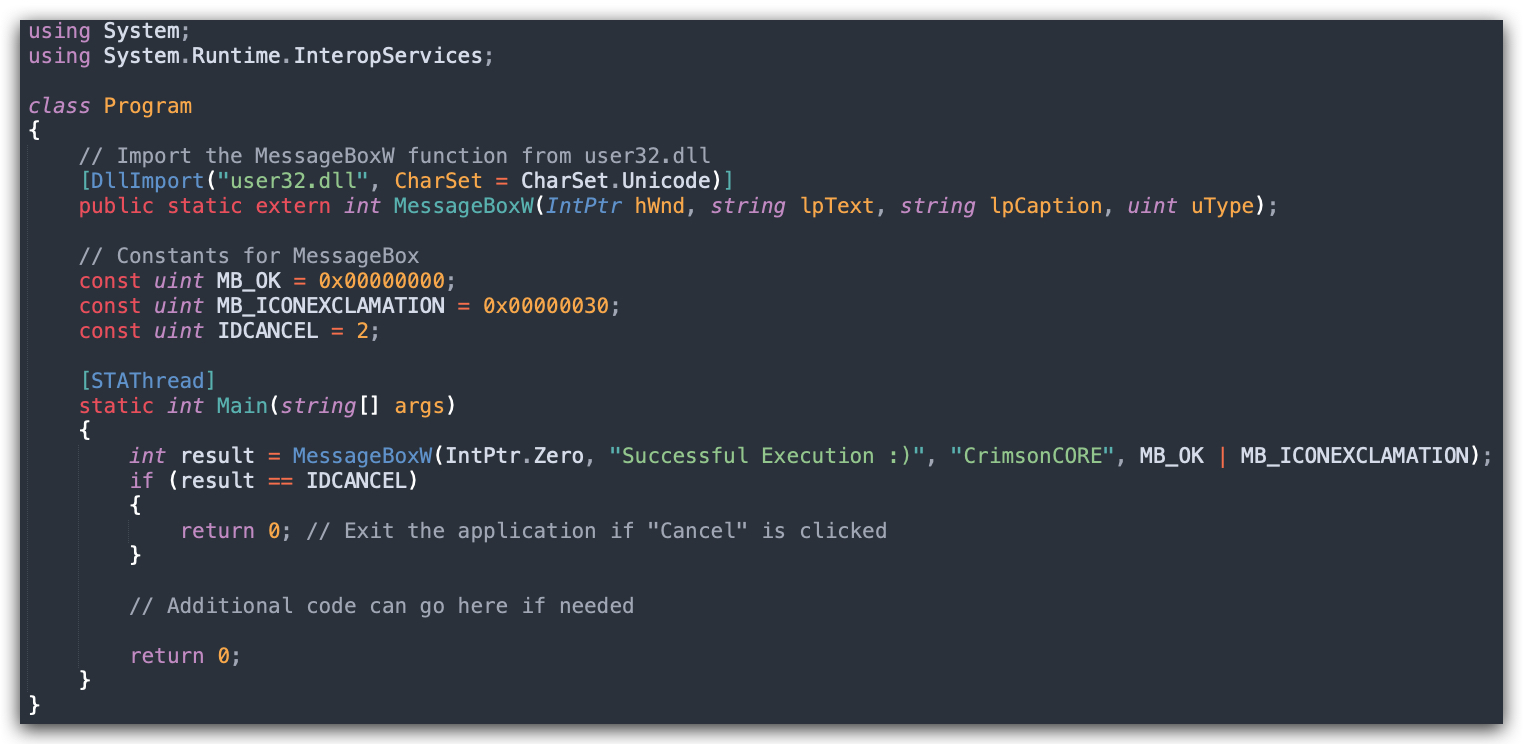
.NET binaries store MSIL and metadata, including plain text strings (e.g., URLs, file paths), easily decompiled with dnSpy or ILSpy into readable C# code. Attackers use obfuscators (e.g., ConfuserEx) to scramble strings or methods, but analysts can often deobfuscate with tools or manual effort.
DFIR Analysis: Extract strings (e.g., C2 URLs) with dnSpy during malware analysis. Check for obfuscation and use de4dot to deobfuscate if needed. Find plain text strings in memory dumps or logs for quick investigative leads.
AMSI Integration
AMSI (Antimalware Scan Interface) integrates with the CLR to scan .NET code, scripts, or in-memory content (e.g., strings, buffers, assemblies) for malicious behavior. The CLR dynamically loads AMSI when processing .NET methods or scripts (e.g., PowerShell using .NET objects).
Attackers bypass AMSI (e.g., via PowerShell commands like [Ref].Assembly.GetType('System.Management.Automation.AmsiUtils').GetField('amsiInitFailed','NonPublic,Static').SetValue($null,$true)).
DFIR Analysis: Check Windows Event Logs (Microsoft-Windows-Windows Defender/Operational, Event IDs 1100–1102) for AMSI detections. Look for AMSI bypass scripts in PowerShell logs or memory. Analyze CLR-managed memory with Volatility for AMSI-scanned buffers.
1.5 WHY C# FOR THIS TRAINING?
So why are we doing this training in C# (CSHARP/dotnet) - below is an overview, but having C# payloads, stagers and loaders is that they can easily be re-used in other frameworks (i.e. SLIVER), using execute-assembly and similar features that allow executing .net executables in memory. Additionally they can be used in powershell scripts, as we'll see in the next few labs.
| Perspective | Advantages | Disadvantages |
|---|---|---|
| Detection/Forensics | Fileless Execution: Leverages .NET for in-memory execution (e.g., PowerShell, Assembly.Load), avoiding disk writes and evading file-based AV.Living Off the Land: Uses trusted Windows tools (e.g., PowerShell, WMI), blending with legitimate activity. Obfuscation: Supports runtime compilation (e.g., CSharpCodeProvider) to generate dynamic payloads, complicating static analysis.Ephemeral Artifacts: Memory-based attacks leave transient evidence, lost on reboot, challenging forensics without live memory captures. | .NET Telemetry: CLR generates logs (e.g., PowerShell Script Block Logging, Event ID 4104), detectable by EDRs like Microsoft Defender. Behavioral Detection: High-level APIs (e.g., System.Net.Http) trigger EDR alerts for unusual process behavior.Memory Forensics: .NET's structured memory (e.g., IL code, metadata) is easier to analyze than raw shellcode using tools like Volatility. .NET Dependency: Requires .NET runtime, which may be hardened or absent, increasing detectability. |
| Capabilities | Rapid Development: High-level syntax and .NET libraries enable quick creation of complex tools (e.g., C2 clients, keyloggers). Windows Integration: Seamless use of PowerShell, WMI, and Windows APIs for fileless attacks and lateral movement. Dynamic Payloads: Runtime code generation (e.g., Assembly.Load) allows adaptive, stealthy payloads.Obfuscation Ecosystem: Tools like ConfuserEx enhance payload protection against reverse-engineering. Cross-Platform Support: Modern .NET Core/.NET 5+ provides cross-platform capabilities beyond Windows. | Limited Low-Level Control: Managed environment restricts raw memory manipulation (e.g., shellcode injection) without P/Invoke, increasing complexity. Runtime Overhead: .NET CLR (JIT, garbage collection) adds performance overhead, potentially noticeable in constrained environments. Lack of Persistence: Fileless attacks require disk-based persistence mechanisms (e.g., registry), risking detection. Primary Windows Focus: While cross-platform capable, most security-relevant .NET usage remains Windows-centric. |
Let's continue to how AMSI and ETW are relevant within an AV/EDR's detection engine.