ETW - EVENT TRACING FOR WINDOWS
TL;DR
ETWbasically is a kernel level debug logging mechanism in Windows - it allows to gather advanced telemetry about functions being called.Windows Event Logscontain a subset ofETWevents. Typically used by application developers to debug programs, but has found its way as a telemetry source forEDR's.
Event Tracing for Windows (ETW) is a high speed tracing facility built into Windows. Using a buffering and logging mechanism implemented in the operating system kernel, ETW provides an infrastructure for events raised by both user mode (apps) and kernel mode components (drivers). ETW can be used for system and app diagnosis, troubleshooting, and performance monitoring.
1. ETW ARCHITECTURE
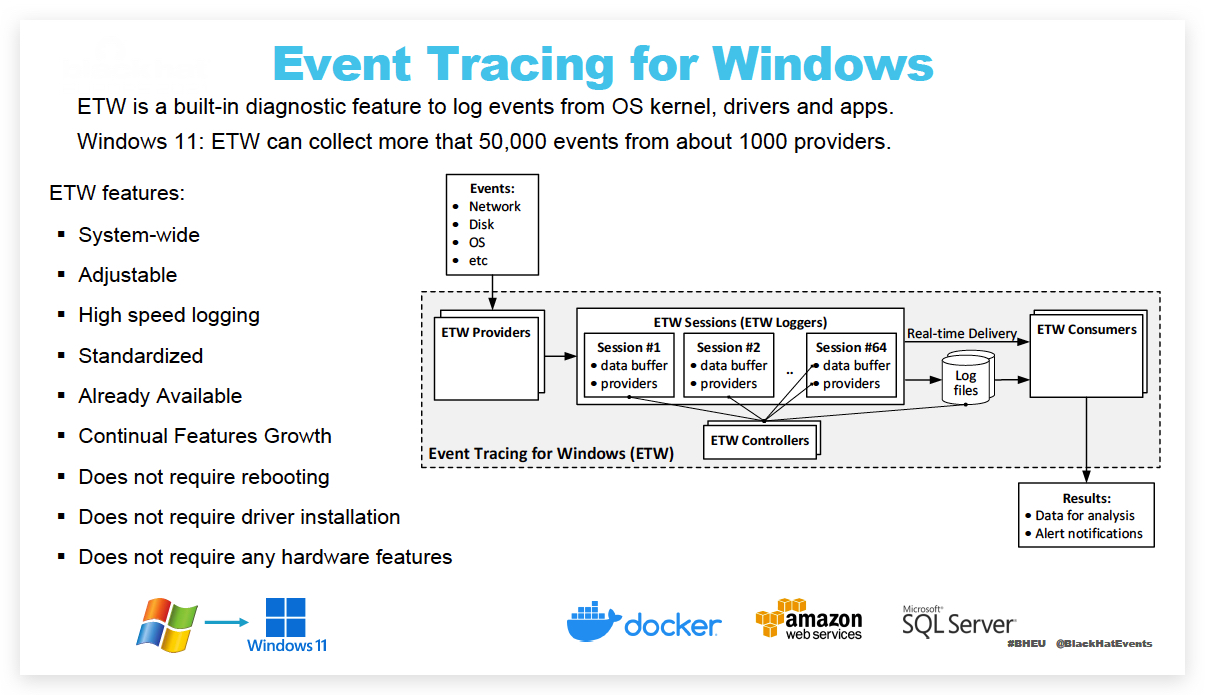 https://learn.microsoft.com/en-us/windows-hardware/test/weg/instrumenting-your-code-with-etw
Provider A provider is an instrumented component that generates events. A provider can be a user mode app, a kernel mode driver, or the Windows kernel itself. In addition to fixed event data (header), an event can carry user data.
An event is an event-based representation of data. The data can be used for in-depth analysis. An event can also be used to produce counters. Counters provide a sample-based view of data. They typically contain a small set of data to show current state, for example I/O bytes per second and interrupts per second.
A provider must register with ETW and send events by calling the ETW Logging APIs. Providers register a callback function for enable and disable notifications so that tracing can be enabled and disabled dynamically.
Session
The ETW session infrastructure works as an intermediate broker that relays the events from one or more providers to the consumer. A session is a kernel object that collects events into kernel buffer and sends them to a specified file or real-time consumer process. Multiple providers can be mapped to a single session, which allows users to collect data from multiple sources.
Controller
A controller starts, stops, or updates a trace session. A session is a unit for tracing. Providers are mapped (or enabled) to a specific session. A controller enables and disables providers so that they can start sending events to ETW. Controller functionalities can be invoked with tools provided by Microsoft or you can write your own app.
Logman.exe is an in-box controller app. Windows Performance Recorder (WPR) in the Windows Performance Toolkit is the recommended controller process.
Consumer
A consumer is an app that reads a logged trace file (ETL file) or captures events in an active trace session in real time, and processes events. Event Viewer and Resource Monitor are in-box ETW consumer apps.
Windows Performance Analyzer (WPA) in the Windows Performance Toolkit is the recommended consumer process.
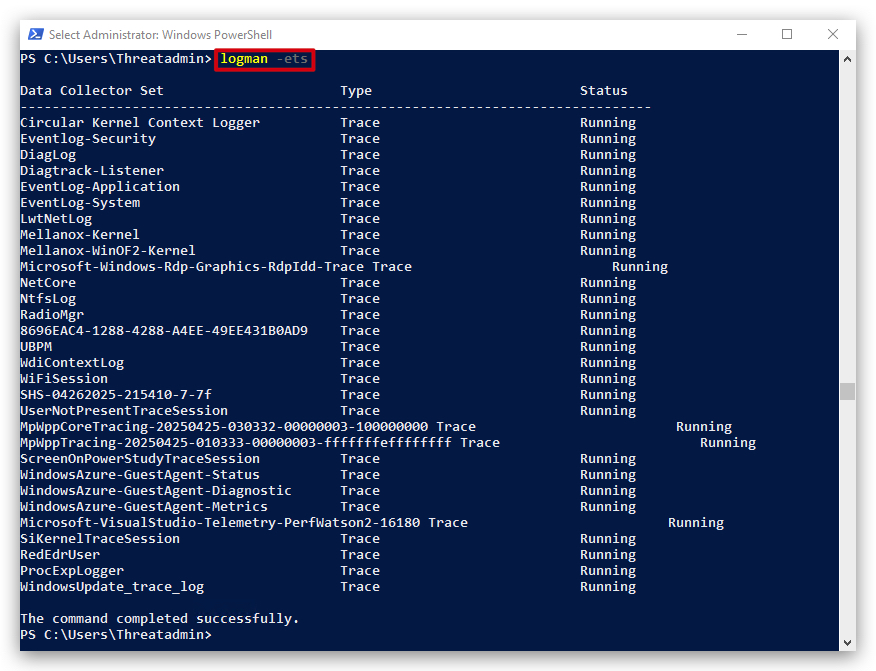
To see which ETW providers are running on the system
logman query -ets
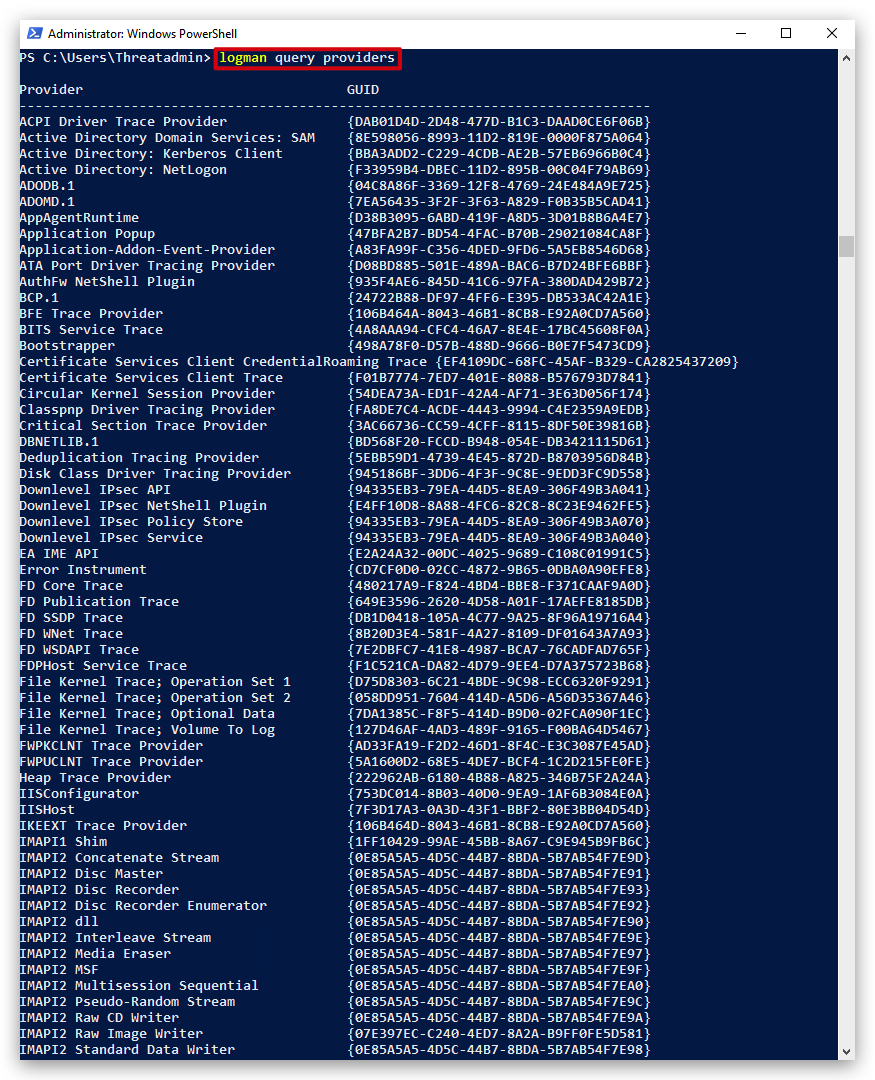
But there are a lot more ETW providers available:
2. INTERESTING ETW PROVIDERS
USER MODEproviders log very detailed information, scriptblock logging. Processes in user land will useETWEventWriteand ... to write to the user modeETW Provider(Microsoft-Windows-Powershell), the windows eventlog service subscribes to thisETWprovider and writes the events to the event-log. This can be tampered with.
KERNEL MODEProviders have limitations on what they can log, they focus more on process creation, network connection, command line parameters (likeSYSMONtelemetry), but are harder to bypass.
Microsoft-Windows-Kernel-ProcessMicrosoft-Windows-DotNETRuntimeMicrosoft-Windows-Threat-Intelligence(only acessible to AV/EDR vendors...)Microsoft-Windows-DefenderMicrosoft-Windows-PowerShellMicrosoft-Windows-Kernel-Audit-API-Calls
3. MICROSOFT-WINDOWS-THREAT-INTELLIGENCE ETW PROVIDER
KEY POINTS:
-
Microsoft-Windows-Threat-Intelligenceis a "Secure ETW Channel" provider, inaccessible to regular user-mode processes—even with elevated rights or running asSYSTEM. This specific provider is protected and designed for use only by trusted components in Windows security architecture. -
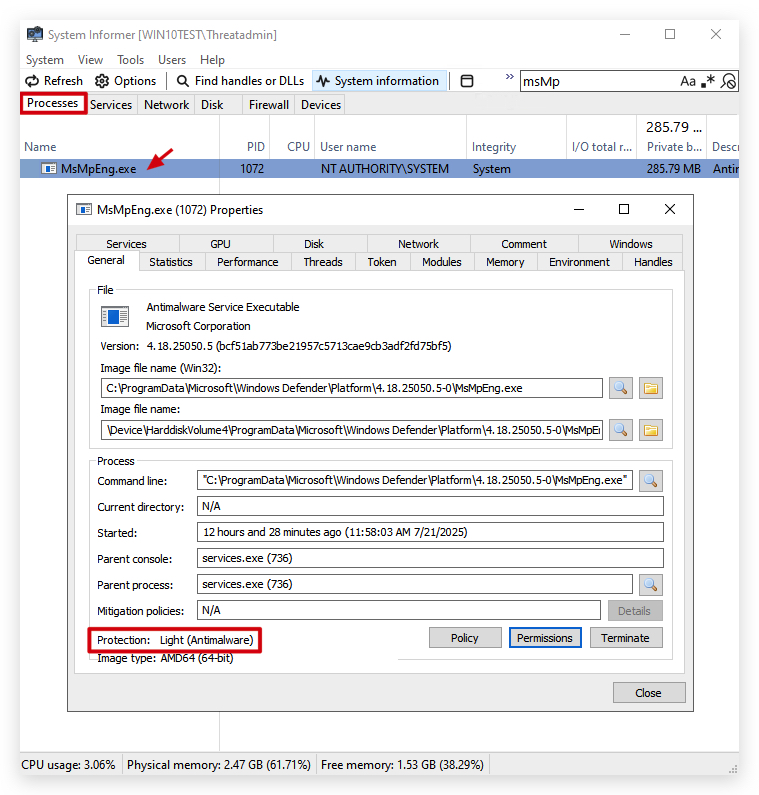
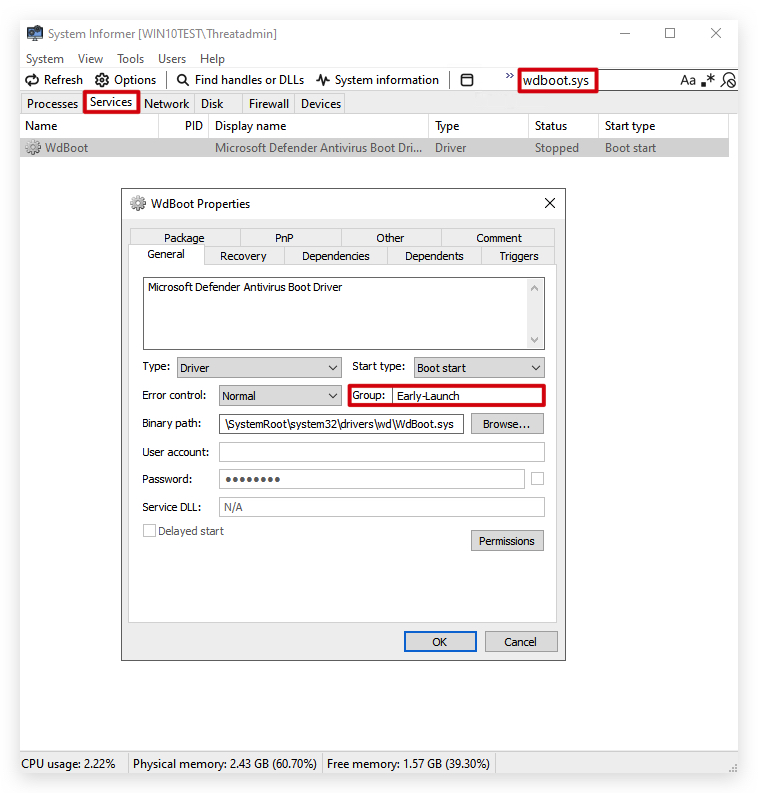
Only processes or services running with SERVICE_LAUNCH_PROTECTED_ANTIMALWARE_LIGHT/PS_PROTECTED_ANTIMALWARE_LIGHT protection level, and signed using the Microsoft Early Launch Anti Malware (ELAM) certificate, can subscribe to or receive data from this provider.
-
This restriction is intentional and enforced by Windows to prevent tampering and unauthorized access to sensitive security event streams. The pipeline is typically accessible only to select, Microsoft-approved endpoint protection or antivirus solutions.
Attempts to set up ETW collection for this provider using regular tools (such as logman or third-party collectors) will fail with "Access is denied" or will produce empty traces due to the enforced provider access control
Microsoft Defender for Endpoint (MDE) does operate with the required Early Launch Antimalware (ELAM) driver and uses the Protected Antimalware Process (PPL/ELAM) mechanism—just like Microsoft Defender Antivirus (MsMpEng.exe).
Official Documentation and Requirements for Microsoft-Windows-Threat-Intelligence ETW Provider Access:
-
ELAM is Required for MDE: Documentation for Microsoft Defender for Endpoint specifically notes that, for full functionality and onboarding, the Early Launch Antimalware (ELAM) driver must be enabled. This applies to all core supported Windows platforms.
-
Protection Level: When Microsoft Defender Antivirus is present (the core engine leveraged by MDE for scanning, telemetry, and protection), it runs with ELAM protection (PS_PROTECTED_ANTIMALWARE_LIGHT/SERVICE_LAUNCH_PROTECTED_ANTIMALWARE_LIGHT) and uses the ELAM-signed WdBoot.sys driver, providing the elevated security context needed.
-
Access to Sensitive ETW Providers: This protected status allows Microsoft's antimalware (Defender for Endpoint, via
MsMpEng.exeand associated drivers/services) to subscribe to security-criticalETWsources (includingMicrosoft-Windows-Threat-Intelligence), which are inaccessible to standard administrators,SYSTEM, or non-ELAM third-party software. -
Onboarding and Policy: If Defender Antivirus is not the active antimalware (for example, third-party AV is present), the ELAM driver is still required—in "passive mode" — for MDE to function and report security and threat events. Disabling ELAM, or blocking Defender policies, will cause error states and block Defender for Endpoint telemetry.
-
Conclusion: Microsoft Defender for Endpoint (MDE) runs components (notably MsMpEng.exe) at the required protected antimalware process level (PPL/ELAM) and with ELAM driver support. This ensures it can access protected event sources and kernel telemetry channels, which is foundational for its advanced endpoint detection and response features
Only other processes with at least the same or higher protection level and proper Microsoft-signed/ELAM-signed binaries can interact with it beyond basic operations. Even if malware or a user gets
SYSTEMrights, they cannot inject into or tamper with this process unless they are running with the same trust/signature leve
|
|
The following command shows the telemetry of the Microsoft-Windows-Threat-Intelligence ETW provider:
wevtutil gp Microsoft-Windows-Threat-Intelligence
| Task / ETW Functionality | Description | Monitored NTDLL Function(s) |
|---|---|---|
| Allocating Virtual Memory (AllocVM) | Allocates (remote/local) memory | NtAllocateVirtualMemoryNtMapViewOfSection |
| Changing Memory Protection (ProtectVM) | Changes protection on memory | NtProtectVirtualMemory |
| Mapping Process/View (MapView) | Maps sections to address spaces | NtMapViewOfSection |
| Writing Virtual Memory (WriteVM) | Writes to virtual memory | NtWriteVirtualMemory |
| Reading Virtual Memory (ReadVM) | Reads from virtual memory | NtReadVirtualMemory |
| Queueing Asynchronous Procedure Calls (APC) | Queues APCs to threads | NtQueueApcThreadNtQueueApcThreadEx |
| Setting Thread Context | Modifies thread execution context | NtSetContextThread |
| Suspending/Resuming Thread | Suspends/resumes threads | NtSuspendThreadNtResumeThread |
| Suspending/Resuming Process | Suspends/resumes processes | NtSuspendProcessNtResumeProcess |
| Driver/Device Interaction | Interacts with kernel drivers/devices | NtDeviceIoControlFile |
You can also query it with logman:
logman query providers Microsoft-Windows-Threat-Intelligence
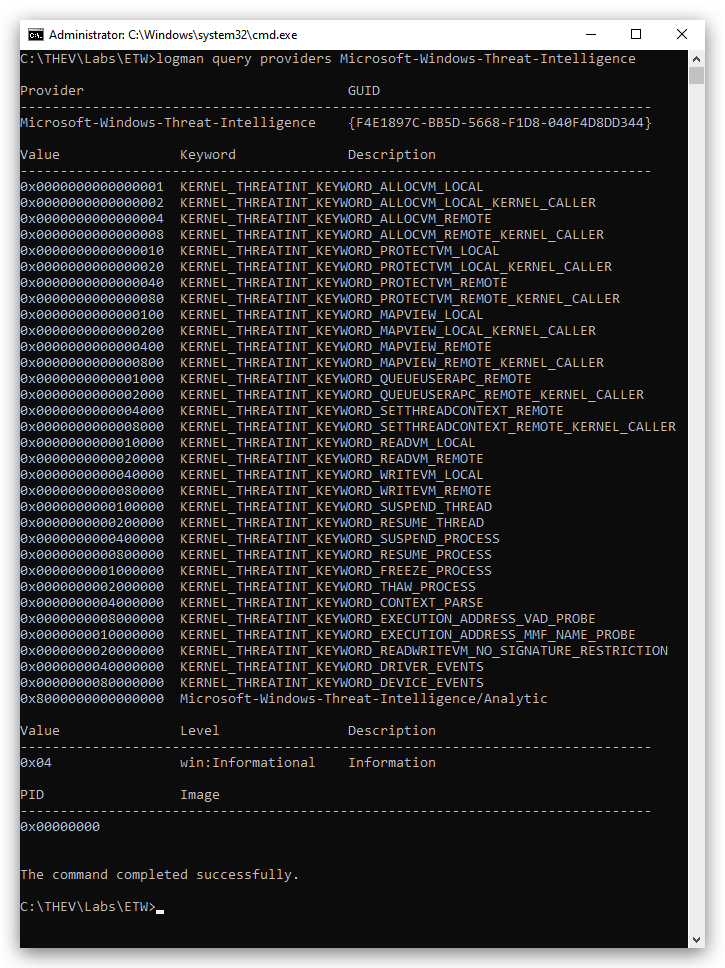
So let's do a deep dive on what ETW can see in Powershell by using logman to collect events to PowerShellTrace.etl.
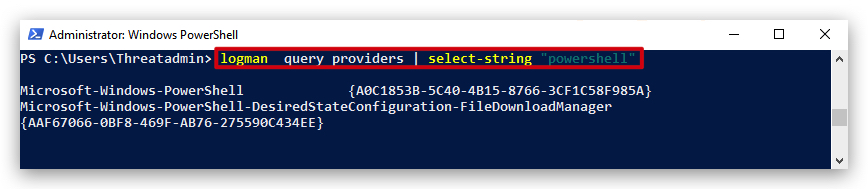
You can search the available ETW providers like this:
logman query providers | select-string "powershell"
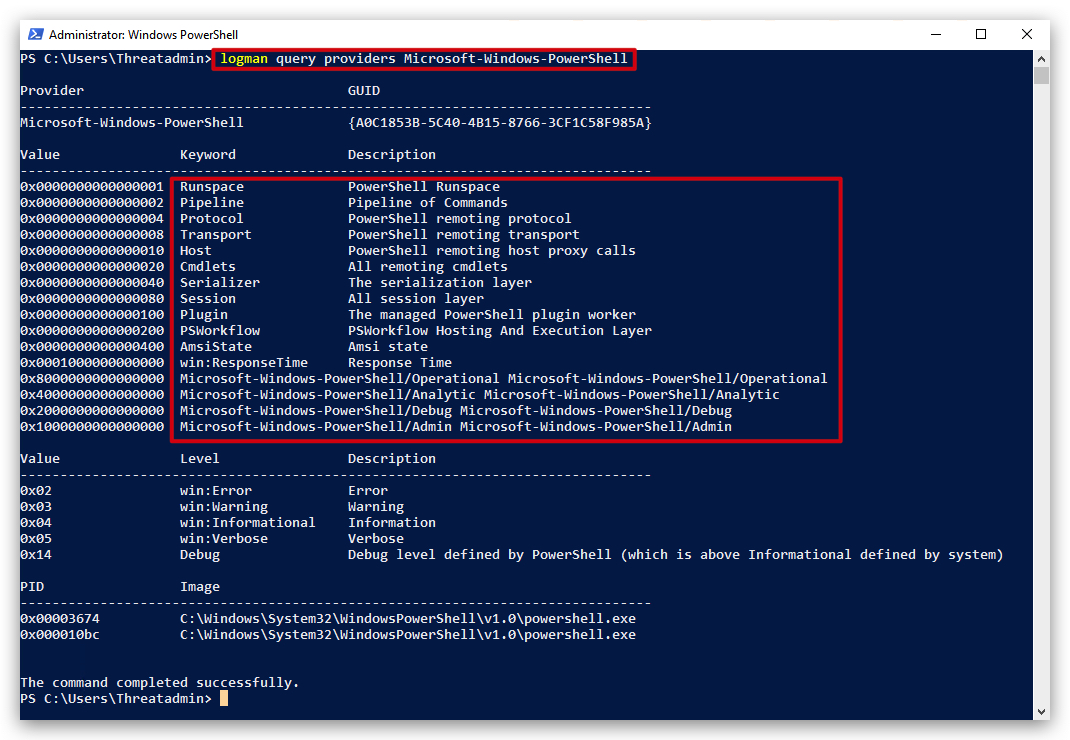
And get detailed information like this:
logman query providers Microsoft-Windows-PowerShell
We can set up an ETW tracing session (
logman create trace PowerShellTrace -p Microsoft-Windows-PowerShell -o PowerShellTrace.etl -ets
logman -ets
This will create an event trace log (.etl file), which we can then convert to txt, csv or even evtx (windows event log format), any commands we run will be collected. In the same Powershell console you just ran the create trace command, run some Powershell commands:
$pid
get-process
IMPORTANT: After running our commands, stop the Powershell event trace session and remove it (otherwise this keep collecting logs,
this will fill up your disk eventually as the trace session continues to run in the background and is very verbose):
logman stop PowerShellTrace -ets
Remove-EtwTraceSession -Name PowerShellTrace
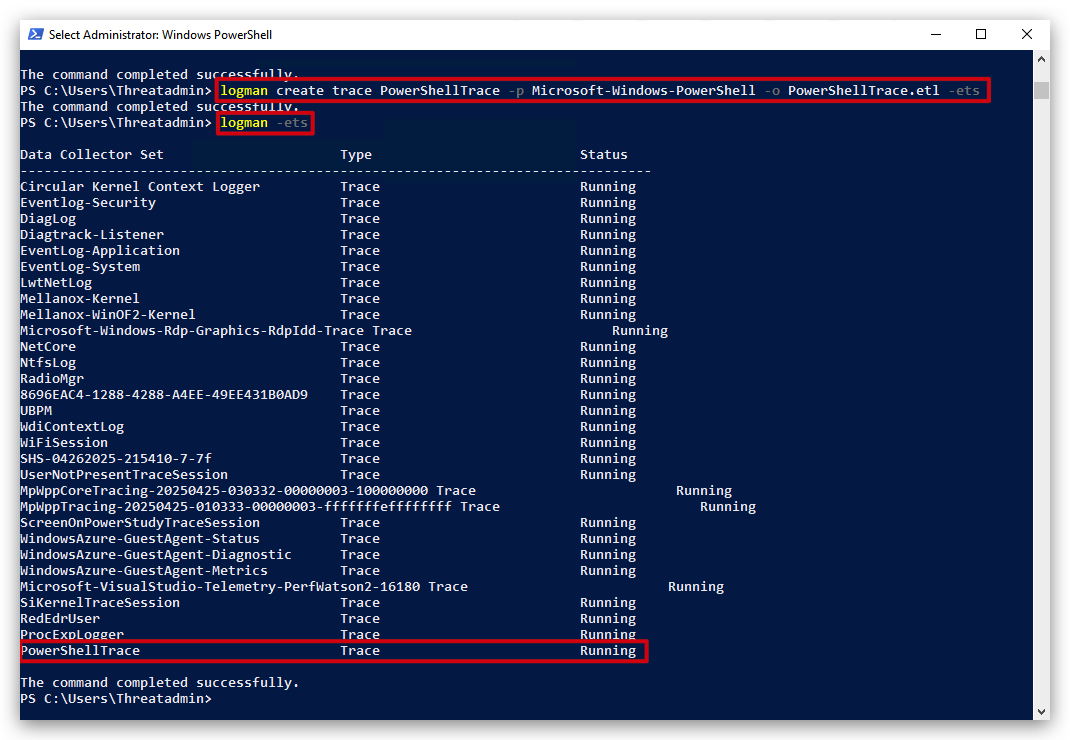
- Real-Time Tracing:
-etsenables the command to interact with an ETW session, which collects events in real time from the specified provider and writes them to the output file (e.g., .etl).- Session Management: It ensures that the logman command is applied to an ETW session rather than other logman operations (e.g., performance counters or data collectors).
- Non-Persistent: By default, ETW sessions created with -ets are temporary and stop when the command is terminated or the system restarts, unless configured for persistence.
4. ETW PATCHING IN .NET BINARIES VS POWERSHELL
Powershell Patch:
- Uses reflection to modify the
PSEtwLogProviderwithin the Powershell process. - Specifically targets how Powershell logs events.
Limitedto the Powershell process.- Executed as a Powershell command.
- Targets the Powershell ETW logging mechanism.
.NET Binary Patch (C# Example):
- Compiles into a standalone .NET executable.
- Uses reflection to directly modify the
EventProviderclass within the running .NET binary. - Can patch ETW logging for any .NET application that uses the standard .NET
EventProviderclass, if the correctEventProviderinstance can be located. - Can affect
any .NETapplication. - Executed as a compiled executable.
- Targets the
EventProviderclass, allowing it to target any .NET application using that class.
Key Differences and Implications:
- Scope:
- Powershell patch: Limited to the Powershell process.
- .NET binary patch: Can affect any .NET application, if the correct event provider can be located.
- Execution Context:
- Powershell patch: Executed as a Powershell command.
- .NET binary patch: Executed as a compiled executable.
- Targeting:
- Powershell patch: Targets the Powershell
ETWlogging. - .NET binary patch: Targets the event provider class, so it can target any .NET application that uses that class.
- Powershell patch: Targets the Powershell
In summary: Later on when we're going to write our shellcode loader in C# we'll use a more general-purpose ETW patching mechanism that can be used independently of Powershell, while the Powershell one-liner is specific to the Powershell environment. For now it's just important to understand that both patches achieve similar goals (disabling ETW logging) but operate in different contexts and scopes.