Privilege Escalation / Persistence
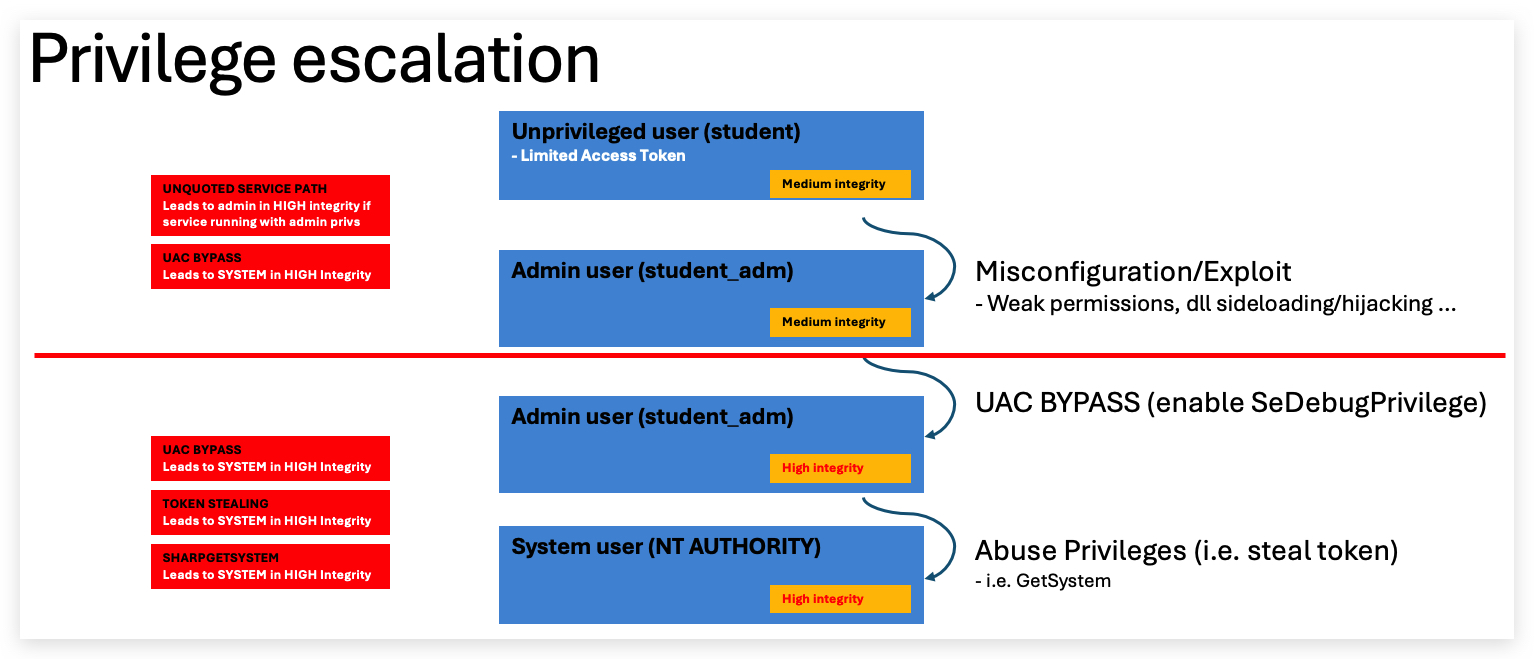
In order to escalate privileges from a regular user to a higher level account (Administrator/System Authority), you need either a misconfiguration (typically permission issues on services, scheduled tasks etc.) or an exploit (Remote/Rogue/Sweet/Rotten/Juicy/God Potato etc.) - a properly patched and configured system will provide challenges to escalate privileges from a standard user to an administrator user.
There are tons of privilege escalation techniques (many are based on misconfigurations) and it is impossible to cover them all here.
| Privilege Escalation Technique | Admin | Category | Brief Description |
|---|---|---|---|
| Service misconfigurations | ❌ | Misconfiguration | Replace service binaries (exe or dll) with malicious binary when service has weak permissions |
| Scheduled tasks misconfigurations | ❌ | Misconfiguration | Modify scheduled tasks to run malicious binary when task has weak permissions |
| ❌ | Path Interception | Exploit Windows service path resolution by placing malicious executable in unquoted path spaces | |
| PATH environment variable hijacking | ❌ | Path Interception | Place malicious executable in PATH directories to hijack legitimate program execution |
| Insecure registry permissions | ❌ | Misconfiguration | Modify registry entries with weak permissions to execute malicious code |
| Weak service permissions | ❌ | Misconfiguration | Modify service configuration or binpath when service has weak permissions |
| DLL hijacking | ❌ | DLL Hijacking | Place malicious DLL in search path locations to be loaded instead of legitimate DLL |
| Insecure file/folder permissions | ❌ | Misconfiguration | Replace or modify files/folders with weak permissions to execute malicious code |
| AlwaysInstallElevated | ❌ | Registry Exploit | Exploit Windows Installer policy to run MSI packages with SYSTEM privileges |
| ✅ | Token Manipulation | Steal and impersonate access tokens from higher privileged processes | |
| ⚠️ | UAC Bypass | Bypass User Account Control to execute code with high integrity without user prompt | |
AlwaysInstallElevated | ❌ | Registry Exploit | Exploit Windows Installer policy to run MSI packages with SYSTEM privileges |
LEGEND:
- ✅ - Requires
SeImpersonatePrivilege - ❌ - Does not require admin privileges
- ⚠️ - Requires medium integrity level and user to be part of
local administratorsgroup
These techniques often also perform code execution and persistence. We will cover a few of them (marked in
That being said, there are numerous techniques to obtain hashes/passwords that don't require administrator privileges - such as kerberoasting, NTLM relaying and password spraying.
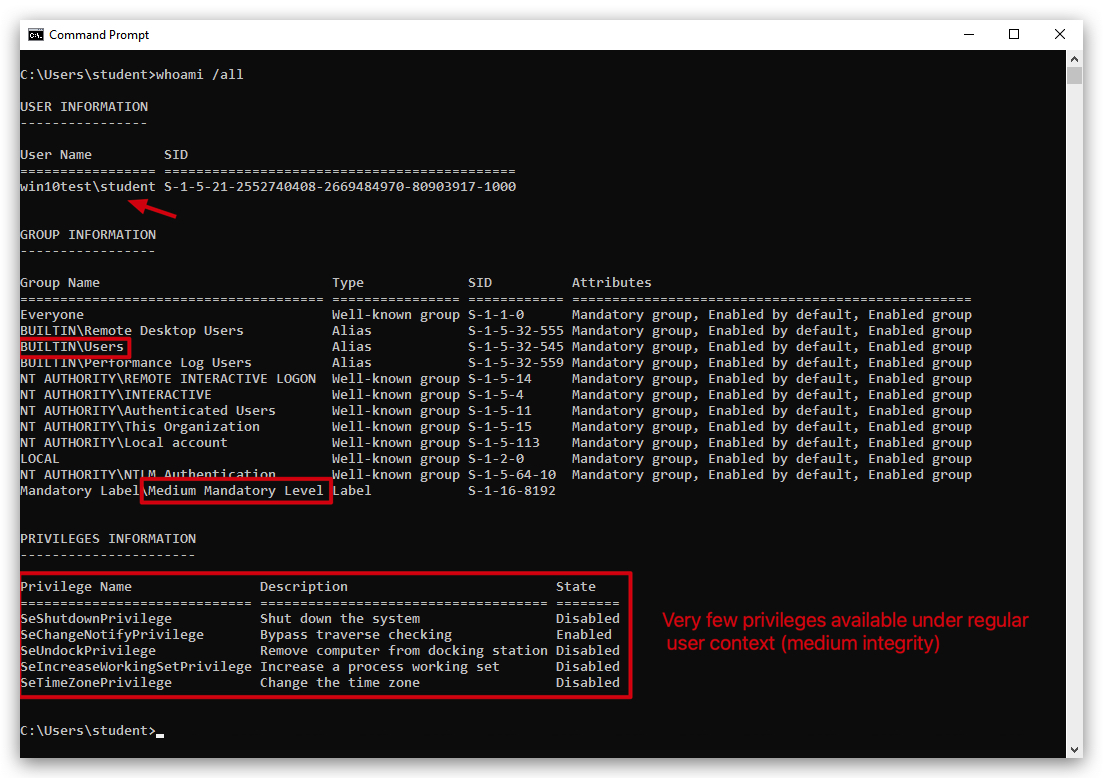
Running as a regular unprivileged user:

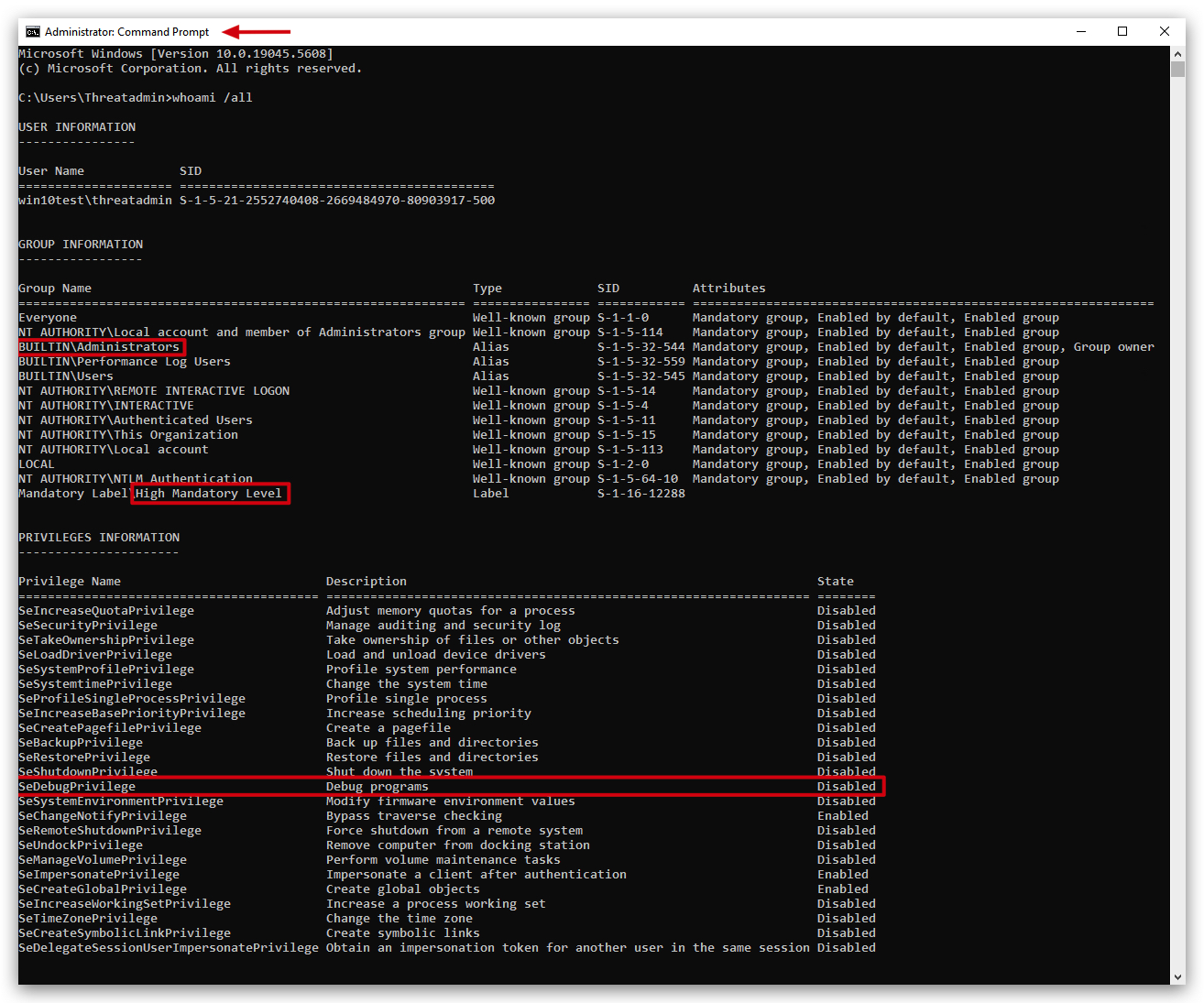
Running as an administrator:
What is SeDebugPrivilege?
SeDebugPrivilege is a special privilege in Windows that allows a user or process to debug other processes, even those running under different security contexts or with higher privileges, such as system services. This privilege is part of Windows' security model, which uses privileges to control what actions a user or process can perform on the system. SeDebugPrivilege basically allows a user to bypass normal security restrictions when it comes to debugging and interacting with other processes.
Key Points About SeDebugPrivilege
Purpose:
- By default, users can only debug processes they own (i.e., processes they started or are running under their user account).
- SeDebugPrivilege extends this capability, allowing a process or user with this privilege to:
- Attach a debugger to,
- Inspect, or
- Modify any process on the system, including those running as other users or as the SYSTEM account (a highly privileged account in Windows).
How It Works:
- The privilege is managed through Windows security policies and can be assigned or revoked by an administrator.
- It is typically enabled for members of the Administrators group by default on many Windows systems, but this can be changed via Group Policy Objects (GPOs) or local security policies.
- To use SeDebugPrivilege, a process must explicitly request it using Windows API functions like
LookupPrivilegeValueandAdjustTokenPrivileges. This involves:- Obtaining a handle to the process token.
- Enabling the privilege.
When is SeDebugPrivilege required?
- To open a handle to another process with full access rights (including the ability to steal its token), you must enable SeDebugPrivilege.
- This privilege allows you to bypass security descriptors and access tokens of processes you do not own (like SYSTEM processes), which is commonly needed for credential dumping, process injection, or SYSTEM-level impersonation.
- Without SeDebugPrivilege, a process can generally only manipulate tokens associated with its own security context (i.e., impersonate a token it already has or one created for it) or those it is allowed access to by the process’s Discretionary Access Control List (DACL).
Default Settings: On many Windows versions (e.g., Windows 10),
SeDebugPrivilegeis assigned to theAdministratorsgroup by default, which can be risky if not properly managed. Even with SeDebugPrivilege, some actions (like injecting into a SYSTEM process) may still fail if other security mechanisms, such as User Account Control (UAC) or additional restrictions, are in place.Note: Administrators can control SeDebugPrivilege through the Local Security Policy editor (secpol.msc) or Group Policy Management Editor. It is listed under "User Rights Assignment" as "Debug programs". To enable or disable it, an administrator can modify the security policy to add or remove user groups (e.g., Administrators) from having this privilege.
Escalating from unprivileged user to SYSTEM in 3 steps: