Lab - Basic Loader
IMPORTANT : Please do not send submit samples to
Virus Total or any other public virus-scanning services, unless specifically instructed. We don't want to burn our payloads for this training. Make sure at all times thatsample submission in Microsoft Defender isturned off, and if for some reason you get prompted to submit a sample,deny the request .
LABS OVERVIEW
| Step | Action | Description |
|---|---|---|
| 1. | PHASE 1 (clean dialogbox) payload | Create our POC shellcode loader |
| 2. | PHASE 2 (malicious MSFVenom dialogbox) payload | Use our shellcode loader with a malicious payload |
| 3. | PHASE 3 Modularization | Evasion techniques and modularity |
When building a shellcode loader, you can use any coding language, c, c++, c#, powershell, rust, golang (evasive by nature as it dynamically resolves functions, so no IAT - but it bloats your code quite a lot. Also strings won't work), nim and so on. In general, detection rates for languages like golang, rust and nim are lower, they are much harder to analyze and reverse than standard c or c# code. In this training we''l be using C# as our language for writing our code. Along the way you'll see the advantages (and challenges) of using C#!
The lower level your coding language is (i.e. C or C++) the more control you have on specific manipulations. That being said rust, nim and golang to compile to assembly/machine code just like C or C++.
The very basic shellcode loader below injects shellcode into its own process - a stealthier way to evade your beacon getting killed is doing remote process injection (injecting the shellcode into a remote process like explorer.exe). Even if AV detects the loader and kills it, your beacon still lives in explorer.exe.
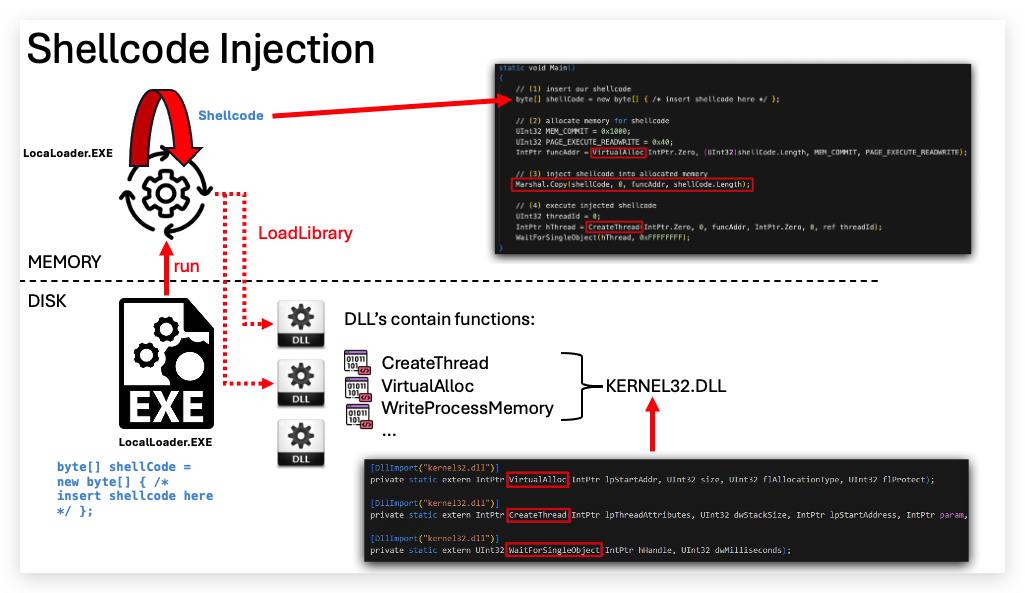
EVASION TIP: Injecting shellcode (especially when this shellcode is a reverse shell, beacon, demon ...) into a remote process can hide the network traffic. So if your shellcode performs HTTP(s) or DNS traffic, inject it into a process that also behaves like that (i.e. Onedrive, Outlook, Chrome...) - obviously not in notepad or calc :) - that is if you want to do remote process injection. In this lab we'll inject the shellcode in the process of our own loader.
So to build our own shellcode loader we only need 5 functions, we'll go through each of them in detail later in this lab:
| Win32 Function | API Library | Objective |
|---|---|---|
| GetCurrentProcess | Kernel32.dll | Get the PID of our process to get a handle on it |
| VirtualAlloc | Kernel32.dll | Allocate memory in our process and set RWX permissions |
| WriteProcessMemory | Kernel32.dll | Write our shellcode to the allocated memory space |
| CreateThread | Kernel32.dll | Execute the injected shellcode |
| WaitForSingleObject | Kernel32.dll | Wait for our exectution to full finish |
This is the logical order in which our code will execute:
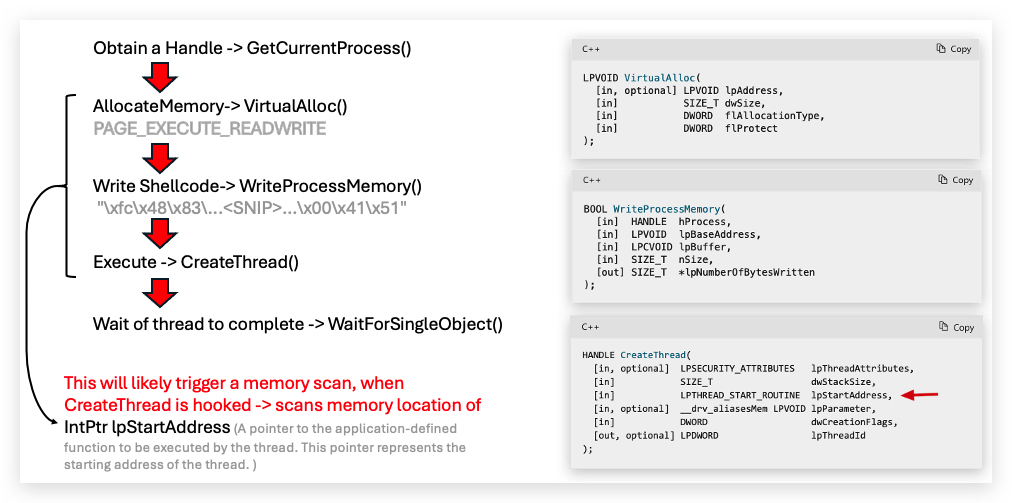
EXPLAIN P/INVOKE (Platform Invoke)
Our C# code relies on direct Win32 system calls (VirtualAlloc, WriteProcessMemory, CreateThread, etc.) through P/Invoke to execute shellcode. .NET does not expose these low-level operations in its standard libraries. Since we have to interact with native Windows memory management and threading APIs, we're going to have to introduce some unmanaged (native) code in our C# Shellcode loader.
For example you cannot mark memory as executable (RWX) or spawn a thread pointing to arbitrary shellcode (raw native/assembly code) just with managed calls — these capabilities are restricted for security reasons.
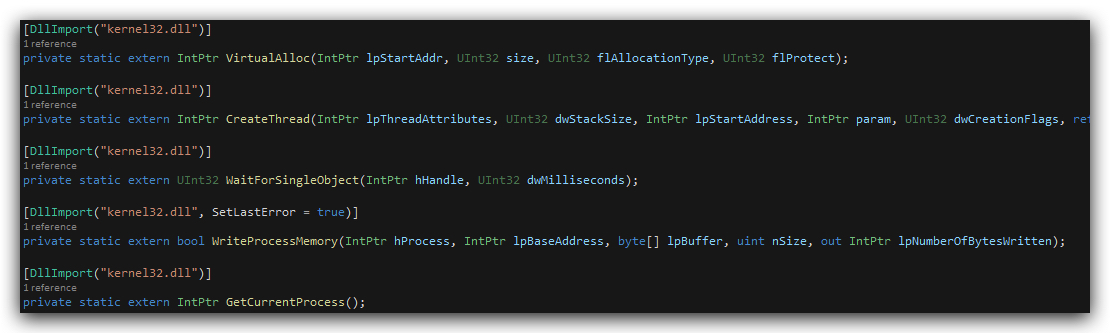
The screenshot belows shows how we use P/Invoke to import the VirtualAlloc function from kernel32.dll:
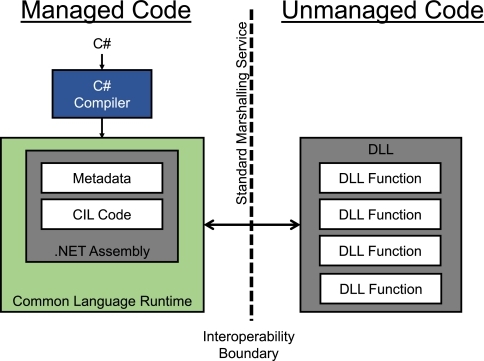
And again here is a high level overview of how P/Invoke works in our shellcode loader:
-
Definition:
P/INVOKEis a .NET mechanism to call unmanaged (native) functions in DLLs, such as Windows API functions (e.g., kernel32.dll for VirtualAlloc). -
How It Works: Uses [DllImport] attributes to declare managed C# methods that map to native functions, enabling .NET to marshal data between managed and unmanaged code.
-
Usage in Shellcode Loader: Calls Win32 functions directly, e.g., [DllImport("kernel32.dll")] public static extern IntPtr VirtualAlloc(...);, to allocate memory for shellcode.
-
PROS:
- Simple and well-supported in .NET.
- Clear documentation and easy to implement.
-
CONS:
- Easily detected by antivirus/EDR due to static import signatures.
- Static function imports can be hooked or blocked by security tools.
https://learn.microsoft.com/en-us/dotnet/framework/interop/consuming-unmanaged-dll-functions