Win32API, Functions, kernel and user mode
The Windows API is Microsoft’s way of exposing the inner workings of the operating system to developers. To do anything which requires the operating system to do things for you (for example process management, interacting with windows, making cool popup boxes, screenshotting, security, identity, and many other things such as system services), you need to interact with the API. Commonly referred to as the Win32 API, the documentation can be found here.
It’s the foundation for creating performant and native applications on Windows, giving you the ability to leverage the full capabilities of the Windows operating system.
NOTE: Some very good references on functions typically abused in malware can be found here
- Windows API Abuse Atlas - detailled overview of functions typically abused in malware.
- MalAPI.io - Brief explanation of how adversaries use the functions in their malicious code.
- Undocumented NTInternals - some functions are not documented by Microsoft, but you can find them here.
Another very nice one, recently developed is the Windows API Arsenal:
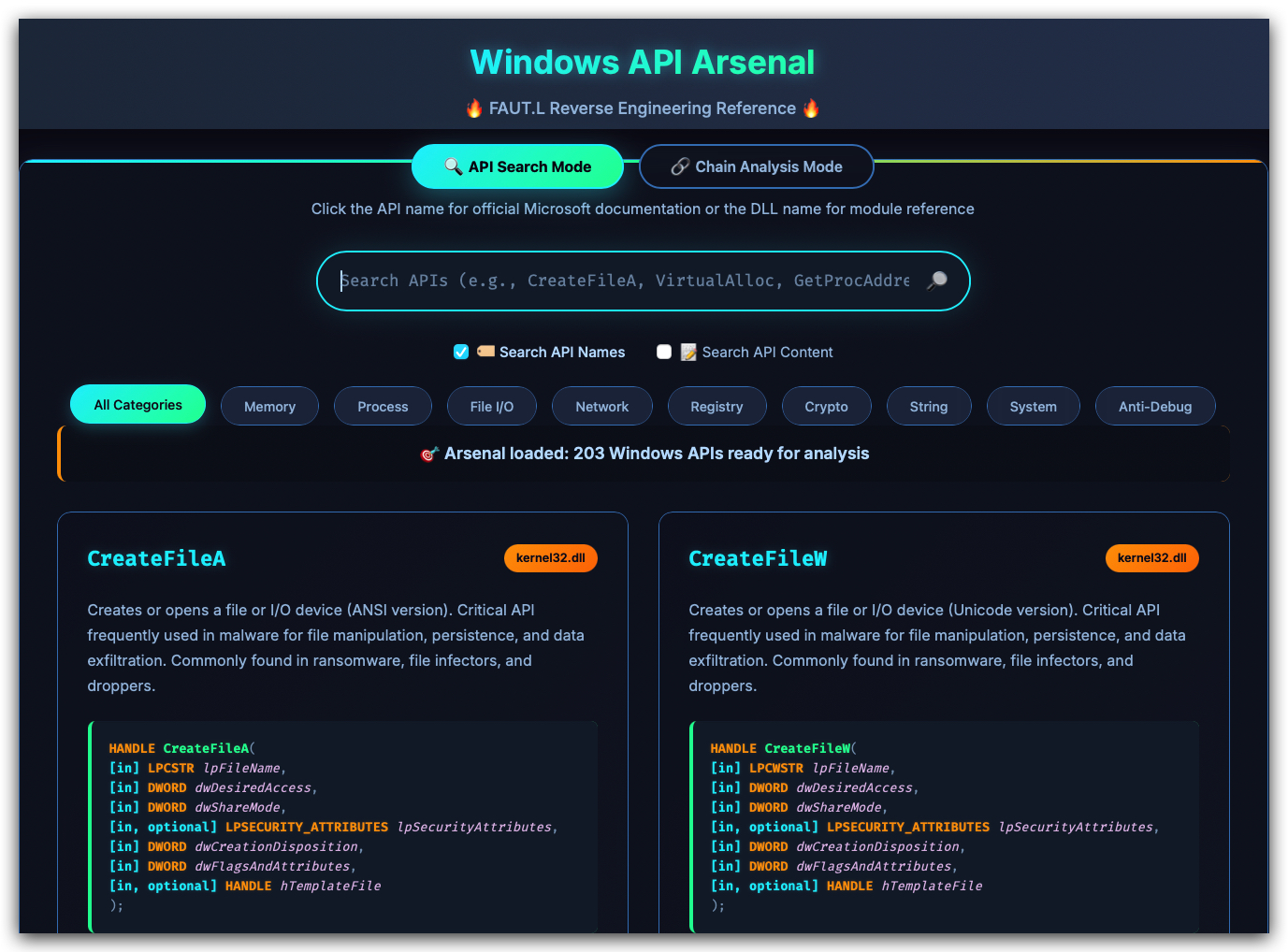
In this training we are using the WIN32 API (kernel32.dll), which is the most common API used in Windows applications. The Win32 API is a set of functions provided by Windows that allows applications to interact with the operating system at a low level. These functions are exposed through various DLLs (Dynamic Link Libraries) such as kernel32.dll, user32.dll, gdi32.dll, advapi32.dll, and many others.
We don't use the NT API (ntdll.dll) directly in this training, but it's important to understand the difference between the two. As Defender does not hook API calls at all, we don't really care about the differences for this training. However, for completeness, here is a brief overview of the differences between the Win32 API and the NT API.
Differences between Win32 API and NT API:
| Win32 API Function (kernel32.dll) | NT API Equivalent (ntdll.dll) | Purpose | Win32 Characteristics | NT API Characteristics |
|---|---|---|---|---|
| VirtualAlloc | NtAllocateVirtualMemory | Allocates memory in virtual address space | Simple interface, automatic handle management | More granular control, requires manual parameter handling |
| WriteProcessMemory | NtWriteVirtualMemory | Writes data to memory area of specified process | User-friendly error handling with GetLastError | Returns NTSTATUS codes, more direct kernel access |
| CreateThread | NtCreateThread | Creates a thread to execute within virtual address space | Simplified thread creation with standard parameters | Extended control over thread attributes and creation flags |
| VirtualProtect | NtProtectVirtualMemory | Changes protection on region of committed pages | Abstracted memory protection interface | Direct access to memory protection mechanisms |
| WaitForSingleObject | NtWaitForSingleObject | Waits until specified object is in signaled state | High-level synchronization with timeout handling | Lower-level wait operations with kernel object access |
For reference, if you want to use the NT API functions, you can find the documentation here: NtDoC.
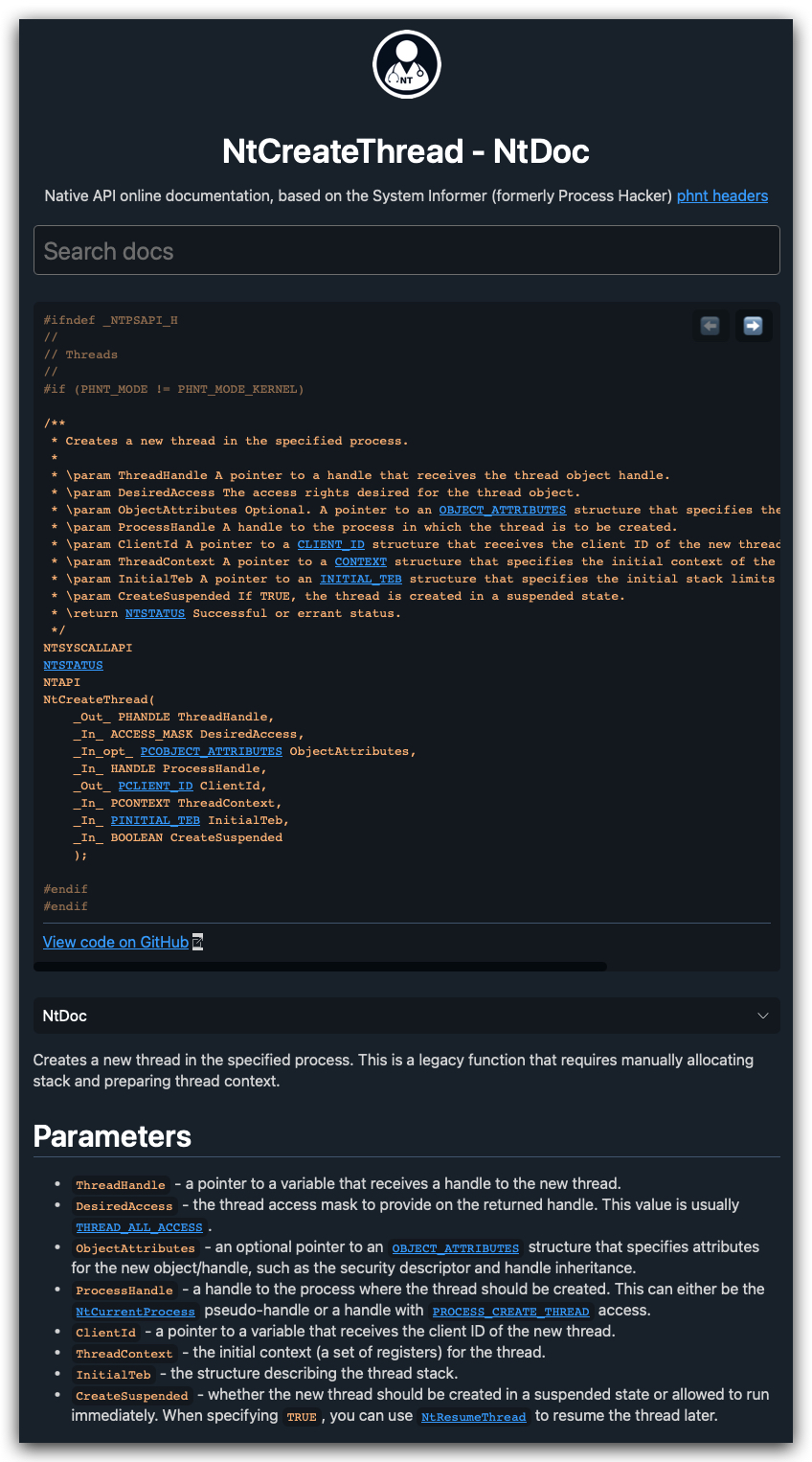
user-mode and kernel-mode:
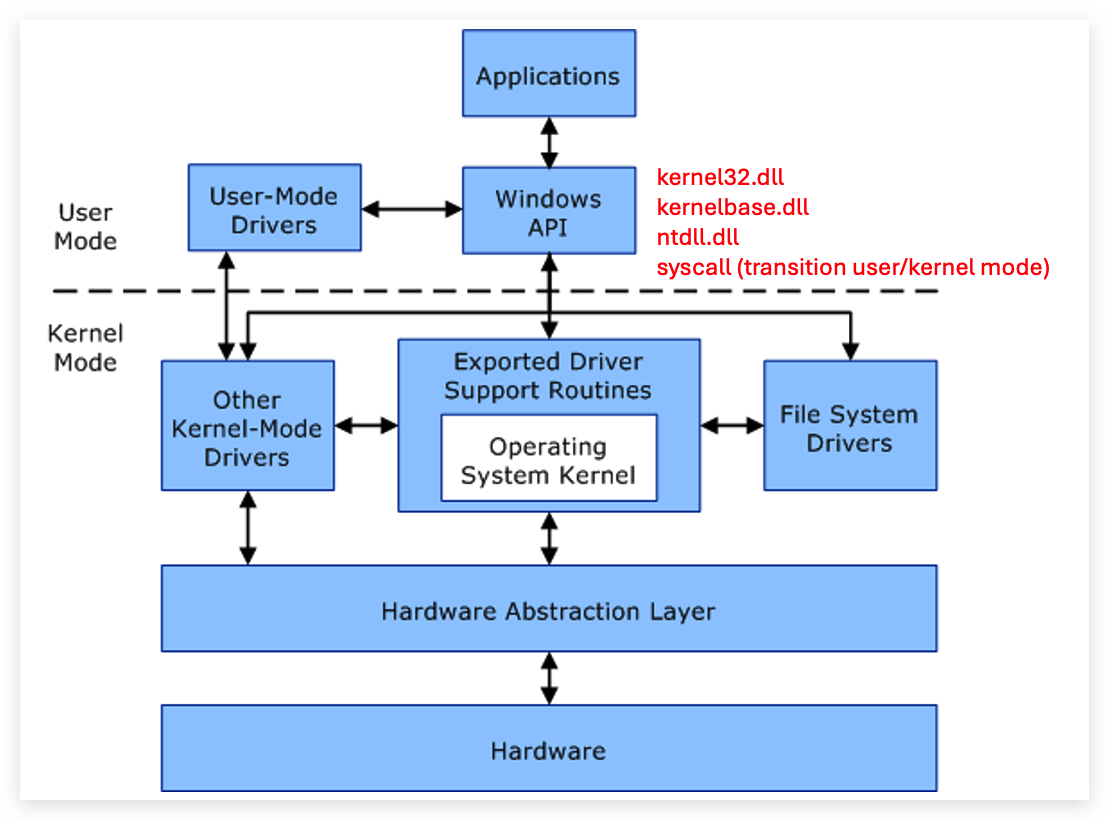
User Mode vs Kernel Mode in Windows
1. Kernel Mode
- What it is: Kernel mode is the privileged mode of operation in which code has unrestricted access to all system resources, including hardware and memory. It operates at the core of the operating system.
- Who uses it: The Windows kernel, device drivers, and other low-level system processes operate in kernel mode.
- Capabilities:
- Direct access to the hardware (e.g., CPU, memory, storage devices).
- Ability to execute critical system-level instructions.
- Risks: Errors in kernel-mode processes can lead to system crashes or instability (commonly referred to as a "blue screen").
2. User Mode
- What it is: User mode is the restricted mode in which applications and processes run. Code executed in user mode cannot directly access hardware or system resources and relies on the kernel for such operations.
- Who uses it: Regular applications (e.g., browsers, text editors) and user-level processes operate in user mode.
- Capabilities:
- Processes in user mode interact with hardware indirectly through system calls provided by the kernel.
- Memory and resources are isolated, minimizing the impact of an application crash.
- Benefits: User mode enhances system stability by isolating applications from the core system operations. If a user-mode application crashes, it typically does not affect the operating system itself.
Switching Between Modes
- In Windows, switching between user mode and kernel mode happens when a user-mode application requests system resources (e.g., file I/O or network access). These requests are performed using system calls. The operating system processes these calls in kernel mode and returns the results to the user-mode application.
Win32 API vs. NT API: Differences Explained
The Win32 API and the NT API (also known as the Native API) are two distinct sets of functions provided by the Windows operating system, each serving different purposes and operating at different levels of abstraction. Below, we explain their differences in terms of purpose, accessibility, usage, and their relevance to process injection and APIs like CreateThread, VirtualAlloc, and WaitForSingleObject.
1. Overview and Purpose
Win32 API
- Definition: The Win32 API is the high-level, user-facing interface provided by Windows for developing applications. It’s a comprehensive set of functions exposed primarily through DLLs like
kernel32.dll,user32.dll, andgdi32.dll. - Purpose: Designed for application developers (both user-mode and some kernel interactions), it provides a stable, documented, and abstracted way to interact with Windows services, such as process and thread management, memory allocation, file I/O, and UI components.
- Examples:
CreateThread,VirtualAlloc,WaitForSingleObject,WriteProcessMemory. - Abstraction Level: High-level, with a focus on ease of use, portability, and stability across Windows versions.
- Accessibility: Fully documented in Microsoft’s MSDN, widely supported, and intended for use by developers in user-mode applications. It’s the standard API for most Windows software, including .NET applications via P/Invoke.
NT API (Native API)
- Definition: The NT API is a lower-level, mostly undocumented set of functions used internally by the Windows NT kernel and its subsystems. These functions are exposed through
ntdll.dlland are prefixed withNtorZw(e.g.,NtCreateThreadEx,NtAllocateVirtualMemory). - Purpose: Provides direct access to core kernel services for low-level operations, such as system calls for process management, memory management, and I/O. It’s primarily used by Windows subsystems (e.g., the Win32 subsystem), drivers, and low-level components.
- Examples:
NtCreateThreadEx,NtAllocateVirtualMemory,NtWaitForSingleObject. - Abstraction Level: Low-level, closer to the kernel, with minimal abstraction. It’s more granular and exposes internal OS mechanics.
- Accessibility: Partially documented, primarily for internal use by Microsoft and low-level developers (e.g., driver developers, security researchers). Public documentation is sparse, and Microsoft discourages its use in standard applications due to potential instability across Windows versions.
2. Key Differences
Here’s a detailed comparison across several dimensions:
| Aspect | Win32 API | NT API |
|---|---|---|
| Abstraction Level | Higher-level, abstracts kernel details for ease of use. | Lower-level, directly interfaces with kernel services via system calls. |
| Documentation | Fully documented in MSDN, with extensive examples and support. | Mostly undocumented; information comes from reverse engineering or leaks. |
| Stability | Stable across Windows versions, with backward compatibility. | Less stable; function signatures or behavior may change between versions. |
| Accessibility | Publicly available for all developers via kernel32.dll, etc. | Exposed via ntdll.dll, but intended for internal use or advanced cases. |
| Usage | Standard for application development (e.g., GUI apps, services). | Used by system components, drivers, or advanced malware/research tools. |
| Examples | CreateThread, VirtualAlloc, WaitForSingleObject. | NtCreateThreadEx, NtAllocateVirtualMemory, NtWaitForSingleObject. |
| Performance | Slightly slower due to abstraction layers (e.g., calls often route through NT API). | Faster, as it’s closer to the kernel with minimal overhead. |
| Error Handling | Standardized, with GetLastError for detailed error codes. | Less consistent; error codes are NTSTATUS values, which are less intuitive. |
| Security Monitoring | Heavily monitored by security tools due to common abuse in malware. | Less monitored, making it attractive for stealthy operations. |
3. Technical Differences
- Function Mapping:
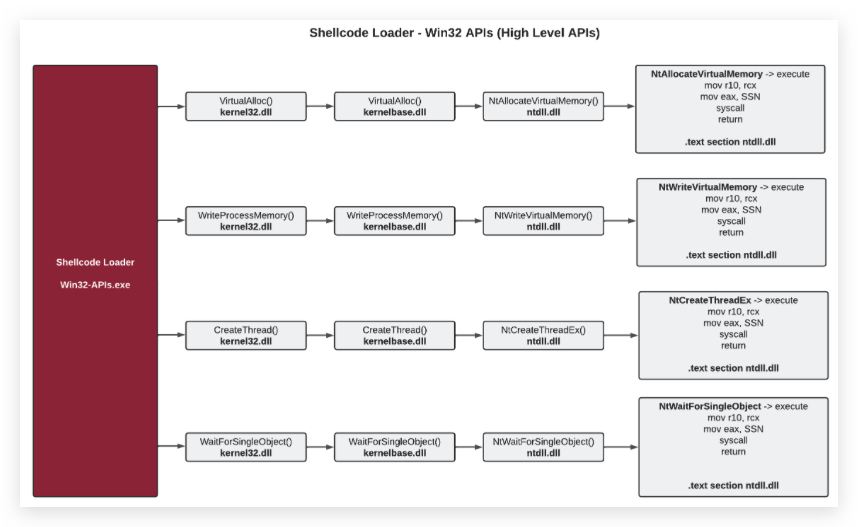
- Many Win32 API functions are wrappers around NT API functions. For example:
CreateThread(Win32) callsNtCreateThreadExor similar NT API functions internally.VirtualAllocmaps toNtAllocateVirtualMemory.WaitForSingleObjectusesNtWaitForSingleObjectunder the hood.
- The Win32 API adds user-friendly abstractions, such as simpler parameter types or additional error-checking, while NT API functions are raw and require precise parameter handling (e.g.,
NTSTATUSreturn codes).
- Many Win32 API functions are wrappers around NT API functions. For example:
-
Parameter Differences:
- Win32 API functions often use simpler data types (e.g.,
HANDLE,DWORD) and handle some memory management automatically. - NT API functions use complex structures (e.g.,
UNICODE_STRING,OBJECT_ATTRIBUTES) and require manual memory management, making them harder to use correctly.
- Win32 API functions often use simpler data types (e.g.,
-
Execution Context:
- Win32 API: Operates in user mode, designed for application-level tasks. It’s restricted from directly accessing kernel resources without going through proper channels.
- NT API: Can be called from user mode (via
ntdll.dll) or kernel mode (viaZwvariants), offering more direct access to kernel services. This makes it more powerful but riskier.
4. Relevance to Process Injection
In the context of process injection (e.g., using CreateThread, VirtualAlloc, or WaitForSingleObject), the differences between Win32 and NT APIs are particularly relevant:
-
Win32 API in Injection:
- Functions like
CreateThread,VirtualAlloc, andWaitForSingleObjectare commonly used in classic injection techniques. They’re straightforward, well-documented, and sufficient for most injection scenarios. - However, their widespread use makes them prime targets for security monitoring. Tools like EDRs (Endpoint Detection and Response) heavily scrutinize calls to
CreateThreadorVirtualAllocin suspicious contexts (e.g., unsigned binaries injecting intoexplorer.exe).
- Functions like
-
NT API in Injection:
- Attackers often prefer NT API equivalents (e.g.,
NtCreateThreadEx,NtAllocateVirtualMemory,NtWaitForSingleObject) for stealth. These functions are less monitored because they’re not part of the standard Win32 API and are harder to hook or detect. - For example, instead of using
CreateThread, malware might useNtCreateThreadExto create a thread in the current process with finer control over thread attributes, reducing the chance of detection. - The NT API’s lower visibility and lack of documentation make it attractive for advanced persistent threats (APTs) or red teams aiming to bypass security tools.
- Attackers often prefer NT API equivalents (e.g.,
-
Example Comparison:
- Win32:
CreateThreadcreates a thread in the current process with a simple interface:[DllImport("kernel32.dll")] private static extern IntPtr CreateThread(IntPtr lpThreadAttributes, uint dwStackSize, IntPtr lpStartAddress, IntPtr lpParameter, uint dwCreationFlags, ref uint lpThreadId); - NT API:
NtCreateThreadExoffers more control (e.g., extended attributes) but requires complex structures:[DllImport("ntdll.dll")] private static extern int NtCreateThreadEx(out IntPtr hThread, uint DesiredAccess, IntPtr ObjectAttributes, IntPtr ProcessHandle, IntPtr lpStartAddress, IntPtr lpParameter, bool CreateSuspended, uint StackZeroBits, uint SizeOfStackCommit, uint SizeOfStackReserve, IntPtr BytesBuffer); - The NT version is harder to use but less likely to be flagged by security tools.
- Win32:
5. Why Attackers Prefer NT API
- Stealth: NT API calls are less commonly monitored by security software, as they’re not part of the standard Win32 API. This makes them ideal for evading detection in process injection.
- Flexibility: NT APIs often provide more granular control (e.g.,
NtCreateThreadExsupports additional thread creation options not available inCreateThread). - Bypassing Hooks: Some security tools hook Win32 APIs like
CreateThreadto detect malicious behavior. NT APIs, being lower-level, may bypass these hooks, as they’re called directly viantdll.dll.
6. Why Developers Use Win32 API
- Ease of Use: Win32 APIs are well-documented, with clear error codes and simpler interfaces, making them suitable for most application development.
- Stability: Microsoft ensures backward compatibility for Win32 APIs, so code using
CreateThreadorVirtualAllocis less likely to break across Windows versions. - Support: Extensive community and vendor support for Win32 APIs reduces development friction.
7. Caveats
- NT API Risks: Using NT APIs in user-mode applications is risky due to their often undocumented nature. Microsoft may change their behavior, parameters, or availability without notice, breaking code across Windows versions.
- Security Implications: While NT APIs are stealthier, their use in unsigned or suspicious binaries is itself a red flag for advanced security tools, as it suggests deliberate evasion.
- Legitimate Use: Win32 APIs are sufficient for most legitimate applications, while NT APIs are typically reserved for low-level system programming, drivers, or security research.
Summary
- Win32 API: High-level, documented, stable, and user-friendly, ideal for standard application development but heavily monitored for malicious use (e.g.,
CreateThread,VirtualAlloc). - NT API: Low-level, partially undocumented, closer to the kernel, and stealthier, favored by malware and red teams for evasion (e.g.,
NtCreateThreadEx,NtAllocateVirtualMemory). - In process injection, Win32 APIs are easier to use but more likely to be detected, while NT APIs are harder to use but offer stealth at the cost of complexity and instability.
A word about Kernel32 and Kernelbase.dll
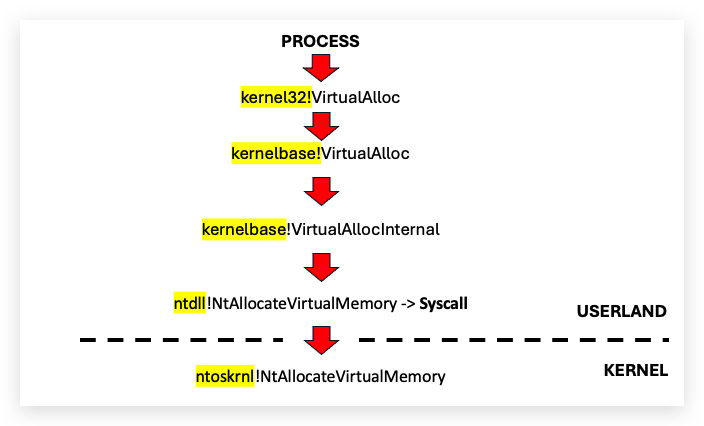
Kernel32.dll basically forwards (redirects) requests to Kernelbase.dll, the image below illustrates this:
-
On modern Windows systems (Windows 7 and later), many functions in kernel32.dll are forwarded to kernelbase.dll. For example, kernel32.dll exports functions like CreateFileA or VirtualAlloc, but their actual implementation resides in kernelbase.dll. When a program calls a kernel32.dll function, the call is often redirected to kernelbase.dll, and API Monitor may only show the kernelbase.dll function being called.
-
This redirection happens because kernelbase.dll was introduced to modularize the Windows API, separating core functionality (kernelbase.dll) from higher-level abstractions (kernel32.dll). As a result, API Monitor might not log kernel32.dll calls if the actual execution occurs in kernelbase.dll.
IMPORTANT: The closer you can work to the kernel (ntdll.dll), the least chance on detection, since kernel32 and kernelbase all eventually translate into an ntdll.dll function. NTDLL.dll is basically a wrapper for syscalls to kernel mode.
AV and EDR's hooking functions
In this training we are using the Win32 API functions directly from kernel32.dll. However, many AV and EDR solutions hook these functions to monitor and intercept calls that may indicate malicious activity. Hooking is a technique where the original function is replaced or intercepted by a custom function, allowing the security software to analyze or modify the behavior of the function call. Microsoft Defender, for example, doe snot implement function hooking so we don't need to worry about it in this training.
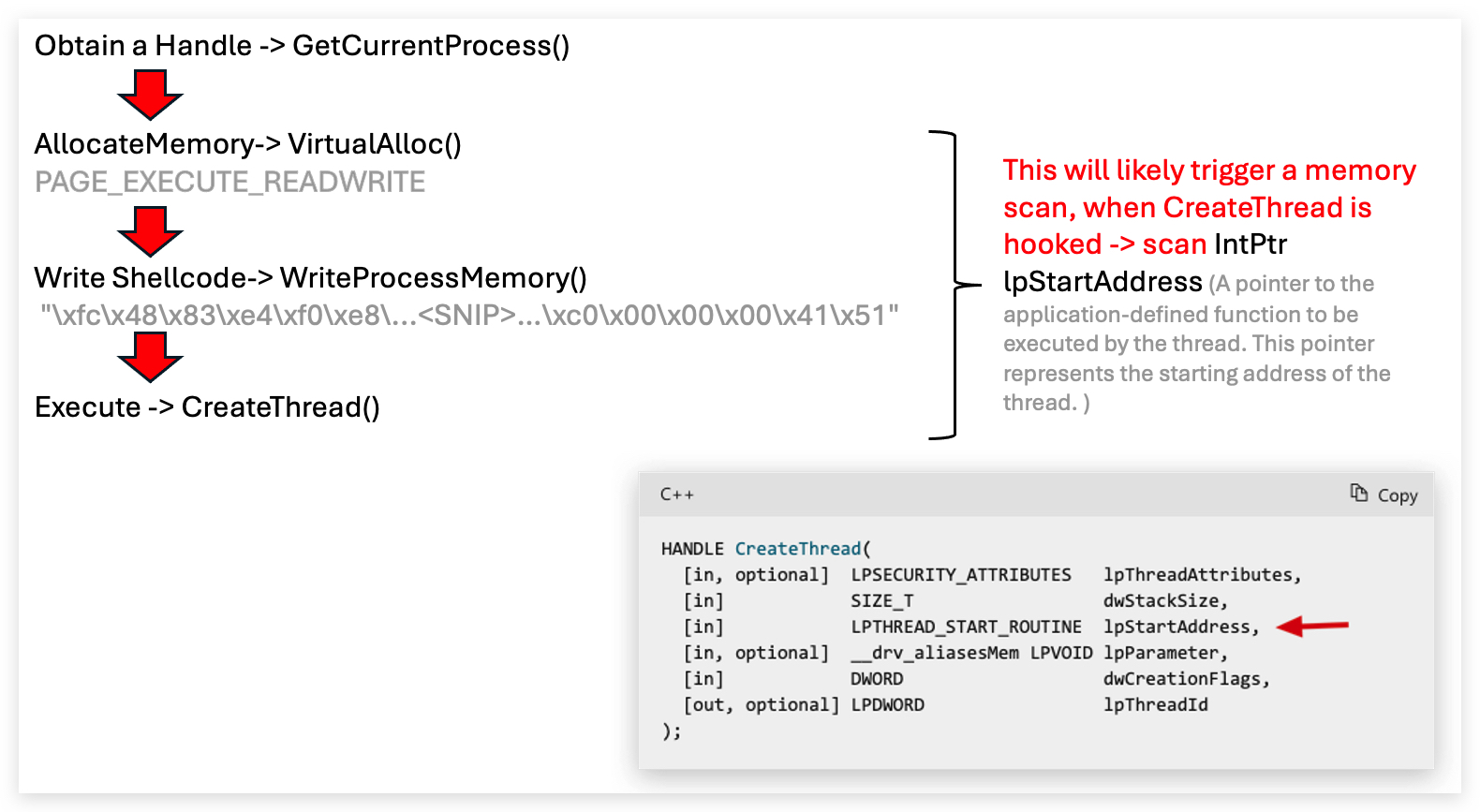
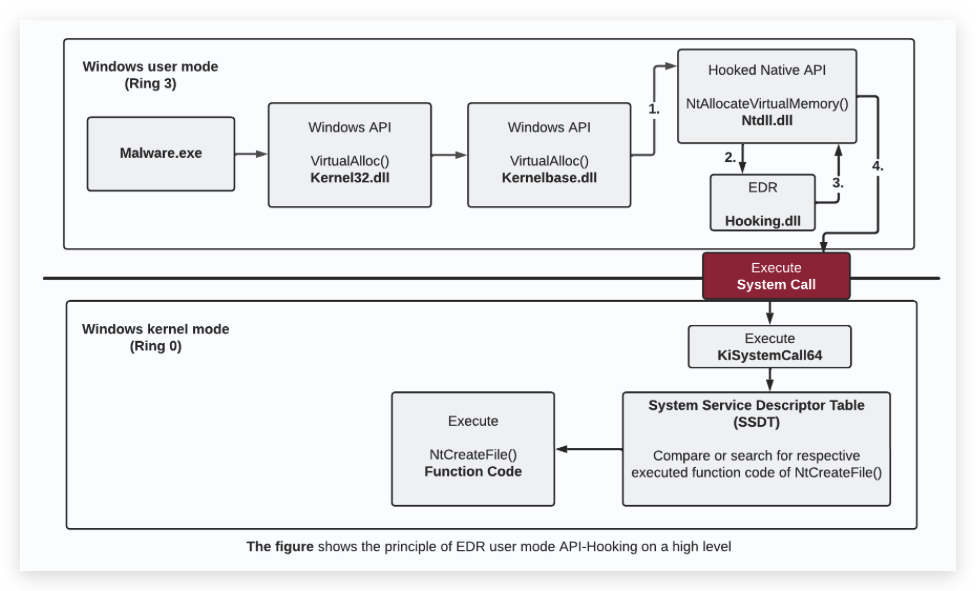
Let's have a more detailed look at some of the Win32 API functions commonly used in process injection.