WINDOWS LOGGING AND EVENT IDs
By default Windows logs a lot of information, but not everything is enabled by default. In this section we'll go through the most important logs that are relevant for red team operations and how to enable them. Microsoft recommends enabling the following audit policies for comprehensive logging: https://learn.microsoft.com/en-us/previous-versions/windows/it-pro/windows-10/security/threat-protection/auditing/advanced-security-audit-policy-settings
WE PREFER EVENTLOG EXPLORER (ELEX) over Windows Event Viewer
EventLog Explorer (ELEX) is a powerful tool for viewing, analyzing, and managing Windows event logs. It offers several advantages over the built-in Windows Event Viewer, such as a more user-friendly interface, advanced filtering options, and the ability to handle large log files more efficiently. ELEX also provides features like log exporting, bookmarking, and customizable views, making it easier for administrators and security professionals to analyze event logs and identify potential issues or security threats.
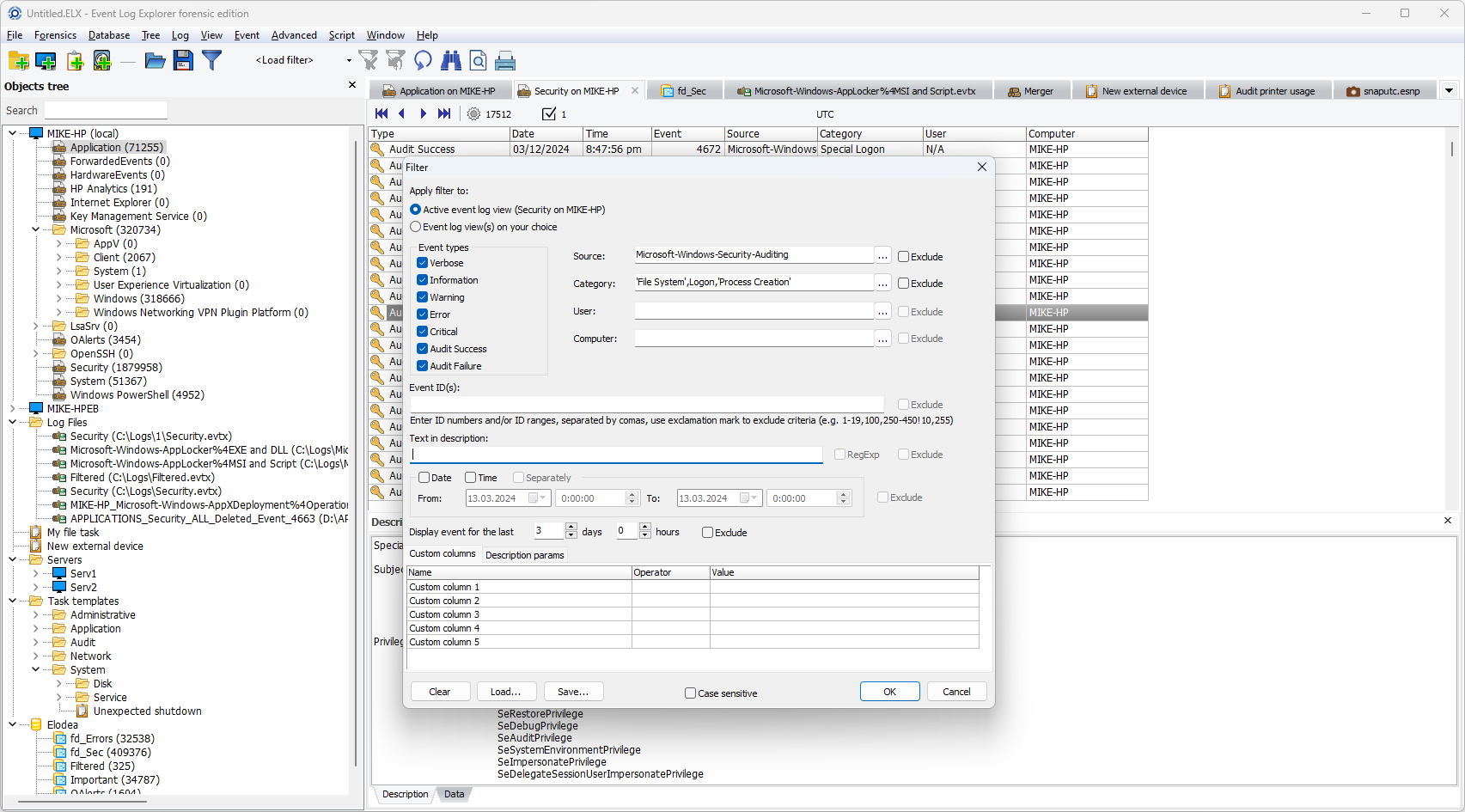
CUSTOM EVENT FILTERS IN ELEX
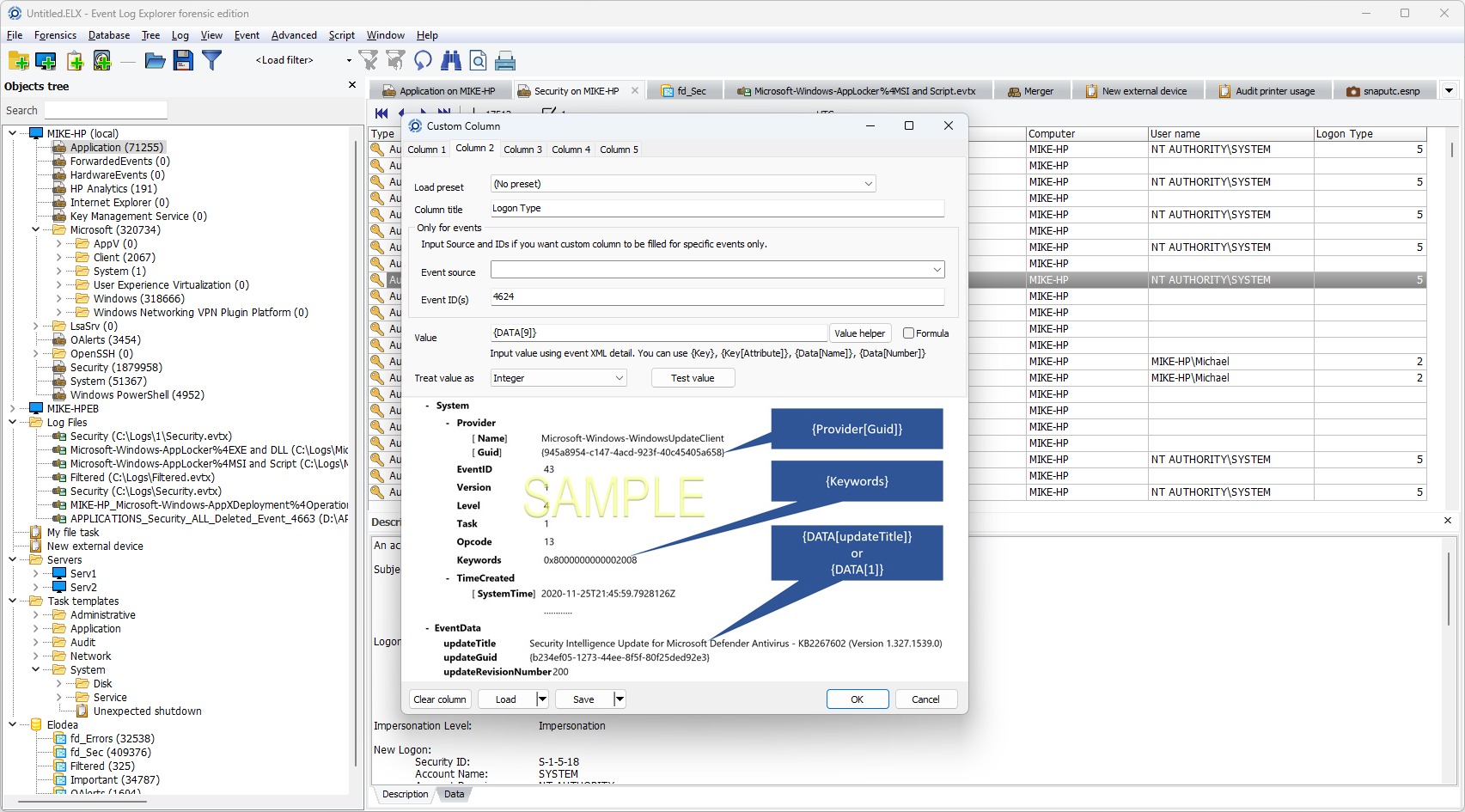
CUSTOM COLUMN VIEWS IN ELEX
WINDOWS EVENT ID's BEST PRACTICES
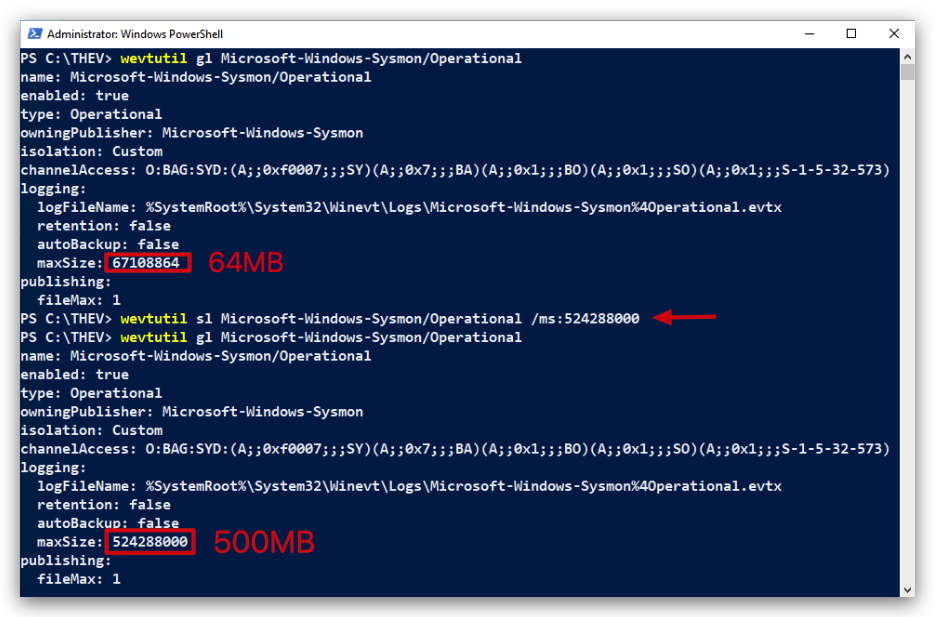
INCREASE FILE SIZE : When enabling detailed logging (e.g., PowerShell Script Block Logging, Process Creation with Command Line), ensure that the log file size is increased to accommodate the higher volume of events. This helps prevent log overwriting and ensures that critical events are retained for analysis.
wevtutil gl Microsoft-Windows-Sysmon/Operational
wevtutil sl Microsoft-Windows-Sysmon/Operational /ms:524288000
wevtutil gl Microsoft-Windows-Sysmon/Operational
A 64 MB Sysmon event log can hold approximately 16,384 to 65,536 events, with a typical estimate of ~32,768 events assuming an average event size of 2 KB - A 500 MB Sysmon event log can hold approximately 128,000 to 512,000 events, with a typical estimate of ~256,000 events assuming an average event size of 2 KB. For a precise count, analyze your Sysmon configuration and environment to determine the actual average event size.
1. POWERSHELL (SCRIPT BLOCK LOGGING)
LogSource: Microsoft-Windows-PowerShell/Operational
| Field | Value | Purpose | Enabled by Default | Noise Level |
|---|---|---|---|---|
| EventID | 4104 | Logs PowerShell script execution and deobfuscated content for threat detection | 🟠 (WIN10/11) | 🔴 Very High (with full logging) |
Note: By default, Windows logs only suspicious PowerShell activity through AMSI. To capture all PowerShell script execution, you must enable Script Block Logging via GPO or registry modification.
Benefits of Enabling Full Script Block Logging
- Comprehensive Logging: Unlike default logging (limited to AMSI-flagged suspicious scripts), GPO-enabled Script Block Logging captures all script activity, including non-suspicious and obfuscated code
- Centralized Management: GPO deployment ensures consistent logging across enterprise systems, superior to manual registry changes
- Granular Insights: Logs complete script content, execution context (user, process ID), and deobfuscated code - critical for detecting fileless attacks
Deobfuscation Behavior:
- Default AMSI logging: Deobfuscates Base64-encoded scripts only when flagged as suspicious
- Full Script Block Logging: Always deobfuscates Base64-encoded scripts, logging decoded content in Event ID 4104 regardless of threat level Important: When Script Block Logging is enabled, AMSI detection events are included within the comprehensive 4104 logs. This means all scripts (malicious and benign) are logged with full deobfuscation, significantly increasing forensic visibility but also log volume.
Manual Registry Configuration (Alternative to GPO)
Registry Path: HKLM\SOFTWARE\Policies\Microsoft\Windows\PowerShell\ScriptBlockLogging
- Key:
EnableScriptBlockLogging - Value:
1(DWORD)
2. WINDOWS DEFENDER
LogSource: Microsoft-Windows-Windows Defender/Operational
| Field | Value | Purpose | Enabled by Default | Noise Level |
|---|---|---|---|---|
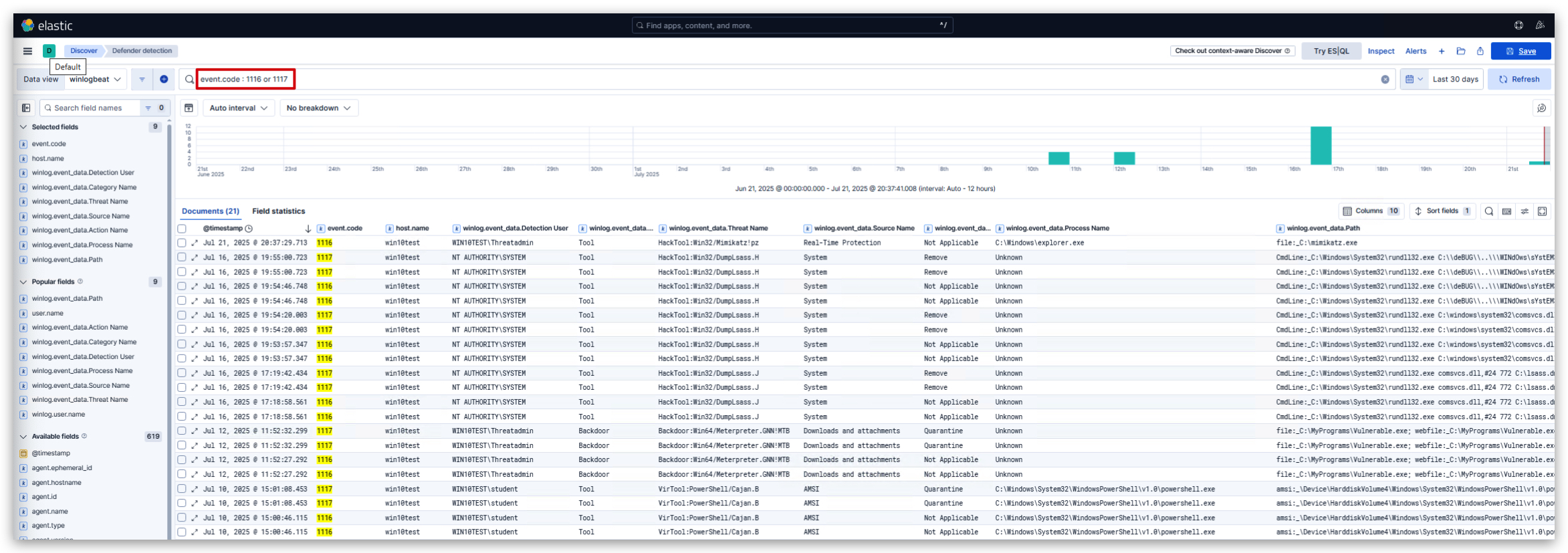
| EventID | 1116 | Logs malware detection events from Windows Defender | ✅ | 🟢 Low (only on detections) |
| EventID | 1117 | Logs actions taken by Windows Defender (quarantine, block, etc.) | ✅ | 🟢 Low (only on actions) |
AMSI also logs to Microsoft-Windows-Windows Defender/Operational as Event ID 1116 (detection) and 1117 (action taken), providing antivirus-specific details (e.g., threat name, process).

3. RDP CONNECTION
LogSource: Microsoft-Windows-Terminal-Services-RemoteConnectionManager/Operational
| Field | Value | Purpose | Enabled by Default | Noise Level |
|---|---|---|---|---|
| EventID | 1149 | Successful RDP connections and authentication attempts | ✅ | 🟡 Medium (per RDP session) |
| EventID | 4778 | Session reconnected to Window Station | ✅ | 🟡 Medium (per reconnection) |
| EventID | 4779 | Session disconnected from Window Station | ✅ | 🟡 Medium (per disconnection) |
| EventID | 21 | RDP logon successful (Terminal Services) | ✅ | 🟡 Medium (per successful logon) |
| EventID | 24 | RDP session disconnect | ✅ | 🟡 Medium (per disconnect) |
4. SERVICE CREATION LOGS
LogSource: SYSTEM
| Field | Value | Purpose | Enabled by Default | Noise Level |
|---|---|---|---|---|
| EventID | 7045 | Logs Windows service creation events for persistence detection | ✅ | 🟢 Low (only on service creation) |
5. EVENT LOG CLEARING LOGS
LogSource: Security
| Field | Value | Purpose | Enabled by Default | Noise Level |
|---|---|---|---|---|
| EventID | 1102 | Logs event log clearing attempts (anti-forensics detection) | ✅ | 🟢 Very Low (only when logs cleared) |
6. PROCESS EXECUTION AND COMMAND LINE
LogSource: Security
| Field | Value | Purpose | Enabled by Default | Noise Level |
|---|---|---|---|---|
| EventID | 4688 | Logs process creation with command line arguments | ❌ (Requires 2 GPO settings) | 🔴 Extremely High (every process) |
| EventID | 4689 | Process termination | ❌ (Requires GPO) | 🔴 Extremely High (every process) |
Important: Event ID 4688 requires TWO separate GPO configurations:
- Audit Process Creation (enables basic 4688 events)
- Include command line in process creation events (adds command line logging)
Without both settings, you'll only get process names without command line arguments.
Configuration Steps for Process Creation Logging (Event ID 4688)
Step 1: Enable Process Creation Auditing
- Navigate to: Computer Configuration → Windows Settings → Security Settings → Advanced Audit Policy Configuration → Audit Policies → Detailed Tracking
- Double-click "Audit Process Creation"
- Check the box "Configure the following audit events"
- Check both "Success" and "Failure" boxes
Step 2: Enable Command Line Logging
- Navigate to: Computer Configuration → Administrative Templates → System → Audit Process Creation
- Double-click "Include command line in process creation events"
- Set to "Enabled"
Result
- Event ID 4688 will now log process creation events with full command line arguments
- Critical for detecting malicious process execution and lateral movement activities
- Provides visibility into process spawning chains and command line obfuscation attempts.
7. LOGON EVENTS
LogSource: Security
| Field | Value | Purpose | Enabled by Default | Noise Level |
|---|---|---|---|---|
| EventID | 4624 | Successful logon events (interactive, network, service) | ✅ | 🟡 Medium to High (depends on environment) |
| EventID | 4625 | Failed logon attempts (brute force detection) | ✅ | 🟡 Medium (legitimate failures + attacks) |
| EventID | 4634/4647 | Logoff events | ✅ | 🟡 Medium to High (per logoff) |
8. PRIVILEGE ESCALATION
LogSource: Security
| Field | Value | Purpose | Enabled by Default | Noise Level |
|---|---|---|---|---|
| EventID | 4672 | Special privileges assigned to new logon (admin detection) | ✅ | 🟡 Medium (admin logins) |
9. ACCOUNT MANAGEMENT
LogSource: Security
| Field | Value | Purpose | Enabled by Default | Noise Level |
|---|---|---|---|---|
| EventID | 4720 | User account created | ✅ | 🟢 Low (only on account creation) |
| EventID | 4726 | User account deleted | ✅ | 🟢 Low (only on account deletion) |
| EventID | 4728 | User added to security-enabled global group | ✅ | 🟢 Low (only on group changes) |
10. WMI EVENT LOGGING (Advanced)
LogSource: Microsoft-Windows-WMI-Activity/Operational
| Field | Value | Purpose | Enabled by Default | Noise Level |
|---|---|---|---|---|
| EventID | 5857 | WMI provider activity | ❌ (Requires GPO) | 🟡 Medium (legitimate WMI usage) |
| EventID | 5860 | Registration of temporary WMI events | ❌ (Requires GPO) | 🟢 Low (only on WMI event registration) |
| EventID | 5861 | Registration of permanent WMI events | ❌ (Requires GPO) | 🟢 Low (only on persistent WMI events) |
Configuration for WMI Logging
- Navigate to: Computer Configuration → Administrative Templates → Windows Components → WMI
- Enable "Enable Logging" for WMI-Activity
Log Retention Considerations
| Log Type | Recommended Retention | Storage Impact | Noise Level |
|---|---|---|---|
| PowerShell 4104 | 90 days minimum | High (with full Script Block Logging) | 🔴 Very High |
| Process Creation 4688 | 30 days minimum | Very High | 🔴 Extremely High |
| Sysmon Events | 30 days minimum | Extremely High | 🔴 Extremely High |
| Security Events | 180 days minimum | Medium | 🟡 Medium to High |
⚠️ Performance Warning: Enabling comprehensive logging (especially Process Creation 4688 and full PowerShell Script Block Logging) can generate 100GB+ logs daily on busy systems. Ensure adequate storage and consider log forwarding to SIEM solutions.
Noise Level Legend:
- 🟢 Low: Rare events, high signal-to-noise ratio
- 🟡 Medium: Moderate frequency, manageable with filtering
- 🔴 High/Very High: Frequent events, requires significant filtering and storage
OTHER INTERESTING EVENT LOGS
LogSource: Microsoft-Windows-DNS-Client/Operational
| Field | Value | Purpose | Enabled by Default | Noise Level |
|---|---|---|---|---|
| EventID | 3006 | DNS query initiated/called | ❌ (Requires GPO) | 🔴 Very High (every DNS query started) |
| EventID | 3008 | DNS query completed with results | ❌ (Requires GPO) | 🔴 Very High (every completed DNS query) |
| EventID | 3010 | DNS reverse lookup query (PTR records) | ❌ (Requires GPO) | 🟡 Medium (reverse DNS lookups) |
| EventID | 3018 | DNS cache lookup operations | ❌ (Requires GPO) | 🟡 Medium (DNS cache hits/misses) |
| EventID | 3020 | DNS query response | ❌ (Requires GPO) | 🟡 Medium (legitimate DNS queries) |