1. WINDOWS DEFENDER / MDE (EDR)
TL;DR : This chapter explains how most AV/EDR's work - in this case we'll focus on Microsoft Defender (the AV part), MDE (Microsoft Defender for Endpoint) which is the EDR component that we'll deal with later on. Windows defender is the most widely used Antivirus and also one of the most targeted products seen in attacks in the wild it is ALSO pretty darn good!
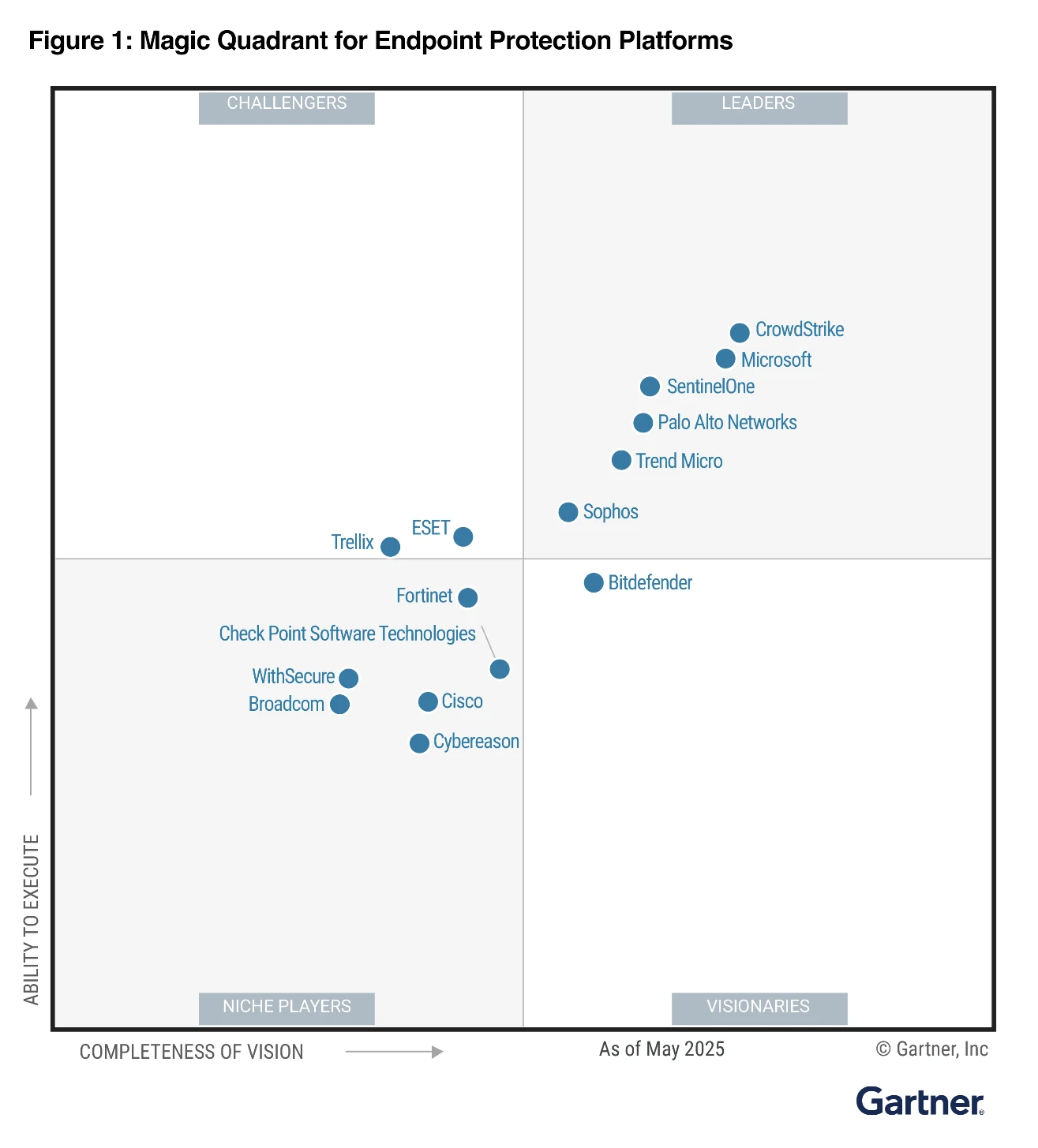
This training focuses on user-level techniques to bypass Defender/MDE, and does not cover kernel-level techniques (like kernel driver hooking, DKOM, etc.) which are more complex and risky. Kernel level techniques require a signed driver, and are more likely to cause system instability or crashes. There are many known BYOVD (Bring Your Own Vulnerable Driver) techniques that can be used to load unsigned drivers, but these are outside the scope of this training.
That being said there are plenty of ways to bypass Defender/MDE without touching the kernel, and these are the techniques that will be covered in this training:
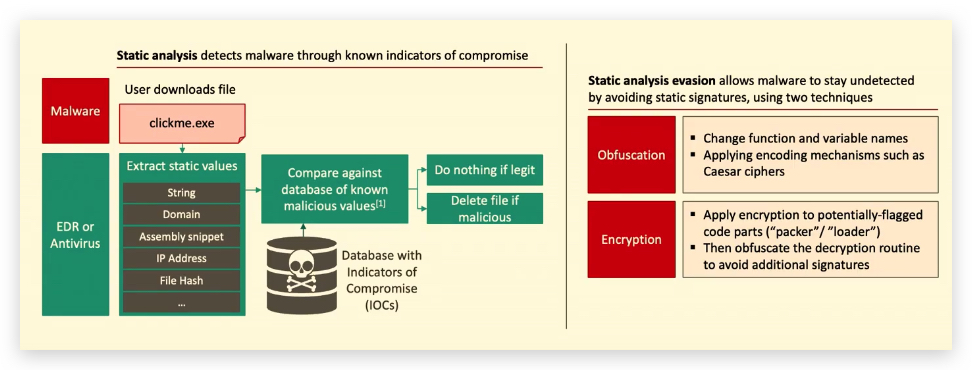
- Making our code evasive to static analysis (obfuscation, packing, encryption)
- Using living-off-the-land techniques (LOLbins, signed binaries, etc.)
- Using fileless techniques (PowerShell, WMI, etc.)
- Abusing trusted processes (process hollowing, DLL sideloading, etc.)
- Abusing Defender/MDE weaknesses (disabling, tampering, etc.) - Tamper protection is enabled by default for enterprise customers with MDE (Defender for Endpoint), making this significantly more difficult. For standalone Microsoft Defender Antivirus installations, tamper protection can be manually configured through the Windows Security app.
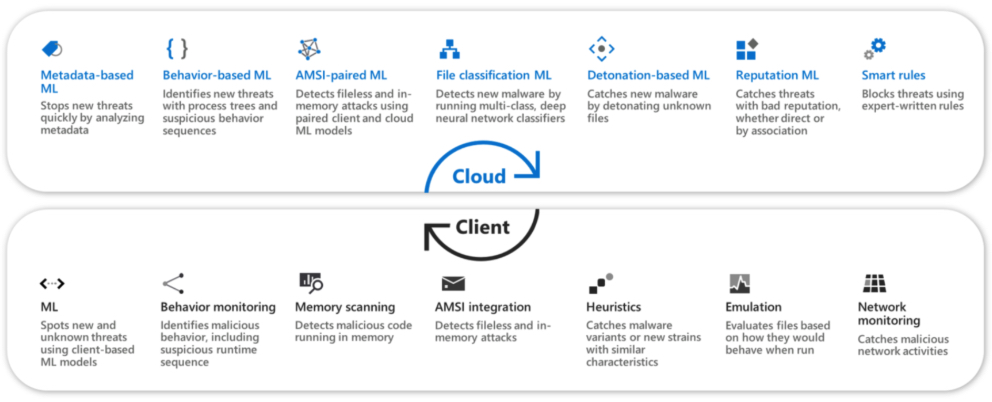 https://learn.microsoft.com/en-us/defender-endpoint/adv-tech-of-mdav
1.1 DEFENDER ARCHITECTURE
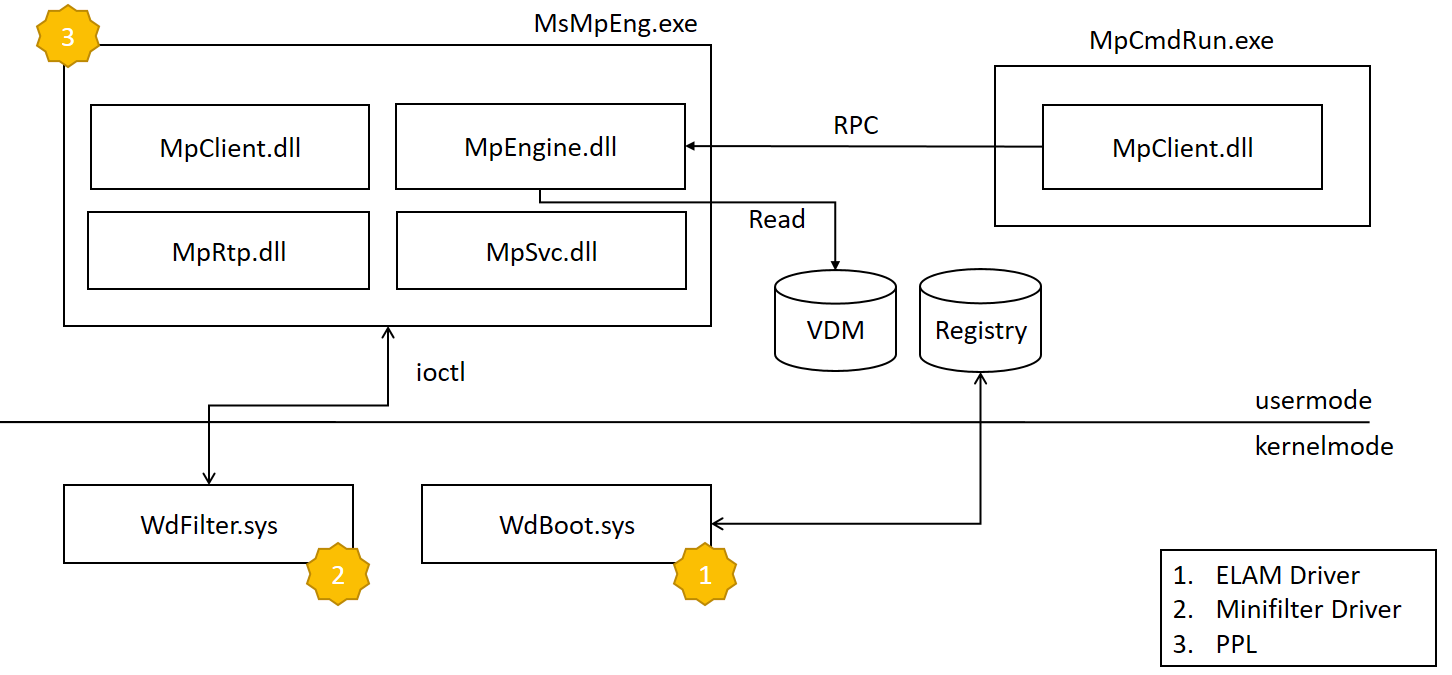
The MDA product is composed of modules running both in kernel and user mode. The overview is depicted in the figure above.
-
The first component which is loaded is the
WdBoot.sys. This is theELAMdriver that checks the integrity of the system during the early stages of the system boot. It is loaded before any other third party driver and it scans each loaded driver image before its DriverEntry is invoked. For the detection it uses its own set of signatures that are stored on a special registry Value Key (HKLM\ELAM\Microsoft Antimalware Platform\Measured) which is not accessible after the ELAM driver is unloaded. -
The Microsoft Defender Antivirus Service main responsibility is to start the main MDA executable, namely MsMpEng.exe . Such process is executed with EPROCESS.Protection equal to
AntimalwareLight(0x31) thanks to the WdBoot certification. MsMpEng is a relatively small (approximately 300K) executable which loads the following bigger components that implement most of the logic:- MsRtp: it manages the Real-time protection
- MpSvc: it loads and manages the main component MpEngine
- MpEngine: is the biggest component (approximately 19 MB). It implements scanners, emulators, modules, signature loading from the VDM file and signature handling.
-
MpCmdRun is an external command line tool that uses the MpClient library to interact with the main service. MpClient is an auxiliary library that implements a bunch of RPC requests for the service (to get the configuration or to request a scan).
-
Last but not least, there is the WdFilter.sys, the main kernel space component of the MDA architecture. It monitors the
access to the filesystem by registering as minifilter driver(think ETW events), it registers notification routines (image load, process creation, object access etc.) and more.
1.2 DIFFERENCES BETWEEN MICROSOFT DEFENDER ANTIVIRUS (MDA) AND MICROSOFT DEFENDER FOR ENDPOINT (MDE)
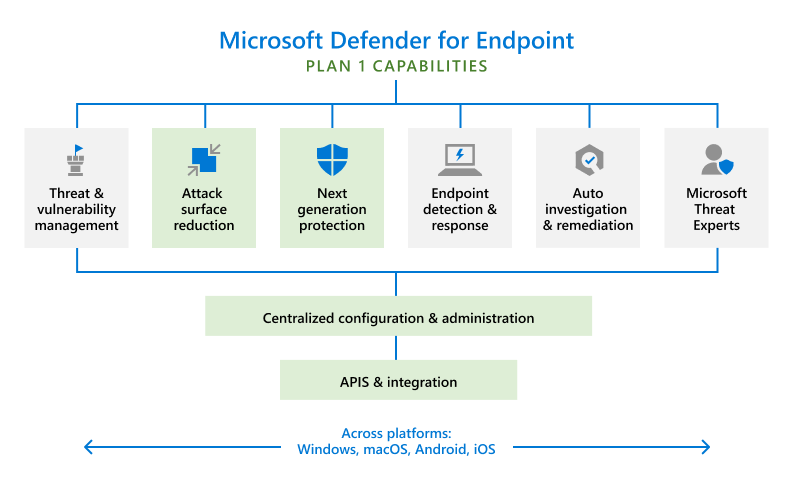
| Feature | Microsoft Defender Antivirus (MDA) | Microsoft Defender for Endpoint (MDE) |
|---|---|---|
| Endpoint Detection and Response (EDR) | Not available | Provides advanced EDR capabilities to detect, investigate, and respond to threats. |
| Threat and Vulnerability Management | Not available | Offers comprehensive threat and vulnerability management to identify and remediate vulnerabilities. |
| Attack Surface Reduction (ASR) | Limited | Provides extensive ASR rules to reduce the attack surface and prevent exploit techniques. |
| Automated Investigation and Remediation | Not available | Automatically investigates and remediates threats using AI and automation. |
| Advanced Threat Hunting | Not available | Offers advanced threat hunting capabilities with detailed search queries and analytics. |
| Integration with Microsoft 365 | Limited | Seamlessly integrates with Microsoft 365 and other enterprise security solutions. |
| Sandboxing and Detonation | Limited (local disabled/cloud) | Uses sandboxing to analyze and detonate suspicious files in a controlled environment. |
| Behavioral Analytics and Anomaly Detection | Basic | Employs advanced behavioral analytics and anomaly detection to identify sophisticated threats. |
| Threat Intelligence and Analytics | Limited | Leverages Microsoft's Threat Intelligence to provide real-time insights and analytics. |
| Centralized Management and Reporting | Basic | Provides centralized management, reporting, and alerting for enterprise environments. |
1.3 MICROSOFT DEFENDER DETECTION AND PROTECTION ENGINES
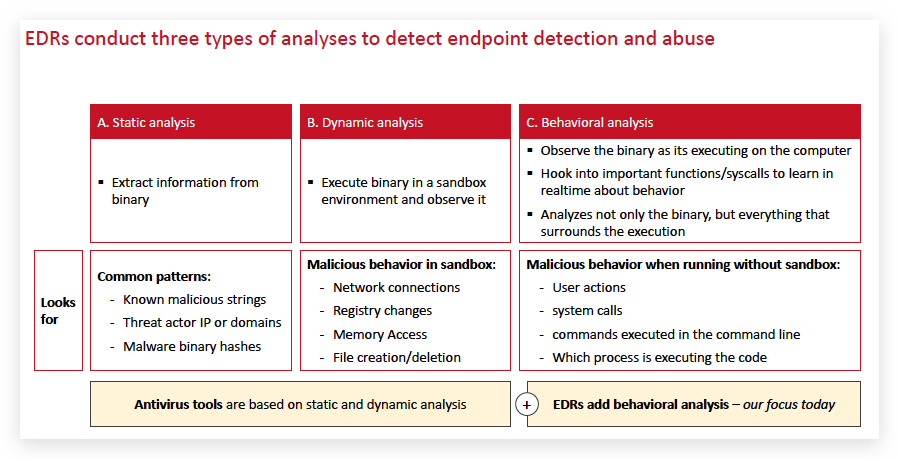
Microsoft Defender incorporates multiple detection and protection engines, each with specific functions and complementary strengths. Below is an explanation and a comparative table based on official Microsoft documentation.
Overview of Defender Engines
-
Static (Signatures, ML):
- Signature-based: Uses known virus definitions and hashes to rapidly identify known malware.
- Machine Learning (ML): Employs lightweight models on the client and advanced models in the cloud to detect new/unknown threats by analyzing file characteristics and behaviors in milliseconds.
-
Emulation:
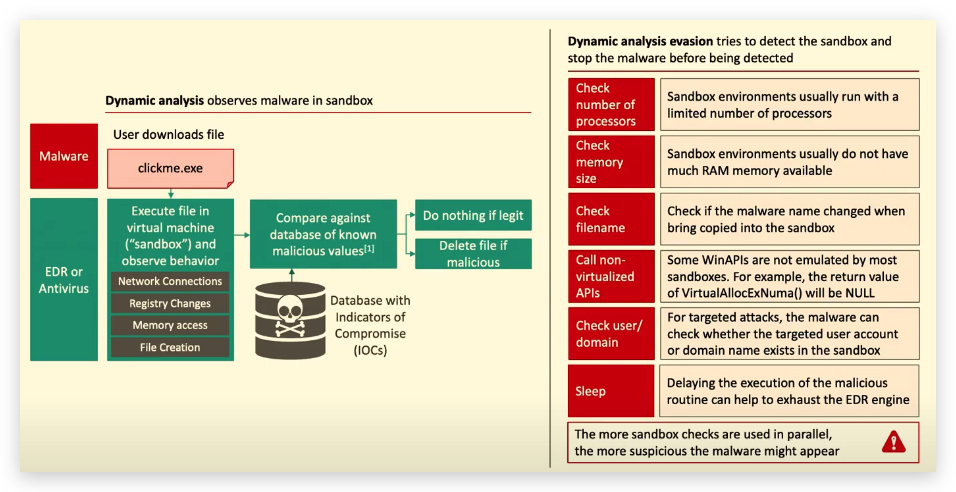
- Executes suspicious files in a controlled, simulated environment (emulator) on the endpoint, allowing Defender to observe how the file behaves at runtime—useful for unpacking or exposing polymorphic and packed malware.
-
Sandboxing:
- Suspicious files are "detonated" (executed) in an isolated virtual cloud environment. Defender observes resultant behaviors to detect malware that evades static and emulation detection. This layer is highly effective against sophisticated, targeted attacks and new threats.
-
Behavioral:
- Monitors processes, user and system activity, memory, network connections, and command lines during execution. Behavioral engines detect threats based on actions (e.g., abnormal file encryption, privilege escalation, lateral movement) even if no static indicators exist.
Microsoft Defender Engine Comparison Table
| Engine Type | Core Function | Detection Method | Typical Use Cases | Strengths | Limitations |
|---|---|---|---|---|---|
| Static (Signatures, ML) | Identifies threats by matching known patterns (signatures, hashes) or by ML analysis | Pattern matching; ML model verdicts | Quickly block known malware; first-look analysis | Rapid, effective for known and many unknown threats | Can be bypassed by novel/obfuscated threats |
| Emulation | Simulates execution of suspicious files in a local emulator | Dynamic runtime analysis | Unpacking obfuscated or packed malware | Exposes runtime behaviors even if statically hidden | Limited to emulatable/compatible formats |
| Sandboxing | Executes files in an isolated cloud environment to observe real behavior | Full dynamic behavioral analysis | Detecting evasive/targeted/new malware | Safely observes full attack chain; detects zero-days | Higher latency; resource intensive |
| Behavioral | Continuously monitors for suspicious, malicious, or anomalous real-time activity | Runtime and process tree analysis | Fileless malware, exploit detection, post-infection | Detects advanced and evolving threats, even unknown | May miss slow/stealthy threats; possible false positives |
NOTE:
Local sandboxingis by default turned OFF, more information on this in the article below - so your default Defender installation relies completely on the cloud for sandboxing. You can enable local sandboxing by using the command :setx /M MP_FORCE_USE_SANDBOX 1(DON'T DO THIS IN THE TRAINING LAB - SERIOUS PERFORMANCE IMPACT ). A reboot is required for these changes to take effect, expect a serious performance impact when enabling this. https://learn.microsoft.com/en-us/defender-endpoint/sandbox-mdav
Get-ChildItem -Path Env:MP_FORCE_USE_SANDBOX -ErrorAction SilentlyContinue
1.4 HOW MICROSOFT DEFENDER EMULATION WORKS
The emulation engine dynamically runs suspicious executable code inside a controlled, virtualized "emulator" environment on the endpoint.
It simulates the CPU instructions and basic operating system calls to unpack and reveal the true behavior of the malware payload without allowing it to run natively on the system.
The engine uses an advanced form of dynamic translation (lifting CPU instructions into a safe intermediate representation) for architectures like x86 (16, 32, 64-bit), ARM, and others.
During emulation, the engine monitors how the code behaves:
- Unpacks polymorphic and packed malware by observing decrypted or decompressed payloads in memory.
- Detects suspicious or malicious operations like modifying memory, self-modifying code, or triggering known malware behaviors.
The emulation results are analyzed in real-time: the engine inspects both the memory contents at the end of emulation and the sequence of operations performed.
It caches results upon successful emulation so repeated scans don't waste resources.
Emulation is tightly integrated with heuristic and machine learning detectors to boost accuracy and expose behaviors that static analysis or quick reputation checks cannot detect.
Benefits and Role in Malware Detection
- Emulation is especially effective at defeating packers, obfuscators, and polymorphic malware, which hide malicious payloads behind transformations.
- It bridges the gap between static scanning (fast but sometimes fooled by obfuscation) and full sandbox detonation (cloud-based, deeper but slower analysis).
- It helps increase detection accuracy and reduce false negatives in real-time endpoint protection.
Trigger Conditions for Defender Emulation
Microsoft Defender's emulation engine typically triggers when a file or executable cannot be reliably classified using faster static analysis or machine learning techniques and is suspected of being evasive malware. Key trigger conditions include:
- Unknown or untrusted executables without clear static signatures. When the static engine cannot classify a file confidently, emulation is used for dynamic unpacking and behavior observation.
- Detection of packed, obfuscated, or polymorphic files which may hide their malicious payload behind encryption or code transformations.
- Heuristic indicators or ML suspicion scores that flag a file as suspicious but require further runtime behavioral context.
- Files or code sections that exhibit runtime characteristics suspicious enough to warrant deeper dynamic analysis on the endpoint.
- Emulation may be skipped or deferred if the file is already known safe or blocked by signature/ML, or if resource constraints dictate prioritization.
| Feature | Description |
|---|---|
| Purpose | Dynamically analyze suspicious files by emulating execution of code |
| Technology | CPU instruction emulation, dynamic translation to intermediate representation |
| Supported Architectures | x86 (16/32/64-bit), ARM, and others |
| Detection Focus | Packed, polymorphic, and self-modifying malware; suspicious memory and behavioral actions |
| Integration | Works with heuristics, ML, and other detection engines on the client |
| Output | Behavioral analysis, memory state inspection post-emulation, emulation result caching |
| Usage | Endpoint-level, real-time, lightweight alternative to cloud sandboxing |
| Strengths | Effective unpacking, detects evasive malware, enhances overall detection rate |
| Limitations | Resource intensive compared to static scanning; limited to what can be emulated on the client |
How Microsoft Defender Heuristics Works
A Suspicious heuristic score in Microsoft Defender typically refers to a detection signal generated by a heuristic rule or model that identifies files exhibiting characteristics or behaviors similar to known malware, but without an exact signature match. This score reflects how closely the file matches these suspicious patterns, guiding the decision to escalate the file for further analysis such as emulation.
EXPLANATION
Heuristic rules are manually crafted or automatically derived logic patterns that look for features often found in malicious files, such as suspicious file structure, unusual API usage, packing or encryption indicators, or code anomalies.
The heuristic score quantifies the suspicion level, often combined with other factors like machine learning confidence scores or reputation data.
When a heuristic signature or score exceeds a threshold, it can trigger the emulation engine to dynamically analyze the file's behavior.
Example
A heuristic rule might flag an executable that:
- Uses uncommon system calls associated with code injection (Win32API)
- Contains suspiciously aligned sections or irregular import tables (PE-Format)
- Includes a known
packer(i.e. UPX ) signature or exhibits entropy patterns typical of encrypted payloads
For example, a heuristic rule could be:
- "Flag PE files where the .text section contains more than 80% high
entropybytes indicating encryption, and the import table appears unusually small or corrupted."
If a scanned file matches this rule, Defender will assign a suspicious heuristic score. If high enough, the emulation engine will be triggered to unpack and inspect the file's runtime behavior to confirm if it is malicious.
1.5 BEHAVIORAL MONITORING WITH ETW
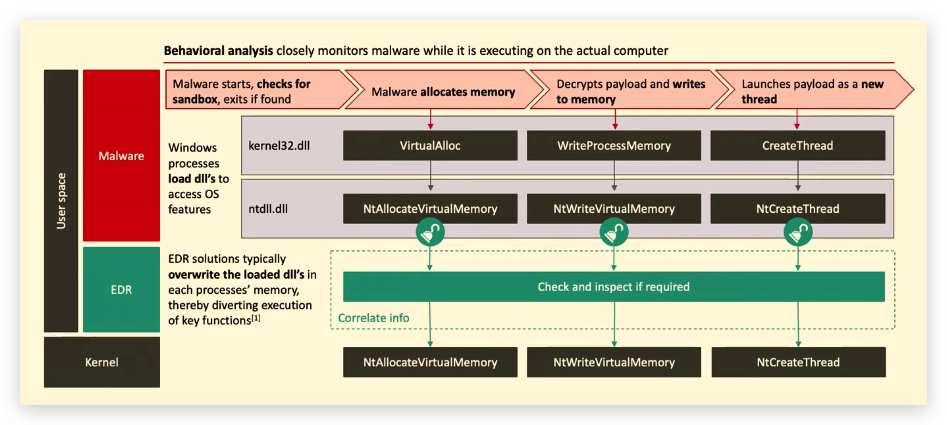
Microsoft Defender does not use hooking of functions, API's or syscalls to monitor behavior - instead it relies on ETW (Event Tracing for Windows) and Eventlog policies that need to be enabled.
Microsoft Defender uses ETW and kernel callbacks for behavioral monitoring:
- ETW / Kernel callbacks
- Eventlog policies that need to be enabled
- Sampling includes:
- file writes
- dll's loaded
- Registry writes
- network connections (1 per unique process per day per machine)
1.6 EDR TELEMETRY COMPARISON MATRIX
Source: edr-telemetry.com
| Telemetry Feature Category | Sub-Category | Sysmon | MDE | Cortex XDR | SentinelOne | CrowdStrike |
|---|---|---|---|---|---|---|
| Process Activity | Process Creation | ✅ | ✅ | ✅ | ✅ | ✅ |
| Process Termination | ✅ | ❌ | ✅ | ❌ | ✅ | |
| Process Access | ✅ | ✅ | ✅ | ✅ | ✅ | |
| Image/Library Loaded | ✅ | ✅ | ✅ | ✅ | ✅ | |
| Remote Thread Creation | ✅ | ✅ | ✅ | ✅ | ✅ | |
| Process Tampering Activity | ✅ | ✅ | ⚠️ | ✅ | ✅ | |
| Process Call Stacks | ✅ | ❌ | ❌ | ❌ | ✅ | |
| Win32 API Telemetry | ❌ | ✅ | ❓ | ❓ | ❓ | |
| File Manipulation | File Creation | ✅ | ✅ | ✅ | ✅ | ✅ |
| File Opened | ❌ | ❌ | ❌ | ❌ | ⚠️ | |
| File Deletion | ✅ | ✅ | ✅ | ✅ | ✅ | |
| File Modification | ❌ | ✅ | ✅ | ✅ | ✅ | |
| File Renaming | ❌ | ✅ | ✅ | ✅ | ✅ | |
| User Account Activity | Local Account Creation | ❌ | ✅ | 🪵 | ✅ | ✅ |
| Local Account Modification | ❌ | ✅ | 🪵 | 🪵 | ⚠️ | |
| Local Account Deletion | ❌ | ✅ | 🪵 | 🪵 | ✅ | |
| Account Login | ❌ | ✅ | ✅ | ✅ | ✅ | |
| Account Logoff | ❌ | ❌ | ✅ | ✅ | ✅ | |
| Network Activity | TCP Connection | ✅ | ✅ | ✅ | ✅ | ✅ |
| UDP Connection | ✅ | ❌ | ✅ | ❌ | ✅ | |
| URL | ❌ | ✅ | ❌ | 🎚️ | ❌ | |
| DNS Query | ✅ | ✅ | ✅ | ✅ | ✅ | |
| File Downloaded | ❌ | ✅ | ❌ | ❌ | ✅ | |
| Hash Algorithms | MD5 | ✅ | ✅ | ✅ | ✅ | ✅ |
| SHA | ✅ | ✅ | ✅ | ✅ | ✅ | |
| IMPHASH | ✅ | ❌ | ❌ | ❌ | ❌ | |
| JA3/JA3s | ❌ | ✅ | ❌ | ❌ | ❌ | |
| Registry Activity | Key/Value Creation | ✅ | ✅ | ✅ | ✅ | ⚠️ |
| Key/Value Modification | ✅ | ✅ | ✅ | ✅ | ⚠️ | |
| Key/Value Deletion | ✅ | ✅ | ✅ | ✅ | ❌ | |
| Scheduled Task Activity | Scheduled Task Creation | ❌ | ✅ | 🪵 | ✅ | ✅ |
| Scheduled Task Modification | ❌ | ✅ | 🪵 | ✅ | ✅ | |
| Scheduled Task Deletion | ❌ | ✅ | 🪵 | ✅ | ✅ | |
| Service Activity | Service Creation | ❌ | ✅ | 🪵 | ✅ | ✅ |
| Service Modification | ❌ | ❌ | 🪵 | 🎚️ | ⚠️ | |
| Service Deletion | ❌ | ❌ | ❌ | ❌ | ❌ | |
| Driver/Module Activity | Driver Loaded | ✅ | ✅ | ✅ | ✅ | ✅ |
| Driver Modification | ❌ | ❌ | ❌ | ❌ | ✅ | |
| Driver Unloaded | ❌ | ❌ | ❌ | ⚠️ | ❌ | |
| Device Operations | Virtual Disk Mount | ❌ | ✅ | ⚠️ | ❌ | ✅ |
| USB Device Unmount | ❌ | ✅ | ⚠️ | 🎚️ | ✅ | |
| USB Device Mount | ❌ | ✅ | ⚠️ | 🎚️ | ✅ | |
| Other Relevant Events | Group Policy Modification | ❌ | ✅ | ❌ | ✅ | ❌ |
| Volume Shadow Copy Deletion | ❌ | ❌ | ❓ | ✅ | ✅ | |
| Named Pipe Activity | Pipe Creation | ✅ | ✅ | ❌ | 🎚️ | ✅ |
| Pipe Connection | ✅ | ✅ | ❌ | 🎚️ | ✅ | |
| EDR SysOps | Agent Start | ✅ | 🪵 | ⚠️ | ✅ | ✅ |
| Agent Stop | ✅ | 🪵 | ✅ | ✅ | ✅ | |
| Agent Install | ❌ | 🪵 | ✅ | ✅ | ❌ | |
| Agent Uninstall | ❌ | ❌ | ✅ | ✅ | ✅ | |
| Agent Keep-Alive | ❌ | 🪵 | ✅ | ✅ | ✅ | |
| Agent Errors | ✅ | ✅ | ✅ | ✅ | ✅ | |
| WMI Activity | WmiEventConsumerToFilter | ✅ | ✅ | 🎚️ | ✅ | ✅ |
| WmiEventConsumer | ✅ | ✅ | 🎚️ | ✅ | ✅ | |
| WmiEventFilter | ✅ | ✅ | 🎚️ | ✅ | ✅ | |
| BITS JOBS Activity | BITS JOBS Activity | ❌ | ❌ | 🎚️ | 🪵 | ✅ |
| PowerShell Activity | Script-Block Activity | ❌ | ✅ | 🪵 | ✅ | ✅ |
Legend
| Icon | Meaning | Description |
|---|---|---|
| ✅ | Yes | Fully implemented |
| ❌ | No | Not implemented |
| ⚠️ | Partially | Partially implemented |
| ❓ | Pending | Pending response |
| 🪵 | Via EventLogs | Available via Windows Event Logs |
| 🎚️ | Via Enabling | Requires manual enablement (not default) |
1.7 ADDITIONAL RESOURCES
BSides Berlin 2022: "EDR Evasion Primer" - Jorge Gimenez
https://www.youtube.com/watch?v=3sPb9d9WIG0
FirstCon 2022 : "EDR Internals From a Defenders Perspective" - Olaf Hartong (FalconForce)
https://www.youtube.com/watch?v=6SSVOfcoVUA
Wild West Hackin' Fest 2025 : "Detection Engineering...My Educational Failures That Proved to be Useful, After All" - Olaf Hartong (FalconForce)
https://www.youtube.com/watch?v=EhpJc4W9-fE
https://www.edr-telemetry.com/windows.html
References: