1. PROCESSES, TOKENS & DLL'S
1.1 INTRODUCTION
In the complex landscape of cybersecurity, a deep understanding of operating system internals is paramount for effective digital forensics, proactive threat hunting, and decisive incident response. This chapter focuses on three core Windows OS components: processes, DLLs, and process tokens. We will explore their definitions, internal mechanisms, interrelationships, and, crucially, their significance in detecting and analyzing malicious activities.
1.2 PROCESSES
A Windows process typically starts from a PE-file on disk, below is an overview of a typical PE-file. We will dive deeper into this later on when we'll be building our own evasive shellcode loader. Once this PE-file is executed, it becomes a process in memory.
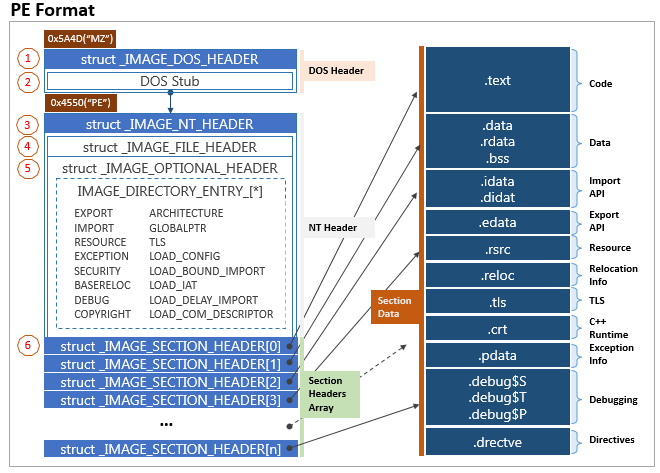
What is a Process?
A process is an instance of a running program. It encapsulates the necessary resources to execute a program, providing an isolated environment for its operations. Each process has its own dedicated virtual address space, containing the executable code, data, heap, and stack. It also manages its own set of resources, such as open files, network connections, and security context.
Basically, a process holds all kinds of information about itself, including:
- Process ID (PID)
- Parent Process ID (PPID)
- Threads
- Loaded modules (DLLs)
- Handles to system resources
- Token information (user, groups, privileges)
- IAT (Import Address Table) - which holds addresses of functions loaded from DLLs
A HANDLE is like a reference number or a ticket that a program uses to access system resources. These resources could be files, windows, registry keys, processes, network sockets or even threads. Handles are used to track access to resources safely.
A THREAD is the smallest unit of execution in a process, think of threads as individual workers within a single company (the process), each doing a specific task - like downloading a file, updating the UI, or processing data.
Key Process Structures and Components
In Windows, a process is represented by several important data structures that help the operating system manage and track it:
-
EPROCESS (Executive Process Block): Think of this as the main "file folder" that Windows keeps for each running program. It contains essential information like the process's unique ID number, which program started it (the parent), and when it was created.
-
KPROCESS (Kernel Process Block): This is a section within the main folder that specifically tracks information about the program's threads (the individual tasks it's performing) and how the operating system schedules when it gets to use the computer's processor.
-
PEB (Process Environment Block): This is information that the running program itself can access. It includes details about what additional code libraries (DLLs) the program is using, startup parameters, and data from the Windows loader.
-
PID (Process ID): A unique number assigned to each running program, like a serial number that helps Windows keep track of which program is which.
-
Virtual Address Space: Each program gets its own private "workspace" in memory. For 32-bit programs, this workspace is up to 4 GB, and for 64-bit programs, it can be up to 8 TB on typical Windows systems. This workspace maps to the computer's actual physical memory.
Parent/Child Process Relationships
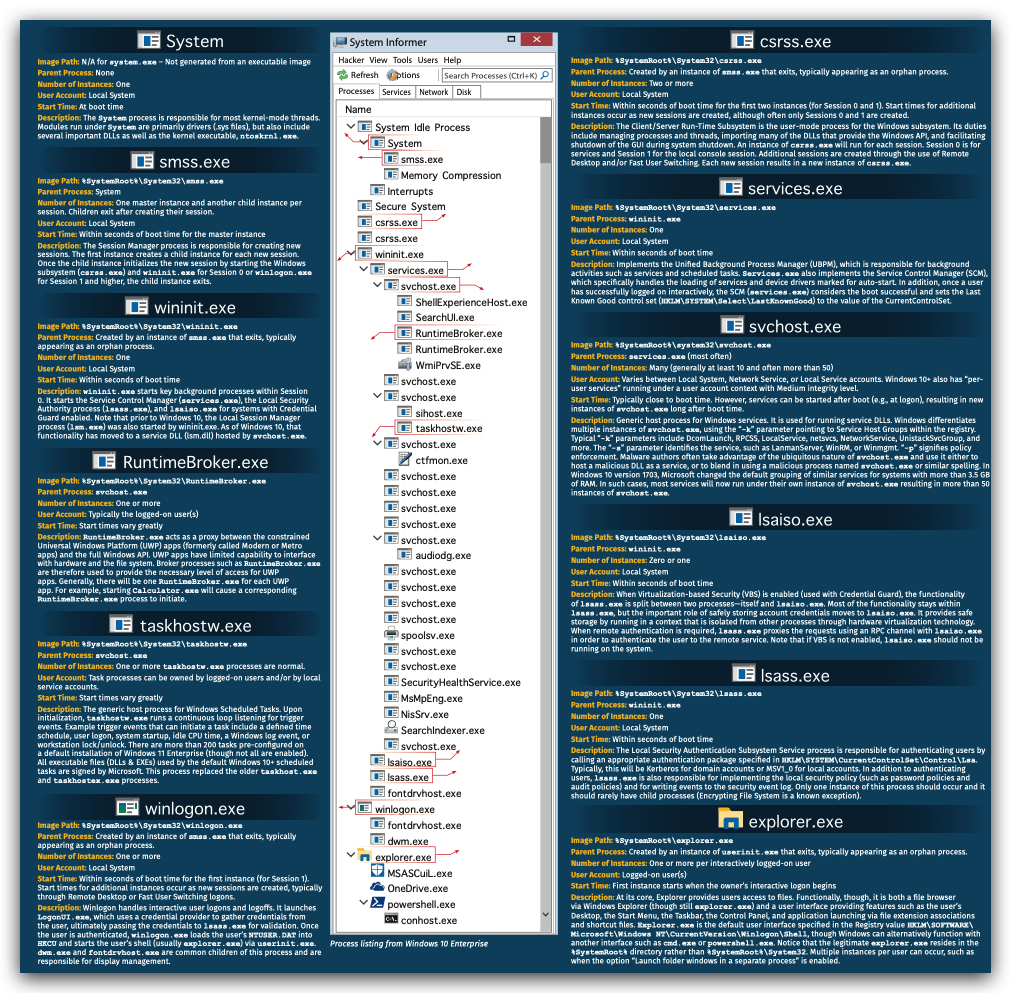
Processes are typically created by other processes. The creating process is known as the parent process, and the newly created process is the child process. This relationship is hierarchical, forming a process tree where System (PID 4) is often the root, and smss.exe (Session Manager SubSystem) is a key early parent. explorer.exe is commonly the parent for user-launched applications.
When a new process is created (e.g., via CreateProcess API), the child process inherits certain attributes from its parent, including environment variables, some handles, and importantly, a duplicate of the parent's access token. This inheritance is crucial for understanding privilege propagation and potential abuse.
Parent process creates
- new process and
- assigns new PID
- Child process inherits
- Copy of security context (token)
- Environment variables
- Some handles
- Child process has its own virtual address space
- Child process inherits
OVERVIEW: Simplified Process Creation Flow
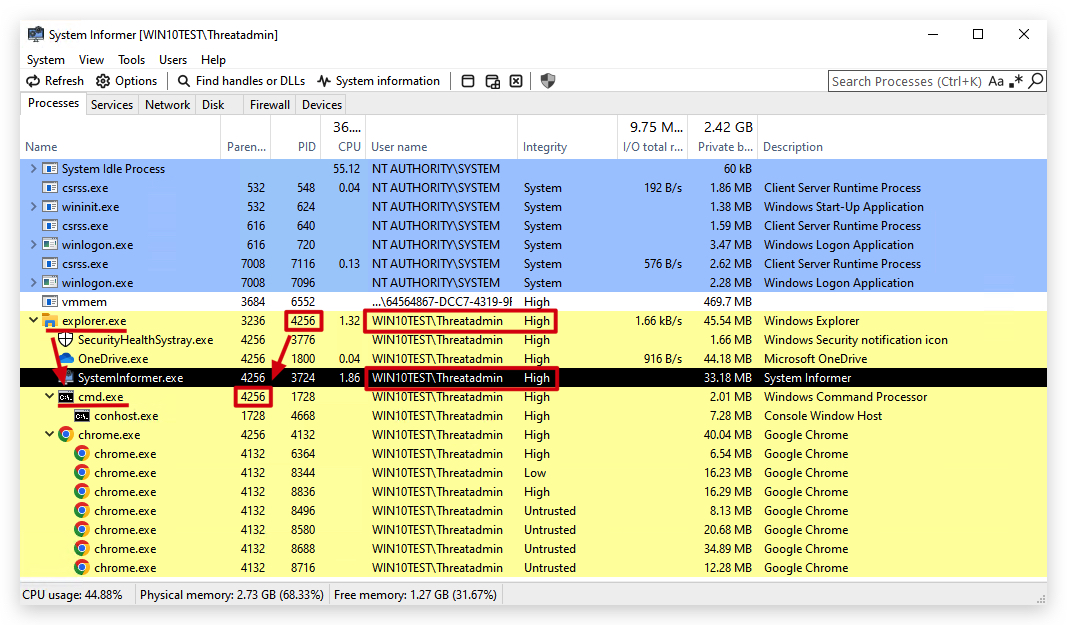
DFIR Relevance: Identifying Suspicious Process Creation
- Anomalous Parent-Child Chains: Unexpected parent-child relationships are a prime indicator of malicious activity.
- Example:
svchost.exespawningcmd.exeorpowershell.exe.svchost.exetypically hosts services and should not directly launch user-interactive shells. - Example: Microsoft Office applications (
word.exe,excel.exe) spawningcmd.exe,powershell.exe, or other executables. This is a common tactic for macro-enabled malware.
- Example:
- Process Renaming/Masquerading: Malware often renames itself to commonly seen processes (e.g.,
svchost.exe,explorer.exe) to blend in. Analyzing the process path, command line arguments, and parent process can reveal masquerading. - Execution from Unusual Locations: Processes running from temporary directories (
%TEMP%,C:\Windows\Temp), user profile directories (%APPDATA%,%LOCALAPPDATA%), or non-standard system paths are highly suspicious. - Unusual Command Line Arguments: Many legitimate processes have predictable command line arguments. Malicious processes might use unusual flags, obfuscated strings, or encoded commands (e.g., base64 encoded PowerShell).
 📄
📄 1.3 DYNAMIC LINK LIBRARIES (DLLS)
What is a DLL?
A Dynamic Link Library (DLL) is a type of executable file that contains code and data that can be used by multiple programs simultaneously. Unlike static libraries, which are linked into an executable at compile time, DLLs are loaded into memory at runtime, either when a program starts or on demand. This allows for:
- Code Reusability: Multiple applications can use the same DLL, reducing memory footprint and disk space.
- Modularity: Applications can be updated by simply replacing DLLs without recompiling the entire executable.
- Resource Sharing: DLLs can contain resources (icons, strings) that are shared across applications.
How DLLs are Loaded
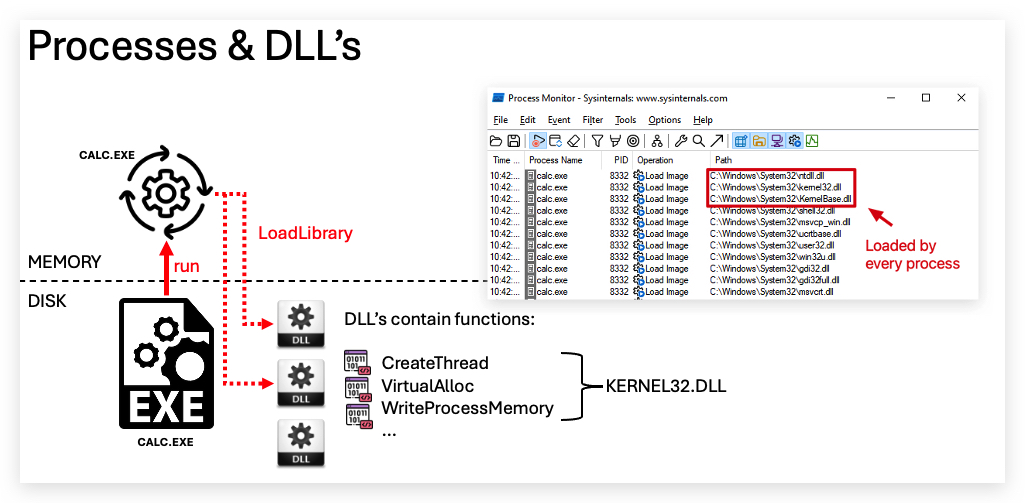
DLLs can be loaded into a process in two primary ways:
- Implicit (Static) Linking: When an executable is compiled, if it's designed to use functions from a specific DLL, a record of this dependency is stored in the executable's import address table (IAT). When the executable loads, the Windows loader automatically finds and maps these required DLLs into the process's virtual address space.
- Explicit (Dynamic) Linking: A program can explicitly load a DLL at runtime using functions like
LoadLibraryorLoadLibraryEx. This allows programs to load DLLs conditionally or load DLLs whose names are determined at runtime.
Once loaded, the DLL's code and data become part of the process's virtual address space, and the process can call functions exported by the DLL.
DLL Injection Techniques
DLL injection is a widely used technique by malware to execute arbitrary code within the context of another process. Common methods include:
- Remote Thread Injection: The most common. A malicious process writes the path to a malicious DLL into the target process's memory and then creates a remote thread in the target process that calls
LoadLibraryto load the DLL. - SetWindowsHookEx: Exploits Windows hooking mechanisms to inject a DLL into processes that receive certain window messages.
- APCs (Asynchronous Procedure Calls): Enqueuing a DLL loading routine into a target thread's APC queue.
- Process Hollowing/RunPE: Creating a suspended process, hollowing out its legitimate code, and injecting malicious code (often including DLLs) before resuming.
- Reflective DLL Injection: The DLL is loaded directly from memory without touching the disk, making detection harder.
DFIR Relevance: DLLs in Malware and Evasion
- Malware Persistence: DLLs can be registered as services, run via
AppInit_DLLsregistry key, or hijacked through DLL search order flaws to achieve persistence. - Evasion: Reflective DLL injection or techniques that load DLLs from non-standard locations can bypass traditional endpoint detection mechanisms that monitor file system activity.
- Privilege Escalation: Some DLLs might be vulnerable to hijacking, allowing a lower-privileged process to load a malicious DLL that then executes with higher privileges.
- Code Injection: DLLs are the primary vehicle for code injection into legitimate processes, allowing malware to masquerade, hide, and access resources with the target process's privileges.
- Forensic Artifacts: Analyzing loaded DLLs in memory dumps, Prefetch files, ShimCache, and registry keys related to DLL loading can reveal malicious activity.
1.4 PROCESS TOKENS
What is an Access Token?
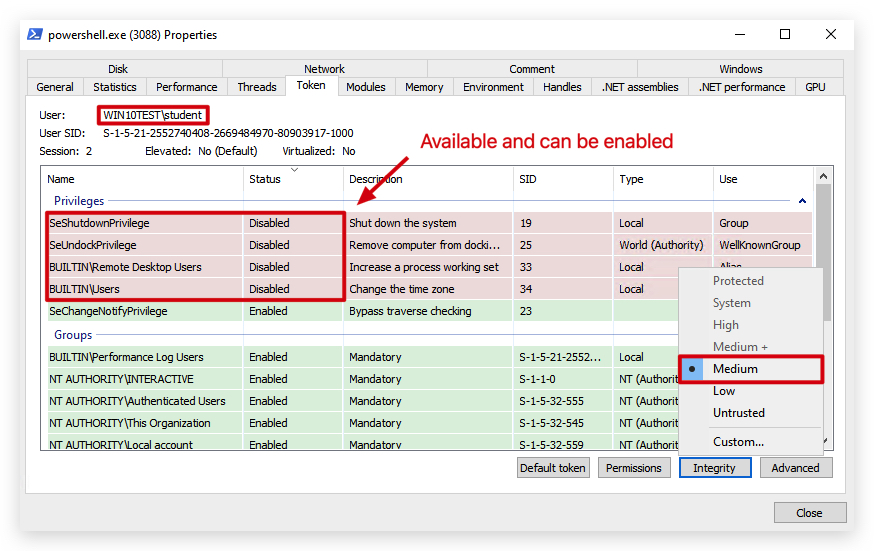
An access token is a kernel object that describes the security context of a process or thread. It contains all the security-relevant information about the user account under which the process or thread is running. When a process tries to access a secured object (e.g., a file, registry key, or another process), the operating system performs an access check by comparing the information in the process's (or thread's) access token against the object's Security Descriptor.
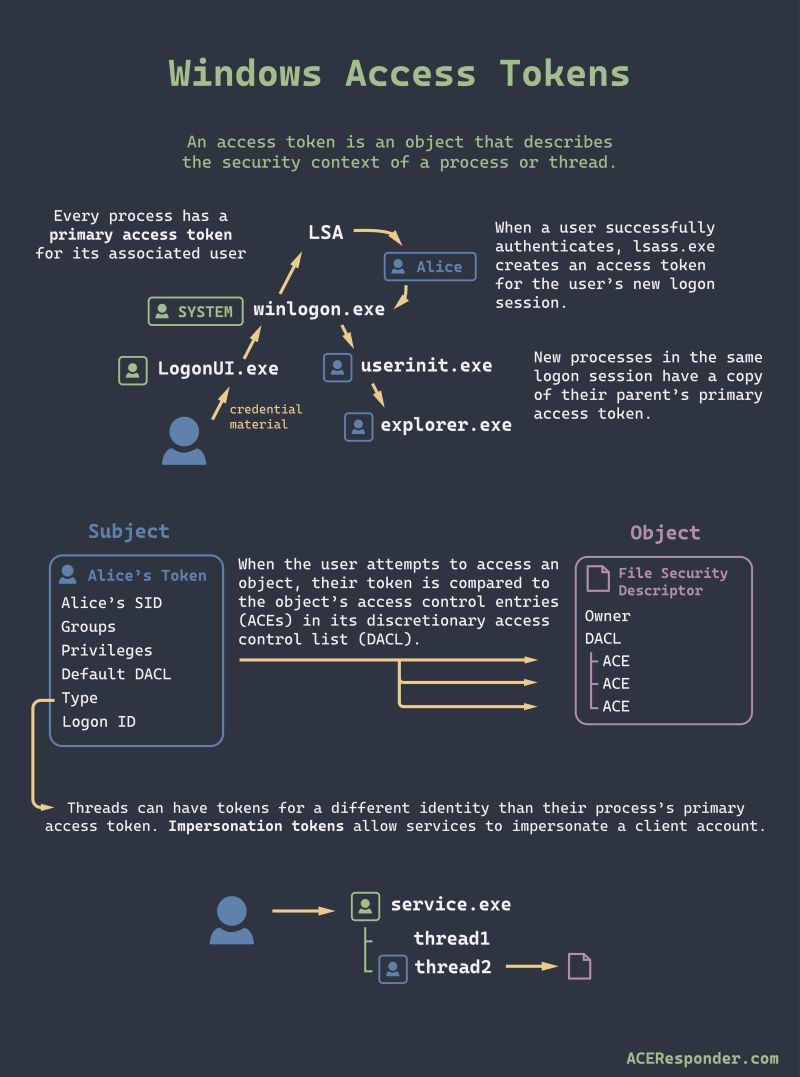
Access Token Contents
A typical access token contains:
- User SID (Security Identifier): Identifies the user account.
- Group SIDs: Identifies all security groups the user is a member of (e.g., Administrators, Domain Users).
- Privileges: A list of special rights assigned to the user or group (e.g., SeDebugPrivilege for debugging, SeBackupPrivilege for backing up files).
- Integrity Level (IL): A security attribute that defines the trustworthiness of a process (discussed below).
- Default DACL (Discretionary Access Control List): Specifies default permissions for objects created by the process.
- Authentication ID: Unique identifier for the logon session.
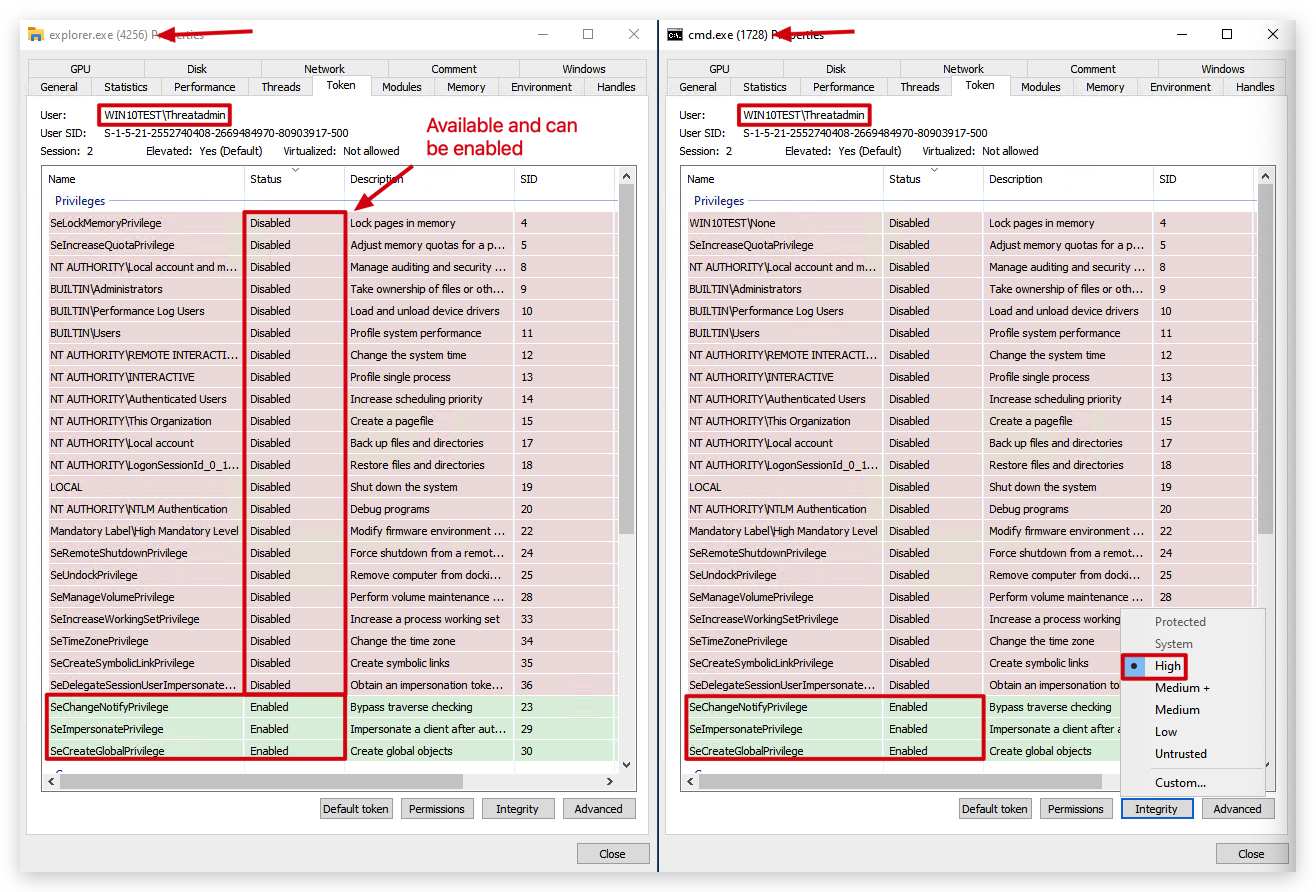
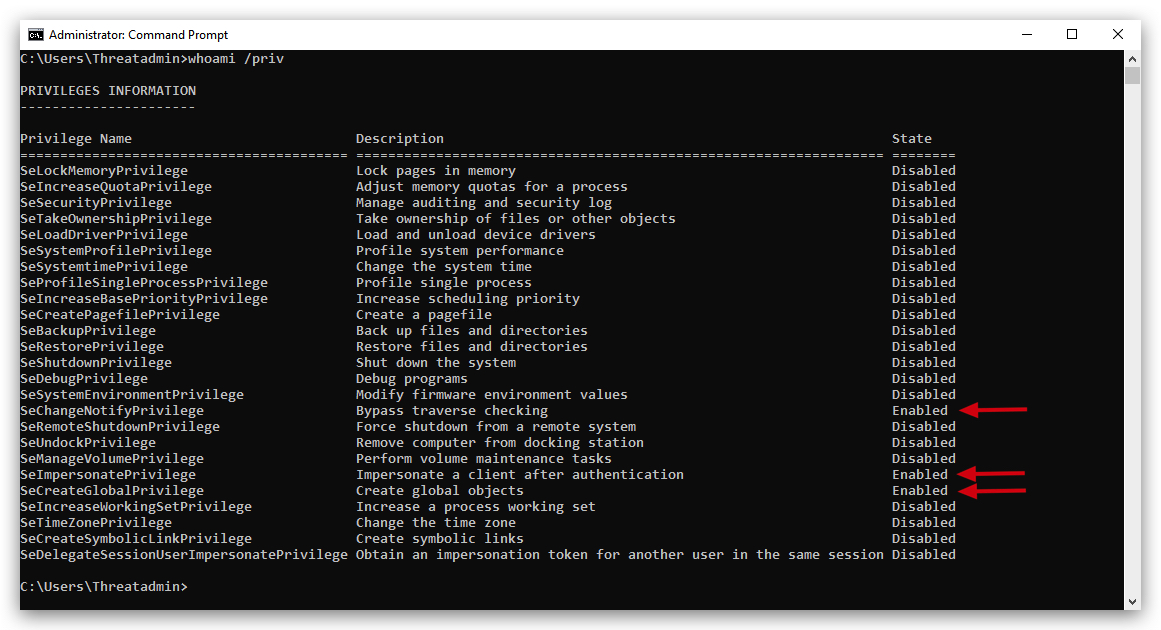
Starting a process with unprivileged user:
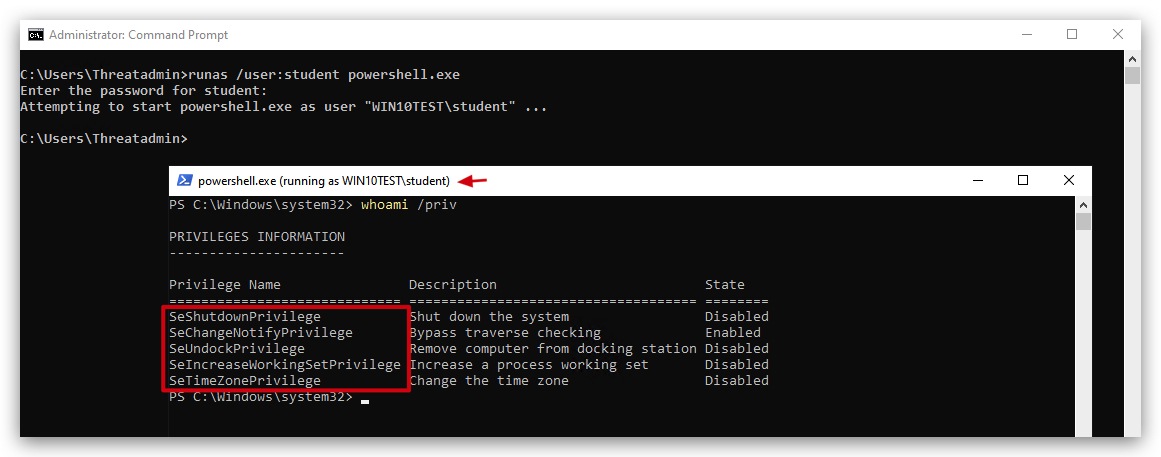
Access Token Creation
Access tokens are primarily created during the user logon process. When a user successfully authenticates, the Local Security Authority (LSA) creates an initial access token for that logon session.
When a new process is created, by default, it inherits a copy of its parent's access token. This means a child process runs with the same security context as its parent. However, processes can also be created with a different token (e.g., CreateProcessAsUser, ShellExecuteAsUser, or CreateRestrictedToken).
Integrity Levels (IL)
Integrity Levels (ILs) are a core component of Windows Mandatory Integrity Control (MIC), introduced in Windows Vista. They add another layer of security beyond traditional Discretionary Access Control Lists (DACLs) by assigning a "trustworthiness" level to processes and objects.
There are several standard Integrity Levels:
- Untrusted (0x0000): Very low trust (e.g., for anonymous logon).
- Low (0x1000): Restricted processes, often for internet-facing applications (e.g., Internet Explorer in Protected Mode). Cannot write to most user directories.
- Medium (0x2000): Default for most user-launched applications.
- High (0x3000): For processes launched with administrative privileges (e.g., "Run as administrator" or UAC elevated processes).
- System (0x4000): For core operating system processes and services.
- TrustedInstaller (0x5000): The highest integrity level, reserved for Windows Update and Windows Modules Installer Service, allowing modification of critical system files.

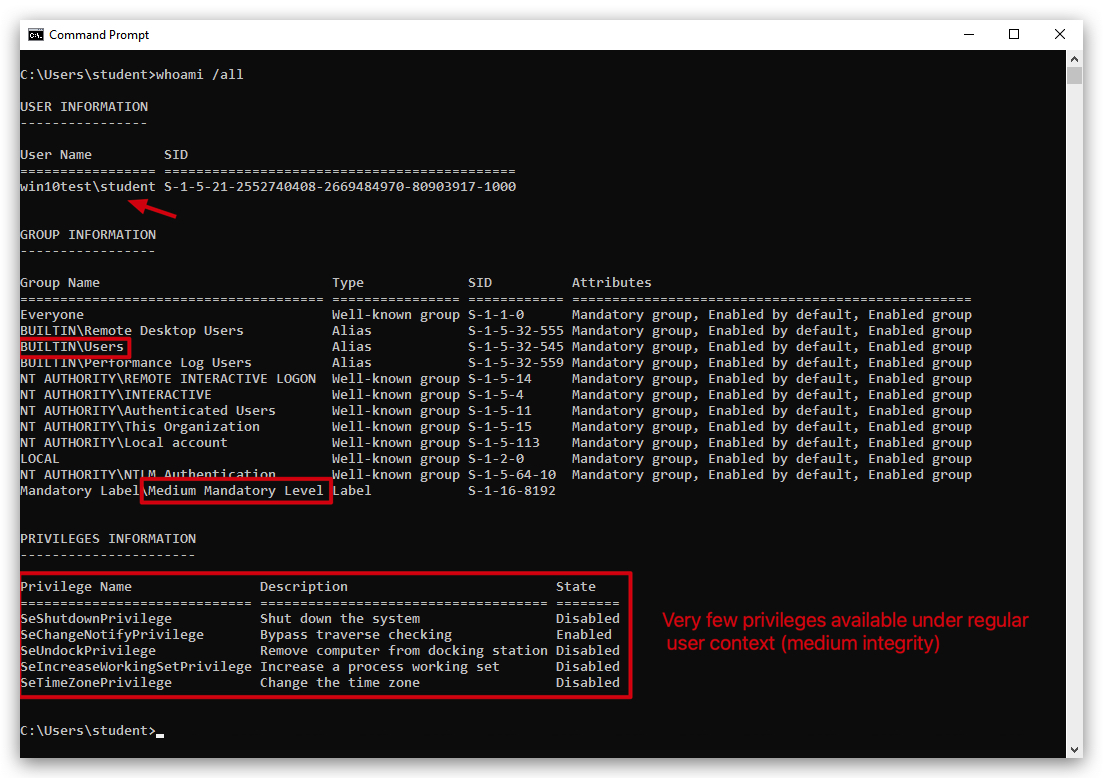
Understanding Mandatory Integrity Control (MIC)
Mandatory Integrity Control (MIC) is a security feature in Windows (introduced in Vista and refined over time) that helps protect your system by assigning integrity levels (IL) to processes, files, registry keys, and other system objects. These levels act like a "trust rating" – think of them as floors in a secure building, where higher floors hold more sensitive stuff (like executive suites) and lower floors are more accessible (like the lobby).
The Key Principle: "No Write Up" Rule
The key principle of MIC is all about controlling writes and modifications between these levels to prevent low-trust processes from compromising high-trust objects. Here's a clearer breakdown:
-
What it means: A process running at a lower integrity level (e.g., Medium) cannot write to, modify, or delete objects (like files, registry entries, or even other processes) that are at a higher integrity level (e.g., High or System).
-
Why? This stops malware or buggy apps from "escalating" their damage. For example, if a virus infects your browser (Medium IL), it cannot sneakily edit critical system files (High IL) to take over your PC.
-
Analogy: Imagine you're on the lobby floor (Low/Medium) – you can't mail a package up to the executive floor (High) without strict approval. But the executives can send memos down to the lobby if they want.
Write Down Rule (The Exception)
-
The allowance: A process at a higher integrity level (e.g., High) can freely write to or modify objects at a lower integrity level (e.g., Medium or Low).
-
Why? Trusted, high-privilege tasks (like an admin tool) often need to update or clean up lower-level resources without barriers.
-
Example: When you run an antivirus scan as an admin (High IL), it can delete infected files in your Downloads folder (Medium IL).
Why This Matters
MIC isn't foolproof (e.g., it doesn't stop read access or UAC prompts for elevation), but it's a core defense against privilege escalation attacks. It enforces a one-way "trust flow" downward, keeping the system safer without locking everything down completely.
DFIR Relevance: Token Manipulation and Privilege Escalation
-
Token Theft/Impersonation: Attackers often steal or impersonate tokens from privileged processes (e.g.,
lsass.exe,services.exe) to gain elevated privileges without needing credentials. This is a common post-exploitation technique.
Tools: Mimikatz, Incognito, etc... -
Bypassing UAC (User Account Control): Many UAC bypasses involve finding ways to launch processes with a High integrity token from a Medium integrity context, often by abusing legitimate Windows binaries that auto-elevate.
-
Integrity Level Analysis: In threat hunting, observing a process running at an unexpectedly low or high integrity level can be suspicious.
Example: A standard user application running at System integrity level (a strong indicator of compromise).
Example: Malware attempting to drop files into a Program Files directory (which requires High integrity) from a Medium integrity process, which would fail due to MIC unless a privilege escalation occurred.
Parent-Child Integrity Discrepancy: While children typically inherit the parent's IL, a sudden jump in integrity level without a legitimate UAC prompt or
CreateProcessAsUsercould indicate a UAC bypass or other privilege escalation.